


 Video Converter Ultimate
 Gravadora de pantalla
 Reparació de vídeo
Apreneu a convertir AMV a MOV sense degradar la qualitat
AMV és un format de vídeo propietari utilitzat per desar reproduccions de vídeo als reproductors multimèdia S1 MP3 i MP4. Aquesta extensió de fitxer .amv és de baixa resolució i es comprimeix per poder emmagatzemar el fitxer en aquest reproductor multimèdia portàtil. Encara que el format encara existeix, és difícil trobar un reproductor multimèdia per al telèfon que sigui compatible, ja que és un format antic. En lloc de buscar un reproductor multimèdia compatible, per què no convertiu els fitxers AMV a un format nou que tingui molt suport, com el MOV? Per tant, si voleu saber la millor manera de convertir AMV a MOV, comencem la investigació.

Part 1. Breu introducció sobre AMV i MOV
La idea d'Action Media Video o AMV és substituir l'MP4 com a format universal perquè aquest format és millor i molt més comprimit. A més, aquest format és la millor versió del format AVI. Però el format s'ha ignorat durant aquesta nova era perquè no rep cap actualització per millorar la qualitat de la resolució. I ara, si emmagatzemeu aquest format als nostres dispositius mòbils i el reproduïu, espereu que no el podreu reproduir perquè el format no és compatible. Per tant, si voleu reproduir un vídeo amb aquest format, heu de descarregar un reproductor multimèdia de tercers per a AMV. Tot i que MOV, aquest format guanya molt suport perquè és el format de fitxer natiu que desenvolupa QuickTime.
Part 2. Converteix AMV a MOV amb el programari d'escriptori Ultimate
FVC Video Converter Ultimate
Convertiu AMV a MOV amb l’ajuda d’aquest convertidor de vídeo professional que produeix un resultat fenomenal que ningú no pot igualar, el FVC Video Converter Ultimate. Aquest convertidor està disponible per a PC i Mac, i tots dos tenen les mateixes funcions avançades que ofereix aquesta eina. A més, la conversió ràpida i l’acceleració per maquinari disponibles a PC també ho estan a Mac. Molts usuaris ja han escollit aquest programari com a convertidor de primera opció per solucionar els seus problemes. A més, abans de poder utilitzar aquesta eina, l’haureu de comprar a FVC. Encara que sigui de pagament, no haureu de gastar centenars de dòlars, i el preu valdrà la pena. Sense més dilació, posem a prova aquesta eina per veure si podem aconseguir la conversió definitiva, tal com promet el seu nom.
Passos per convertir AMV a MOV amb el FVC Video Converter Ultimate:
Pas 1. Baixeu el FVC Video Converter Ultimate a l’ordinador fent clic al botó següent; instal·leu el programari un cop finalitzat el procés de descàrrega.
Descàrrega gratuïtaPer a Windows 7 o posteriorDescàrrega segura
Descàrrega gratuïtaPer a macOS 10.7 o posteriorDescàrrega segura
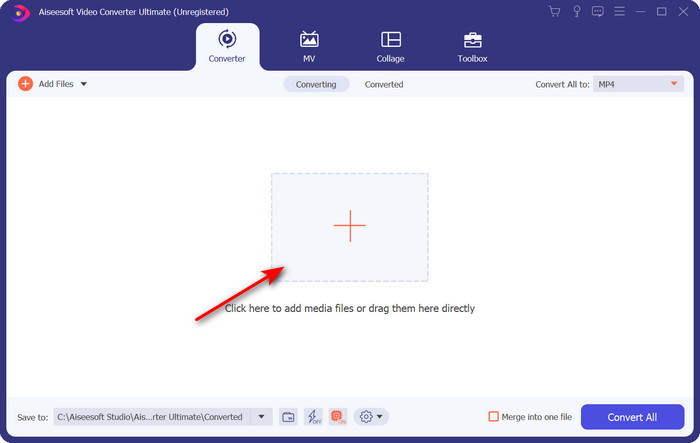
Pas 2. Obriu el programari per utilitzar-lo i, per pujar el fitxer .amv, feu clic al signe +. Cerqueu el fitxer a la carpeta i premeu Open per inserir-lo.
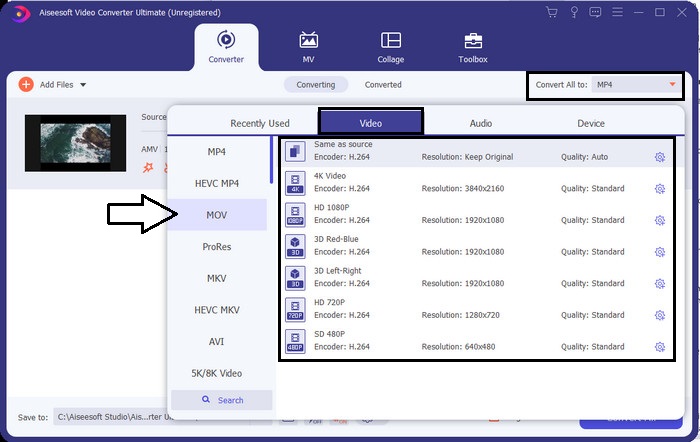
Pas 3. Per canviar el format a MOV, feu clic a Convert All to: i trieu MOV o el format que desitgeu.
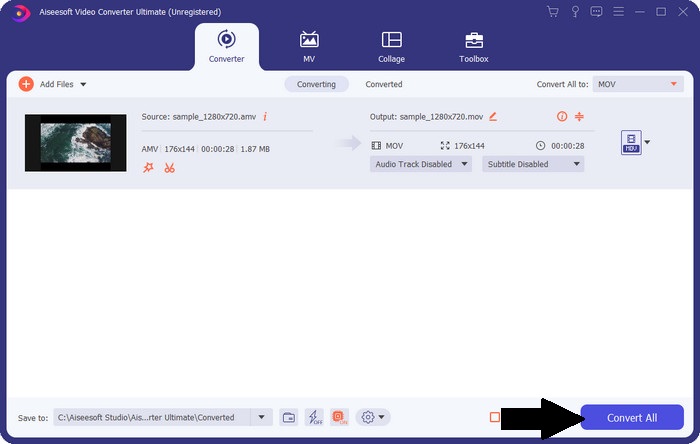
Pas 4. Per convertir el fitxer AMV a MOV, feu clic a Convert All per iniciar el procés de conversió.
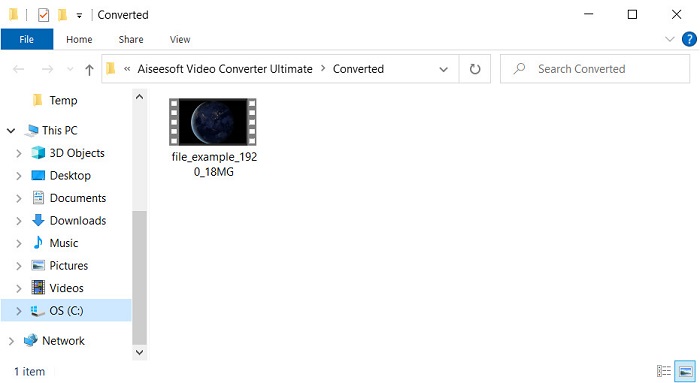
Pas 5. La conversió del fitxer només trigarà uns segons. Després, espereu que aparegui la carpeta amb el fitxer .mov que heu creat abans; feu clic al fitxer per veure’l amb el vostre reproductor multimèdia nadiu.
Part 3. Converteix AMV a MOV amb els 2 convertidors de serveis en línia disponibles
1. ConvertFiles
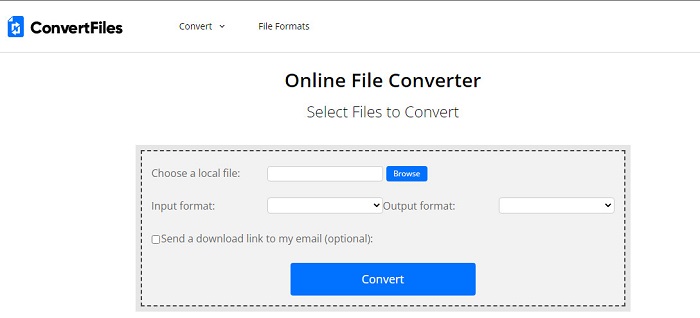
Un dels millors convertidors en línia als quals podeu accedir des del vostre navegador preferit és el ConvertFiles. Aquesta eina en línia pot convertir el vostre format a un format nou sense cap dificultat. A més, aquesta eina admet un petit conjunt de formats entre els quals podeu triar. Tot i això, la descàrrega del fitxer convertit aquí triga força temps perquè no ofereix una conversió ràpida. Una altra cosa negativa és la publicitat; n’hi ha molta a la interfície. Malgrat els problemes amb el procés de descàrrega i els anuncis, aquesta eina funciona bé com a eina gratuïta en línia.
Passos per convertir AMV a MOV amb ConvertFiles:
Pas 1. Obriu el vostre navegador preferit i cerqueu ConvertFiles.
Pas 2. Quan la pàgina web estigui oberta, feu clic a Browse per localitzar el fitxer a la carpeta; a Output Format, busqueu MOV i feu clic a Convert.
Pas 3. Quan la conversió estigui feta, feu clic a l’enllaç en blau ressaltat per descarregar el fitxer a l’ordinador.
2. MConverter
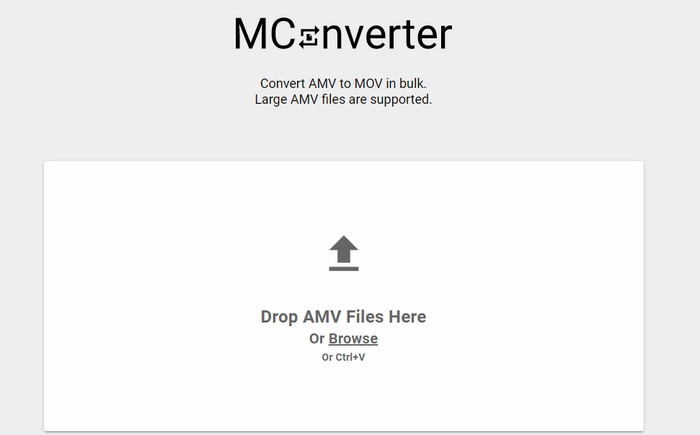
No voleu anuncis a la interfície per poder convertir AMV a MOV tranquil·lament? Aleshores proveu d’utilitzar el MConverter disponible al navegador. A més, aquesta eina admet la conversió per lots per fer el procés de conversió eficient, com el FVC Video Converter Ultimate. Tanmateix, l’inconvenient d’aquesta eina en línia és que no podeu superar una mida de fitxer de 200 MB. Per tant, si voleu convertir un vídeo llarg i la mida del fitxer supera la mida admesa, aquesta no és l’opció que hauríeu d’utilitzar. Però si voleu gaudir d’una experiència de conversió millor que amb ConvertFiles, seguiu els passos següents.
Passos per convertir AMV a MOV amb MConverter:
Pas 1. Cerqueu MConverter al vostre motor de cerca i obriu-lo.
Pas 2. Feu clic al botó Upload per inserir el fitxer, espereu un moment perquè l’eina web es carregui, cerqueu MOV i feu-hi clic. La conversió del fitxer començarà després que feu clic al format MOV.
Pas 3. Premeu Download All per desar el fitxer.
Part 4. Preguntes freqüents sobre AMV i MOV
Puc convertir el meu MP4 en AMV?
Podeu convertir el vostre MP4 a AMV per transferir el fitxer ràpidament en línia. Especialment si el vídeo dura una hora, us suggerim que convertiu els fitxers .mp4 a .amv perquè és molt més petit en mida si comparem aquests dos formats.
VLC és compatible amb AMV?
Per sort, podeu utilitzar el VLC Media Player per reproduir els fitxers .amv en aquest reproductor multimèdia encara que estigui antiquat. Però sabíeu que hi ha reproductors multimèdia que superen aquest reproductor? Així que, si voleu saber quins reproductors multimèdia són, heu de fer clic en aquest enllaç per conèixer els 5 reproductors multimèdia alternatius a VLC.
Com puc convertir el meu AMV en AVI?
AMV és la versió millorada d’AVI; tanmateix, si parlem de qualitat, AVI ofereix un rendiment fenomenal en comparació amb aquest format antic. A més, AVI és molt compatible amb totes les plataformes. Per tant, si ara voleu veure el vostre AMV en una versió millor i en totes les plataformes, heu d’aprendre com convertir AMV a AVI.
Conclusió
La discussió ha d'acabar aquí; tot i que volem emmagatzemar un fitxer AMV al nostre disc, el problema de compatibilitat és un dels motius pels quals hem de convertir-lo. Després de tot, es diu que AMV era popular abans a causa de com aquest contenidor comprimeix el fitxer. Tanmateix, avui heu de plantejar-vos convertir-lo en un nou format per utilitzar-lo encara. A més, les solucions proporcionades aquí es converteixen de manera eficaç. Tot i així, el FVC Video Converter Ultimate té un rendiment fenomenal en comparació amb les altres dues eines. Per tant, si voleu experimentar la millor eina, és imprescindible descarregar-la al vostre ordinador i copiar els passos indicats anteriorment.
-
 4 millors mètodes per convertir MOV a MP3 fàcilment a Windows i Mac
 Quan vulgueu extreure fitxers d'àudio MP3 de fitxers MOV, podeu obtenir més informació sobre els 4 convertidors de MOV a MP3 més eficients per obtenir els fitxers desitjats de l'article.
-
 MKV a MOV - Com convertir MKV a MOV
 Com puc convertir MKV a MOV a Mac? Pot iMovie llegir MKV? Què significa el format MOV? Aquesta publicació explica dues maneres senzilles d'ajudar-vos a convertir MKV a MOV amb convertidors de vídeo gratuïts en línia i professionals.
-
 FLV a MOV - Com convertir FLV a MOV a Mac / PC / en línia gratuïtament
 Com convertir FLV a MOV? Com puc convertir FLV a MOV a Mac? Hi ha alguna manera gratuïta de convertir FLV de YouTube a MOV en línia? Aquesta publicació comparteix 3 convertidors de FLV a MOV per canviar fitxers FLV a MOV.
