


 Video Converter Ultimate
 Gravadora de pantalla
 Reparació de vídeo
Els millors convertidors i fàcils d'utilitzar que converteixen MOV a WMV que heu de provar!
Apple va crear els fitxers MOV, i és un dels formats de fitxer més habituals juntament amb WMV, MP4 i AVI. Els fitxers MOV es poden reproduir a Windows fent servir QuickTime. Per tant, si vols convertir el teu fitxer MOV, et suggerim convertir-lo a un fitxer WMV, perquè el sistema Windows sol reproduir aquest format de fitxer. Així doncs, si vols saber com convertir MOV a WMV, aquest és l’article perfecte per llegir.

Part 1. Converteix el teu MOV a WMV amb el millor convertidor fora de línia
Quan es tracta de convertir fitxers, no hi ha dubte que FVC Video Converter Ultimate ho pot fer millor que ningú. Aquest convertidor és una eina d’escriptori que et permet convertir el teu fitxer MOV a WMV, AVI, MP4, M4V, WebM i molts més. També disposa de funcions fantàstiques que et permeten editar, millorar, unir i comprimir el teu fitxer MOV. A més, aquest convertidor de fitxers té una funció per activar la conversió ultraràpida i convertir el teu MOV a WMV amb rapidesa.
Com convertir MOV a WMV amb FVC Video Converter Ultimate:
Pas 1. Instal·la FVC Video Converter Ultimate fent clic a la icona de Free Download que hi ha més avall. Pots descarregar aquest convertidor tant a Windows com a macOS. A continuació, segueix el procés d’instal·lació i després executa l’aplicació.
Descàrrega gratuïtaPer a Windows 7 o posteriorDescàrrega segura
Descàrrega gratuïtaPer a macOS 10.7 o posteriorDescàrrega segura
Pas 2. Després d’executar el programa, veuràs la interfície principal del convertidor. Fes clic a Add Files, o bé arrossega i deixa anar el teu fitxer MOV sobre el signe + per començar la conversió del teu fitxer MOV al fitxer WMV.
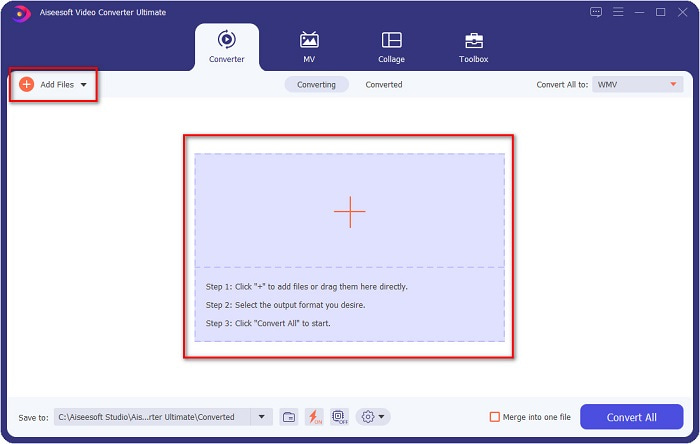
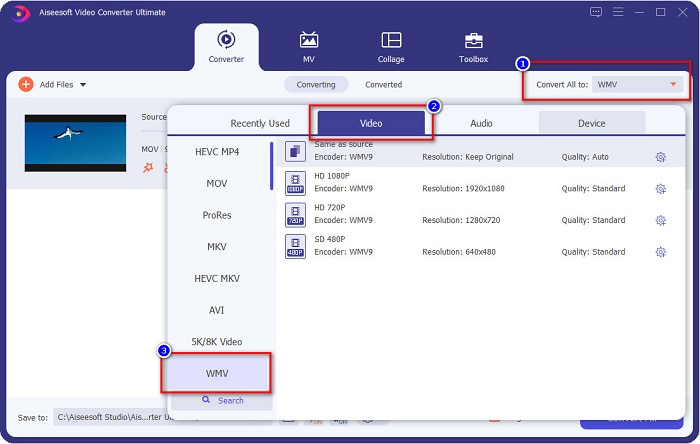
Pas 3. A continuació, fes clic al botó Convert All to. Apareixerà una llista de formats de fitxer on podràs seleccionar el format desitjat. Després fes clic al format de fitxer WMV.
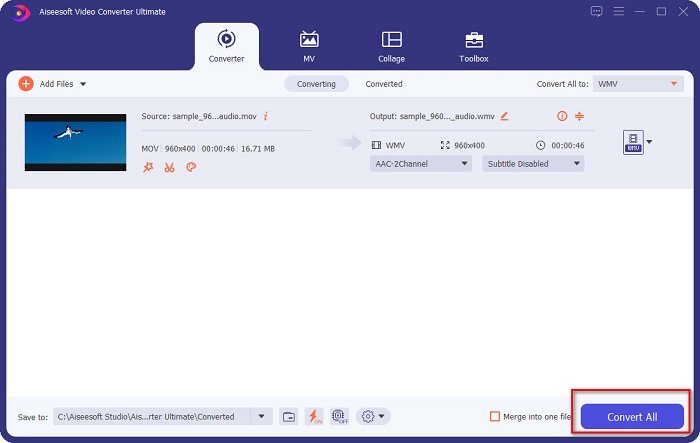
Pas 4. Un cop hagis seleccionat el format WMV, marca el botó Convert All a l’extrem inferior dret per iniciar la conversió. Llavors el teu fitxer de MOV a WMV començarà a convertir-se. Finalment, només cal esperar uns quants segons, i ja està! Amb aquests passos tan senzills, pots convertir fàcilment fitxers MOV a WMV.
Pros
- Té una opció on podeu tenir una conversió ultra ràpida.
- Us permet editar, millorar i comprimir el vostre fitxer.
- Pot convertir diversos formats de fitxer com MOV, WMV, AVI, MP4, M4V, VOB, MPG i molt més.
Contres
- Per accedir a les seves funcions especials, primer heu de comprar l'aplicació.
Part 2. Converteix MOC a WMV mitjançant un programari gratuït
Quan convertiu el vostre fitxer MOV a WMV, també podeu utilitzar programari gratuït que ja teniu al vostre escriptori. Un dels famosos convertidors de programari gratuït disponible avui dia és utilitzar el reproductor multimèdia VLC com a convertidor. El reproductor multimèdia VLC és un reproductor multimèdia que us permet reproduir diversos formats multimèdia. A més, aquest programari gratuït també pot convertir fitxers. Per tant, llegiu els passos següents si voleu convertir MOV a WMV amb programari gratuït mitjançant VLC.
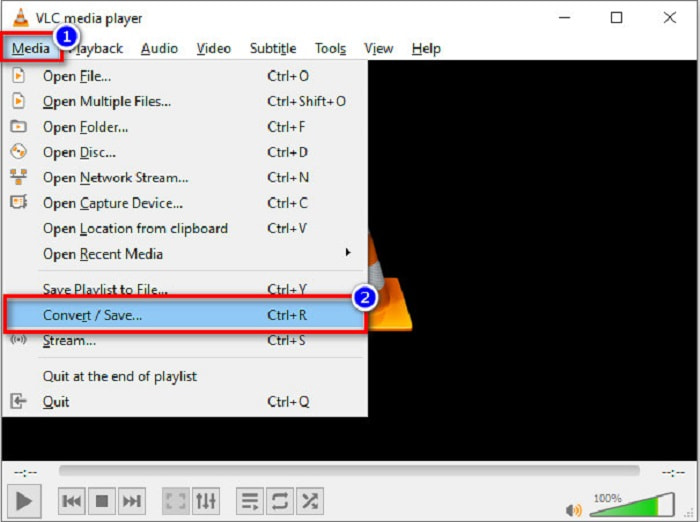
Pas 1. Obre el VLC Media Player, fes clic a l’opció Media situada a la part superior de la interfície del programa i selecciona Convert/Save.
Pas 2. Després, fes clic al botó Add per seleccionar el teu fitxer en format MOV. El format de fitxer apareixerà a la llista. Llavors fes clic al botó Convert/Save per continuar amb el pas següent.
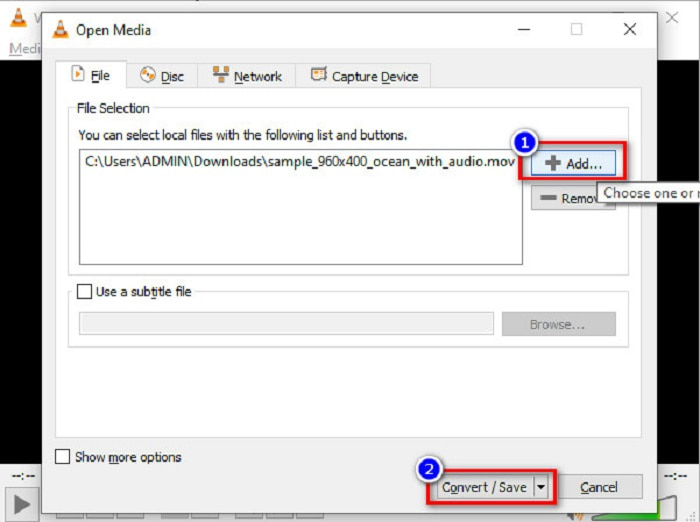
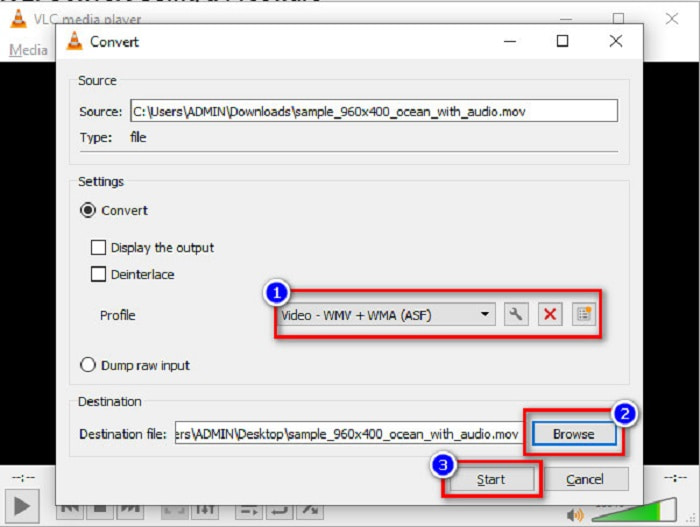
Pas 3. Finalment, selecciona WMV i tria les carpetes de destinació fent clic a Browse, després fes clic al botó Start per iniciar la conversió.
Part 3. Converteix MOV a WMV mitjançant un convertidor en línia
Si et preguntes com pots convertir fitxers MOV a fitxers WMV en línia, tenim una eina en línia pensada per a tu. FVC Free Video Converter Online és un convertidor en línia que et permet convertir els teus fitxers MOV a WMV, MP4, AVI, MPG i molts més. Aquest convertidor és fàcil d’utilitzar, de manera que no tindràs dificultats per convertir fitxers. Tanmateix, pots trobar-te amb una conversió lenta perquè aquest convertidor és basat en web. Tot i així, és un convertidor eficient per convertir vídeos de MOV a WMV en línia, i molta gent el fa servir.
Aquests són els passos sobre com podeu convertir amb aquest convertidor en línia:
Pas 1. Primer, obre el navegador i busca FVC Free Video Converter Online.
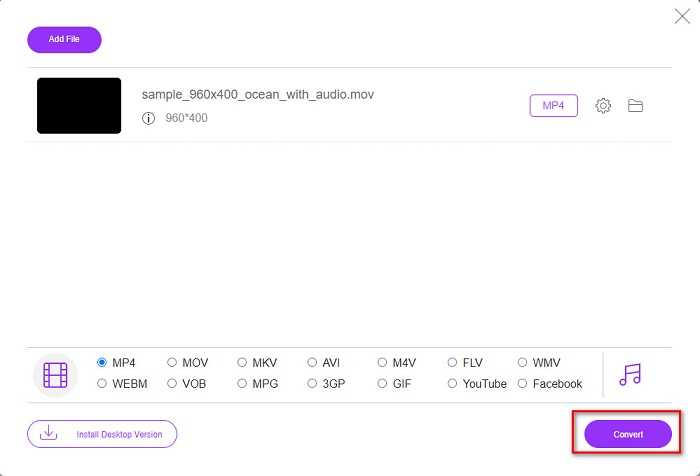
Pas 2. Després d’obrir el convertidor al navegador, fes clic a Add Files to Convert. Llavors el convertidor començarà a launch. A continuació se t’adreçarà als fitxers del teu ordinador, on escolliràs el fitxer MOV que vols convertir.
Baixa la versió d’escriptori per convertir fitxers per lots.
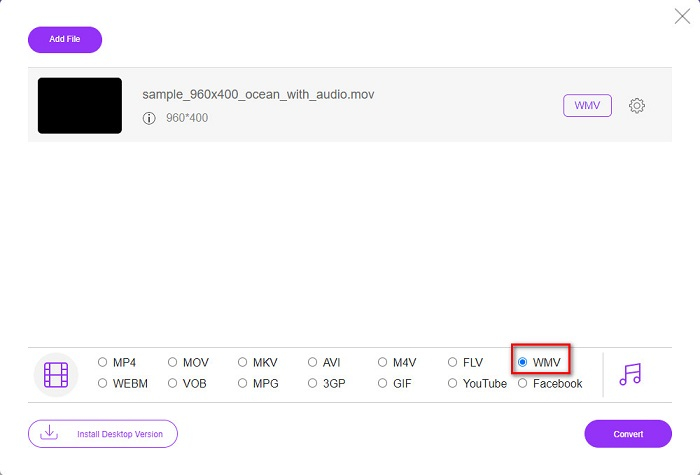
Pas 3. A la segona interfície del programa, a la part inferior veuràs la llista de formats de fitxer on podràs triar el format de fitxer WMV que vulguis.
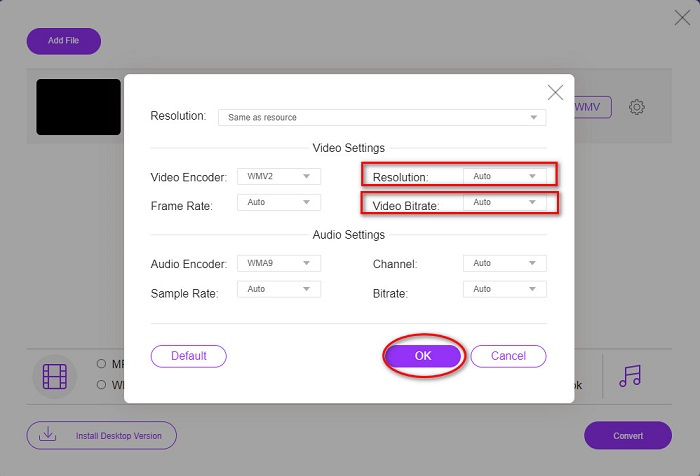
Opcional. Fent clic al botó de setting, pots canviar la resolució i la taxa de bits de vídeo del teu fitxer. Després fes clic a OK per aplicar els ajustos.
Pas 4. Després de seleccionar el format WMV, marca el botó Convert per convertir el teu fitxer MOV a un fitxer WMV. Finalment, espera que la conversió es completi. I ja ho tens! Així de senzill és convertir MOV a WMV.
Part 4. Coneixement ampliat dels fitxers MOV i WMV
MOV és un format de fitxer àmpliament compatible amb macOS. Encara que pots reproduir fitxers MOV a Windows, igualment necessites el suport de QuickTime. A més, el fitxer MOV es desa en el format de fitxer QuickTime. Com que és principalment compatible amb QuickTime i les plataformes Mac, s’ha convertit en un dels formats de fitxer més habituals avui dia. En comparació, el format WMV o Windows Media Video és compatible amb molts dispositius, principalment amb el sistema Windows. A més, aquest format de fitxer utilitza un compressor que et permet reduir la mida del fitxer sense afectar-ne la qualitat.
MOV vs. WMV
El format MOV es pot utilitzar per emmagatzemar una pel·lícula, un programa de televisió, un videoclip curt o una pel·lícula casolana. De fet, es desa en el format de fitxer QuickTime (QTFF), que va ser introduït per Apple l'any 1991. Els fitxers MOV s'utilitzen sovint quan la gent vol desar un vídeo amb alta qualitat.
Produït per Microsoft, WMV era un dels formats de vídeo més comuns als anys 2000. Es pot veure a la xarxa i reproduir-lo per diversos reproductors multimèdia a Windows. I també és el format de fitxer de vídeo predeterminat de Windows Media Player. Però recentment ha estat assumit per altres formats.
Part 5. Preguntes freqüents sobre com convertir MOV a WMV
La conversió de MOV a WMV afecta la qualitat del meu fitxer?
Hi ha alguns casos en què la qualitat del vostre fitxer es veurà afectada, depenent del convertidor que utilitzeu. Hi ha convertidors que no admeten vídeos de píxels d'alta qualitat.
QuickTime admet fitxers WMV?
Els reproductors QuickTime no poden reproduir fitxers WMV. Tot i això, pots convertir els teus fitxers WMV a formats de fitxer compatibles amb QuickTime, inclosos MOV, MP4, M4V i altres. Per obtenir més informació sobre com convertir WMV a MOV, fes clic en aquest enllaç.
Podeu comprimir fitxers MOV?
Fer servir un fitxer ZIP pot comprimir fitxers MOV i altres fitxers. Tanmateix, comprimir fitxers MOV amb ZIP només en reduirà un petit percentatge. Per tant, et recomanem convertir el teu fitxer a un format de mida més petita fent servir els convertidors presentats més amunt.
Conclusió
Com s’ha mostrat abans, hi ha una gran varietat de convertidors per triar. Pots escollir si vols un convertidor en línia, d’escriptori o gratuït. Aquests convertidors tenen característiques i funcions diferents que pots provar. Tot i això, et recomanem fer servir FVC Video Converter Ultimate perquè té més funcions que altres convertidors. A més, pot convertir de manera ultraràpida i eficient. Descarrega’l ara per gaudir d’aquestes funcions fantàstiques que ofereix aquest convertidor.
-
 [Gratis i en línia] 4 mètodes per convertir MOV a MP4
 Voleu convertir fitxers MOV (Apple QuickTime Movie) a MP4? Aquesta publicació comparteix 4 mètodes gratuïts per convertir els fitxers de vídeo MOV a format MP4 a Windows 10/8/7 / XP i Mac OS X.
-
 4 millors mètodes per convertir MOV a MP3 fàcilment a Windows i Mac
 Quan vulgueu extreure fitxers d'àudio MP3 de fitxers MOV, podeu obtenir més informació sobre els 4 convertidors de MOV a MP3 més eficients per obtenir els fitxers desitjats de l'article.
-
 2 maneres fàcils de convertir fitxers MOV a FLV a Windows / Mac
 Com convertir MOV a FLV de forma gratuïta? Aquests són els millors convertidors de vídeo per a ordinadors i en línia per convertir el fitxer MOV a FLV en qüestió de segons sense pagar ni un cèntim.

