


 Video Converter Ultimate
 Gravadora de pantalla
 Reparació de vídeo
3 maneres diferents de transformar fitxers MPG a MOV al vostre escriptori o en línia
Convertir un format és essencial, especialment si parlem de compatibilitat i de la finalitat del format. Com l’MPG, aquest format emmagatzema dades de DVD, com ara metadades intercalades, àudio i vídeo. Però si extreus aquest format dels DVD i el reprodueixes amb QuickTime o l’edites amb iMovie, no el podràs pujar perquè el format no és compatible. Tot i això, pots convertir el teu fitxer .mpg a un format compatible com el format MOV. Aquest article et suggerirà alguns dels millors programes conversors que pots utilitzar per convertir MPG a MOV al Mac gratuïtament i sense reduir-ne la qualitat.

Part 1. Com convertir MPG a MOV a Mac i Windows
El primer de la llista és la crème de la crème de tots els conversors que pots utilitzar per aprendre a convertir MPG a MOV en un Mac o un PC. FVC Video Converter Ultimate proporciona la màxima qualitat i la conversió més ràpida, que pots fer en menys d’un minut. A més a més, descarrega’l si no tens cap experiència convertint fitxers i no vols quedar decebut al primer intent. Però, si ets el tipus d’usuari que vol afegir efectes especials, retallar, ajuntar i fer-hi més coses, dona un cop d’ull a la Caixa d’eines d’aquest conversor. A banda d’això, si busques un programari fiable i fàcil d’utilitzar i vols obtenir un resultat fenomenal a l’instant, segueix les instruccions que trobaràs a continuació.
Pas 1. Descarrega’t el conversor de MPG a MOV gratuïtament al teu Mac o PC. Després, instal·la el fitxer i fes la configuració ràpida.
Descàrrega gratuïtaPer a Windows 7 o posteriorDescàrrega segura
Descàrrega gratuïtaPer a macOS 10.7 o posteriorDescàrrega segura
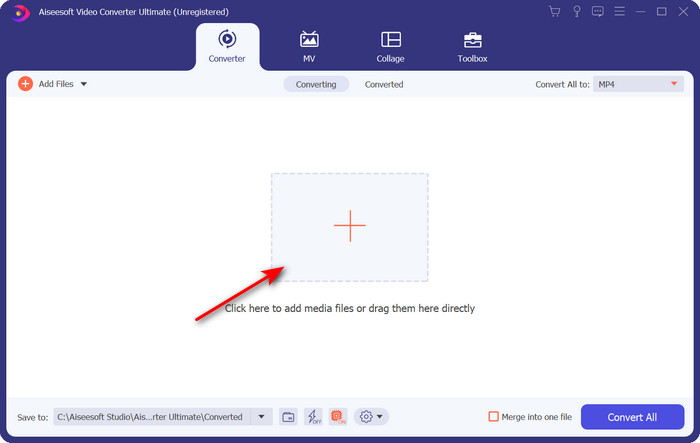
Pas 2. Per inserir el fitxer, fes clic al signe + situat a la part central de la interfície. Cerca el fitxer .mpg a la carpeta que apareixerà a continuació, després fes clic a Obre i continua.
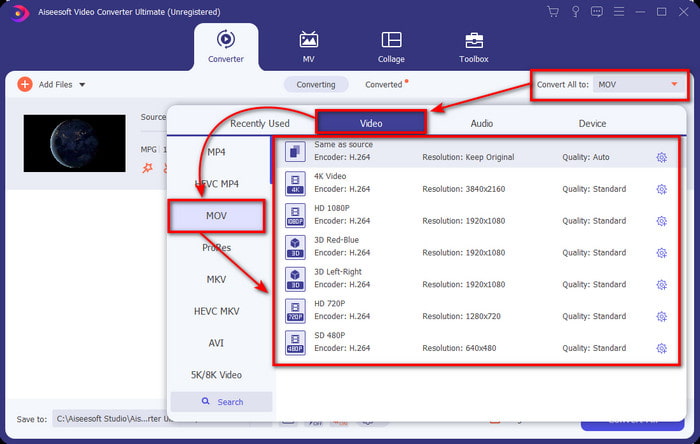
Pas 3. Prem el botó desplegable i tria el format MOV o qualsevol altre format disponible a la llista.
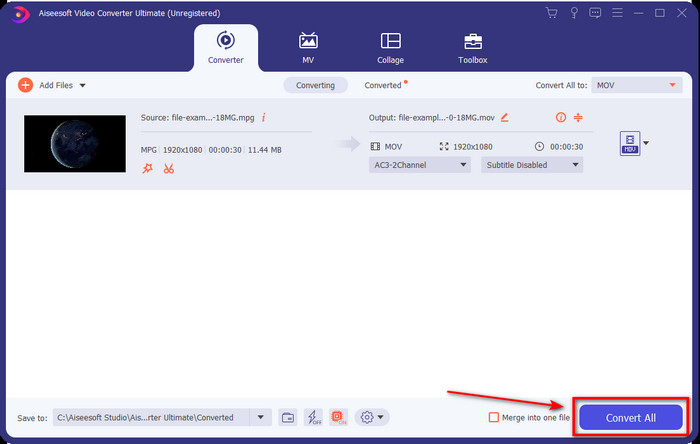
Pas 4. Quan estiguis a punt per començar el procés de conversió, fes clic a Converteix-ho tot.
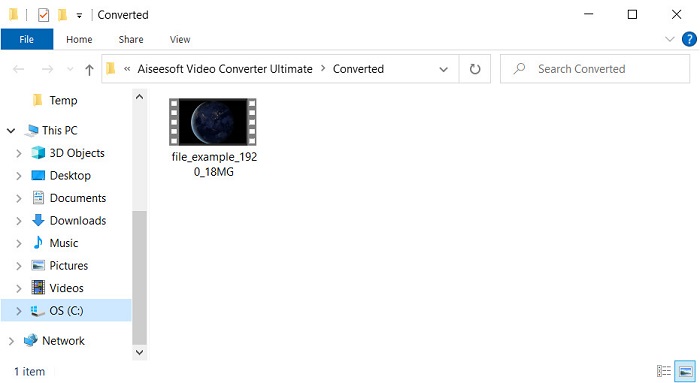
Pas 5. El teu .mov estarà llest al cap d’uns segons, i si la carpeta s’obre a la pantalla, fes clic al primer fitxer per mirar-lo o editar-lo al teu dispositiu Apple.
Part 2. Converteix MPG a MOV amb Quicktime
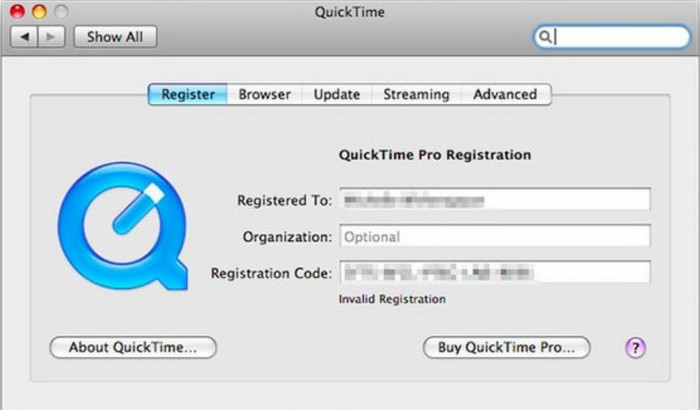
QuickTime Player és un reproductor multimèdia nadiu creat per a dispositius Apple per reproduir gairebé qualsevol format de vídeo i àudio. Però sabies que també el pots utilitzar com a conversor? Ara bé, el conversor que ofereix aquesta eina no és tan complet com el primer conversor esmentat més amunt. Tot i així, si tens un dispositiu Apple i vols convertir MPG a MOV amb QuickTime Player, segueix els passos següents.
Pas 1. Obre QuickTime Player al teu Mac, fes clic a File, després fes clic a Open File, localitza el fitxer .mkv a la carpeta i prem Open.
Pas 2. Torna a fer clic a File, però ara fes clic a Export As i tria la resolució (píxels) disponible a la llista.
Pas 3. Per començar a convertir el fitxer amb QuickTime, fes clic a Save.
Part 3. Converteix MPG a MOV mitjançant el convertidor de MPG a MOV en línia gratuït
Vols saber quin és el millor conversor gratuït de MPG a MOV en línia si no vols córrer el risc de descarregar programari? Aleshores FVC Free Video Converter Online és l’eina indicada. És senzill, disponible a tots els navegadors, lliure de programari maliciós i una eina en línia fiable. Tot el que ha de tenir un conversor senzill hi és present. A més, aquest programari admet nombrosos formats multimèdia i fa la conversió sense que hagis d’iniciar cap compte. Vols fer servir aquesta eina? Llavors segueix aquests senzills passos.
Pas 1. Fes clic en aquest enllaç per anar al lloc web oficial de FVC Free Video Converter Online.
Pas 2. Un cop siguis a la interfície web, fes clic a Add Files to Convert. Cerca el fitxer .mpg que vols convertir a la carpeta i prem Open.
Baixa la versió d’escriptori per convertir fitxers per lots.
Pas 3. Després de pujar el fitxer, tria el format MOV al submenú.
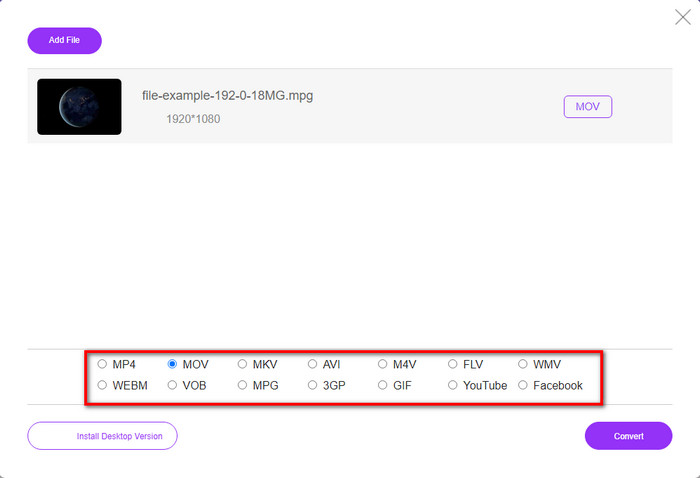
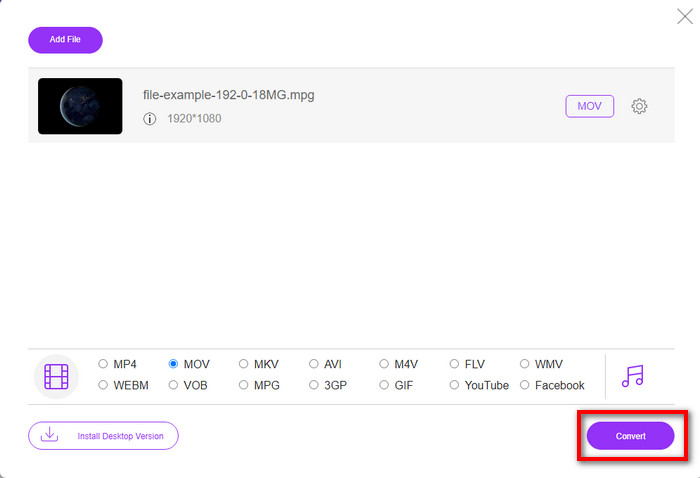
Pas 4. Com que ja has fet clic a MOV, ara descarreguem-lo prement Convert.
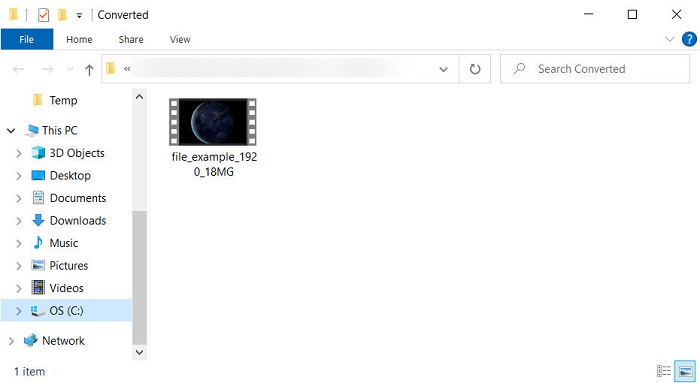
Pas 5. Després de la conversió, apareixerà una carpeta amb el fitxer .mov.
Part 4. Amplis coneixements sobre MPG a MOV i per què hem de convertir-lo
MPG és un format multimèdia conegut que utilitza MPEG com a format de vídeo estàndard digital. Aquest tipus de fitxers solen utilitzar MPEG-1 i MPEG-2 com a codificador de fitxers multimèdia. Utilitza aquests dos compressors per suportar totes les deficiències del compressor, especialment per emmagatzemar vídeos amb una resolució més alta. Com s'ha dit anteriorment, aquest format pot contenir tres elements: àudio, vídeo i metadades en un sol flux per a una distribució més ràpida de pel·lícules al web.
Però MOV pot emmagatzemar un vídeo d'alta qualitat i un àudio nítid que s'utilitza habitualment per editar el vídeo. A diferència de MPG, aquest format multimèdia multiplex pot fer un seguiment de diferents dades multimèdia, com ara vídeo, àudio i subtítols. Però el codificador i descodificador d'aquest format que s'utilitza habitualment és el MPEG-4.
El millor seria convertir el vostre MPG en MOV perquè quan transferiu el fitxer a dispositius Apple, no es reproduirà a Quicktime ni editarà a iMovie. Tot i que Quicktime Player i iMovie admeten MPEG-1 i MPEG-4, els altres MPEG, com el MPEG-2 que utilitza un .mpg, no són compatibles. Perquè sigui compatible amb dispositius Apple és el motiu pel qual cal convertir el fitxer a MOV.
MPG vs. MOV
Creat pel Moving Picture Experts Group (MPEG), MPG és un format de vídeo digital comú per emmagatzemar informació de vídeo, àudio i metadades. És molt útil a l'hora de crear pel·lícules per compartir a Internet. Aquests fitxers en MPG solen contenir compressió de vídeo/àudio MPEG-1 o MPEG-2.
El format MOV es pot utilitzar per emmagatzemar una pel·lícula, un programa de televisió, un videoclip curt o una pel·lícula casolana. De fet, es desa en el format de fitxer QuickTime (QTFF), que va ser introduït per Apple l'any 1991. Els fitxers MOV s'utilitzen sovint quan la gent vol desar un vídeo amb alta qualitat.
Part 5. Preguntes freqüents sobre la conversió de MPG i MOV
Quant de temps trigaria a convertir MPG?
Hi ha dos factors que poden afectar el vostre procés de conversió. Primer, si utilitzeu un convertidor en línia, dependrà de la velocitat de la vostra Internet. Aquest procés trigaria més temps en comparació amb l'altre convertidor no basat. I l'últim, com més gran sigui la mida del fitxer, més temps trigarà a convertir-lo. Per tant, si la mida del fitxer .mpg és gran, normalment esperareu que acabi.
Puc reproduir fitxers .mpg a VLC?
VLC és un dels principals reproductors multimèdia que podeu baixar a tots els dispositius per reproduir vídeos en el format no reproduïble al vostre reproductor multimèdia natiu. També podeu reproduir aquí tots els formats MPEG-1, MPEG-2, MPEG-3 i MPEG-4.
La compressió de MPG afecta la qualitat?
Comprimir un fitxer no hauria d’afectar-ne la qualitat perquè el que fas és només reduir-ne la mida. Però quan comprimeixes massa el teu .mpg, la seva qualitat pot canviar una mica. Per evitar-ho, hauràs de llegir aquesta llista dels 7 millors compressors de vídeo que pots utilitzar.
Conclusió
Per recapitular tota la informació detallada esmentada anteriorment, podeu convertir el vostre MPG a MOV si voleu utilitzar el vídeo en dispositius Apple. Tot i que programari com Quicktime i iMovie admet MPEG-1 i MPEG-4, encara no s'admeten MPEG-2 i MPEG-3. Per tant, per fer-lo compatible amb els vostres dispositius Apple, és ideal convertir-lo. Totes les eines esmentades aquí són molt efectives i fàcils d'utilitzar si convertiu el fitxer.
-
 FLV a MPG: com convertir FLV a MPG a Mac, PC i en línia gratuïtament
 Com convertir FLV a MPEG? Puc convertir FLV a MPG de forma gratuïta? Aquesta publicació comparteix 3 convertidors de vídeo gratuïts per ajudar-vos a convertir FLV a MPG sense pèrdues de qualitat.
-
 Com convertir MPG a format GIF [en línia i fora de línia]
 Vols expressar una emoció molt millor? Aleshores, heu d'utilitzar GIF. Aquest escrit us ensenyarà com convertir un fitxer MPG a GIF per expressar el vostre sentiment molt millor.
-
 [2022] Selecció popular del convertidor MPG a AVI per ajudar-vos a convertir MPG a AVI
 Alguna vegada us heu preguntat com convertir el vostre MPG a un fitxer de vídeo AVI només per reproduir-lo al vostre reproductor de vídeo? Aquí teniu el millor article que podeu trobar que parla del problema anterior.

