


 Video Converter Ultimate
 Gravadora de pantalla
 Reparació de vídeo
Diferents maneres de convertir RMVB a MOV en línia i fora de línia
A causa de l’enorme quantitat de formats de fitxer de vídeo confusos disponibles a internet, molts usuaris tenen dificultats per triar quin reproductor multimèdia utilitzar per al vídeo concret que obtenen. Encara que sembli mentida, reproduir un vídeo no sempre és tan fàcil com descarregar-lo. Alguns formats són exclusius del seu creador, i n’hi ha d’altres que els usuaris poden reproduir pràcticament a tot arreu. Tanmateix, és essencial saber quins formats de fitxer de vídeo has de buscar que estiguin admesos pels reproductors que tens. Però tampoc no ens hauríem de conformar només amb això. Saber com convertir formats de fitxer que no veus cada dia és la millor opció. Per això, et proporcionem totes les maneres possibles de convertir RMVB a MOV per a la teva comoditat.
Part 1. Una visió general: RMVB i MOV
RMVB i MOV són dos formats de vídeo diferents d'altres dues empreses que els van desenvolupar. Hauríeu de conèixer els fitxers RMVB, abreviatura de RealMedia Variable Bitrate, una extensió de taxa de bits variable desenvolupada per RealNetworks al format de contenidor digital multimèdia RealMedia. Algunes persones utilitzen RMVB per a material multimèdia desat localment. Com que presenten mides de fitxer més petites i velocitats de bits més baixes, però amb una qualitat més excel·lent, els fitxers RMVB s'han convertit en un format popular per als títols de pel·lícules d'anime i asiàtiques. L'extensió de fitxer '.rmvb' s'utilitza per a aquest format.
D'altra banda, MOV és un format de fitxer de contenidor multimèdia desenvolupat per Apple desat en el format de fitxer QuickTime (QTFF). El format contenidor pot gestionar diversos formats multimèdia per facilitar la transmissió multimèdia entre dispositius, sistemes operatius i aplicacions. Els fitxers multimèdia QTFF emmagatzemen fitxers .mov. Tanmateix, també es poden desar com a fitxers .qt.
| Extensió de fitxer | RMVB | MOV |
| Tipus d'arxiu | Fitxer de taxa de bits variable de RealMedia | Apple QuickTime Movie |
| Desenvolupador | RealNetworks | poma |
| Avantatges | RMVB és un format per emmagatzemar i compartir informació multimèdia. I és notablement famós per distribuir contingut asiàtic, com ara episodis i pel·lícules de televisió xinesa. | Un fitxer MOV pot incloure moltes pistes de dades, cadascuna conté un flux multimèdia digital o relacionat amb un flux d'un altre fitxer. Com a resultat, podeu canviar els fitxers sense haver de tornar a fer les dades després. |
| Desavantatges | No són freqüents, a causa de la seva incompatibilitat amb altres reproductors multimèdia. | Cada fitxer MOV pot incloure diversos còdecs diferents, cosa que fa que sigui difícil de reproduir. |
| Els programes admeten el fitxer | Reproductor multimèdia RealPlayer VLC iOrgSoft Video Converter | Microsoft Windows Media Player Apple QuickTime Player Reproductor multimèdia VideoLAN VLC |
Part 2. Accessible i millor mètode per convertir RMVB a MOV [fora de línia]
La conversió d'un vídeo de RMVB a MOV de vegades es necessita en una hora i un dia inesperats. Tot el procés requereix majoritàriament una connexió a Internet que no sempre està disponible en qualsevol lloc. Per tant, Video Converter Ultimate és el camí a seguir si voleu convertir el vostre vídeo a un format adequat per a la situació en què us trobeu. Fins i tot us permet convertir diversos vídeos simultàniament, estalviant la molèstia dels processos repetits. Fins i tot us ofereix diverses opcions, com ara triar una determinada resolució, velocitat de fotogrames i velocitat de bits per al vostre vídeo. Anomena una resolució i Video Converter Ultimate us la donarà.
Pas 1: Ves al lloc web i veuràs un botó que diu Free Download i For Mac OS. Fes-hi clic per descarregar el fitxer .exe. Has d’instal·lar el programa i esperar que acabi. Un cop fet, obre el fitxer per continuar amb el procés d’instal·lació.
Descàrrega gratuïtaPer a Windows 7 o posteriorDescàrrega segura
Descàrrega gratuïtaPer a macOS 10.7 o posteriorDescàrrega segura
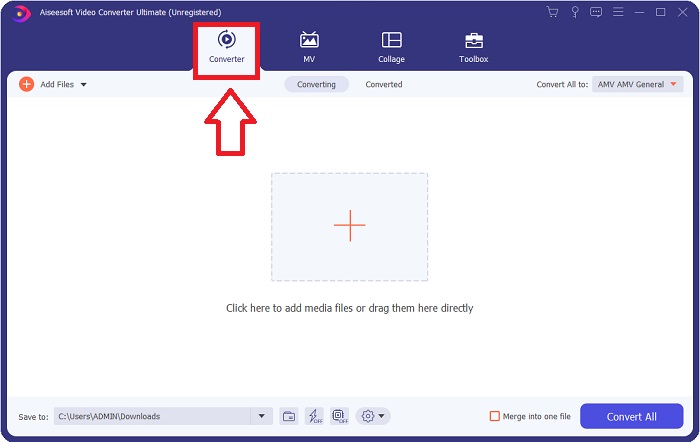
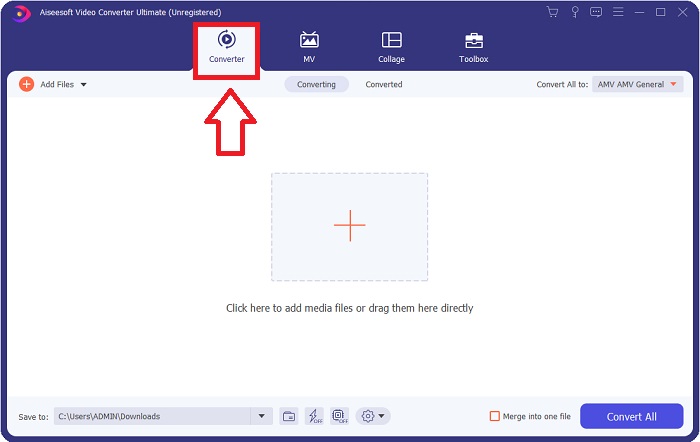
Pas 2: Després de completar la instal·lació, obre el programa i s’obrirà una finestra. T’hi apareixerà una interfície amb pestanyes a la part superior. Inicialment, et trobaràs a la pestanya Converter i, si no és així, només cal que la seleccionis.
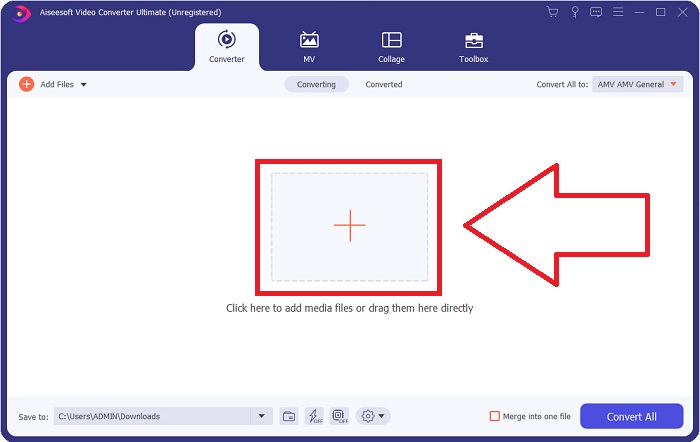
Pas 3: A la interfície veuràs un botó quadrat amb una icona + al mig. Fes-hi clic per importar el fitxer de vídeo que vols convertir, o bé arrossega’l i deixa’l anar sense cap complicació.
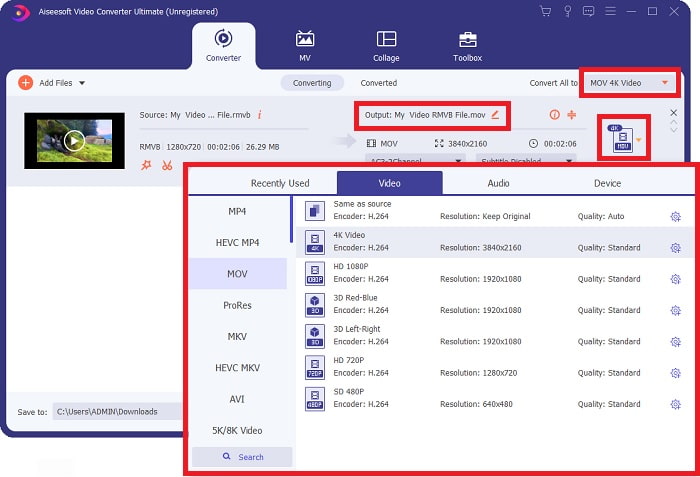
Pas 4: Apareixerà una interfície nova que mostra totes les opcions per editar el teu vídeo. A l’extrem dret és on tries el format que vols per al teu vídeo convertit. Només has de fer clic a la fletxa desplegable i t’apareixeran tots els formats disponibles.
En aquest cas, tria MOV. A més, pots fer clic a la icona d’engranatge que hi ha al costat de la resolució que hagis seleccionat per editar paràmetres com la velocitat de fotogrames del vídeo i la freqüència de mostreig de l’àudio. Per desar els canvis, fes clic a Create New.
Pas 5: Si has acabat la tasca amb tots els canvis que has fet al teu vídeo, ja pots iniciar el procés de conversió fent clic al botó Convert All a l’extrem inferior dret de la finestra.
Part 3. Un altre mètode excel·lent per convertir RMVB a MOV [en línia]
Si descarregar i instal·lar programari a l’ordinador no és el teu estil i només necessites una conversió puntual per a les teves pel·lícules, aquí tens una opció completament en línia que pots provar. FVC Free Video Converter Online, una eina web que ofereix diverses opcions de configuració de vídeo i àudio, alhora que t’estalvia el temps d’instal·lar cap programa. Només implica tres passos senzills per fer la feina:
Pas 1: Per començar, ves al lloc web, on trobaràs un botó groc al centre de la pàgina que diu Add Files to Convert. Fes clic al botó per importar el fitxer de vídeo que vols convertir.
Baixa la versió d’escriptori per convertir fitxers per lots.
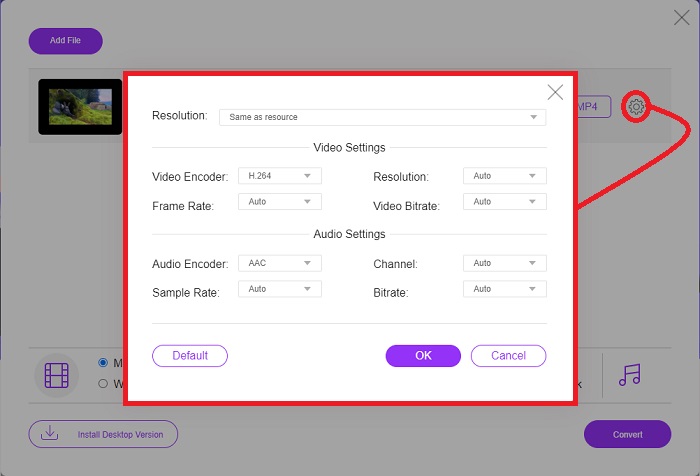
Pas 2: S’obrirà una finestra emergent que mostra el fitxer de vídeo que has importat a la part superior i tots els formats disponibles a la part inferior. Com que vols convertir el teu fitxer RMVB a MOV, selecciona MOV. Per a opcions addicionals, fes clic a la icona d’engranatge a l’extrem dret per editar els paràmetres de vídeo i àudio d’aquestes opcions afegides. Per desar els canvis, fes clic a OK.
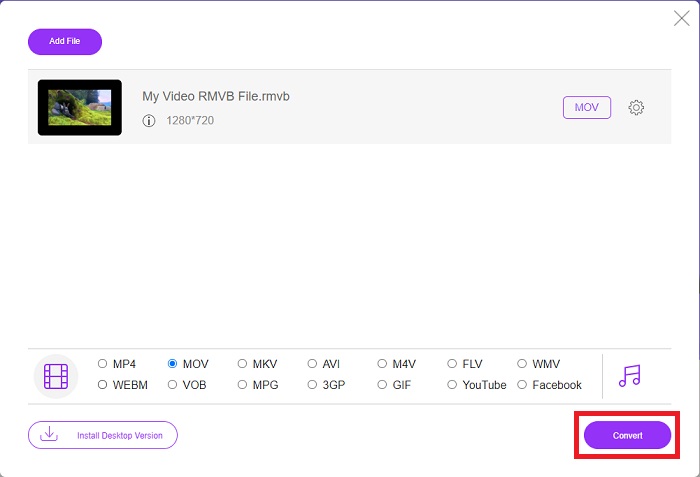
Pas 3: Si tots els canvis que has fet s’ajusten al que necessites per al teu vídeo, ja pots començar a convertir-lo fent clic al botó Convert a l’extrem inferior dret de la finestra. Tria la carpeta on vols que s’exporti el fitxer completament convertit i espera que acabi.
RMVB vs. MOV
RMVB, una variació més recent del format estàndard Real Media (.RM), és un format de fitxer de vídeo Real Media comprimit mitjançant una taxa de bits variable. És un format popular per a pel·lícules i animes asiàtics. Els fitxers RMVB són de mida més petita i tenen velocitats de bits més baixes però de millor qualitat.
El format MOV es pot utilitzar per emmagatzemar una pel·lícula, un programa de televisió, un videoclip curt o una pel·lícula casolana. De fet, es desa en el format de fitxer QuickTime (QTFF), que va ser introduït per Apple l'any 1991. Els fitxers MOV s'utilitzen sovint quan la gent vol desar un vídeo amb alta qualitat.
Part 4. Preguntes freqüents sobre la conversió de RMVB a MOV
Què és exactament un fitxer RMVB?
Qualsevol fitxer RMVB és un fitxer de vídeo Real Media comprimit mitjançant una taxa de bits variable òptima per al contingut del vídeo. És una versió més recent del format de fitxer bàsic Real Media (.RM) que ofereix una millor compressió.
Què poden reproduir fitxers RMVB?
Com que diverses aplicacions utilitzen fitxers amb l’extensió RMVB per motius diferents, necessitaràs un programa que sigui compatible amb el mateix fitxer al qual intentes accedir. RealNetworks RealPlayer (Windows), VLC media player (multiplataforma) i GRETSCH GOM Player (Windows) són reproductors multimèdia gratuïts que poden reproduir fitxers RMVB.
Hi ha possibles errors amb els fitxers .rmvb?
Si no teniu Real Media Player o cap altra eina d'obertura de fitxers adequada, podeu tenir problemes per obrir fitxers .rmvb si el fitxer es corromp a causa de sectors defectuosos del disc dur o d'una descàrrega errònia. Si sorgeixen problemes al registre del sistema de Windows, on s'emmagatzema la informació d'associació de fitxers per al fitxer .rmvb, es pot produir un tercer error.
Conclusió
Escollir si voleu mantenir un programari o simplement utilitzar una eina en línia per convertir un vídeo no és preocupar-vos de si s'ha d'utilitzar FVC. Tant el programari com la seva versió en línia ofereixen les millors opcions per a les vostres necessitats de conversió. Tanmateix, us recomanem que baixeu Video Converter Ultimate per a la caixa d'eines addicional que us proporciona quan cerqueu més edicions per al vostre vídeo, a part de la conversió. Mai saps quan necessites un programari per a principiants, així que és millor tenir-lo sempre al costat de l'ordinador.
-
 Guia sobre com convertir RMVB a MP4 a Windows / Mac (3 formes gratuïtes)
 Voleu convertir RMVB a MP4 per a una fàcil reproducció a l’ordinador o al telèfon mòbil? Trobareu maneres senzilles de convertir els fitxers RMVB a MP4 en aquesta guia.
-
 Les 4 millors aplicacions gratuïtes per a convertidors de RMVB a FLV a l’escriptori o en línia
 Aquest article us explicarà el millor programari de conversió de RMVB a FLV i les aplicacions web que poden convertir fitxers RMVB (velocitat de bits variable RealMedia) a vídeo FLV.
-
 Com convertir MP4 a MOV a Mac / PC / en línia
 Com convertir MP4 a MOV a Mac? Hi ha alguna manera gratuïta de convertir MP4 a MOV sense pèrdua de qualitat? Aquesta publicació comparteix 4 maneres senzilles d'ajudar-vos a fer la conversió de vídeo de MP4 a MOV en Mac, PC amb Windows i en línia.

