


 Video Converter Ultimate
 Gravadora de pantalla
 Reparació de vídeo
 Baixada segura
3 millors mètodes per convertir PNG a MP4 [Solucions ràpides]
Avui dia, molta gent s’enganxa a convertir les seves fotos en vídeos amb efectes, text, transicions i filtres. Tot i que el PNG és un format d’imatge excel·lent per a fotografies, podem ser encara més creatius si el convertim a MP4. Pot sonar estrany per a alguns, però hi ha qui converteix aquests fitxers per crear un petit curtmetratge o un vídeo divertit. Per tant, si estàs buscant una eina que converteixi PNG a MP4, ets al lloc adequat.
D'aquesta manera, hem preparat 3 eines que podeu considerar per convertir fàcilment una imatge a un format de vídeo. Coneix cadascun d'ells i aprèn a utilitzar-los ara!

Part 1: Converteix PNG a MP4 amb la millor qualitat a l'escriptori
Una de les millors maneres de convertir PNG a MP4 és mitjançant FVC Video Converter Ultimate. Aquest convertidor no és un conversor qualsevol, ja que inclou diverses funcions, com la d’MV, que et permeten transformar fitxers PNG en un vídeo MP4. Disposa de diversos temes predefinits que pots utilitzar lliurement. També hi pots afegir la teva pròpia música de fons, aplicar filtres i efectes i fins i tot personalitzar-lo col·locant una marca d’aigua al vídeo. A més, pots girar, retallar i tallar la imatge fàcilment segons les teves preferències i la teva visió creativa. Per això, si t’agrada especialment la part creativa i vols convertir les teves imatges en un fitxer MP4 dinàmic, aquesta serà l’eina de conversió perfecta per a tu.
Pas 1. Primer, al teu Windows o Mac, descarrega el programa i instal·la’l.
Descàrrega gratuïtaPer a Windows 7 o posteriorDescàrrega segura
Descàrrega gratuïtaPer a macOS 10.7 o posteriorDescàrrega segura
Pas 2. Després, obre l’eina i fes clic a la pestanya MV.
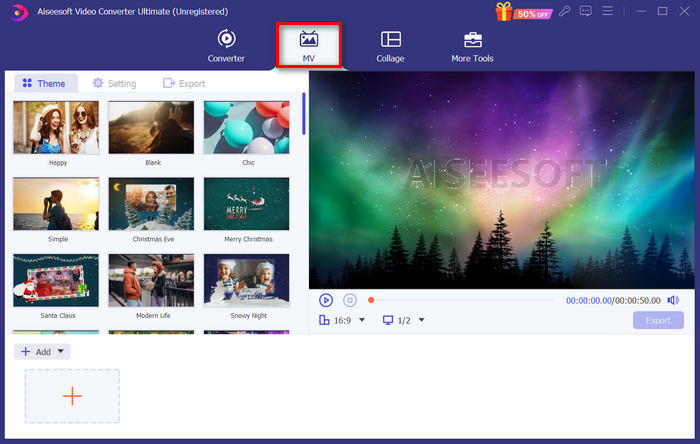
Pas 3. Ara, afegeix els fitxers PNG que vols convertir a MP4 fent clic al botó Add File.
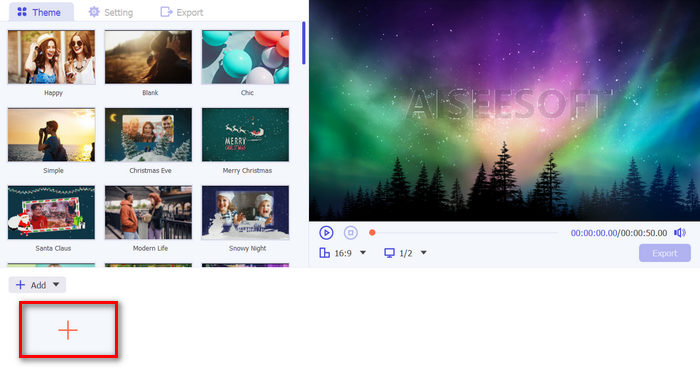
Pas 4. Un cop hagis importat els fitxers PNG al creador d’MV, els podràs afegir, editar i retallar per convertir-los en un vídeo. Només has de fer clic al botó que hi ha a la part superior del botó Add File. També pots triar un tema predefinit fent clic a la pestanya Theme de la part superior.
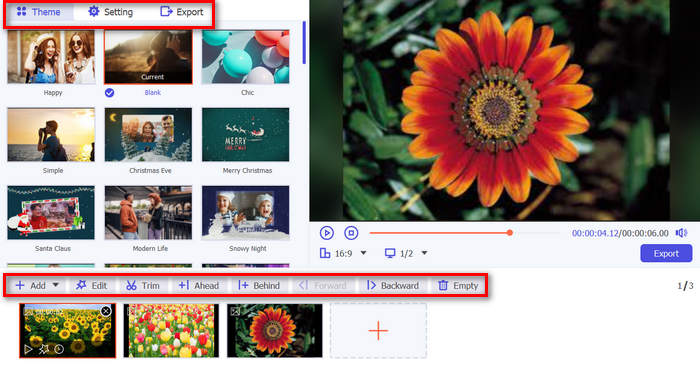
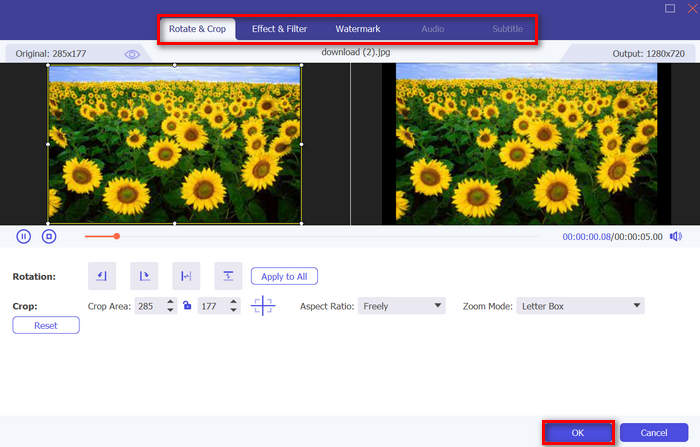
Pas 5. Mentrestant, per afegir filtres i efectes i per retallar i girar les imatges, només cal que facis clic a la icona Edit de sota. També pots personalitzar el teu vídeo MP4 afegint-hi una marca d’aigua.
Pas 6. Si ja ho tens tot a punt, fes clic al botó Export per desar el vídeo en MP4. Abans d’exportar, recorda indicar la carpeta on vols desar el fitxer de sortida i assegura’t que el format de sortida estigui configurat com a MP4.
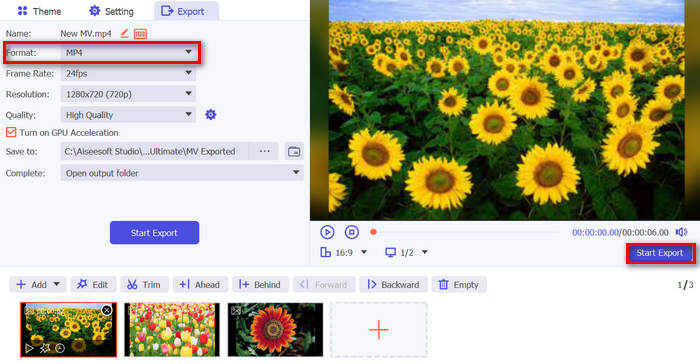
També podeu modificar la velocitat de fotogrames, la resolució i la qualitat de la sortida de vídeo.
Pas 7. Finalment, podràs accedir al vídeo exportat a la carpeta que hagis seleccionat.
Quan convertiu PNG a MP4 amb FVC Video Converter Ultimate, realment podeu garantir un resultat de sortida de qualitat. La seva interfície intuïtiva fa que la conversió sigui fàcil de processar i les seves funcions d'edició poden augmentar l'aspecte visual de la sortida de vídeo. A més, podeu seleccionar la vostra resolució de vídeo preferida fins a 4K per garantir la compatibilitat amb el vostre dispositiu i diversos reproductors multimèdia.
Part 2: Converteix PNG a MP4 amb FFmpeg
Una altra manera de convertir PNG a MP4 és utilitzar FFmpeg. Aquesta eina és gratuïta i de codi obert, i ofereix un conjunt complet de biblioteques i programes per gestionar diferents fitxers i fluxos multimèdia. Amb FFmpeg, pots convertir sense problemes una seqüència d’imatges JPG en un fitxer de vídeo MP4 mitjançant la seva funció de línia d’ordres. Només cal utilitzar una ordre o un codi enganxat al terminal o al símbol del sistema, i el programa durà a terme la conversió i crearà el fitxer de sortida segons correspongui.
Pas 1. Descarrega i instal·la FFmpeg a l’ordinador.
Pas 2. Obre el Terminal o el símbol del sistema Command.
Pas 3. Navega fins al directori que contingui la teva seqüència d’imatges.
Pas 4. Utilitza l’ordre següent per crear el vídeo. Suposem que el nom de fitxer de la imatge és happy: ffmpeg -framerate 1 -i happy%d.png -c:v libx264 -r 30 output.mp4

Pas 5. Opcionalment, pots especificar el número d’inici de la seqüència d’imatges amb l’opció -start_number. Per exemple, si la teva seqüència d’imatges comença amb happy3.png, afegiries -start_number 3 a l’ordre.
Pas 6. Prem Enter per executar l’ordre. FFmpeg començarà a processar les imatges i crearà el vídeo.
Pas 7. Un cop el procés hagi finalitzat, podràs accedir al vídeo al directori que hagis indicat.
Tot i que aquesta eina sembla tenir un procés i un resultat de conversió prometedors, el seu inconvenient és la complexitat de la seva interfície, cosa que dificulta als usuaris navegar pel procés de conversió de PNG a MP4.
Pros
- Gratuït i de codi obert.
- Interfície de línia d'ordres potent.
Contres
- Corba d'aprenentatge pronunciada per a principiants.
- Manca d'interfície gràfica d'usuari.
Part 3: Converteix PNG a MP4 en línia
Una altra manera de transformar PNG a MP4 és emprar una eina de conversió en línia. Amb els conversors en línia, pots garantir la compatibilitat amb diferents dispositius, ja que només cal un navegador i connexió a Internet. Una de les millors eines de conversió en línia que et podem recomanar és FlexClip. Es tracta d’una eina en línia versàtil que et permet convertir imatges PNG en vídeos MP4. Només hauràs d’importar els teus fitxers PNG, i disposaràs d’una interfície fàcil de seguir per transformar-los en un fitxer de vídeo quan l’exportis.
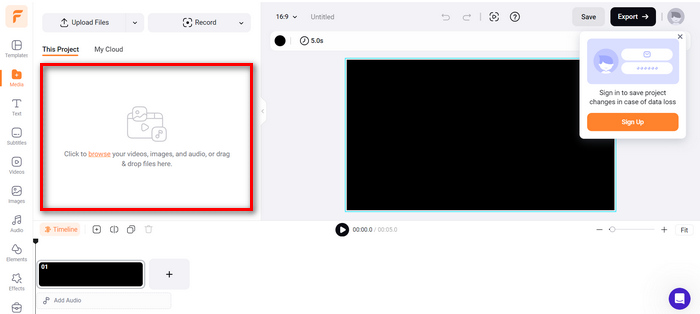
Pas 1. Primer, ves a la pestanya Media i fes clic a Browse per importar els teus fitxers PNG.
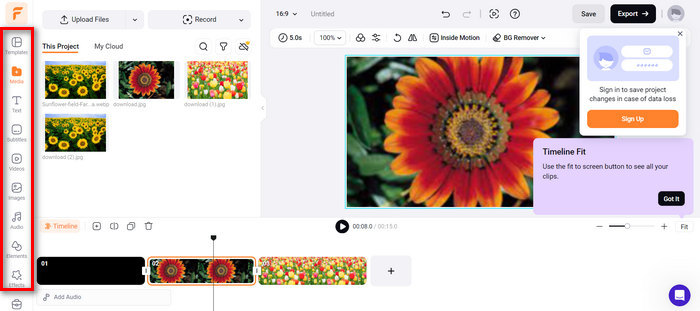
Pas 2. Després, arrossega els fitxers PNG a la línia de temps perquè puguis retallar-los i afegir-hi transicions al resultat. A més, si vas a la pestanya de l’esquerra de la interfície del programa, podràs millorar encara més la qualitat visual del teu vídeo afegint-hi text, subtítols, àudio, elements i efectes.
Pas 3. Ara ja pots descarregar el teu MP4 fent clic al botó Export, però recorda triar abans la resolució de vídeo, la velocitat de fotogrames i la qualitat que prefereixis.
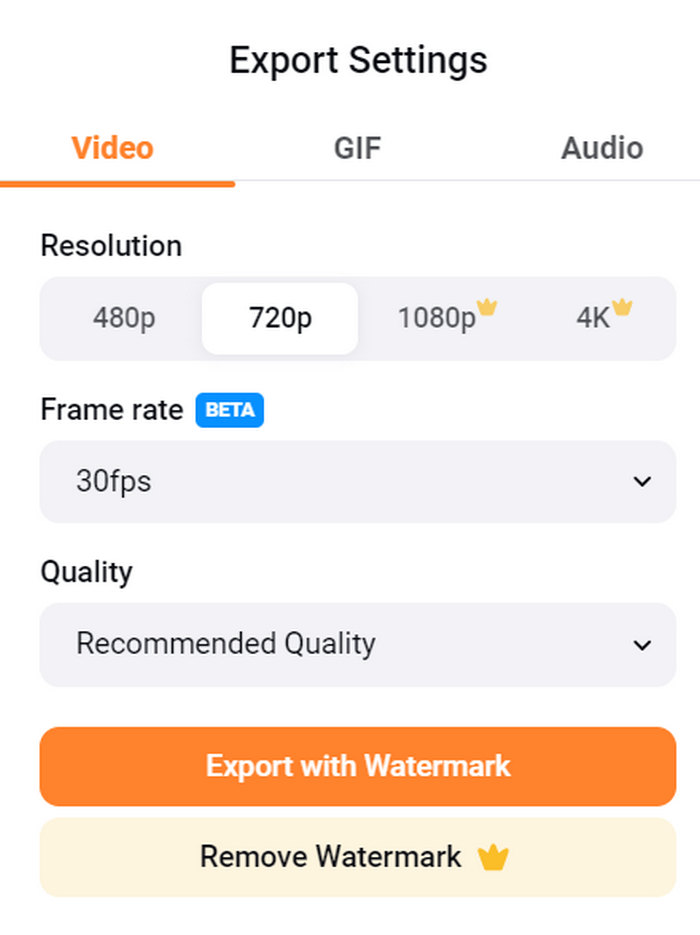
Amb FlexClip, podeu convertir fàcilment PNG a MP4 en línia sense preocupar-vos pel consum d'emmagatzematge al vostre dispositiu. Tanmateix, si utilitzeu la seva versió gratuïta, no podreu gaudir de totes les seves característiques, cosa que us impedirà modificar la vostra sortida preferida.
Pros
- Interfície fàcil d'utilitzar.
- Funcions d'edició versàtils.
- Opcions de sortida personalitzables.
- Procés de conversió ràpid.
Contres
- Requereix connexió a Internet.
- Funcions limitades a la versió gratuïta.
- Els vídeos exportats tenen marques d'aigua.
Part 4: Preguntes freqüents sobre la conversió de PNG a MP4
Per què voldria convertir PNG a MP4?
Convertir PNG a MP4 permet als usuaris transformar imatges estàtiques en vídeos dinàmics, cosa que pot ser útil per crear presentacions, animacions o afegir-hi elements d’àudio. El format MP4 també és àmpliament admès i compatible amb diversos dispositius i plataformes. Per tant, convertir PNG a MP4 el fa més adequat per compartir i reproduir en línia.
Quin és el millor mètode per convertir PNG a MP4?
El millor mètode depèn de les preferències i necessitats dels usuaris. Si prefereixen programari d'escriptori amb funcions d'edició avançades, poden utilitzar eines com FVC Video Converter Ultimate. Si volen una solució de codi obert amb una interfície de línia d'ordres, FFmpeg és una bona opció. Si prefereixen una solució en línia senzilla, es recomana FlexClip.
Com varien PNG i MP4 entre si?
PNG o Portable Network Graphics és un format de fitxer que s'utilitza habitualment per a imatges fixes amb compressió sense pèrdues, ideal per a gràfics i imatges amb transparència. D'altra banda, MP4 o MPEG-4 és un format de fitxer de vídeo conegut per les seves capacitats de compressió, que emmagatzema tant dades de vídeo com d'àudio.
Conclusió
Convertir PNG a MP4 no és només una qüestió de conversió. Es tracta de creativitat i passió. Imagina convertir imatges estàtiques i quietes en vídeos dinàmics. Això requereix molta creativitat i, és clar, també un bon convertidor. Així doncs, no deixis passar aquesta oportunitat i prova avui mateix un d’aquests mètodes!
-
 Maneres a gran escala de convertir JPG a PNG en línia i fora de línia
 Esteu buscant mètodes útils per convertir el format de fitxer JPG a PNG? Aquesta guia té la resposta que necessiteu. Per descobrir aquests mètodes, llegiu l'article.
-
 Els 5 principals tutorials per convertir PNG a JPG ràpidament
 Si necessiteu convertir el vostre fitxer PNG a format JPG, aquí podeu aprendre les millors maneres. També aprendràs la diferència entre els formats de fitxer PNG i JPG.
-
 Tutorials pas a pas sobre com convertir ICO a PNG
 Feu clic a aquesta guia per conèixer els mètodes més fàcils per convertir ICO a PNG. Descobrim els convertidors d'ICO a PNG per a tràmits en línia i fora de línia.
