


 Video Converter Ultimate
 Gravadora de pantalla
 Reparació de vídeo
 Baixada segura
Els millors convertidors de MP4 per augmentar el contingut: eines per a conversions sense problemes
La conversió de fitxers de vídeo a format MP4 s'ha convertit en essencial per a qualsevol persona que vulgui gaudir d'una reproducció perfecta a través de dispositius. Tot i que hi ha innombrables eines disponibles per convertir vídeos a MP4, no totes ofereixen la mateixa qualitat i rendiment.
Aquesta és la raó per la qual ens hem pres el temps de ressenyar i comparar els millors convertidors MP4 del mercat, perquè puguis prendre una decisió informada i optimitzar el teu flux de treball de vídeo. Tant si ets un videògraf professional, un creador de contingut o simplement vols convertir alguns vídeos per a ús personal, la nostra ressenya completa dels convertidors MP4 més ben valorats t’ajudarà a trobar l’eina perfecta per a les teves necessitats.

Part 1. Comparació de programes
Si voleu conèixer d'un cop d'ull el millor programa per a les vostres necessitats, podeu fer una ullada a la taula que compara els programes esmentats en aquest post. Tots aquests programes garanteixen que us ajudaran a convertir a MP4.
| Programes | Conversió per lots | Acceleració de la GPU | Característiques adicionals |
| Convertidor de vídeo gratuït en línia | Sí | No | Personalització del format de sortida, conversió per lots |
| Online-Convert.com | Sí | No | Conversió de diferents tipus de fitxers |
| CloudConvert | Sí | No | Integració amb serveis d'emmagatzematge al núvol |
| Convertio | Sí | No | Integració amb serveis d'emmagatzematge al núvol, conversió de diversos tipus de fitxers |
| FVC Video Converter Ultimate | Sí | Sí | Edició de vídeo, creador de GIF, creador de 3D |
| Reproductor multimèdia VLC | No | No | Reproductor multimèdia, streaming de vídeo, conversió d'àudio |
| Fre de mà | Sí | No | Edició de vídeo, escaneig per lots |
Part 2. Els 4 millors convertidors MP4 en línia
Amb els convertidors de fitxers en línia, podeu convertir fàcilment els vostres fitxers des de qualsevol dispositiu sense necessitat de descarregar cap programari addicional. Els convertidors de fitxers en línia també solen ser molt ràpids, gratuïts i segurs, i garanteixen que les vostres dades estiguin protegides de l'accés no autoritzat. Per tant, si voleu convertir a MP4 o convertir des de MP4, podeu consultar aquests programes en línia.
1. Convertidor MP4 gratuït en línia
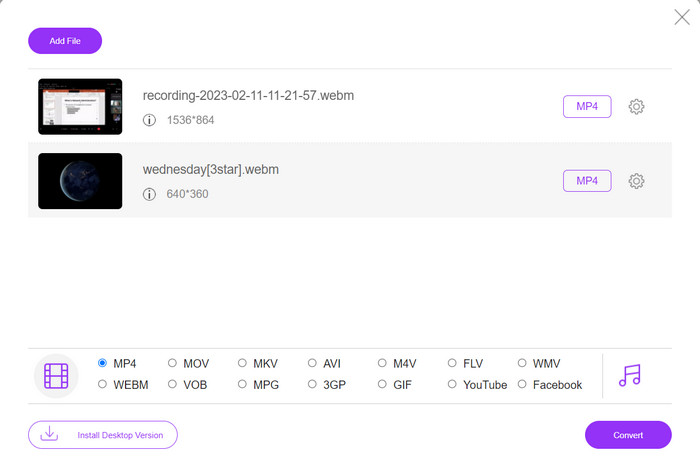
Convertir arxius en línia és molt convenient, ja que ho pots fer des de qualsevol dispositiu amb connexió a internet sense necessitat de descarregar cap programa addicional. Per a això serveix el Free MP4 Converter Online. Això vol dir que no has d’instal·lar res al teu dispositiu per convertir arxius a MP4. Una de les seves funcions més destacades és l’opció de personalització. Els usuaris poden editar la resolució de vídeo, la taxa de bits, la freqüència de fotogrames, etc. A més, el procés és simple i directe.
Funcions clau:
◆ Converteix vídeos a molts formats de sortida ràpidament.
◆ No limita la mida del fitxer que els usuaris poden descarregar.
◆ Accessible des de qualsevol navegador i dispositiu amb accés a Internet.
Pas 1. Pots utilitzar aquest convertidor de vídeo MP4 visitant el seu lloc web oficial. Simplement obre qualsevol navegador a l’ordinador i ves immediatament al seu lloc web.
Pas 2. Instal·la tot seguit el petit llançador i puja el(s) vídeo(s) que vols convertir a MP4. Des de la selecció de formats de sota, tria MP4 marcant el seu botó d’opció.
Pas 3. Finalment, prem el botó Convert per iniciar el procés de conversió dels arxius.
2. Online-Convert.com
Online-Convert és un convertidor MP4 en línia fàcil d'utilitzar i versàtil que admet una àmplia gamma de formats d'entrada i sortida, inclosa la personalització de la configuració de sortida com ara la resolució, la taxa de bits i la velocitat de fotogrames. L'eina és ràpida i fiable, amb integració d'emmagatzematge al núvol i funcions de seguretat com el xifratge SSL per protegir els vostres fitxers durant el procés de càrrega i conversió. A més, és totalment gratuït d'utilitzar sense costos ocults, la qual cosa la converteix en una opció accessible per a qualsevol persona que necessiti convertir fitxers de vídeo amb un pressupost.
Funcions clau:
◆ Ve amb una àmplia gamma de formats de vídeo.
◆ Interfície fàcil d'utilitzar.
◆ Conversió ràpida i fiable.
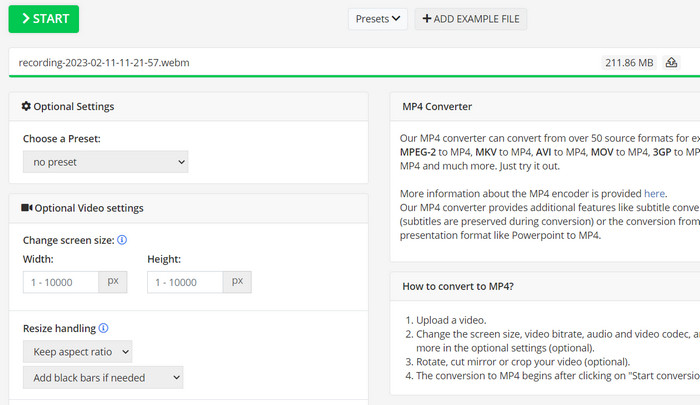
Pas 1. Ves a Online-Convert.com i tria Video Converter de la llista d’eines.
Pas 2. Fes clic a Choose Files per afegir el fitxer de vídeo que vols convertir. També pots arrossegar el fitxer i deixar-lo anar dins la caixa.
Pas 3. També pots canviar la resolució, la taxa de bits i la freqüència de fotogrames del resultat si ho desitges. Els paràmetres estaran disponibles sota l’àrea de conversió.
Pas 4. Per iniciar el procés de conversió, fes clic al botó Start. A la pàgina apareixerà una barra de progrés que mostrarà en quin punt es troba la conversió.
3. CloudConvert
CloudConvert és un convertidor de MP4 en línia que ofereix una àmplia gamma de funcions als seus usuaris, com ara suport de format complet, paràmetres de sortida personalitzables, una interfície fàcil d'utilitzar, integració d'emmagatzematge al núvol, seguretat i privadesa, integració d'API i opcions gratuïtes i de pagament. A més, aquest convertidor de vídeo a MP4 és una eina fiable i versàtil per convertir fitxers de vídeo a format MP4. La seva configuració de sortida personalitzable la converteix en una opció fantàstica per als usuaris que necessiten ajustar la qualitat i la mida dels seus vídeos per adaptar-se a les seves necessitats específiques.
Funcions clau:
◆ CloudConvert ofereix integració d'API per integrar fluxos de treball.
◆ Utilitza xifratge SSL per protegir els fitxers de l'usuari.
◆ Admet la integració d'emmagatzematge al núvol.
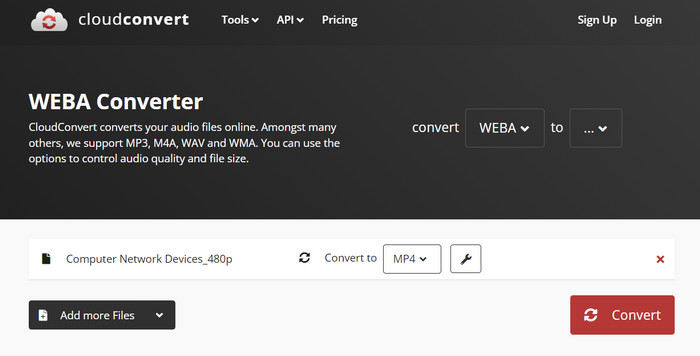
Pas 1. Ves al lloc web de CloudConvert i crea un compte gratuït si encara no en tens.
Pas 2. Fes clic a Select Files per afegir el fitxer de vídeo que vols convertir. També pots simplement arrossegar i deixar anar el fitxer al quadre de pujada. Tria MP4 al menú desplegable com a fitxer de sortida.
Pas 3. Modifica les opcions de sortida, com ara resolució, taxa de bits i freqüència de fotogrames, si vols.
Pas 4. Fes clic al botó Convert per començar el procés de conversió.
4. Convertio
Convertio és una opció fantàstica si voleu una manera ràpida de transformar els vostres fitxers de vídeo en format MP4. Amb la seva interfície fàcil d'utilitzar i els temps de conversió ràpids, és fàcil canviar les teves pel·lícules perquè es puguin veure en una àmplia gamma de dispositius i plataformes. Convertio és una eina versàtil que pot gestionar totes les vostres necessitats de conversió de vídeo. Funciona amb emmagatzematge al núvol i us permet utilitzar una àmplia gamma de fitxers d'entrada i sortida. Descobriu com funciona aquest convertidor MP4 gratuït.
Funcions clau:
◆ Conversió per lots per a diversos fitxers.
◆ Integració amb serveis com Google Drive, Dropbox, etc.
◆ Funcions avançades com OCR per convertir documents escanejats.
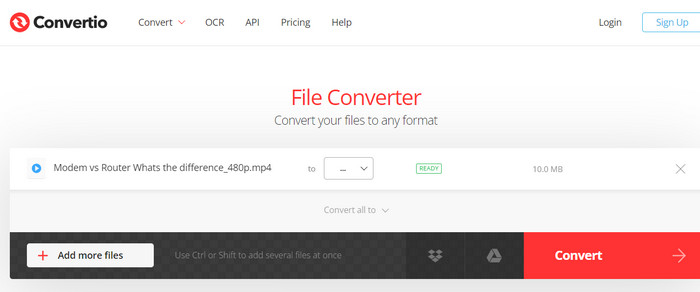
Pas 1. Fes clic a Choose Files al lloc web de Convertio (https://convertio.co/) per afegir el fitxer de vídeo que vols convertir. També pots arrossegar el fitxer i deixar-lo anar a l’àrea de pujada.
Pas 2. Al quadre desplegable, tria MP4 com a format a utilitzar. També pots canviar la resolució, la taxa de bits i la freqüència de fotogrames del resultat si ho desitges.
Pas 3. Per iniciar el procés de conversió, fes clic al botó Convert. A la pàgina apareixerà una barra de progrés que mostrarà en quin punt es troba la conversió.
Pas 4. Quan el procés hagi acabat, pots fer clic a Download per desar el fitxer MP4 a l’ordinador.
Part 3. Els millors 3 convertidors MP4 fora de línia
Ara, si, en alguns casos, us trobeu sense accés a Internet, podeu optar per programes fora de línia en aquests casos. Per tant, aquí teniu les eines en què podeu confiar.
1. FVC Video Converter Ultimate
FVC Video Converter Ultimate és un potent programari que ofereix una solució integral per convertir fitxers de vídeo al format MP4. Admet una àmplia gamma de formats d’entrada i sortida, incloent-hi compatibilitat amb vídeo HD i 4K, i ofereix paràmetres de sortida personalitzables per garantir una qualitat de sortida alta. A més, aquest convertidor MP4 permet la conversió per lots de diversos arxius alhora i inclou eines d’edició per retallar, escalar, afegir marques d’aigua i molt més. Amb els seus temps de conversió ràpids i la seva alta qualitat de sortida, FVC Video Converter Ultimate és una eina fiable i versàtil per a totes les teves necessitats de conversió a MP4.
Funcions clau:
◆ Inclou suport per a vídeos HD i 4K per conservar vídeos d'alta qualitat.
◆ Suport d'acceleració de maquinari per a les GPU NVIDIA i AMD.
◆ Admet diversos dispositius de sortida.
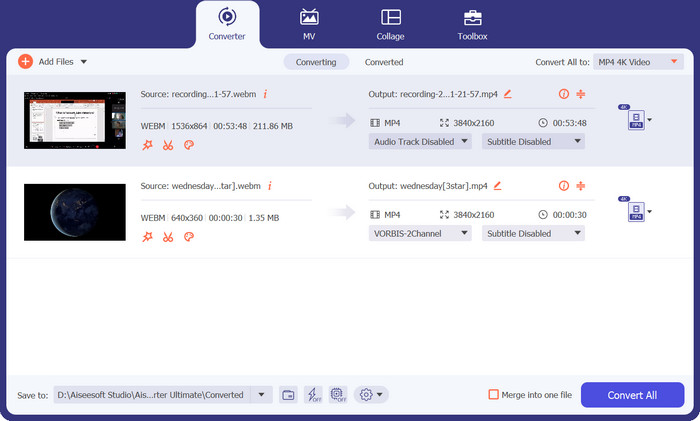
Pas 1. El primer que has de fer per utilitzar aquest convertidor és obtenir-ne l’instal·lador. Després, instal·la’l al teu dispositiu. Pots aconseguir l’aplicació fent servir els botons de Free Download de sota.
Baixada gratuïtaPer a Windows 7 o posteriorBaixada segura
Descarrega gratisPer a MacOS 10.7 o posteriorBaixada segura
Pas 2. Després, obre l’eina i carrega qualsevol vídeo fent clic al botó amb el signe de més de la interfície principal del programa.
Pas 3. A continuació, ves al menú Profile i selecciona MP4 a la pestanya Video. Finalment, prem el botó Convert All i converteix tots els teus vídeos a fitxers MP4.
2. Reproductor multimèdia VLC
VLC Media Player és un reproductor multimèdia gratuït que ha estat àmpliament reconegut per la seva capacitat per reproduir gairebé qualsevol format de fitxer d'àudio o vídeo. El que potser molta gent no sap és que VLC Media Player també és un potent convertidor de vídeo que pot convertir els vostres vídeos a format MP4 amb facilitat. A continuació es mostren algunes de les seves característiques clau per saber més sobre aquest programa.
Funcions clau:
◆ Pot editar còdec de vídeo i àudio, resolució i taxa de bits.
◆ Té la capacitat d'afegir subtítols als vídeos.
◆ És capaç de previsualitzar vídeos abans de convertir-los.
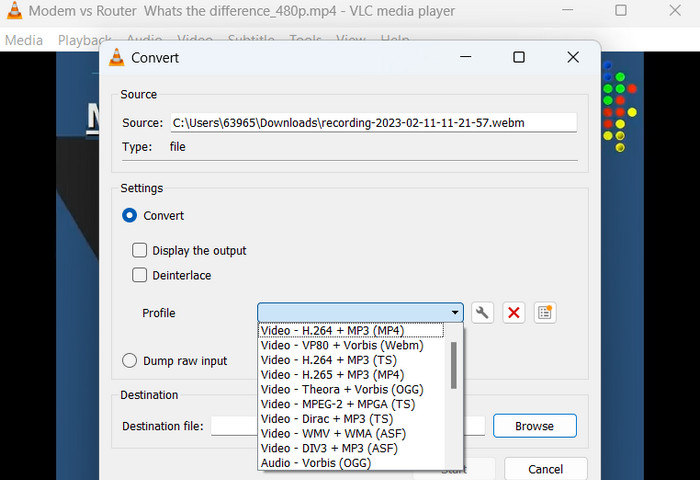
Pas 1. Obre el VLC Media Player a l’ordinador. Fes clic a Media a la barra de menú superior i selecciona Convert/Save al menú desplegable.
Pas 2. Fes clic al botó Add per seleccionar el fitxer de vídeo que vols convertir. Un cop hagis afegit el fitxer, fes clic al botó Convert/Save.
Pas 3. A la secció Profile, selecciona Video - H.264 + MP3 (MP4) com a format de sortida. Fes clic al botó Start per iniciar el procés de conversió i espera que finalitzi.
3. Fre de mà
HandBrake és un transcodificador de vídeo de codi obert que us permet convertir els vostres fitxers de vídeo a diversos formats, inclòs MP4. És una eina popular entre els entusiastes del vídeo per la seva facilitat d'ús i les seves potents funcions. De la mateixa manera, aquest convertidor de vídeo MP4 també ofereix processament per lots, de manera que podeu convertir diversos fitxers alhora, i té una sèrie de preajustos que faciliten l'optimització dels vostres vídeos per a diferents dispositius i plataformes.
Funcions clau:
◆ Programari lliure i de codi obert.
◆ Admet subtítols i creadors de capítols.
◆ Preajustos per optimitzar la sortida de vídeo.
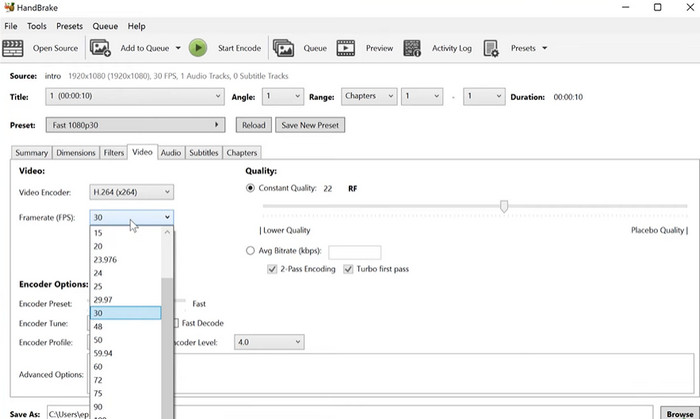
Pas 1. Descarrega i instal·la HandBrake des del lloc web oficial. Obre HandBrake i selecciona el fitxer de vídeo que vols convertir fent clic al botó Open Source a l’extrem superior esquerre de la finestra.
Pas 2. Tria una configuració predefinida per al teu fitxer de sortida seleccionant una de les opcions del menú Presets de la fila superior de la finestra. Si no saps quina preconfiguració utilitzar, pots triar Fast 1080p30 per aconseguir un bon equilibri entre velocitat i qualitat.
Pas 3. Fes clic al botó Start Encode del menú superior per iniciar el procés de conversió.
Part 4. Preguntes freqüents sobre els convertidors MP4
Puc reproduir fitxers MP4 al meu iPhone?
Sí. El format MP4 ja és compatible amb els dispositius iPhone. MP4 és un format de vídeo universal que és compatible amb la majoria de dispositius, inclosos els iPhone. Per tant, no hauràs d’utilitzar cap convertidor d’MP4 a iPhone. Simplement pots fer servir el reproductor preinstal·lat de l’iPhone o buscar un reproductor de vídeo per a iPhone de tercers.
Puc penjar fitxers MP4 a TikTok?
Sí. No cal que trobeu un convertidor MP4 a TikTok per pujar perquè TikTok accepta fitxers de vídeo MP4 com un dels formats compatibles per penjar vídeos a la plataforma.
Puc convertir fitxers MP4 a formats compatibles amb iTunes?
Sí. No cal que trobis un convertidor MP4 a iTunes. Podeu utilitzar convertidors, com ara HandBrake, per ajudar-vos amb això.
Conclusió
Els convertidors MP4 són eines essencials per a qualsevol persona que vulgui veure o compartir els seus vídeos en diferents dispositius o plataformes, i proporcionen una manera còmoda i fiable de garantir-ne la compatibilitat i una reproducció de vídeo d’alta qualitat. Per això, hem recopilat i comparat els millors programes disponibles per ajudar-te a triar l’aplicació que millor s’adapta a tu.
-
 El millor editor de MP4 per a Windows i Mac el 2023
 Tant si utilitzeu l’ordinador per editar vídeo MP4 com si només esteu treballant al telèfon, podreu trobar algunes opcions fantàstiques aquí, inclòs el millor editor MP4 per a Windows i Mac.
-
 Com comprimir un vídeo MP4 a mida més petita
 El vídeo MP4 és massa gran per penjar-lo? Voleu reduir la mida del vídeo? Aquí hi ha 3 maneres eficients de comprimir un fitxer MP4 a una mida més petita sense límit.
-
 Els 5 editors de metadades MP4 més importants [Actualitzat el 2023]
 Com puc canviar les meves metadades MP4? La millor manera de canviar les metadades del vostre MP4 és utilitzar un editor d'etiquetes que admeti el format MP4 com la mostra que enumerem a continuació.
