


 Video Converter Ultimate
 Gravadora de pantalla
 Reparació de vídeo
 Baixada segura
5 maneres de solucionar el Windows Media Player que no funciona al Windows 7/8/10
El Windows Media Player ha deixat de funcionar. Un problema va fer que el programa deixés de funcionar correctament. També reproduirà àudio però no vídeo. Com solucionar aquest problema?
Quan el Windows Media Player deixa de funcionar, és possible que rebeu l'error "Windows Media Player ha deixat de funcionar" sense informació específica al respecte, o se us informa que "No s'admet el tipus de fitxer". Fins i tot no hi ha cap sol·licitud i els vostres clics no funcionen.
Hi ha molts motius que poden provocar que el Windows Media Player no funcioni. El problema més habitual és que els fitxers no siguin compatibles, cosa que pot fer que els vídeos es reprodueixin sense imatge, sense àudio o sense subtítols. En cas contrari, les causes poden ser molt diverses i no apareix cap avís específic. En aquesta situació, has de revisar tots els problemes que es detallen en l’article següent per solucionar aquest error complex. Però també pots triar la millor opció, que és fer servir un reproductor de vídeo alternatiu per veure qualsevol vídeo sense problemes ni limitacions.

Primera part: el millor reproductor multimèdia alternatiu que no us heu de perdre
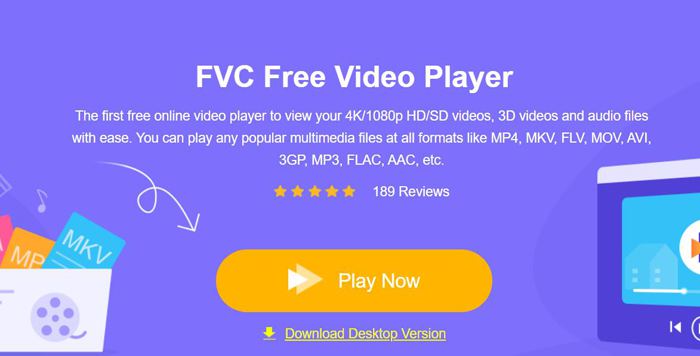
Per evitar que Windows Media Player no funcioni, és millor triar una alternativa professional. FVC Free Video Player és un reproductor de vídeo en línia gratuït que resoldrà tots els problemes que puguis trobar en utilitzar Windows Media Player. Permet reproduir vídeos sense limitacions de format ni de resolució. I sense haver de descarregar cap altre programa, podràs reproduir tots els formats de vídeo de manera fluida.
- 1. Admet la reproducció de gairebé tots els formats, inclosos els fitxers FLV, MKV, RMVB i DVD o Blu-ray.
- 2. Reprodueix vídeos d'alta qualitat que arribin a la resolució 4K.
- 3. Capaç d'ajustar les pistes d'àudio i els subtítols en diferents idiomes.
- 4. Feu una captura de pantalla en qualsevol moment en reproduir vídeos.
Pas 1: Ves al lloc web de FVC Free Video Player amb qualsevol navegador. A continuació, fes clic al botó Play Now per instal·lar el llançador. Després d’uns minuts, torna a fer clic al botó Play Now per iniciar FVC Free Video Player.
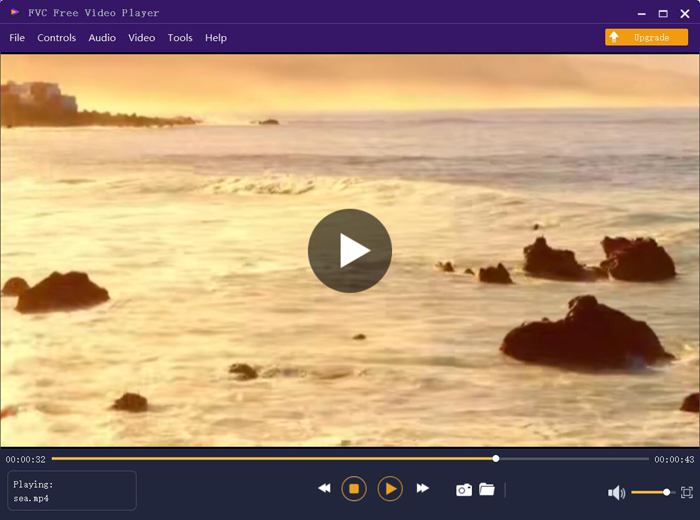
Pas 2: Fes clic al botó Open Files per triar el vídeo desitjat. A continuació, la reproducció començarà automàticament. Al menú Control, pots veure les tecles de drecera per ajustar el volum. També pots triar les pistes d’àudio o de vídeo segons les teves necessitats. A més, si fas clic al botó Tools i tries l’opció Effect, fins i tot podràs ajustar el to, la brillantor, el contrast, la saturació i el gamma.
Part 2: Com solucionar el Windows Media Player que no funciona al Windows 7/8/10
Com es va esmentar abans, moltes raons poden fer que el reproductor de Windows Media no funcioni i hi ha 3 mètodes per solucionar aquest problema en diferents situacions.
Mètode 1: inicieu l'eina de resolució de problemes de Windows Media Player
Quan el reproductor de Windows Media no respongui després de fer clic, d'aquesta manera us ajudarà a resoldre-ho.
Pas 1: Prem les tecles Windows i R del teclat per iniciar el programa Run. Després has de copiar i enganxar msdt.exe -id WindowsMediaPlayerConfigurationDiagnostic a la barra de cerca. Fes clic al botó OK per obrir l’eina de resolució de problemes de la configuració de Windows Media Player. A continuació, fes clic al botó Next per començar.
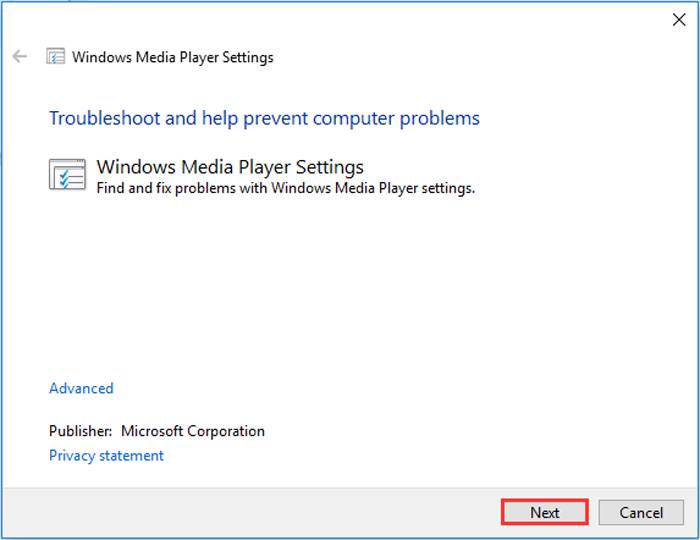
Pas 2: Quan aparegui la finestra emergent, fes clic al botó Apply this fix per restablir Windows Media Player als paràmetres predeterminats. Després pots provar de reiniciar Windows Media Player.
Mètode 2: instal·leu altres descodificadors al Windows Media Player
Si el Windows Media Player no funciona amb alguns àudios o vídeos especials, podeu descarregar el descodificador que respon per reproduir aquests vídeos.
Pas 1: Obre Microsoft Store a l’ordinador. Fes clic al botó Search i, a continuació, escriu Video Extension a la barra de cerca. Podràs descarregar l’ampliació de vídeo que vulguis a l’ordinador.
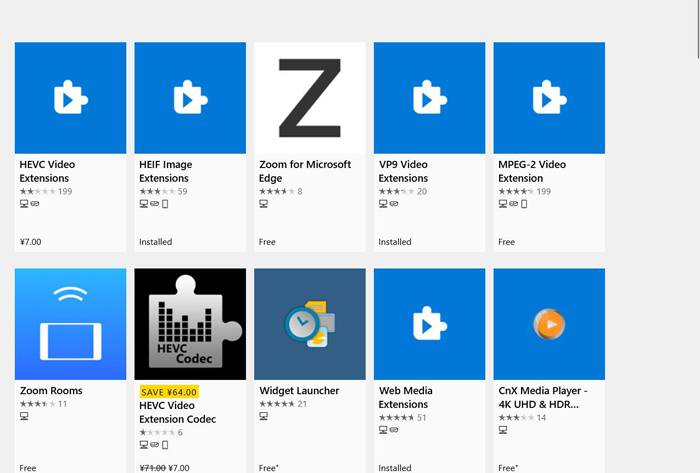
Pas 2: Després de la instal·lació, torna a obrir els vídeos amb Windows Media Player. Però has de tenir en compte que encara hi ha molts formats que no són compatibles, com ara FLV, RMVB, etc.
Mètode 3: torneu a instal·lar el reproductor de Windows Media.
Si el mètode esmentat no funciona, proveu de reinstal·lar el programari quan el Windows Media Player deixi de funcionar.
Pas 1: Prem les tecles Windows i R del teclat per obrir el programa Run. Després escriu optionalfeatures.exe a la barra de cerca. Fes clic al botó OK per obrir o tancar una funció. A continuació, pots desmarcar l’opció de Windows Media Player.
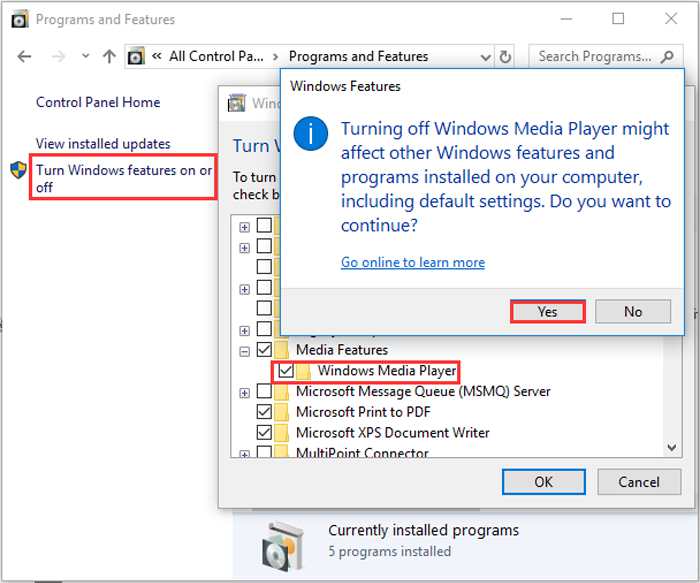
Pas 2: Reinicia l’ordinador i repeteix l’operació anterior. Després marca de nou l’opció de Windows Media Player. Després d’això, torna a reiniciar l’ordinador i el programa s’instal·larà automàticament al teu equip.
Excepte aquests problemes, el reproductor de Windows Media també té molts desavantatges. No es pot ajustar la velocitat de reproducció de vídeo i les tecles d'accés directe sempre són inútils. Llavors, per què no triar el reproductor de vídeo en línia gratuït per resoldre tots els problemes?
Part 3: Preguntes freqüents sobre el reproductor de Windows Media que no funciona
1. Per què no es poden reproduir fitxers de vídeo FLV al Windows Media Player?
Encara que Windows Media Player admet la instal·lació de múltiples descodificadors per reproduir vídeos en alguns formats poc habituals, el format FLV no és compatible. En aquest cas, pots provar de descarregar alternatives a Windows Media Player o convertir els formats de vídeo.
2. Per què el meu Windows Media Player no funciona després de les actualitzacions de Windows 10?
Potser el Windows Media Player es va corrompre després de l’actualització. Podeu provar el mètode esmentat 3 per tornar a instal·lar el Windows Media Player.
3. Com triar les pistes de subtítols al Windows Media Player?
Malauradament, no hi ha cap opció per triar diferents subtítols, vídeos i pistes d’àudio al Windows Media Player. Podeu triar altres alternatives per reproduir vídeos.
Conclusió
Les raons per les quals el reproductor de Windows Media no funciona seran molt complexes, cosa que fa que sigui difícil solucionar aquest problema. Per tant, només podeu descarregar el millor reproductor multimèdia alternatiu: el reproductor de vídeo gratuït FVC per reproduir vídeos sense problemes amb alta qualitat. D’aquesta manera, podeu evitar que el Reproductor de Windows Media no funcioni per sempre.
-
 Com reproduir DVD al Windows Media Player el 2021
 Per què el meu DVD no es reprodueix al Windows Media Player? Com es reprodueix el DVD al reproductor multimèdia de Windows 7? Aquesta publicació comparteix 3 maneres de reproduir DVD amb o sense WMP.
-
 6 solucions verificades per solucionar vídeos que no es reprodueixen a Chrome
 Per solucionar el problema que els vídeos no es reprodueixen a Chrome, tot el que heu de fer és llegir la resolució de problemes i realitzar les solucions verificades una per una.
-
 5 100% Solucions de treball per solucionar vídeos que no es reprodueixen a l'iPad
 Els vostres vídeos no es reprodueixen a l'iPad? Aquí teniu cinc solucions per ajudar-vos a desfer-vos d’aquest problema i, a continuació, podreu gaudir fàcilment dels vostres vídeos preferits al telèfon.
