


 Video Converter Ultimate
 Gravadora de pantalla
 Reparació de vídeo
 Baixada segura
3 dels millors editors de metadades FLAC que hauríeu de conèixer aquest 2025
It is known to us that FLAC is the best lossless musical file format, and it is an ideal format for ripping the audio on CDs because it doesn't lose the raw audio if this is the format you choose. Amongst the lossless audio file, this is the best choice for it is compatible with any device. It produces a compression ratio of 30 to 50 percent without losing the original quality. With this audio format, you can have the metadata, album cover, and fast seeking all at once. Instances may occur, such as wrong tags on the FLAC file, because the format is not perfect like the other format. In less than five minutes, you will know the different FLAC metadata editors on Mac and Windows that you can use to fix the problem.

Part 1. Millor editor de metadades FLAC per a Mac i Windows: FVC Video Converter Ultimate
FVC Video Converter Ultimate is the most effective software you must have regarding this metadata editing problem. This tool provides a professional and easy-to-understand GUI to help any users have a smooth sailing process of changing or fixing metadata at ease. Also, you can add multiple information or tags to your FLAC, such as title, author's name, date, album cover, and many more. Its competitor on metadata editing focuses on changing the metadata of a few audio and video formats. But with this software, you can easily upload any FLAC, MP3, WMA, WMV, and other 1000+ formats and edit their metadata as quickly as 1-2-3.
A més, aquesta eina no només és capaç de canviar, arreglar o suprimir les metadades; també es pot utilitzar com a solució a qualsevol problema relacionat amb el vídeo-àudio. I amb això, us podem assegurar que un cop utilitzeu l'eina, no us haureu de preocupar de tornar a trobar el mateix problema perquè teniu la millor solució. Voleu utilitzar l'editor de metadades FLAC de primer nivell a Mac i Windows? Si és així, continueu llegint els passos següents, ja que us oferim el tutorial fàcil de seguir i acabem la tasca de manera eficient.
Step 1. You can have the ultimate software on your desktop; click the appropriate OS to download the correct tool. Continue the installation process by opening the file you've downloaded, and press Start Now to continue.
Descàrrega gratuïtaPer a Windows 7 o posteriorDescàrrega segura
Descàrrega gratuïtaPer a macOS 10.7 o posteriorDescàrrega segura
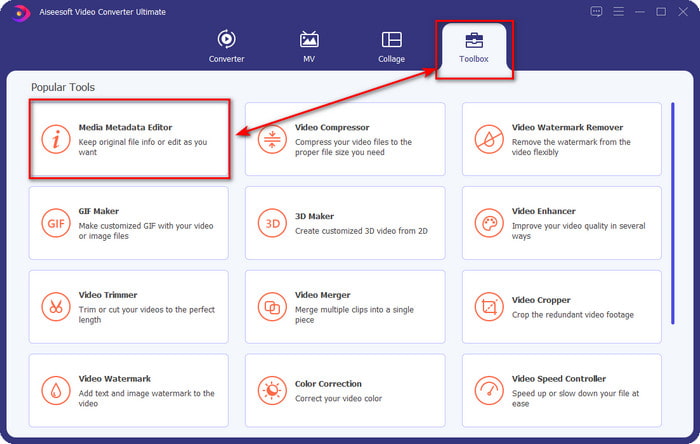
Step 2. Click Media Metadata Editor to open the tag editor feature on the Toolbox section.
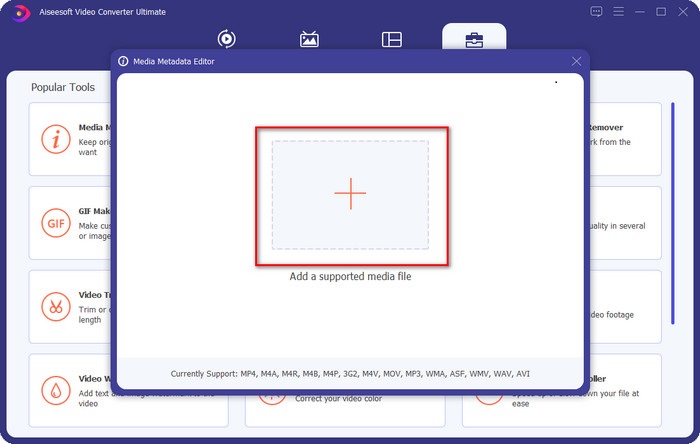
Step 3. You must click the + button to add the file, look it on the folder that will show, and click Open to add the FLAC file successfully.
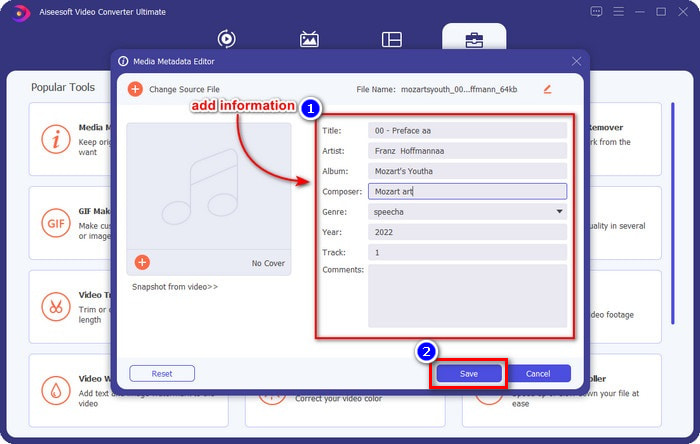
Step 4. In this panel, you can now change the metadata of your FLAC on each textbox. Then click Save to save the update you've made with the software. As easy as that, you've added tags on your FLAC and corrected them efficiently with the help of an ultimate tool.
Pros
- És la millor opció per editar metadades en FLAC, MP4, WMA, WAV, TTA, OGG i més de 1000 formats més.
- Admet diverses funcions d'edició que podeu utilitzar a la secció Caixa d'eines.
- Interfície d'usuari gràfica intuïtiva i fàcil d'utilitzar.
- Es pot descarregar en sistemes operatius Windows i Mac.
Contres
- La compra de l'eina és imprescindible per aprofitar les increïbles característiques a un baix cost.
Part 2. Altres 2 millors editors de metadades FLAC gratuïts per a Windows
fragata 3
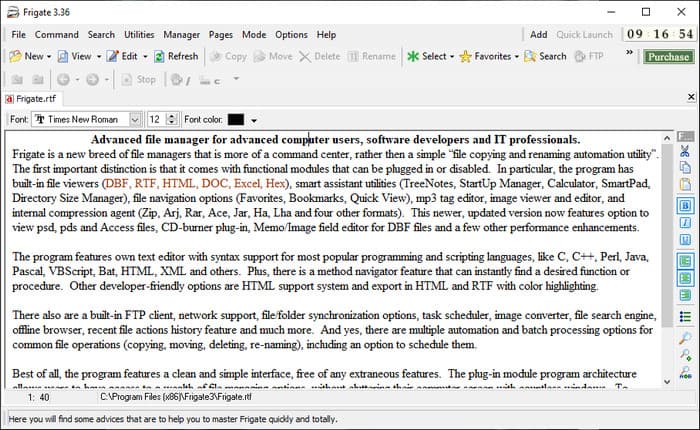
Frigate3 is a FLAC metadata editor that you would love to use on your Windows. With this tool, you can easily adjust the tags you have on your desktop. But before you download the tool, you must check out the two options it provides, the standard and pro versions. The standard version of this tool only includes the basic features you will have while using it. If you've downloaded the standard version, the file size is smaller than the pro one.
Tot i que, si n'heu baixat la versió professional, tindreu totes les funcions que ofereix aquest programari que no estan a l'estàndard, però la mida del fitxer és molt més gran que l'estàndard. Tot i ser un programari gratuït de Windows, encara podem veure que l'eina és una mica difícil d'entendre i la seva GUI no té tan bon aspecte com l'altre programari del mercat. Tot i que això és un problema, encara es considera una eina eficaç per gestionar aquesta tasca.
Pros
- Descàrrega gratuïta a Windows.
- És compatible amb les versions estàndard i pro de l'eina.
- Capaç d'afegir complements.
Contres
- La GUI no és bona com l'altre editor de metadades.
- De vegades, l'eina és difícil de llançar.
- La xarxa no està segura quan accediu al lloc web oficial de l'eina.
MusicBrainz PiCard
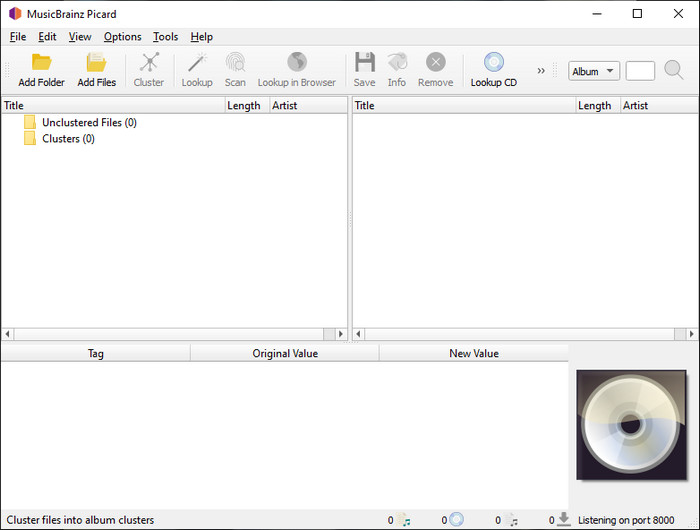
MusicBrainz PiCard is a Windows-based FLAC metadata editor you can freely download on your desktop to finish adding the metadata. If the audio file has a record on the database, you can retrieve the tags or update them with the help of this tool. Unlike other tools, this software can add multiple in-depth information such as the performers and instruments used on the music. But remember that the volunteers accumulate the tags on the MusicBrainz.
A més, aquest programari és un editor d'etiquetes d'àudio dedicat, el que significa que només admet la majoria dels formats d'àudio, ja siguin amb pèrdues, sense pèrdues o ambdós. Tot i que es tracta d'una enciclopèdia d'etiquetes musicals completa i fa que sigui utilitzable pel públic, algunes etiquetes que proporciona no són fiables, de manera que caldrà afegir-les manualment. No obstant això, l'eina és fàcil d'utilitzar i millor que la Frigate3, però no és tan bona com l'eina definitiva.
Pros
- Té una base de dades integrada per a etiquetes d'àudio.
- Interfície d'usuari senzilla.
- Aprendre a utilitzar-lo és fàcil.
Contres
- De vegades, les metadades recollides a la base de dades no són fiables.
- Es limita només als fitxers d'àudio.
Part 3. Preguntes freqüents sobre FLAC Metadata Editor
Puc gravar FLAC d'alta qualitat?
Absolutely, yes, you can record audio in this format, but remember now all of the audio recorders support this format, and not all can record high-quality audio output. So, if you don't know how to record a high-quality FLAC lossless recorder, you must click this link to learn more about this topic.
Quin és el millor programari per convertir FLAC?
Sense cap mena de dubte, el convertidor de vídeo FVC és el millor convertidor de FLAC que podeu utilitzar per fer compatible el FLAC amb els altres dispositius sense perdre la qualitat original. Amb aquesta eina, podeu convertir diversos FLAC simultàniament, però recordeu que si voleu més que una descàrrega d'un convertidor, l'eina definitiva és imprescindible.
La nota de veu admet FLAC com a sortida d'àudio?
Voice Memo uses M4A instead of FLAC for storing audio recorded format. If you want to know more about voice memos, you can read the full-detailed scope we did on the built-in app; read it carefully to know if it is the best audio recorder on iOS devices by clicking this link.
Conclusió
FLAC is not just an audio format, but it is one of the best audio formats you must use to store high-quality audio on your devices. So, if you want to arrange the .flac on your library, then the help of the tool we review can help you handle the task efficiently. If you are a Windows user, we suggest reading the software we found to add metadata on Windows in part 2. But if you want a more reliable and pro tool to add metadata on FLAC, we suggest you use the FVC Video Converter Ultimate instead. With a tool like this, you can do pro editing on tags that the other Windows tool we present can’t provide. So, if you want to know more about the best FLAC metadata editor on Mac and Windows, you must download it to discover the other functions.
-
 Els 5 millors editors de metadades de vídeo per al 2025 [Revisió imparcial]
 Voleu veure les metadades del vostre vídeo? Si és així, llegiu els detalls a continuació per entendre completament el tema i saber quina eina s'adapta millor a vosaltres.
-
 7 editors d'etiquetes de música populars a Windows, Mac i dispositius mòbils
 Les etiquetes de música són populars per a l'ordenació de la música a la biblioteca segons les dades que hi ha a l'interior. Què passa si el vols canviar? Llegiu els detalls a continuació per saber-ne més.
-
 Els 5 editors de metadades MP4 més importants [Actualitzat el 2025]
 Com puc canviar les meves metadades MP4? La millor manera de canviar les metadades del vostre MP4 és utilitzar un editor d'etiquetes que admeti el format MP4 com la mostra que enumerem a continuació.
