


 Video Converter Ultimate
 Gravadora de pantalla
 Reparació de vídeo
 Baixada segura
Com invertir un vídeo en un iPhone o Android fent que el volteig sigui fàcil
Els vídeos estàtics són avorrits, oi? Amb aquesta situació, voleu afegir una nova perspectiva al vostre contingut de vídeo i captivar el vostre públic. Si és així, és hora de començar a donar la volta als vídeos al dispositiu Android o iPhone. Flipping vídeos és una manera senzilla però potent de transformar el teu contingut i crear una experiència de visualització dinàmica. Amb els programes i les tècniques adequades, podeu girar i girar fàcilment els vostres vídeos per afegir un toc únic als vostres vlogs, publicacions a les xarxes socials o qualsevol projecte de vídeo que tingueu en ment.
Aprenent com reflectir un vídeo en un iPhone o en un dispositiu Android, t’adonaràs de com capgirar els teus vídeos pot transformar el teu contingut. Dit això, comencem per aprendre a capgirar vídeos en dispositius mòbils com un professional!

Part 1. Guia Com invertir un vídeo en un iPhone
InShot es pot descarregar i utilitzar gratuïtament, amb moltes de les seves funcions disponibles sense cap compra integrada a l'aplicació. A més, l'aplicació us permet capgirar i girar vídeos sense cap molèstia. Pots capgirar o reflectir vídeos horitzontalment i verticalment. A més, amb aquest programa és possible girar clips 90 o 180 graus. Per saber com girar un vídeo en un iPhone, seguiu els passos indicats:
Pas 1. Si encara no ho has fet, ves a l’App Store i descarrega l’aplicació InShot.
Pas 2. Per capgirar un vídeo, obre l’aplicació InShot i prem la icona del signe més a la pantalla principal. L’eina Flip, entre altres opcions d’edició, apareixerà. En seleccionar l’eina Flip, podràs triar entre Horitzontal i Vertical.
Pas 3. Només has de triar l’opció desitjada, i el teu vídeo es capgirarà a l’instant. Amb el botó Reproduir, pots veure una previsualització del teu vídeo capgirat.
Part 2. Tutorial Com invertir un vídeo en un Android
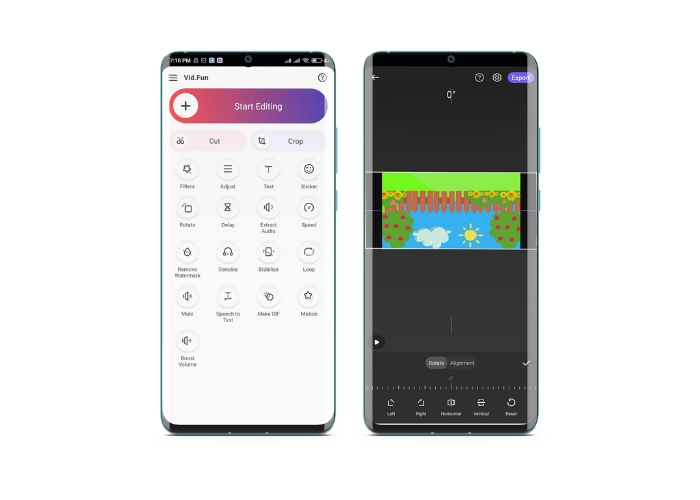
Vid.Fun és una potent aplicació d’edició de vídeo dissenyada específicament per a dispositius Android. A més de capgirar vídeos horitzontalment i verticalment, tens accés a altres eines d’edició útils, com retallar, tallar, unir i dividir els teus vídeos. Al mateix temps, pots mostrar la teva creativitat utilitzant la funció de presentacions de diapositives de l’eina. A continuació tens una guia pas a pas sobre com capgirar un vídeo en un dispositiu Android:
Pas 1. Obre l’aplicació i toca el botó Comença a editar per seleccionar el vídeo que vols capgirar. Prem Sí a la part inferior de la pantalla per confirmar el vídeo seleccionat.
Pas 2. Després, toca Tot a l’angle inferior dret, i apareixeran diferents opcions d’edició. Ara, toca l’opció Moviment.
Pas 3. Veureu que apareix un conjunt d’eines d’edició, inclosa l’eina de capgirament. Toca les opcions corresponents entre Horitzontal i Vertical. Selecciona l’opció que vulguis, i el teu vídeo es capgirarà en conseqüència. Pots previsualitzar el teu vídeo capgirat tocant el botó Reprodueix.
Pas 4. Si estàs satisfet amb el teu vídeo capgirat, toca el botó Exporta per desar-lo al dispositiu o compartir-lo directament a les xarxes socials. Així és com utilitzes aquesta aplicació per capgirar vídeos.
Bonificació: com girar un vídeo en un ordinador
Si busques una manera fàcil i eficaç de capgirar vídeos a l’ordinador, prova FVC Video Converter Ultimate. Aquest popular programari d’edició de vídeo ofereix una gran varietat d’eines i funcions d’edició, inclosa la possibilitat de capgirar i girar vídeos amb només uns quants clics. Permet capgirar vídeos horitzontalment i verticalment o girar-los. A més, el programa inclou una caixa d’eines amb diversos recursos d’edició per cobrir les teves necessitats.
Pas 1. Obtén el programa
En primer lloc, descarrega l’instal·lador del programa prement el botó Descàrrega gratuïta que trobaràs a continuació. Assegura’t de seleccionar l’instal·lador adequat per al sistema operatiu del teu ordinador. Després, instal·la’l i obre’l.
Baixada gratuïtaPer a Windows 7 o posteriorBaixada segura
Descarrega gratisPer a MacOS 10.7 o posteriorBaixada segura
Pas 2. Inicia el girador de vídeo
Un cop hagis iniciat el programa, veuràs que la finestra principal té quatre pestanyes. Tria Video Rotator al menú Toolbox. També tens l’opció d’utilitzar el quadre de cerca per trobar l’eina i accedir-hi ràpidament.
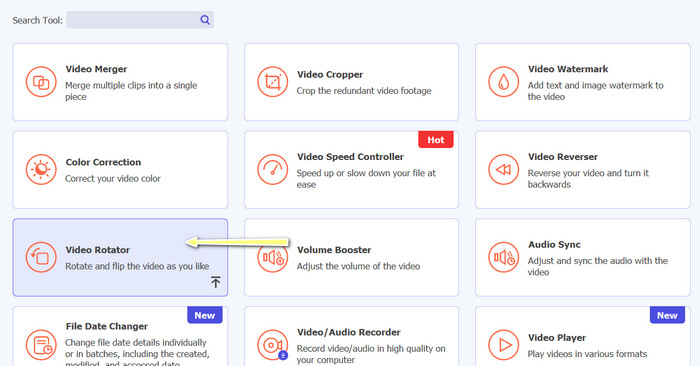
Pas 3. Insereix un fitxer de vídeo
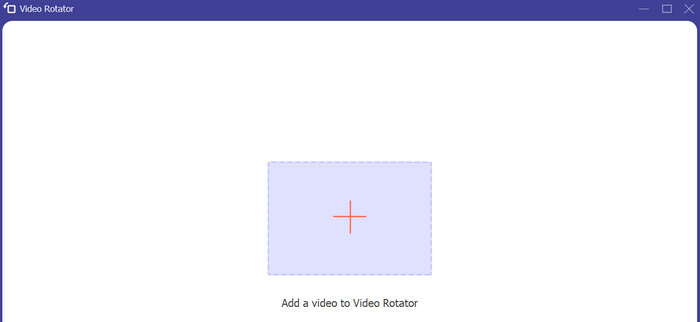
El Video Rotator té un botó + per pujar vídeos. Prem aquest botó, i tot seguit es carregarà la interfície per capgirar.
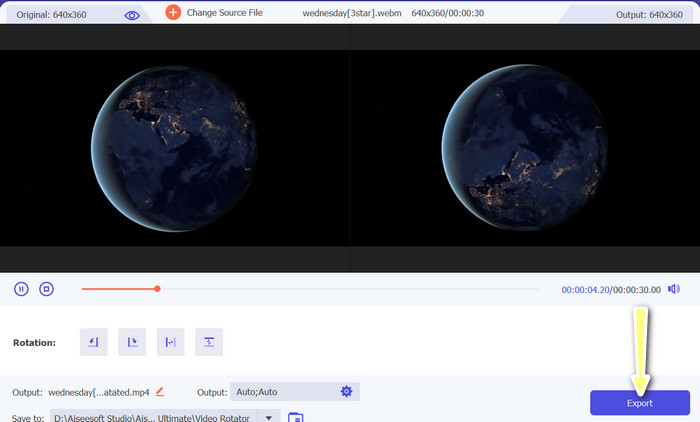
Pas 4. Inverteix el vídeo
Quan es mostri la interfície, podràs utilitzar els botons de capgirament. Pots triar entre reproduir el vídeo horitzontalment o verticalment. Per completar el procés, fes clic al botó correcte i després al botó Exporta.
Lectures relacionades:
Maneres més fàcils d’accelerar un vídeo als teus dispositius Android [2023]
Com escurçar un vídeo a l’iPhone [Tutorials detallats]
Part 3. Preguntes freqüents sobre el canvi de vídeos a Android i iPhone
Puc tornar un vídeo a la seva orientació original?
Sí, podeu tornar fàcilment un vídeo a la seva orientació original mitjançant una aplicació per girar el vídeo a Android o iPhone. Només cal que torneu a aplicar l'efecte de volta i tornarà a la seva orientació original.
Puc capgirar un vídeo amb l'aplicació de càmera integrada al meu dispositiu Android o iPhone?
No, l'aplicació de càmera integrada no té una funció de capgiració de vídeo. Haureu d'utilitzar una aplicació o programari d'edició de vídeo per girar els vostres vídeos.
Donar la volta a un vídeo en reduirà la qualitat?
Voltejar un vídeo no hauria de reduir-ne la qualitat, però pot afectar l'orientació de qualsevol text o gràfic del vídeo. Si us preocupa la qualitat, el millor és utilitzar una aplicació o programari d'edició de vídeo d'alta qualitat.
Conclusió
Així doncs, per què no et descarregues avui mateix una d’aquestes aplicacions i comences a capgirar els teus vídeos per crear contingut emocionant i únic per al teu públic? Sens dubte aconseguiràs més visualitzacions i més “m’agrada” després d’aprendre com capgirar un vídeo en un iPhone o en un dispositiu Android.
-
 Tutorial: 4 maneres gratuïtes de combinar vídeos a l'iPhone en un de nou
 Llegiu i obteniu 4 maneres senzilles de combinar vídeos a l'iPhone. S'admeten tots els models d'iPhone i versions d'iOS. Podeu combinar dos i més vídeos a l'iPhone en un vídeo nou ràpidament.
-
 Consells sobre com canviar les metadades de vídeo a l'iPhone a l'abast
 Teniu dificultats per canviar les metadades de vídeo als dispositius iPhone? Afortunadament, aquest article parla de la millor manera de canviar les metadades de vídeo a l'iPhone.
-
 Edita com un professional: com retallar els vídeos de l'iPhone sense esforç
 Si voleu portar les vostres habilitats d'edició de vídeo de l'iPhone al següent nivell, les aplicacions de retall de vídeo són un canvi de joc. Cobrirem algunes de les millors aplicacions de retall de vídeo per a iPhone.
