


 Video Converter Ultimate
 Gravadora de pantalla
 Reparació de vídeo
Revisió sobre els editors de metadades FLV per editar metadades FLV [sense esforç]
FLV és un format popular que s’utilitza per lliurar contingut digital mitjançant Adobe Flash Player incrustat en un fitxer SWF. Encara que el millor és transferir els fitxers amb l’extensió .flv, es poden perdre alguns continguts, sobretot si la transferència s’interromp. Aleshores, si això passa, què has de fer? Afortunadament, disposem de metadades al mercat. Vols saber quines eines per a Windows, Mac i en línia pots utilitzar? Continua llegint per descobrir les millors maneres de canviar fàcilment el format de metadades FLV.

Part 1. 3 del millor editor de metadades de vídeo disponible a Windows/Mac/Online
Video Converter Ultimate
Video Converter Ultimate és un dels editors de metadades FLV més potents per actualitzar i canviar fàcilment les etiquetes FLV. Aquesta eina està disponible tant per a Windows com per a Mac OS. Amb aquesta eina definitiva, pots afegir, eliminar o actualitzar ràpidament les metadades en més de 1000 formats, no només en FLV. A diferència d’altres editors de metadades, aquesta eina ofereix una varietat d’opcions ideals per resoldre qualsevol problema amb vídeos, com ara convertir, accelerar o alentir, invertir el vídeo i altres conjunts de filtres sorprenents per fer que el teu vídeo sigui molt únic, cosa que altres editors d’etiquetes no t’ofereixen.
A més, planifiqueu fer alguna edició al vostre vídeo FLV, com ara afegir efectes, filtres, retallar, combinar, afegir text o filigrana. Aquesta eina pot ajudar a complir la tasca fàcilment en qualsevol usuari. Totes aquestes coses són possibles amb l'ajuda de l'eina definitiva. No haureu de buscar res amb la millor GUI i les millors funcions. Si us esteu preguntant i voleu provar d'utilitzar aquesta eina, podeu seguir els passos següents per saber com utilitzar-la.
Pas 1. Prem el botó de descàrrega per tenir l’injector de metadades FLV a l’escriptori; tria Windows o Mac. Instal·la l’eina fent clic al fitxer, segueix els passos indicats i executa-la.
Descàrrega gratuïtaPer a Windows 7 o posteriorDescàrrega segura
Descàrrega gratuïtaPer a macOS 10.7 o posteriorDescàrrega segura
Pas 2. Després d’obrir el programari, ves a la Caixa d’eines i selecciona Editor de metadades multimèdia per editar les etiquetes del teu FLV.
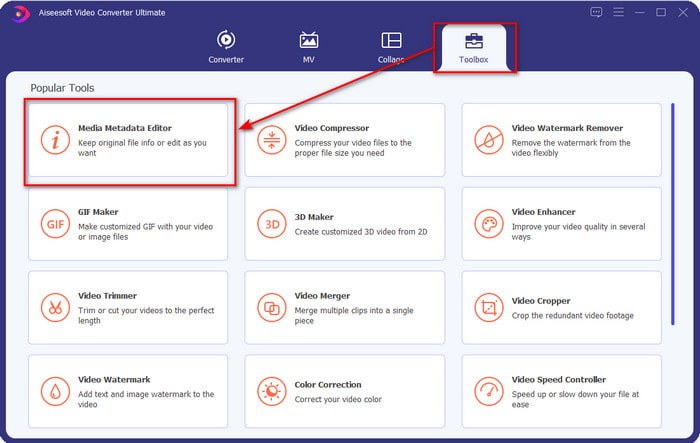
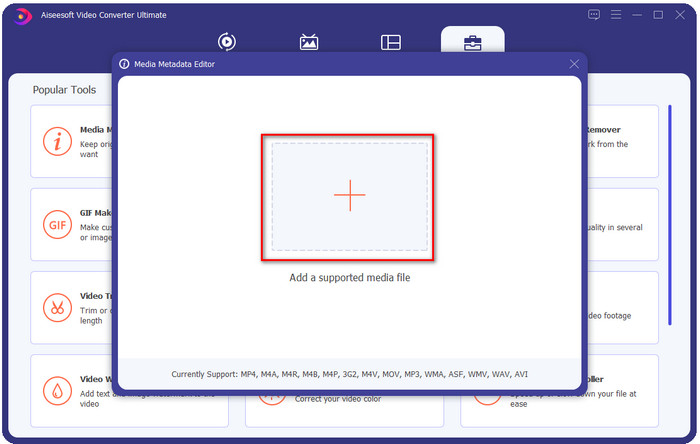
Pas 3. Afegeix els fitxers FLV prement la icona +, localitza el fitxer a la carpeta que apareixerà a la pantalla i fes clic a Obre.
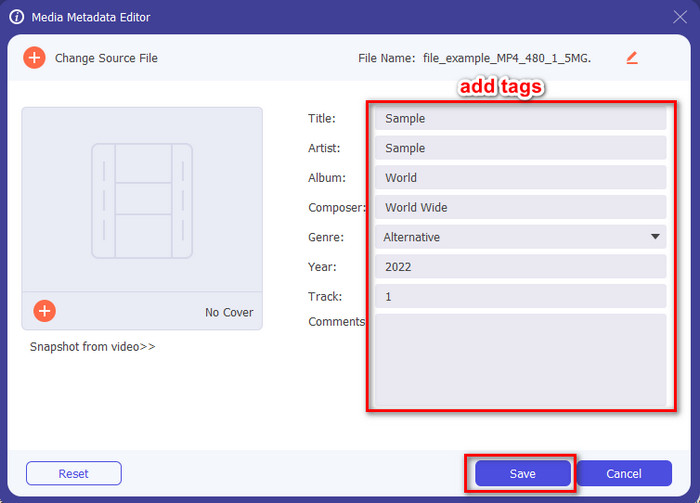
Pas 4. Afegeix, canvia o elimina la informació al quadre de text i prem Desa. Amb això, ja hauràs afegit etiquetes al teu fitxer FLV de manera ben senzilla.
FLVMeta - Editor de metadades FLV
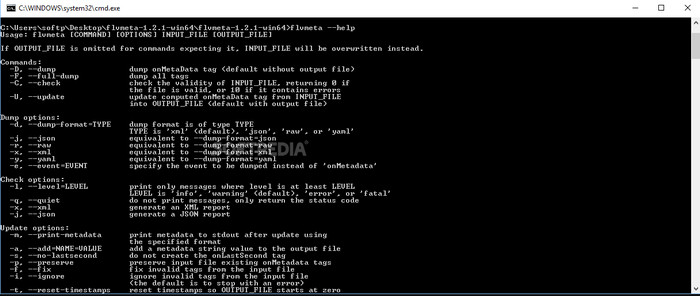
Si ets un usuari avançat i vols provar un editor de metadades FLV dedicat que puguis descarregar, et volem presentar el FLVMeta – Editor de metadades FLV. Aquesta eina no és l’editor típic que ja hagis fet servir, perquè és una eina de línia d’ordres. Això vol dir que, per ordenar què ha de fer l’eina, cal introduir un codi específic. De manera similar a FFmpeg, hauràs d’introduir la ubicació, el nom del fitxer, les dades i moltes altres coses més complicades. Encara que no és la millor opció per a principiants que necessiten editar les seves metadades FLV, val la pena esmentar-la perquè fa la feina a la perfecció.
A més, el programari no funciona amb els altres formats; només podeu utilitzar-lo a FLV si voleu utilitzar l'eina. Si teniu molts fitxers FLV i voleu canviar-ne les etiquetes i teniu coneixements bàsics sobre la manipulació d'una eina de línia d'ordres, us suggerim que utilitzeu aquesta. Si no, necessitareu temps per estudiar l'eina per fer una tasca senzilla, com ara afegir metadades.
Editor de metadades FLV en línia
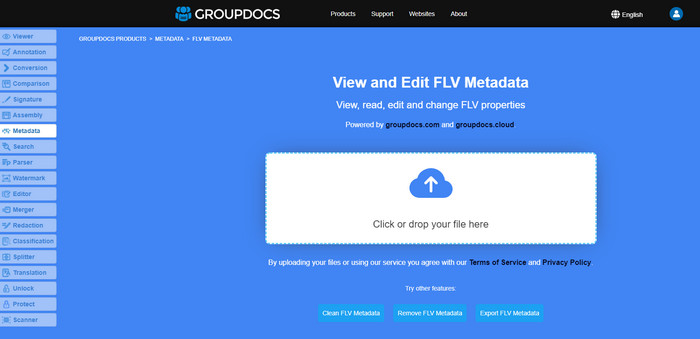
No vols descarregar cap eina per editar el format de metadades FLV? En aquest cas, pots utilitzar l’Editor de metadades FLV en línia. Amb aquesta eina, pots editar les metadades del teu FLV sense instal·lar cap programari i de manera gratuïta, ja que és una eina basada en el web. Tot i que l’eina és gratuïta a internet, no funcionarà si no tens connexió, i el procés es pot interrompre si la teva connexió és lenta.
A diferència del FLVMeta, aquesta eina admet més formats i no només FLV; no admet tan àmpliament com l'eina definitiva. Per tant, si voleu acabar d'editar la tasca sense descarregar el programari, us suggerim que l'utilitzeu, ja que també és segur accedir-hi. Però recordeu que per evitar problemes inesperats, assegureu-vos que teniu una connexió a Internet estable.
Part 2. Quadre de comparació sobre els 3 principals editors de metadades FLV
| Característiques | Video Converter Ultimate | FLVMeta - Editor de metadades FLV | Editor de metadades FLV en línia |
| Segur d’utilitzar |  | | |
| Fàcil d'usar | |  | |
| Dependent d'Internet | | | |
| Funcions d'edició, com ara tallar, retallar, retallar, fusionar, etc. | | | |
| Millor interfície d'usuari gràfic | | | |
Part 3. Preguntes freqüents sobre FLV Metadata Editor
FLV i F4V són el mateix?
Tot i que tots dos estan relacionats amb Adobe Flash, la seva funció és diferent. Per exemple, FLV utilitza el mateix codificador que els fitxers SWF i és ideal per transferir dades per internet. En canvi, F4V és un format basat en ISO que s’assembla a l’MP4. Encara que tots dos són bons per transferir fitxers per internet, el seu aspecte i estructura són diferents. Si vols convertir el teu F4V a FLV, fes clic aquí i aprèn a convertir el format a FLV.
On puc jugar a FLV?
No tots els reproductors multimèdia poden reproduir el format FLV per la seva compatibilitat limitada. Tot i així, tens sort, perquè hem reunit els millors reproductors FLV que pots utilitzar al teu dispositiu per reproduir els teus fitxers FLV sense preocupar-te de si són compatibles. Aquestes eines s’han provat per assegurar que poden reproduir fitxers FLV a Windows, Mac, Android i iPhone; per saber-ne més, fes clic en aquest enllaç.
És FLV el format estàndard per compartir vídeos?
Abans de considerar-lo el millor format per compartir vídeos que podeu utilitzar al web per reproduir vídeos d'alta qualitat; tanmateix, encara hi ha formats millors en aquesta nova era, com ara l'MP4. Com que és més compatible amb diferents dispositius que tenen els usuaris, es coneix com el format de vídeo estàndard. Tot i que encara podeu compartir els fitxers FLV al web, encara haureu de reconsiderar el dispositiu del receptor d'aquest fitxer. I si sou el receptor, haureu de descarregar una eina de tercers per reproduir-la o convertir-la en un format reproduïble.
Conclusió
Encara que hi ha eines limitades que admeten FLV, encara estem d'enhorabona; perquè encara podem editar les metadades FLV gràcies a les eines anteriors. Però ens entristeix el cor que hem de triar-ne un per utilitzar-lo, tot i que ens poden ajudar. Si no heu decidit què utilitzar, heu d'anar amb l'eina definitiva. És l'opció més segura perquè és senzilla però us pot ajudar fàcilment a gestionar la tasca. Encara no creieu quines són les habilitats d'aquesta eina? En aquest cas, l'has de descarregar al teu escriptori per utilitzar-lo i provar-lo tu mateix per veure si realitza la tasca. Agrairem que ens envieu un missatge sobre el vostre suggeriment, recomanació i més a l'aplicació.
-
 Què són les metadades: aprèn la informació bàsica sobre les metadades
 Què són les metadades? Això és important? Quines són les parts de les metadades? Tens la mateixa pregunta? En aquest article, aprendràs la informació bàsica sobre les metadades.
-
 4 dels millors visualitzadors de metadades en línia i fora de línia [Actualitzat el 2025]
 Puc comprovar les metadades del meu fitxer? Sí, pots, amb l'ajuda d'aquesta publicació et presentarem els diferents visualitzadors de metadades que pots utilitzar.
-
 6 filtres de Snapchat animats de Snapchat preferits a Snapchat
 Vols conèixer les millors maneres d'afegir filtres als vídeos de Snapchat? Bé, podeu fer clic aquí i conèixer els diferents filtres que podeu utilitzar per aplicar als vídeos de Snapchat.
