


 Video Converter Ultimate
 Gravadora de pantalla
 Reparació de vídeo
 Baixada segura
Eliminador de filigrana superior per eliminar la filigrana d'Adobe Stock del vídeo fàcilment
Sabies que Adobe té un banc de fotografies? Et presentem Adobe Stock, un dels llocs web més grans que ofereixen qualsevol disseny gràfic que puguis necessitar sense conseqüències imprevistes, ja que utilitza llicències lliures de drets (royalty-free). Pots descarregar vídeos en HD de manera gratuïta però amb una marca d’aigua o segell si no has comprat crèdits o una subscripció. Potser et preguntes si és possible eliminar la marca d’aigua d’Adobe Stock del vídeo, i sí que ho és! Farem servir el millor eliminador de marques d’aigua que et farà falta; llegeix la següent part d’aquest article per conèixer-lo millor!

Part 1. Com eliminar la marca d'aigua d'Adobe Stock del vídeo retallant
FVC Video Converter Ultimate és un editor d’imatge complet i senzill que és compatible amb les versions per a Windows i Mac. Aquest programari desenvolupa una potent funció de retall que et permet desar un vídeo d’Adobe Stock sense la marca d’aigua. A més, pot retallar qualsevol element del teu vídeo, com ara un objecte, segell, marca d’aigua, data i hora.
Fins i tot si no teniu experiència en retallar, encara podeu fer-ho un cop hàgiu acabat de seguir el tutorial que hem afegit a continuació. Tanmateix, aquest pas no és ideal si la marca d'aigua es troba al mig del vídeo perquè esteu canviant la mida de la dimensió i tallant el metratge real innecessari.
Com retallar la marca d’aigua del vídeo amb FVC Video Converter Ultimate:
Pas 1. Fes clic al botó de descàrrega apropiat de sota per tenir la versió correcta d’aquest editor de vídeo a l’ordinador. Segueix el procés d’instal·lació i configuració, i després fes clic a Inicia ara per obrir l’editor al teu sistema.
Descàrrega gratuïtaPer a Windows 7 o posteriorDescàrrega segura
Descàrrega gratuïtaPer a macOS 10.7 o posteriorDescàrrega segura
Pas 2. Ara que l’eina és oberta, ves a la Caixa d’eines i selecciona el Retallador de vídeo.
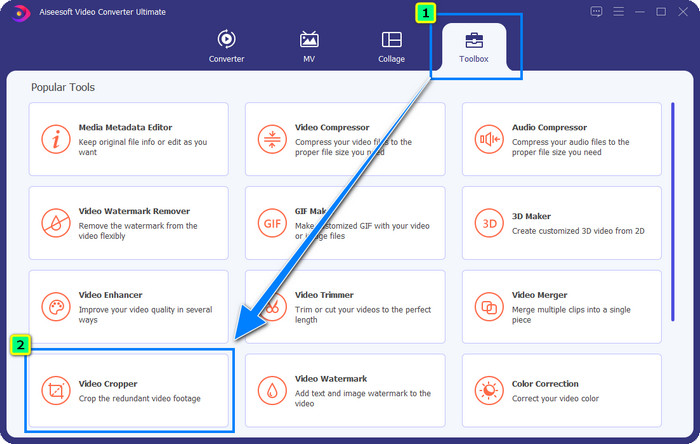
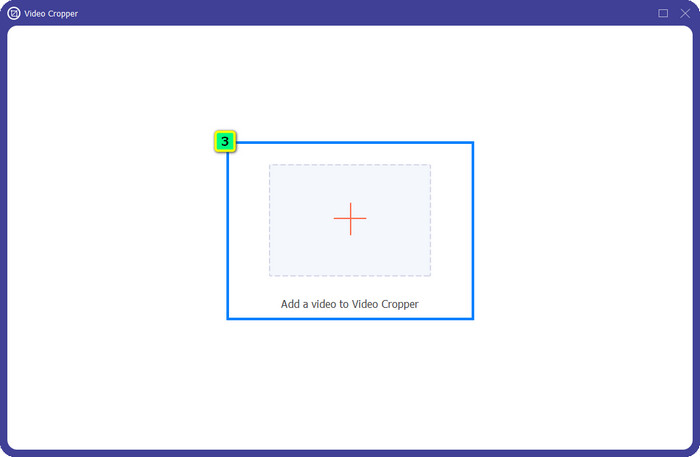
Pas 3. Apareixerà una nova finestra d’eina a la pantalla; prem el botó + per pujar el vídeo que vols retallar.
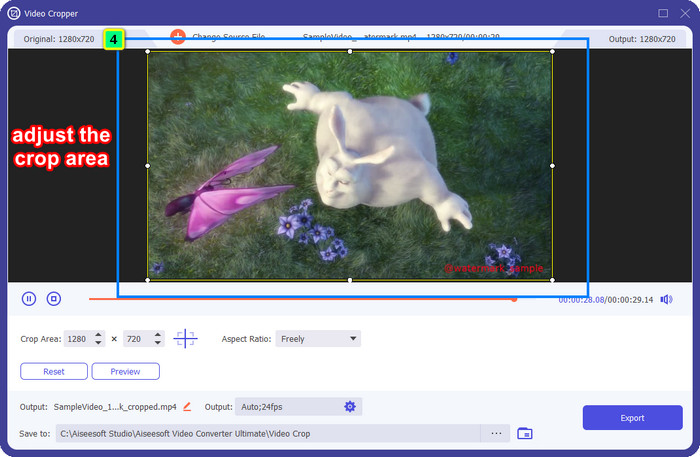
Pas 4. Ajusta l’àrea de retall segons la teva preferència; assegura’t que la marca d’aigua no quedi dins del quadre perquè, en desar-ho, no s’hi inclogui cap marca d’aigua.
Pas 5. Després d’editar la imatge, és hora d’exportar el resultat final. Prem Desa a i selecciona la destinació on es desarà el fitxer un cop guardat, i tot seguit fes clic a Exporta per descarregar el resultat final al teu disc local.
Part 2. Com eliminar la marca d'aigua d'Adobe Stock del vídeo sense retallar
No t’agrada la manera d’eliminar la marca d’aigua d’Adobe Stock fent servir la funció de retall? Doncs pots utilitzar l’eliminador de marques d’aigua d’aquest convertidor definitiu; és potent i no deixarà cap rastre de la marca d’aigua quan acabi. FVC Video Converter Ultimate és una aplicació fiable que admet diverses funcions i característiques que pots utilitzar lliurement sense descarregar extensions addicionals. L’actualització recent incorpora un eliminador de marques d’aigua de vídeo, que permet a qualsevol persona amb un problema de marca d’aigua al vídeo resoldre’l de manera fàcil i efectiva.
A diferència de la funció de retall, la funció d'eliminació de la filigrana elimina la marca d'aigua del vostre vídeo sense deixar una taca de la sortida final. No canvia res en l'aparença, perquè no talla ni canvia la dimensió i la qualitat del vídeo. Per tant, si esteu interessats en com eliminar la marca d'aigua d'Adobe Stock d'un vídeo, podeu seguir els passos que incloem a continuació.
Pas 1. Si ja has descarregat el programari, pots passar al pas següent, però si no, pots fer clic en aquest botó de descàrrega, instal·lar-lo i iniciar l’editor.
Descàrrega gratuïtaPer a Windows 7 o posteriorDescàrrega segura
Descàrrega gratuïtaPer a macOS 10.7 o posteriorDescàrrega segura
Pas 2. Ara que l’eina s’està executant a l’ordinador, fes clic a la Caixa d’eines i selecciona la funció Eliminador de marques d’aigua de vídeo que aquest programari ofereix.
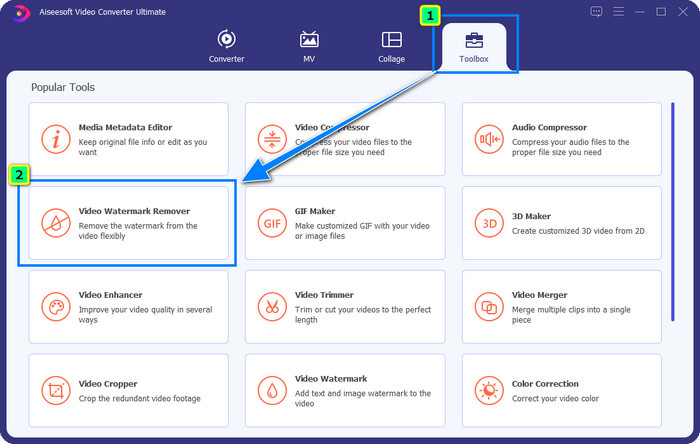
Pas 3. Prem el botó més i s’obrirà una carpeta a la pantalla; puja el vídeo d’Adobe Stock que has descarregat i prem Obre.
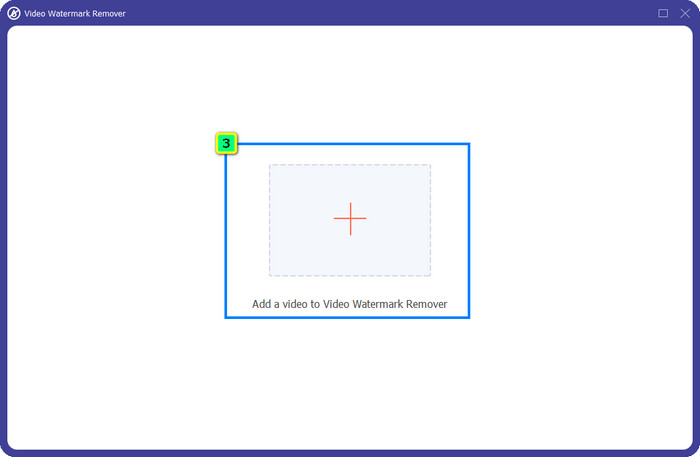
Pas 4. Prem Afegeix àrea d’eliminació de marca d’aigua per eliminar la marca d’aigua del teu vídeo.
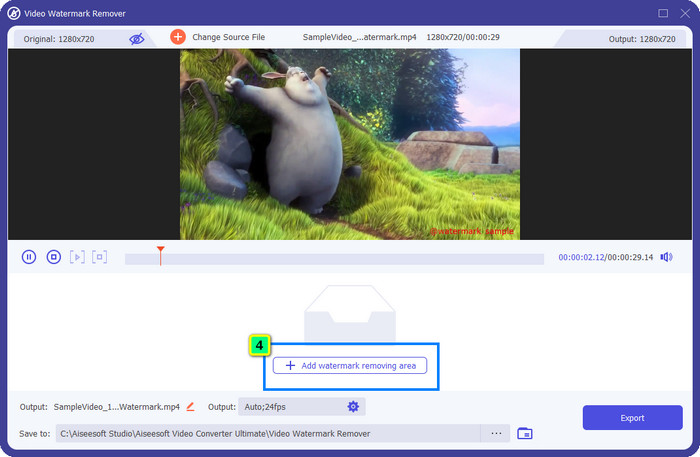
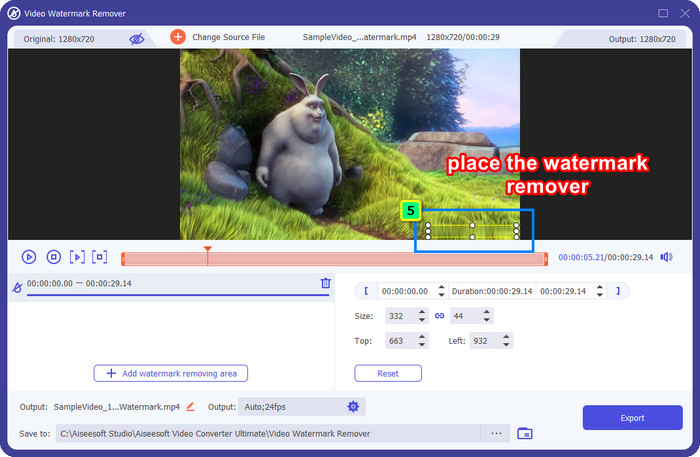
Pas 5. Col·loca el marc a sobre de la zona de la marca d’aigua, i el pots ajustar lliurement perquè s’adapti a la marca d’aigua incrustada al teu vídeo.
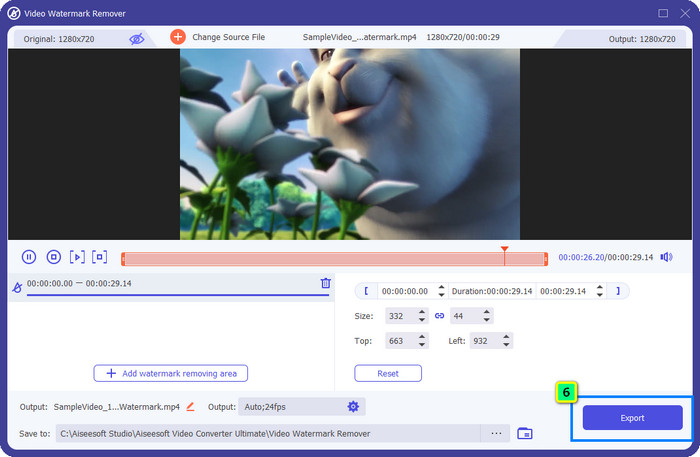
Pas 6. Després de tot, fes clic a Exporta, i podràs gaudir del vídeo sense marca d’aigua així de fàcil.
Bonificació: com eliminar la filigrana d'Adobe Stock a les imatges en línia de forma gratuïta
FVC Free Watermark Remover és un potent eliminador de marques d’aigua que pots utilitzar per a imatges accessible al web. Així que, si tens un problema de marca d’aigua en una imatge que has descarregat o desat al dispositiu, pots començar a utilitzar aquest programari. A continuació, pots seguir el tutorial que hem afegit més avall per eliminar la marca d’aigua d’Adobe Stock a les imatges en línia.
Pas 1. Per obrir aquest eliminador de marques d’aigua en línia, pots fer clic en aquest enllaç.
Pas 2. Prem Puja imatge per afegir-hi la imatge amb la marca d’aigua que vols editar aquí.
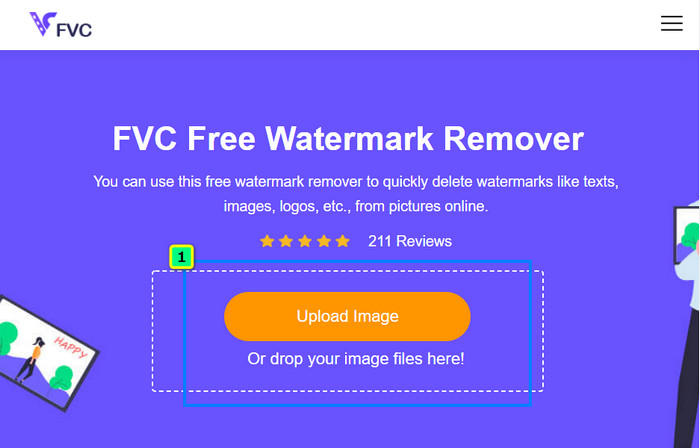
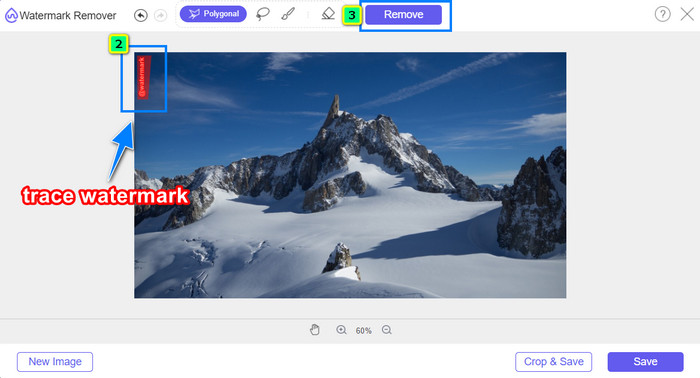
Pas 3. Fent servir el polígonal, ressegueix la marca d’aigua punt per punt prement el botó de clic esquerre del ratolí. Després prem Elimina quan l’hagis resseguit, i la IA processarà per a tu l’eliminació de la marca d’aigua.
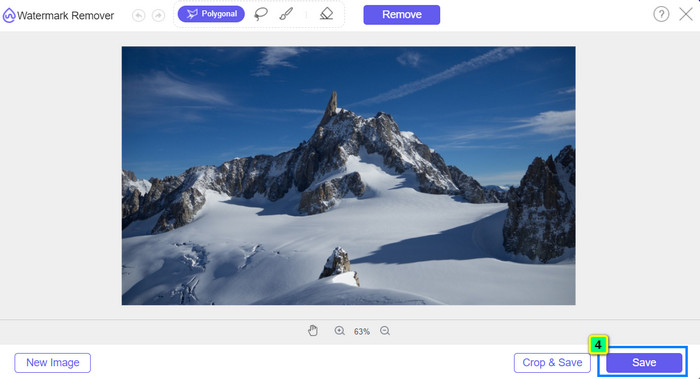
Pas 4. Quan estiguis satisfet amb el resultat i preparat per descarregar la imatge, fes clic al botó Desa per guardar-la directament a l’ordinador.
Lectures relacionades:
Última manera d’eliminar objectes d’una foto [6 mètodes]
Com enfocar la imatge a una foto de 3 maneres [Tutorial ràpid]
Part 3. Preguntes freqüents sobre com eliminar la marca d'aigua d'Adobe Stock del vídeo
Eliminar la marca d'aigua d'Adobe Stock del vídeo empitjora la qualitat?
De vegades, quan heu eliminat la marca d'aigua del vídeo, l'eina que feu servir empitjora la sortida del vídeo. Però, si utilitzeu el FVC Video Converter Ultimate, no experimentareu aquest problema. De fet, podeu ajustar la configuració de la qualitat del vídeo a una de molt més alta per augmentar-ne la qualitat.
On puc comprar crèdits d'Adobe Stock?
Obriu el lloc web oficial d'Adobe Stock i, a continuació, aneu a Preus. A Plans i preus, veureu diferents paquets de crèdit que podeu comprar. Com més crèdit, més car pot ser. Feu clic a quants voleu tenir, premeu Compra ara, afegiu la informació de pagament i, a continuació, feu clic a Fes una comanda segura.
Per què els plans d'Adobe Stock són molt cars?
Pot semblar molt car pel preu de cada producte disponible a Adobe Stock. A més del preu, l'augment és que el desenvolupador Adobe va construir una reputació. Esteu comprant el producte amb el nom del mateix.
Conclusió
Amb l’eliminador de marques d’aigua definitiu que es descriu en aquest article, ara pots acabar de treure la marca d’aigua d’Adobe Stock del vídeo que has descarregat del seu lloc oficial. Però, quin mètode creus que funcionarà millor? Retallant o eliminant la marca d’aigua? Tots dos són funcionals i ofereixen resultats excel·lents. Però si la teva mida es talla o es redimensiona, és millor utilitzar la funció Eliminador de marques d’aigua de vídeo de FVC Video Converter Ultimate. A més, FVC també ofereix eliminació de marques d’aigua a les imatges que tinguis amb l’ajuda d’una eina en línia accessible des de qualsevol navegador web del teu ordinador. Esperem que t’hagi agradat la informació que t’hem portat. Si en vols saber més, llegeix els altres articles següents.
-
 Com eliminar la filigrana del vídeo amb Final Cut Pro [Guia completa]
 Tens algun problema amb la marca d'aigua dels vídeos? No hem dit més, perquè vam oferir un tutorial sobre com eliminar la filigrana del vídeo amb Final Cut Pro.
-
 Elimineu la marca d'aigua de DaVinci Resolve als vídeos exportats amb un tutorial complet
 Per eliminar la marca d'aigua de Davinci Resolve, haureu d'utilitzar una eina o comprar-ne la versió oficial, seguiu llegint això per saber-ne més.
-
 Com eliminar la marca d'aigua a Lunapic amb els passos inclosos [3 maneres]
 Coneix com eliminar la marca d'aigua a Lunapic amb les maneres que afegim en aquest bloc. Segueix llegint la informació per conèixer-la millor.
