


 Video Converter Ultimate
 Screen Recorder
 Oprava videa
Jak zrychlit videa TikTok na Tiktok nebo použít jiný alternativní software
Jednou z nejrychleji rostoucích videozábavních aplikací, které můžete používat ve svém mobilním telefonu, je TikTok. Ačkoli byl TikTok uveden v roce 2016, během několika měsíců od vydání se stal velmi populárním. Jednou z oblíbených úprav, které se tu často používají, je zrychlení videa pro vytvoření vizuálního efektu. Pokud tedy patříte mezi tyto uživatele a chcete zjistit, jak to udělat, jste na správném místě. Podíváme se na různé nástroje, které vám pomohou naučit se, jak zrychlit video na TikToku.

Část 1. Jak zrychlit video na TikTok
Jak už bylo řečeno, TikTok se stal jednou z nejznámějších platforem pro krátká videa, takže úprava videa je zde velmi snadná. Všimněte si, že video můžete zrychlit už při natáčení, a ne až po dokončení videa. Pokud se ale pokusíte video na TikToku zrychlit, musíte rychlost odhadnout předem, aniž byste přesně věděli, zda dosáhnete požadovaného efektu. Jestliže si nechcete stahovat žádný další nástroj třetí strany pro zrychlení videa, vystačíte si jen s funkcemi TikToku. Postupujte podle níže uvedených kroků, abyste zrychlili video na TikToku.
Kroky, jak natočit zrychlené video na TikToku:
Krok 1. Nejprve si stáhněte aplikaci TikTok do mobilního telefonu a po dokončení stahování ji spusťte.
Krok 2. Klepněte na ikonu +, abyste začali natáčet. Poté klikněte na „přidat zvuk“, pokud chcete vložit hudební podkres a filtr. Chcete‑li nyní video zrychlit, klepněte na Speed (Rychlost) a vyberte některou z nabízených možností. Pro zahájení záznamu klikněte na kulaté tlačítko a znovu na něj klepněte, pokud chcete nahrávání zastavit.
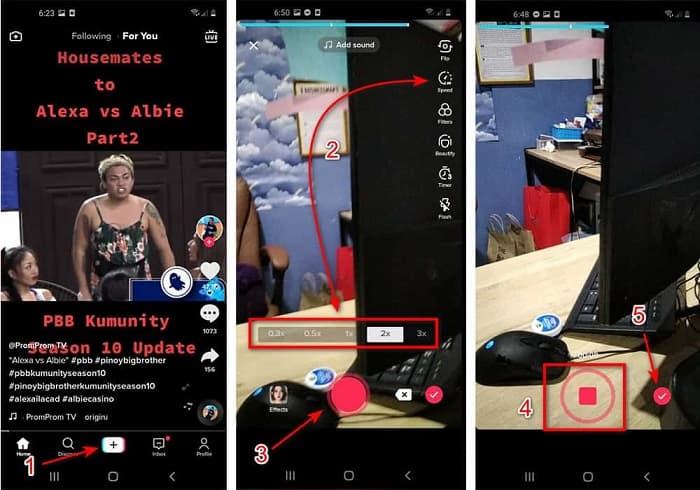
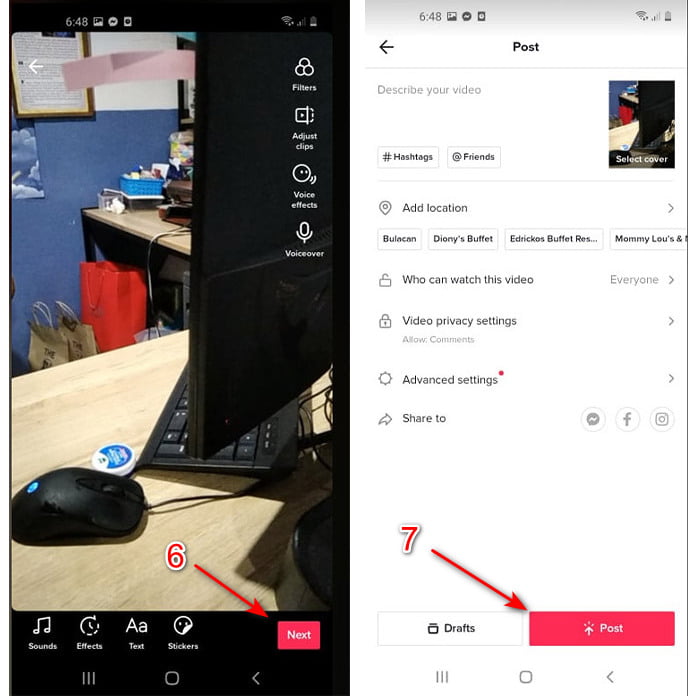
Krok 3. Chcete‑li si video zkontrolovat, stiskněte tlačítko check (zaškrtnutí) a klikněte na Next (Další). Poté klikněte na Post (Publikovat), abyste ho nahráli na TikTok.
Část 2. Jak zrychlit jakákoli videa TikTok na Video Converter Ultimate
Na rozdíl od vestavěných editačních funkcí, které vám TikTok nabízí, vám Video Converter Ultimate umožní zrychlit video ručně, ale mnohem jednodušším způsobem. Během zrychlování navíc uvidíte náhled, takže snadno poznáte, zda rychlost odpovídá vašim představám. Tato výjimečná aplikace svým uživatelům zpřístupňuje pokročilé profesionální editační funkce, ale v podobě zjednodušených kroků. Kvůli pokročilým možnostem, které tento nástroj nabízí, je potřeba zaplatit několik dolarů. Nemusíte se však obávat, částka rozhodně nepůjde do tisíců ani stovek. Pokud chcete vědět, jaké výhody či klíčové funkce získáte, když budete tento nástroj používat, podívejte se na následující přehled.
Nejlepší klíčové funkce, které najdete ve Video Converter Ultimate:
◆ Jedná se o software nezávislý na platformě, což znamená, že si jej můžete stáhnout do počítače PC, Mac nebo Linux.
◆ V tomto nástroji jsou k dispozici všechny pokročilé úpravy, konvertor, GIF maker a další.
◆ Použitelnost nástroje je velmi užitečná pro každého, dokonce i pro profesionály nebo začátečníky v editaci.
◆ Umožňuje uživatelům vyjádřit svou kreativní stránku prostřednictvím různých editačních funkcí dostupných zde.
◆ Přestože je nástroj stále placený, je levnější a velmi dostupný pro každého, kdo by si jej chtěl vyzkoušet.
Pokud teď chcete vědět, jak zrychlit TikTok videa pomocí tohoto skvělého alternativního editoru, přečtěte si níže uvedený návod a postupujte podle něj, abyste dosáhli stoprocentně úspěšného výsledku.
Kroky, jak zrychlit videa na TikToku pomocí Video Converter Ultimate:
Krok 1. Abyste mohli software používat, musíte si jej nejprve stáhnout do svého PC nebo Macu. Poté ho nainstalujte, proveďte jednoduché ruční nastavení a klikněte na „Finish“ (Dokončit), abyste pokračovali.
Zdarma ke staženíPro Windows 7 nebo novějšíBezpečné stažení
Zdarma ke staženíPro MacOS 10.7 nebo novějšíBezpečné stažení
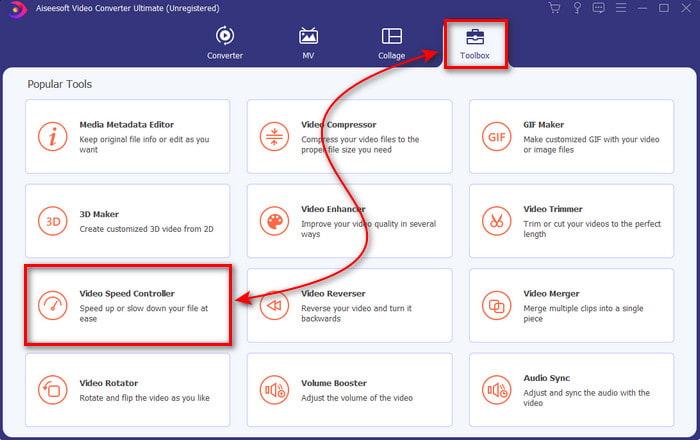
Krok 2. Stiskněte Toolbox (Nástrojová sada) a pod ním vyberte Video Speed Controller (Ovladač rychlosti videa).
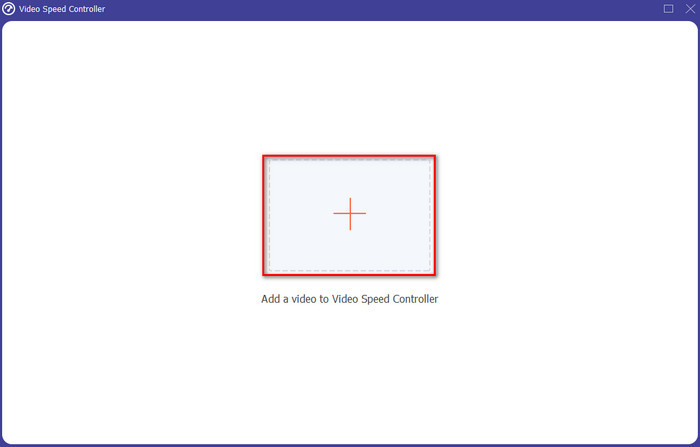
Krok 3. Chcete‑li přidat soubor, který chcete zrychlit, klikněte na tlačítko +. Poté v zobrazené složce vyberte soubor a klikněte na Open (Otevřít), abyste pokračovali.
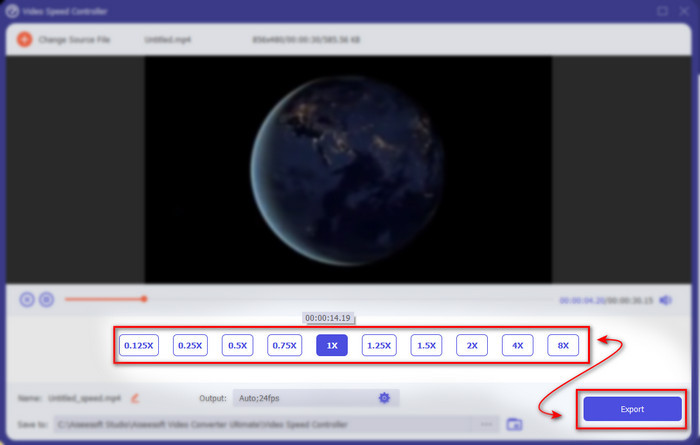
Krok 4. Pro úpravu rychlosti videa zvolte níže možnost speed (rychlost). A pro stažení upraveného souboru klikněte na Export, čímž spustíte proces exportu.
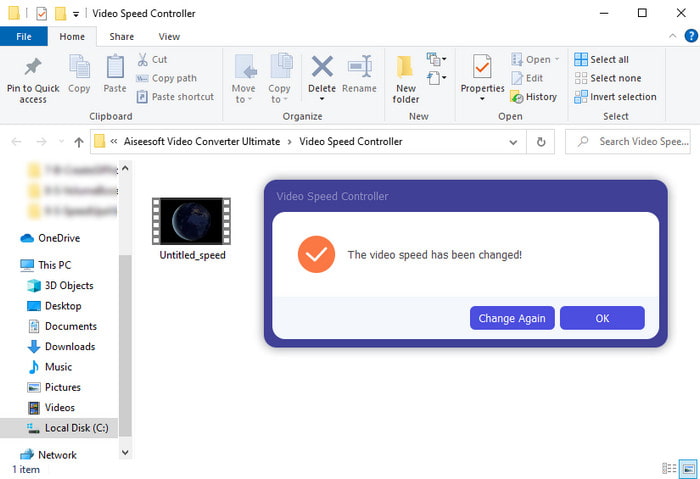
Krok 5. Nemusíte čekat ani minutu, protože soubor bude hotový během několika vteřin. Pokud se vám na obrazovce následně zobrazí složka, znamená to, že soubor byl již exportován. Klikněte na soubor a přehrajte si zrychlené video.
Související:
Část 3. Časté dotazy o zrychlení videa na Tiktoku
Jak zrychlit video TikTok, které není vaše?
Pokud chcete zrychlit video, které není vaše, musíte si ho nejdříve z TikToku stáhnout. Klikněte na tlačítko + a na možnost Upload (Nahrát), pak vyberte video v galerii. Zvolte možnost rychlosti a klikněte na Next (Další), abyste ho nahráli. Nebo použijte Video Converter Ultimate ke zrychlení videa podle výše uvedených kroků.
Mohu na Tiktok nahrát 3minutové video?
Absolutně Ano, můžete, pokud jsou nahrány samostatně, ale nemůžete nahrát rovnou 3minutové video. Protože délka záznamu s touto podporou aplikace je 15 až 60 celých sekund. Pokud je tedy délka videa, kterou chcete zaznamenat, delší než minuta, je lepší jej nahrát samostatně. Pokud jste však jedním z uživatelů, které Tiktok vybral, aby vyzkoušeli 3minutový záznam, pak máte štěstí, protože to bylo testováno pouze pro malou skupinu lidí.
Mohu ke svým videím na Tiktoku přidat MP3?
Když byl TikTok poprvé vydán, měli uživatelé povoleno přidávat hudbu ke svému videu, ale nyní tuto funkci odstranili. Kvůli problému s autorskými právy, který byl podán společnosti TikTok. Aby se tomuto problému vyhnuli, odeberou jej a přidají ukázkovou hudbu, která je k dispozici, nebo můžete použít jinou aplikaci, která to udělá za vás.
Má Tiktok věkové omezení?
Podle podmínek TikTok musí být 13 let nebo starší věk uživatele, který bude tuto aplikaci používat. Tiktok také nemá ověření věku, když se zaregistrujete, takže očekávejte, že se na vašem zdroji objeví obsah pro 16+.
Závěr
A teď, když už víte, jak zrychlit video na TikToku, je čas si to začít naplno užívat. Vyberte si řešení, které vám nejlépe vyhovuje. Jestliže vám stačí vestavěné funkce pro zrychlení, které TikTok nabízí, použijte je. Pokud však chcete zažít mnohem propracovanější zrychlování s náhledy, využijte Video Converter Ultimate. Ať už si zvolíte kteroukoli možnost, můžete očekávat skvělý výsledek díky jejich funkcím i celkovému výkonu.
-
 7 snadných kroků, jak opravit problémy se zpožděním zvuku OBS [Vyřešeno]
 Máte potíže se sledováním videoklipu po nahrávání kvůli zpoždění zvuku při používání OBS Studio? Přečtěte si článek níže, kde se dozvíte, jak efektivně opravit nesynchronizovaný zvuk.
-
 Skvělé možné způsoby | Jak opravit zpoždění zvuku VLC [2021]
 Máte potíže se sledováním svého oblíbeného filmu na přehrávači médií VLC kvůli nejistotě zvuku? Pokračujte ve čtení tohoto článku a zjistěte všechny možné způsoby, jak opravit zpoždění zvuku VLC.
-
 Nejlepší způsoby, jak zvýšit hlasitost MP4 online a offline
 Máte problém slyšet zvuky svého videoklipu? Přečtěte si níže uvedený článek, abyste věděli, jak zvýšit hlasitost mp4 různými způsoby.
