


 Video Converter Ultimate
 Screen Recorder
 Oprava videa
 Bezpečné stažení
Návod, jak snadno zrychlit video na Instagramu
S Instagramem můžeme snadno nahrát nebo zveřejnit video bez omezení na délku – jak dlouhé chceme. I když na Instagramu můžete sdílet své momenty, aplikace vyžaduje dodržení určitého standardu délky videa nebo jeho zkrácení. Pokud ale chcete sdílet video v plné délce bez střihu, doporučujeme ho zrychlit. Změnou běžného přehrávání na rychlejší můžete sdílet video jako celek a nemusíte ho stříhat, protože jeho délka bude kratší než předtím. Zde vám vysvětlíme, jak zrychlit video na Instagramu jako profesionál. Udržte tempo a čtěte dál, abyste zjistili, jak zkrátit délku videa.

Část 1. Jak zrychlit video na Instagramu pomocí Reel
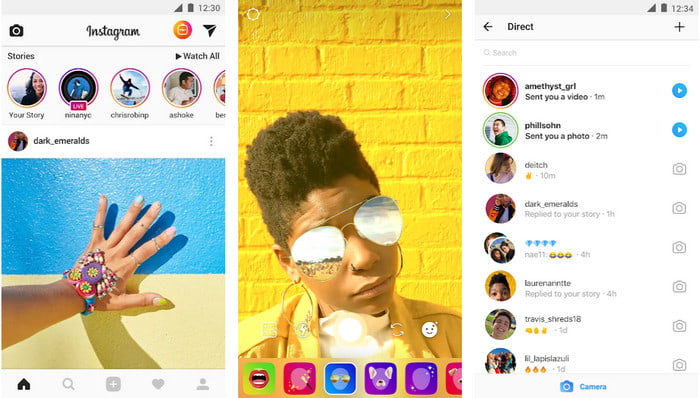
Funkce Reel může zrychlit video pro Instagram zdarma. Tato funkce je k dispozici na zařízeních iOS a Android pro zachycení vysokorychlostního pohyblivého videa až 3x. Přestože dokáže natáčet zrychlené video, má také další funkce, jako je přidávání hudby, nastavení délky videa, časovač atd. Chcete-li vědět, jak tuto funkci používat, musíte postupovat podle kroků, které přidáme níže, abyste urychlili video, které chcete fotit na Instagram jako profesionál.
Krok 1. Po stažení aplikace Instagram do zařízení ji otevřete.
Krok 2. Přejeďte doleva a vyhledejte název REEL.
Krok 3. Nyní můžete kliknout na rychlost v této oblasti a změnit ji na požadovanou hodnotu. Takto snadno můžete začít natáčet ve zrychleném režimu.
Část 2. Top 3 software pro zrychlení videa pro Instagram online a offline
FVC Video Converter Ultimate
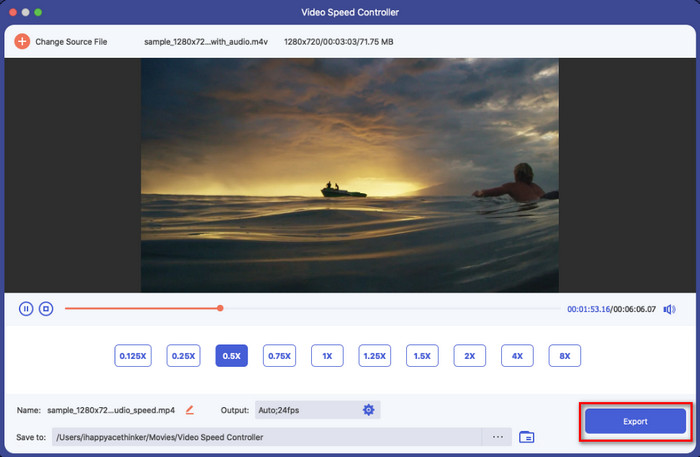
FVC Video Converter Ultimate je mimořádně výkonný desktopový software, který můžete použít k okamžitému zrychlení videí na Instagram. Umožňuje uživatelům dělat mnoho úžasných úprav, aby bylo video ještě lepší po převedení do zrychleného režimu. Několika kliknutími můžete snadno změnit rychlost běžného videa, aniž byste se museli obávat o kvalitu a plynulost. Skvělé, že? Tento nástroj vám také umožní video rychle zpomalit, a v obou případech funguje výborně.
Chcete více? Tento software podporuje více než 1000 video formátů, takže se nemusíte obávat, pokud si myslíte, že formát videa není podporován, protože je zde. Existují také další funkce pro úpravy, které byste mohli chtít použít, zvláště pokud chcete zapůsobit na lidi, kteří to uvidí. Dodržováním uvedených kroků za méně než minutu můžete úspěšně změnit rychlost videa.
Krok 1. Stáhněte a nainstalujte Ultimate Converter na disk a zvolte operační systém, který aktuálně používáte. Poté jej otevřete a seznamte se s jeho rozhraním. Díky tomu pak snadno zvládnete následující kroky.
Zdarma ke staženíPro Windows 7 nebo novějšíBezpečné stažení
Zdarma ke staženíPro MacOS 10.7 nebo novějšíBezpečné stažení
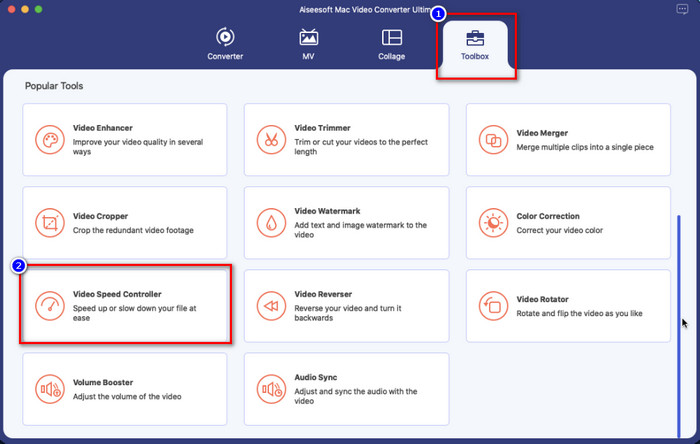
Krok 2. Klikněte na sekci Toolbox a otevřete ji; zobrazí se seznam funkcí, které můžete použít. Klikněte na Video Speed Controller, abyste změnili rychlost videa, které chcete upravit.
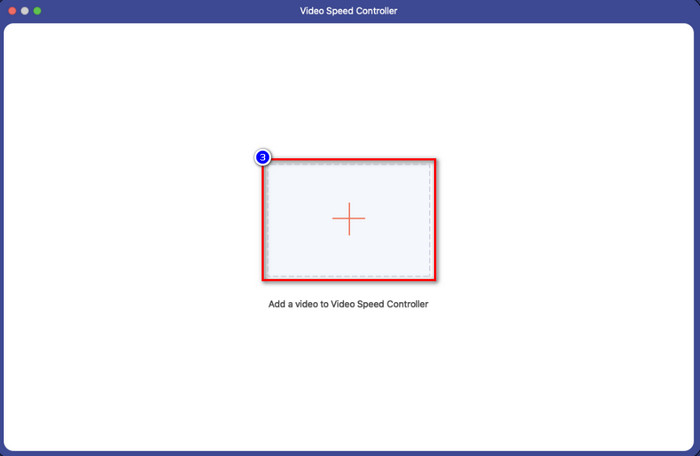
Krok 3. Klikněte na ikonu + a zobrazí se složky vašeho počítače. Najděte video, které chcete zrychlit, a kliknutím na Open ho vložte.
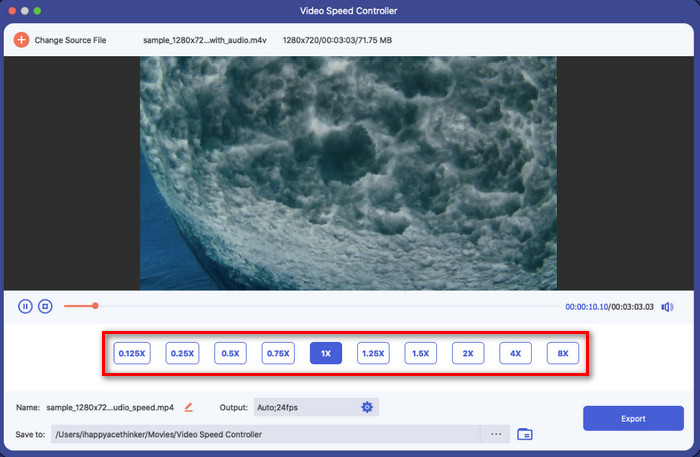
Krok 4. Po nahrání videa zvolte rychlost, kterou chcete použít, z dostupných možností v této části. Klikněte na jednotlivé hodnoty a v náhledu sledujte, zda je to ta správná rychlost, které chcete u videa dosáhnout před zveřejněním na Instagramu.
Krok 5. Nakonec klikněte na Export, abyste uložili video, u něhož jste změnili rychlost, a převod se brzy spustí. Po dokončení převodu se na obrazovce zobrazí složka – video v ní je ten soubor, u kterého jste změnili rychlost.
iMovie
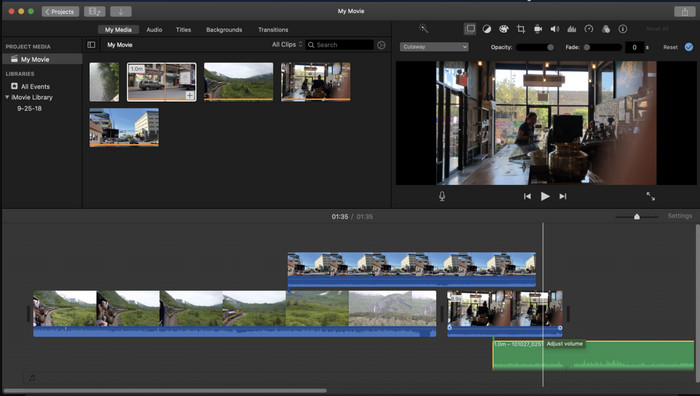
U zařízení Mac není stahování nutné, zejména pokud máte iMovie. Tento vestavěný editor videa vám pomůže změnit rychlost videa, které chcete nahrát nebo sdílet na Instagramu. Pokud tedy chcete video zrychlit a jste uživatelem Macu, doporučujeme tento editor vyzkoušet, protože je zdarma. Přestože je software zdarma, někteří uživatelé ho považují za poněkud nepoddajný, protože práce s takovým editorem vyžaduje určitou zkušenost. Pokud tedy hledáte způsob, jak zrychlit video na Instagramu ještě před jeho zveřejněním, postupujte podle kroků níže.
Krok 1. Otevřete iMovie na Macu a přidejte video na časovou osu (Timeline).
Krok 2. Klikněte na klip, který jste nahráli, a zobrazí se ikona rychloměru.
Krok 3. V nabídce rychlosti vyberte hodnotu, kterou chcete k videu přidat. Nakonec klikněte na Export, abyste si na Mac uložili zrychlené video.
Clideo
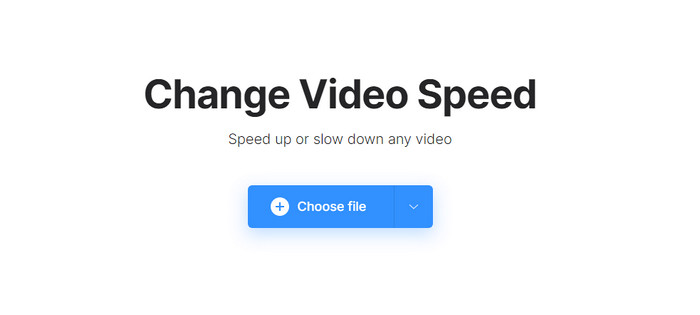
Jedním z nejlepších editorů videa, ke kterým máte přístup, je Clideo. Tento webový nástroj je komplexním řešením pro ty, kteří nechtějí kvůli úspoře místa stahovat editor videa do počítače. I když nemusíte webový nástroj instalovat, stále potřebujete stabilní připojení k internetu, abyste ho mohli používat a zrychlit požadované video. Pokud ho použijete ke změně rychlosti videa, můžete očekávat, že úpravu snadno dokončíte během minuty. Tento webový nástroj je skutečně skvělý pro online zrychlení videa, ale není tak dobrý jako předchozí dva editory. Chcete-li se naučit, jak tento nástroj použít ke zrychlení videa na Instagram, přečtěte si a postupujte podle následujících kroků.
Krok 1. Otevřete webový prohlížeč, vyhledejte Clideo a otevřete jeho nástroj pro změnu rychlosti. Klikněte na Choose File a přidejte video, které zde chcete zrychlit.
Krok 2. V této části můžete buď přetáhnout posuvník doleva pro zrychlení videa, nebo zvolit rychlost z nabízených možností. V obou případech je výsledek stejný.
Krok 3. Po výběru požadované rychlosti klikněte na Export.
Část 3. Často kladené otázky o tom, jak zrychlit video pro Instagram
Jaká je standardní délka videa na Instagramu?
Můžete nahrát video od 3 sekund do 10 minut. Není to moc, ale i tak je to dobré. Pokud je video, které chcete natočit, dlouhé, zkuste to trochu zrychlit, abyste ušetřili nějaký čas na délce videa a celé video na Instagramu zveřejnili za méně než 10 minut.
Jak vysoko může Hyperlapse zrychlit moje video na Instagramu?
Hyperlapse můžete použít k natáčení zrychleného videa na Instagramu od 1 do 12x rychlosti. Kromě ovládání rychlosti podporuje také stabilizaci, aby bylo vaše video stabilnější a omezilo roztřesení pořizovaného videa.
Mohu exportovat video, které zrychlím, na Instagram?
Ano, video, které zrychlíte na Instagramu, si můžete uložit do telefonu; po natáčení můžete klepnutím na tlačítko uložit ze zařízení uložit video ve zrychlené verzi, kterou zvolíte. Vyhledejte video, které zrychlíte, ve Fotkách, ve vaší knihovně všech obrázků, živých obrázků a videosouborů.
Závěr
Tento článek poskytuje solidní vysvětlení a kroky, jak zvládnout zrychlené video pro Instagram. Protože jsme vyřešili váš problém se změnou rychlosti na Instagramu, můžete to nyní zvládnout samostatně. Postupujte podle kroků, které jsme přidali výše, abyste mohli natočit zrychlené video nebo převést video s normální rychlostí na zrychlení pomocí dokonalého nástroje. Jaký způsob byste zvolili? Ať už je vaše rozhodnutí jakékoli, před zveřejněním nebo sdílením na svém Instagramu dosáhnete požadované rychlosti.
-
 Jak zrychlit video pomocí 5 nejlepších softwaru [Windows/Mac/Linux]
 Chcete vědět, jak snadno zrychlit video? Pak si přečtěte tento zápis, když vysvětlujeme, jak efektivně zrychlit na Windows, Mac a Linux.
-
 Nejjednodušší způsoby, jak zrychlit video na vašich zařízeních Android [2021]
 Věděli jste, že na svém Androidu můžete zrychlit video? Pokud tedy chcete vědět, jak zrychlit video na telefonu Android, přečtěte si tento zápis.
-
 Jak zrychlit video v Premiere Pro a s jeho alternativami
 Chcete vědět, jak používat Premier Pro ke zrychlení videa? Pak jste ve správném článku, protože poskytujeme kroky a další dostupné alternativy.
