


 Video Converter Ultimate
 Screen Recorder
 Oprava videa
 Bezpečné stažení
Bezplatné a online způsoby převodu RMVB na MP4
RMVB (RealMedia Variable Bitrate) je video soubor RealMedia, který není podporován všemi aplikacemi. Mnoho lidí si přeje změnit formát souboru z RMVB na MP4 pro snadné přehrávání v mobilních telefonech. Tento návod vám ukáže tři bezplatné online způsoby, jak rychle převést soubory RMVB do MP4, abyste si mohli dál bez problémů užívat svá videa.

Část 1. Jak převést RMVB na MP4 pomocí převaděče RMVB na MP4
Chcete‑li převést RMVB na MP4 ve Windows 10 nebo na Macu, převodník RMVB na MP4 je poměrně rychlý a spolehlivý. Free RMVB to MP4 Video Converter je funkční a bezplatný video konvertor, který umožňuje rychlý převod z RMVB do MP4. Podporuje také převod RMVB do AVI, FLV, MOV a dalších formátů. Níže najdete postup, jak změnit RMVB na MP4.
Free DownloadPro Windows 7 nebo novějšíBezpečné stažení
Free DownloadPro MacOS 10.7 nebo novějšíBezpečné stažení
Krok 1. Než začnete, musíte si tento bezplatný program stáhnout a nainstalovat do počítače. Potom spusťte Free RMVB to MP4 Converter a importujte soubory RMVB do programu kliknutím na tlačítko Add File(s). Mimochodem, umožňuje provádět dávkový převod, takže můžete převést více souborů RMVB najednou.
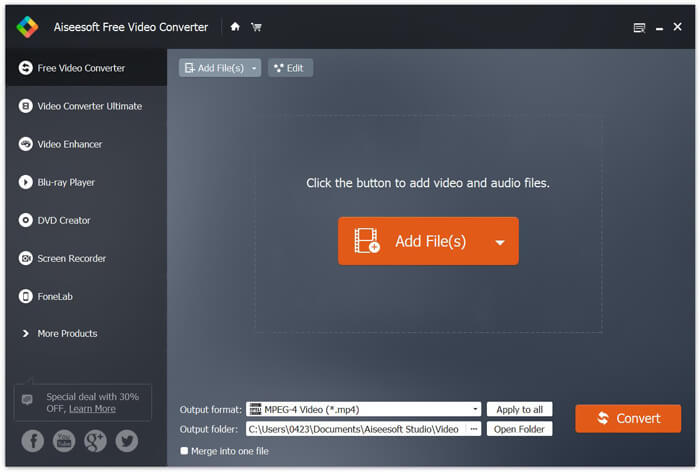
Krok 2. Po přidání souborů do programu přejděte k položce Output format a poté zvolte formát MP4.

Krok 3. Klikněte na tlačítko Convert. Počkejte několik minut a získáte požadované soubory MP4.
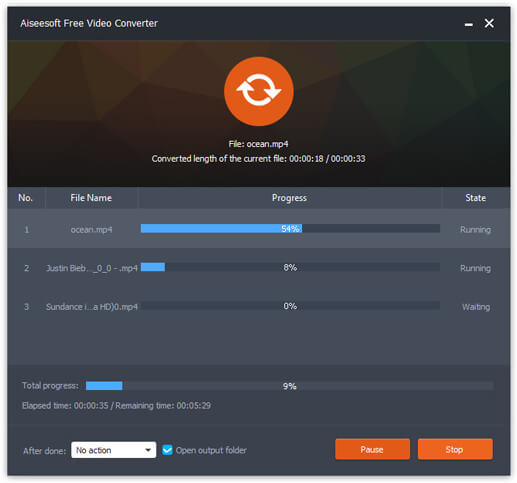
Jakmile získáte soubory MP4, můžete je přehrávat v počítači nebo na mobilních zařízeních. Kromě toho můžete tento Free RMVB to MP4 Converter použít také k převodu RM na MP4 nebo k převodu WMV na MP4.
Část 2. Jak převést RMVB na MP4 pomocí VLC
VLC funguje také jako praktický nástroj pro převod videa a můžete snadno převést soubory RMVB na MP4 ve vysoké kvalitě. Podívejme se, jak tuto práci používat pomocí VLC.
Krok 1. Nejprve si musíte do počítače stáhnout a nainstalovat program VLC Media Player a poté jej spustit.
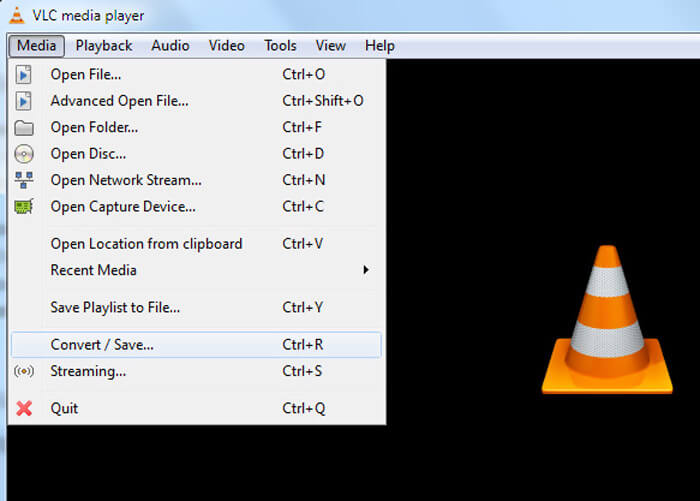
Krok 2. Přejděte na Media a poté zvolte Convert/Save a pokračujte.
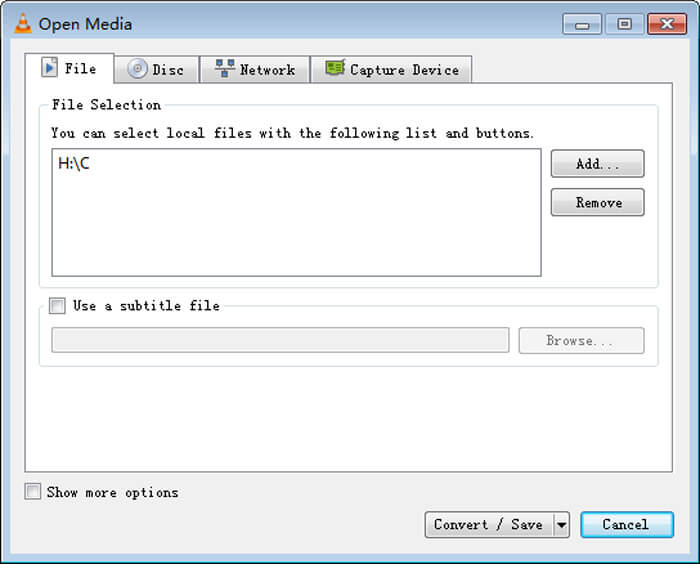
Krok 3. Když se zobrazí okno Open Media, musíte do VLC přidat své soubory RMVB kliknutím na tlačítko Add… v části File. Poté klikněte na tlačítko Convert/Save ve spodní části okna.
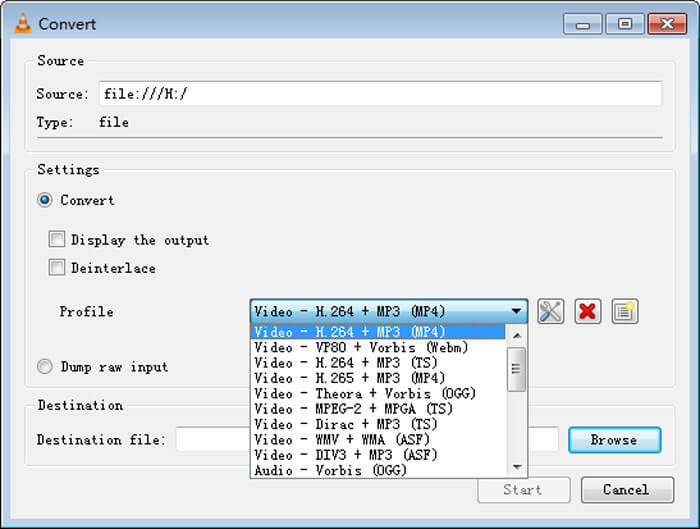
Krok 4. Poté se dostanete do okna Convert. Zde je třeba najít Settings, přejít na Profile a z rozbalovací nabídky vybrat jako výstupní formát MP4. Nakonec klikněte na Start, abyste převedli RMVB na MP4 pro snadné přehrávání.
Část 3. Jak změnit RMVB na MP4 online
Online video konvertor také podporuje rychlý převod videí RMVB do MP4. Free Online Video Converter je webový video konvertor, který dokáže převádět jakékoli běžné video nebo audio soubory do formátů MP4, MOV, FLV, AVI, MP3, AAC a mnoha dalších zdarma. Umožňuje uživatelům snadno změnit soubory z RMVB na MP4 přímo v prohlížeči.
Krok 1. Navštivte https://www.free-videoconverter.net/free-online-video-converter/ a klikněte na tlačítko Add Files to Convert, abyste aktivovali spouštěč.
Stáhněte si desktopovou verzi a převádějte soubory hromadně.

Krok 2. Poté do tohoto online nástroje importujte své soubory RMVB. Následně zvolte formát MP4 na kartě Video. Jakmile jste připraveni provést převod, klikněte na tlačítko Convert pro zahájení převodu. Po dokončení převodu budou převedené soubory automaticky uloženy do vašeho počítače.

RMVB vs. MP4
RMVB, novější varianta standardního formátu Real Media (.RM), je formát videosouborů Real Media komprimovaný pomocí proměnné bitrate. Je to oblíbený formát pro asijské filmy a anime. Soubory RMVB jsou menší velikosti a mají nižší datový tok, ale lepší kvalitu.
Formát MP4, vydaný skupinou Moving Picture Experts Group (MPEG) v roce 2001, vám může pomoci uložit data videa, zvuku, titulků a obrázků do samostatných stop. Je to zkratka pro MPEG-4 Part 14. Navíc je to jeden z nejpopulárnějších formátů používaných pro streamování a sdílení videí.
Část 4. Nejčastější dotazy týkající se RMVB až MP4
Co je to RMVB soubor?
RMVB (RealMedia Variable Bitrate) je formát video souboru Real Media využívající proměnnou bitrate. Kdysi bylo populární pro distribuci asijských anime, filmů, epizod, torrentů atd. Na webu, protože velikost souboru je menší a kvalita je mnohem lepší.
Jak otevřít soubor RMVB?
RealPlayer podporuje přehrávání souborů RMVB ve Windows, Mac OS X a Linux. Nebo můžete použít VLC k přehrávání souborů RMVB.
Může HandBrake převést RMVB na MP4?
HandBrake je skvělý nástroj pro převod videa do práce na řadě podporovaných zařízení. Je to skvělá volba pro kohokoli, kdo promění RMVB na MP4.
Takto tedy převádíte soubory RMVB na MP4. Narazili jste při výše uvedených krocích na nějaký problém? Neváhejte a dejte nám vědět své myšlenky.
-
 3 snadné kroky k vypálení souborů _TS / složky Video na DVD v systému Mac / Windows
 Jak převést a vypálit soubory TS na disk DVD? Tento podrobný průvodce vám ukáže, jak kopírovat soubory a složky TS na DVD ve Windows / Mac, abyste mohli soubory TS sledovat na DVD přehrávači nebo televizi.
-
 6 snadných způsobů, jak převést TS na AVI / MKV / MOV / WMV ve Windows / Mac
 Chcete rychle převést soubory TS na AVI / MKV / MOV / WMV? Tento článek ukazuje online a offline převaděče videa s kompletním průvodcem. Možná zde získáte nejlepší bezplatný převodník TS.
-
 Jak převést MP4 na M4A na Windows / Mac (zdarma a online)
 Jak převést MP4 na M4A online? Mohu extrahovat zvuk ze souborů MP4? Přečtěte si tento příspěvek a získáte všechny odpovědi týkající se převodu z MP4 na M4A.

