


 Video Converter Ultimate
 Screen Recorder
 Oprava videa
 Bezpečné stažení
Mimořádné metody pro okamžitý převod MTS na M4V
Chcete mít pro své zařízení účinný převodník? Pak získáte dobrou představu, když si přečtete podrobné informace v tomto článku. Ukážeme vám různé způsoby, jak převést MTS na M4V v systému Mac a Windows. Také objevíte online nástroj, který můžete vyzkoušet pro převod více souborů.

Část 1: Rozdíly mezi MTS a M4V
Chcete-li vidět rozdíly mezi těmito dvěma formáty souborů, podívejte se na podrobnosti v tabulce níže.
| MTS | M4V | |
| Přípona souboru | Přípona souboru videa AVCHD (Advanced Video Coding High Definition) je MTS. Má příponu názvu souboru .mts a obsahuje HD MPEG video nahrané konkrétními značkami a modely videokamer, včetně JVC, Sony, Canon a Sanyo. Lze jej otevřít na mnoha softwarech a podporovat HD videa až do rozlišení 1080i x 720p. | Společnost Apple Inc. vytvořila formát kontejneru digitálního videa M4V. Strukturou je přiměřeně srovnatelný se známým MP4, ale soubory M4V mohou mít DRM. Hlavním video formátem pro videa na iTunes Store je dnes M4V, který může multiplexovat dohromady více audio a video dat. |
| Vyvinul | Sony/Panasonic | Společnost Apple Inc. |
| Přidružené programy | Přehrávač VLC Media Player Apple Final Cut Pro X Roxio Creator NXT Pro 7 | Klasický přehrávač médií KMPlayer Přehrávač VLC Media Player Zoom Player |
| Typ MIME | video/mp2t | video/x-m4v |
Část 2: Vynikající metody pro převod více MTS na M4V pomocí Mac
Pokud chcete převést MTS na M4V pomocí Mac, můžete vyzkoušet FVC Video Converter Ultimate. Tento offline nástroj dokáže převádět soubory okamžitě, protože má 30x vyšší rychlost převodu. Tento nástroj navíc nabízí dávkovou konverzi, která umožňuje konverzi více formátů souborů najednou. Do této aplikace lze také nahrát téměř všechny formáty videa, protože podporuje řadu formátů souborů, včetně MKV, MOV, MP4, FLV, AVI, SWF a dalších. Můžete také upravit video soubor MTS. Na tento nástroj se můžete spolehnout, pokud máte více souborů MTS a chcete je spojit, protože nabízí nástroj pro slučování videa. Tímto způsobem můžete sloučit více videí MTS do jednoho kusu. Také, pokud chcete upravit hlasitost svého MTS videa, můžete použít nástroj pro zvýšení hlasitosti. Pomocí této offline aplikace můžete snadno změnit hlasitost svého videa. Pomocí Video Converter Ultimate si můžete užít více funkcí.
Funkce
◆ Dokáže převést více než 100 formátů video souborů.
◆ Nabízí tvůrce hudebních videí s mnoha tématy zdarma.
◆ K dispozici je vytvoření koláže s bezplatnými šablonami a filtrem.
◆ Poskytuje editační nástroje, jako jsou ovladač rychlosti videa, kompresor a ořezávač.
◆ Může odstranit vodoznaky z videa.
Chcete-li převést video soubor MTS do formátu M4V pomocí FVC Video Converter Ultimate na vašem Macu, postupujte podle základních kroků níže.
Krok 1: Na Macu si stáhněte FVC Video Converter Ultimate kliknutím na tlačítko Stáhnout níže. Poté aplikaci spusťte.
Zdarma ke staženíPro Windows 7 nebo novějšíBezpečné stažení
Zdarma ke staženíPro MacOS 10.7 nebo novějšíBezpečné stažení
Krok 2: Uprostřed rozhraní klikněte na ikonu Plus a připojte svůj video soubor MTS. Soubor můžete také přetáhnout přímo do rámečku.
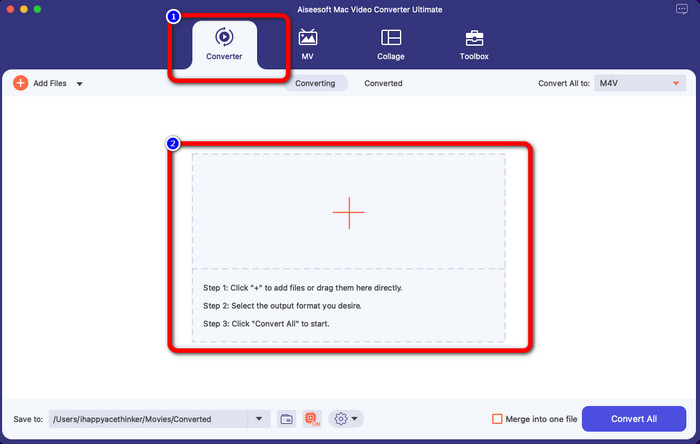
Krok 3: V dalším kroku uvidíte v pravém horním rohu rozhraní tlačítko Convert All to. Klikněte na něj, zobrazí se vám možnosti formátů, a pak zvolte formát souboru M4V. Chcete-li přidat více souborů MTS, stiskněte tlačítko Add Files v levé horní části rozhraní.
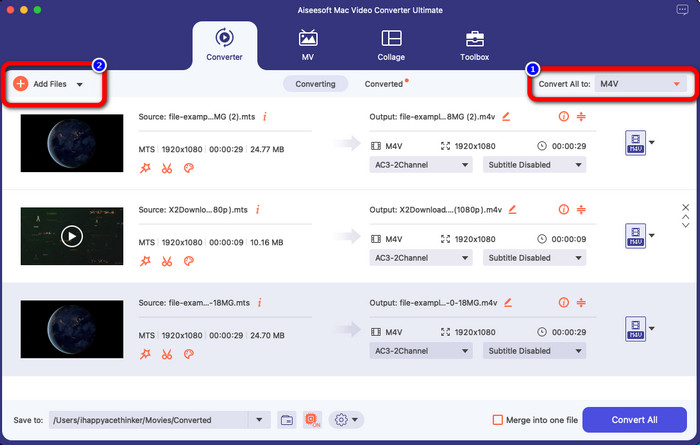
Krok 4: Po převodu všech souborů MTS do formátu M4V klikněte na tlačítko Convert All a uložte finální výstup do požadovaného umístění.
Část 3: Jak převést více souborů MTS na M4V ve Windows zdarma
V této části zjistíte, jak převést více souborů MTS do jednoho souboru M4V v systému Windows. K převodu souborů MTS můžete použít FVC Free TS Converter. Umí převádět vaše video soubory až 10× rychleji než průměrná rychlost převodu. Nabízí dávkový převod, takže můžete převést více souborů najednou. Díky tomu se nebudete nudit převáděním souborů jeden po druhém. Kromě toho má intuitivní rozhraní se snadnými postupy, což jej činí vhodnějším pro uživatele. Pokud chcete v systému Windows převést více souborů MTS do formátu M4V pomocí FVC Free TS Converter, postupujte podle níže uvedených jednoduchých kroků.
Funkce
◆ Převod formátů video souborů, jako je AVI, MOV, MPEG, MP4, DIVX, XVID atd.
◆ Poskytuje Video Enhancer.
◆ Možnost nahrávání obrazovky.
◆ Může přehrávat jakýkoli disk Blu-ray.
◆ Nabízí dávkovou konverzi.
Krok 1: Stáhněte si FVC Free TS Converter do svého systému Windows kliknutím na tlačítko Stáhnout níže. Po instalaci aplikaci spusťte.
Zdarma ke staženíPro Windows 7 nebo novějšíBezpečné stažení
Zdarma ke staženíPro macOS 10.7 nebo novějšíBezpečné stažení
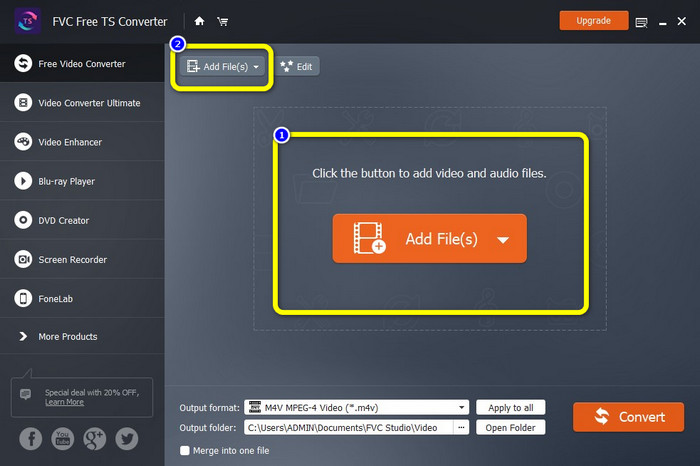
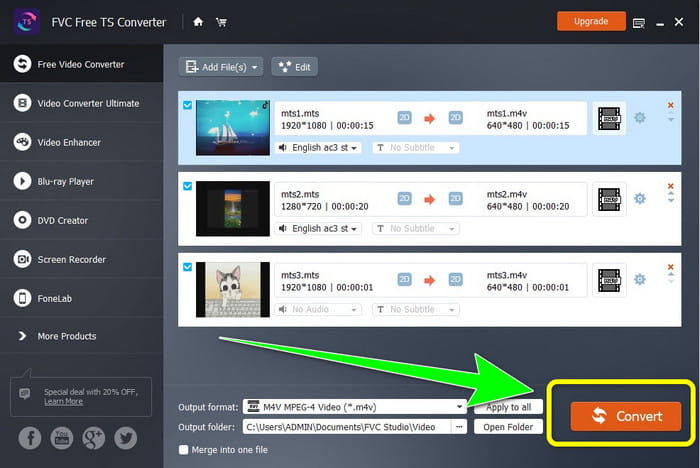
Krok 2: Po spuštění aplikace stiskněte uprostřed tlačítko Add Files a nahrajte soubory MTS. Další soubory MTS, které chcete převést, můžete přidat také kliknutím na druhé tlačítko Add Files v horní části rozhraní.
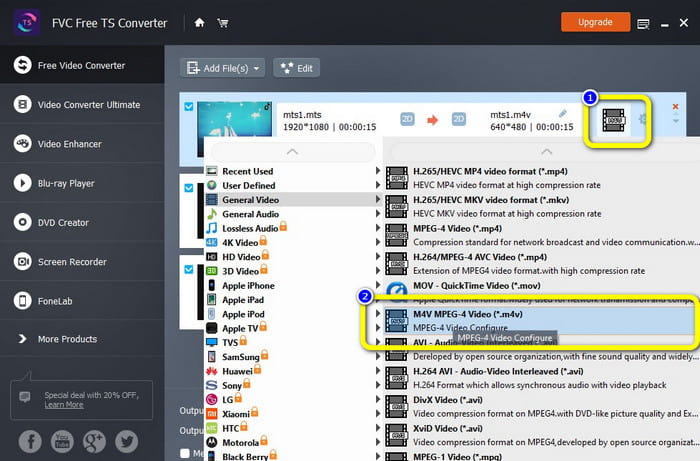
Krok 3: Klikněte na možnosti formátu v pravé části rozhraní. Poté zvolte jako výstupní formát soubor M4V. Stejný postup proveďte i pro zbývající soubory MTS.
Krok 4: Klikněte na tlačítko Convert a převedete více souborů MTS do formátu M4V.
Část 4: Nejlepší způsoby, jak převést MTS na M4V pomocí online aplikace
Při převodu MTS na M4V pomocí online nástroje je nejlepším převodníkem, který můžete použít, FVC Free Video Converter Online. S pomocí tohoto nástroje můžete svůj soubor MTS snadno převést na M4V. K převodu souborů stačí tři kroky. Tento online nástroj je navíc zcela zdarma. Takže bez dalšího otálení pojďme převést váš soubor MTS do formátu M4V. Postupujte podle kroků, které jsme pro vás připravili!
Funkce
◆ Převod více souborů, jako jsou MP4, FLV, WMA, MOV, MTS, M4V atd.
◆ Umožňuje dávkovou konverzi.
◆ Dostupné na počítačích Mac i Windows.
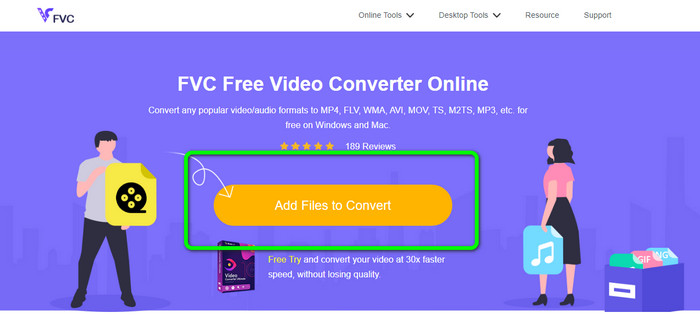
Krok 1: Navštivte webovou stránku FVC Free Video Converter Online. Poté klikněte na tlačítko Add Files to Convert a nahrajte své video MTS.
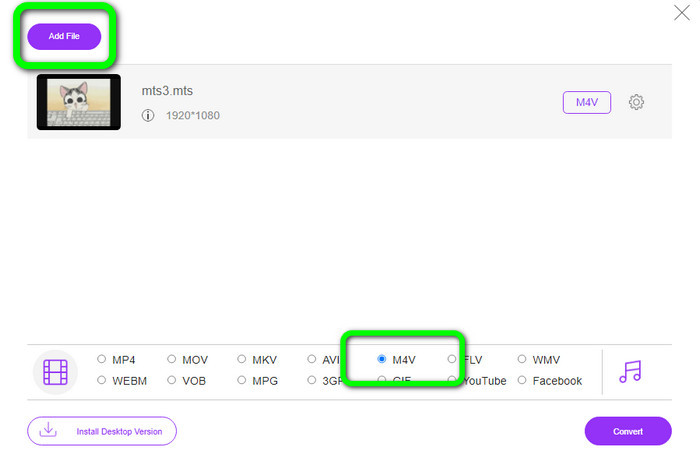
Krok 2: Dále vyberte formát M4V v možnostech formátu ve spodní části rozhraní. Můžete také kliknout na tlačítko Add File a převést více souborů.
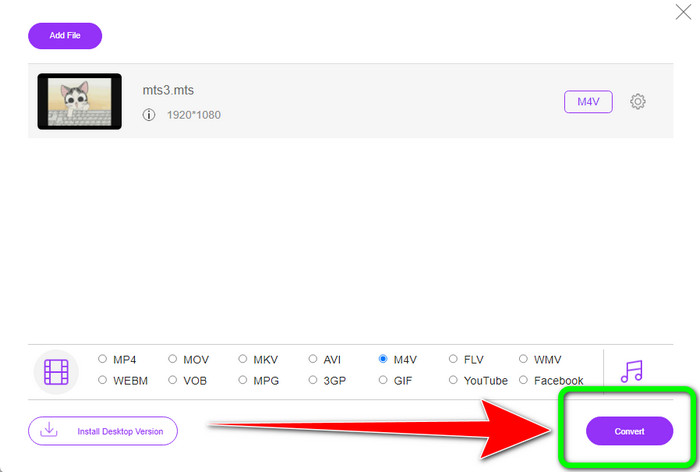
Krok 3: Po výběru požadovaného formátu klikněte na tlačítko Convert a uložte své video ve formátu souboru M4V.
Část 5: Časté dotazy o převodu MTS na M4V
1. Je MTS dobrý formát?
Ano. Video kodeky HD 720p a 1080i jsou podporovány formátem MTS, MPEG s vysokým rozlišením, a formátem transportního streamu H.264. Lidé často označují soubory MTS jako AVCHD, vytvořené společně společnostmi Sony a Panasonic a vydané ve vysoce kvalitním formátu v roce 2006.
2. Jak mohu převést MTS na MP4?
Můžete použít výše uvedené aplikace. Tyto převodníky jsou účinné a užitečné při převodu MTS na MP4 a další formáty souborů.
3. Proč byste použili M4V?
Soubory M4V mohou mít měkké titulky a ochranu DRM, aby zastavily pirátství a znesnadnily spotřebitelům distribuci souborů mezi zařízeními.
Závěr
Tři výše uvedené aplikace jsou nejlepší převodníky, které můžete na svých zařízeních použít. Pokud jste uživatelem Windows, můžete použít FVC Video Converter Ultimate. Pokud používáte Mac, můžete vyzkoušet FVC Free TS Converter. Nakonec, pokud dáváte přednost online aplikaci, můžete použít FVC Free Video Converter Online. Tyto převodníky dokážou plynule převádět MTS na M4V.
-
 MTS VS M2TS - Rozdíl mezi MTS a M2TS
 Co je soubor MTS nebo M2TS? Jaký je rozdíl mezi M2TS a MTS? Jak mohu sledovat soubor MTS nebo M2TS nahraný videokamerou? Všechny odpovědi najdete v tomto příspěvku
-
 Top 5 přehrávačů M4V pro Windows / Mac / Android / iOS, které byste měli vědět
 Když nemůžete přehrávat videa M4V na přehrávači QuickTime Player, měli byste se dozvědět více z 5 vynikajících přehrávačů M4V pro Windows, Mac, Android a iOS z tohoto článku
-
 [Vyřešeno] Jak převést MTS na MKV v původní kvalitě
 Zajímá vás, jak můžete zdarma převést MTS na MKV? V tomto článku jsme uvedli nejlepší bezplatné převodníky MTS na MKV
