


 Video Converter Ultimate
 Screen Recorder
 Oprava videa
Objevte způsoby, jak přehrávat soubory MKV na PS4
Nejen Xbox One S podporuje přehrávání filmů. Nyní se tomuto trendu snaží přizpůsobit i PS4. Pomocí USB kabelu a přes DLNA může PS4 nyní přehrávat MKV, MP4, AVI a mnoho dalších formátů. To znamená, že MKV patří mezi soubory, které můžete přehrát. Úplný seznam podporovaných formátů najdete na oficiálních stránkách PS4. Ostatně, nečetli byste tento článek, kdybyste neměli zájem o přehrávání souborů MKV na PS4. Pokračujte ve čtení, a jak budete postupovat, objevíte způsoby, jak můžete přehrávat MKV na PS4.

Část 1. Lze všechny MKV soubory přehrát na PS4?
Mohu přehrávat soubory MKV na PS4? Určitě můžeš. Formát souboru MKV je podporován systémem PS4. Ale ne všechny soubory MKV lze přehrát správně. Při hraní můžete zaznamenat selhání. Je to proto, že musíte splnit standard stanovený PS4. Většinou jsou podporovány H.264/MPEG-4 AVC. Stejná pravidla platí, pokud se chystáte přehrávat soubory MKV z jednotky USB. Mezitím jsou podporovány audio MP3, AAC LC, AC-3. Většina z těchto formátů jsou formáty Dolby Digital. Pokud si myslíte, že jste splnili standard, můžete pokračovat v krocích, jak hrát MKV přímo na PS4.
Krok 1. Stáhněte a nainstalujte DivX Media Server a spusťte přehrávač. Poté na počítači povolte sdílení.
Krok 2. Nahrajte nebo importujte soubor MKV na server.
Krok 3. Než přejdete k dalšímu kroku, ujistěte se, že jsou počítač i PS4 připojené ke stejné Wi‑Fi síti. Poté si na PS4 stáhněte a nainstalujte přehrávač DivX. Následně otevřete aplikaci Media Player na PS4 a z nabídky zařízení, která se zobrazí, zvolte DivX Media Server.
Krok 4. Nakonec vyhledejte Video, zaškrtněte video, které chcete přehrát, a začněte streamovat.
Část 2. Krok za krokem průvodce Jak hrát MKV na PS4 z USB
Mezitím, pokud používáte úložiště USB, ujistěte se, že je naformátováno buď na FAT nebo exFAT, jinak nebude detekováno. Pokud si myslíte, že jste připraveni a flash disk je kompatibilní, podívejte se na níže uvedený průvodce krok za krokem.
Krok 1. Zapněte PS4 a vložte USB. Přejděte do hlavní nabídky. Poté zvolte Video a vyhledejte název svého USB disku.
Krok 2. Jakmile uvidíte seznam názvů souborů, klikněte na Zobrazit vše, abyste viděli celý seznam souborů uložených na vašem USB. Zkopírujte soubor a přeneste ho do PS4.
Krok 3. Nakonec se ujistěte, že máte stále dostatek úložného místa pro dokončení přenosu.
Část 3. Alternativní způsob přehrávání MKV na PS4 přes Plex Server
Kromě DivX existuje také alternativní přehrávač, který můžete použít k přehrávání MKV na PS4. Jde o streamovací media server s názvem Plex. Tento media server vám umožní streamovat vysoce kvalitní videa, hudbu, televizní pořady a podcasty z vašeho počítače. Ačkoli někteří lidé mají problémy s přehráváním některých souborů MKV, stále jej můžete použít jako alternativu. Pokud ale opravdu chcete používat Plex a přehrát nekompatibilní soubor, měli byste zvážit převod videa. Některé konvertory dokážou převést vaše MKV soubory do formátu podporovaného Plexem. Úpravou video kodeku, snímkové frekvence, datového toku a dalších parametrů je to možné. Existuje nástroj, který je toho schopen? Ano, existuje, můžete vyzkoušet Video Converter Ultimate. Ano, tento nástroj to dokáže. Zkuste ho použít k vyřešení tohoto problému.
Krok 1. Stáhněte a nainstalujte Video Converter Ultimate do svého počítače.
Zdarma ke staženíPro Windows 7 nebo novějšíBezpečné stažení
Zdarma ke staženíPro MacOS 10.7 nebo novějšíBezpečné stažení
Krok 2. Přidejte soubory, které chcete převést, kliknutím na Přidat soubory nebo jednoduše soubor přetáhněte do rozhraní.
Krok 3. Poté zvolte formát, který Plex podporuje, kliknutím na rozbalovací nabídku Převést vše na.
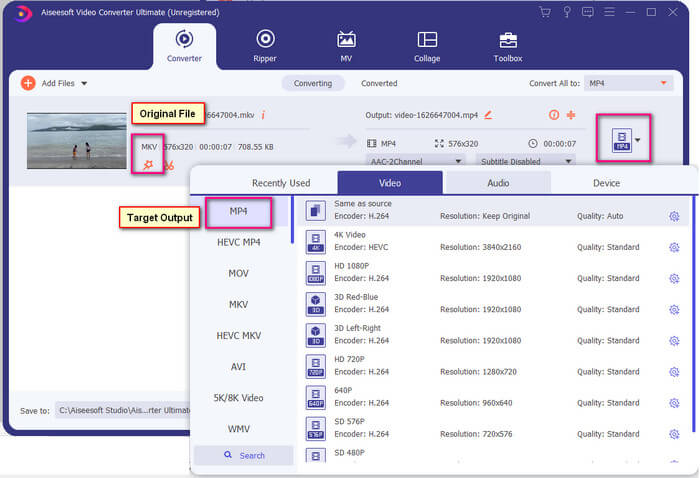
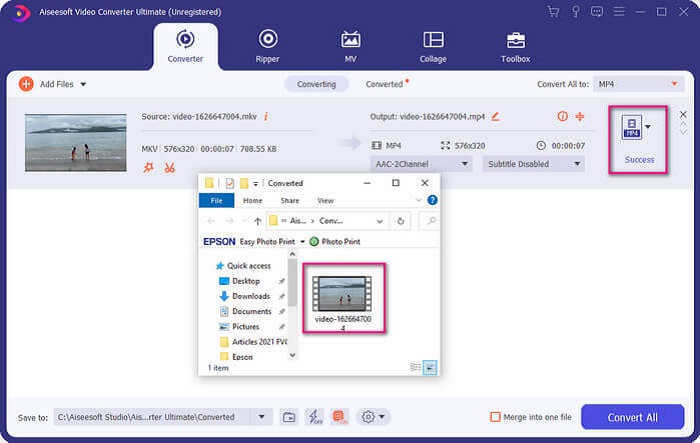
Krok 4. Jakmile je formát nastaven, klikněte na tlačítko Převést vše a spusťte proces převodu. Po dokončení převodu se otevře složka, do které byl soubor uložen.
S Ultimate video konvertorem je toho více. Níže se můžete podívat na seznam výhod a nevýhod, abyste poznali další dobré funkce, které nabízí.
● Tento nástroj konvertuje za tři sekundy.
● Má akcelerační technologii, která může vylepšit převedený soubor.
● Podporuje HD kvalitu.
● Má editační funkce, jako je přidávání filtrů a základních efektů.
● Můžete upravit titulky a zvukovou stopu.
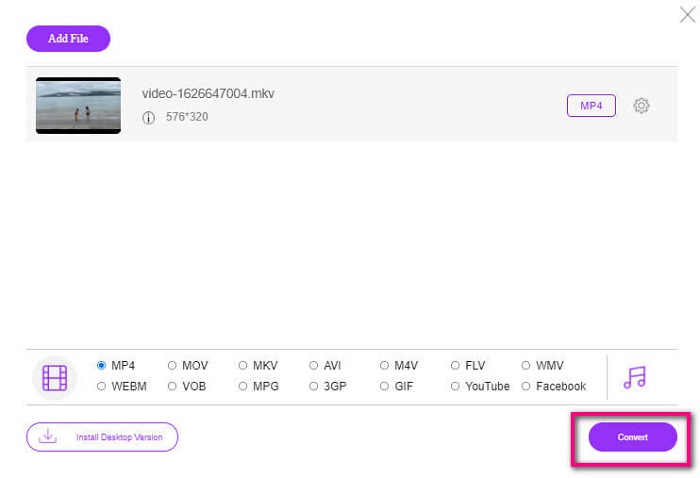
Pokud v každém případě hledáte bezplatný konvertor, můžete také zvážit FVC Free Online Video Converter. I když nemusí být tak dobrý jako Ultimate Video Converter, stále se mu dokáže přiblížit. Rozhodně dokáže soubor převést a učinit jej kompatibilním s Plex nebo DivX. Stačí, když…
Krok 1. Spusťte nástroj návštěvou oficiální stránky uvedené v popisu.
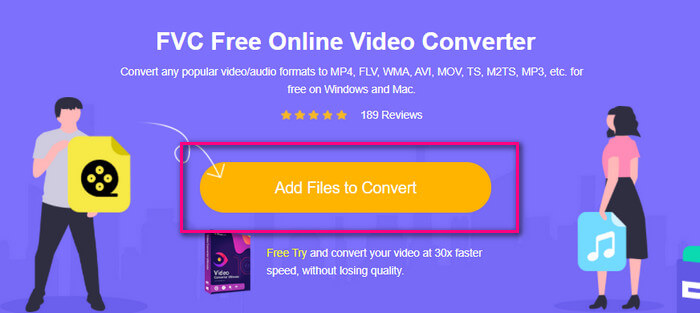
Krok 2. Nahrajte video kliknutím na Přidat soubory k převodu.
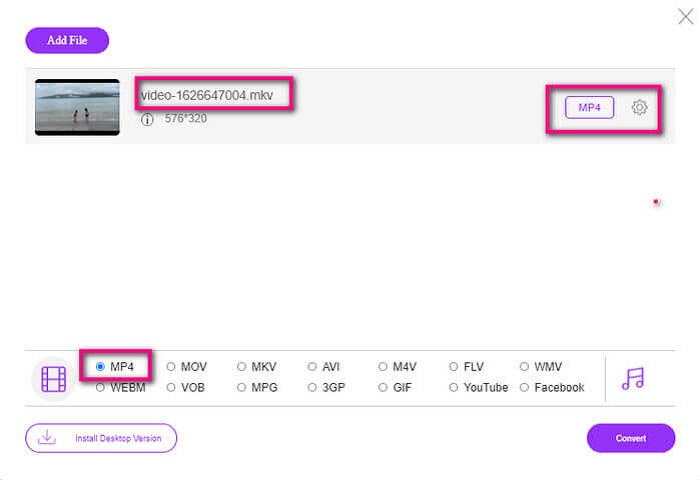
Krok 3. Změňte formát označením kolečka níže.
Krok 4. Nakonec klikněte na tlačítko Převést a zvolte umístění, kam chcete soubor uložit. Poté klikněte na OK. Na ikoně Složka si můžete zobrazit převedený soubor.
Další čtení
Přehrávat MKV ve Windows Media Playeru
Část 4. Další informace o přehrávání souborů MKV na PS4
Kolik stojí PS4?
Maloobchodní cena na trhu je ve Spojených státech 399,99 USD a v Kanadě 399,99 CAD. Ceny se mohou lišit v závislosti na maloobchodní ceně ve vaší zemi.
Je možné hrát CC nebo Close Caption MKV na PS4?
Ano, je. Najdete ji v Nastavení zpřístupnění. Cesta je: přejděte do Nastavení na PS4, poté Zpřístupnění a zvolte Zobrazit titulky. Odtud klikněte na Možnosti a aktivujte skryté titulky.
Pokud PS4 podporuje MKV, proč se moje soubory nepřehrávají?
Jak je uvedeno výše, musíte se ujistit, že soubor MKV splňuje standard přehrávače, který používáte. Stačí zkontrolovat požadavek PS4 nebo jiného serveru pro streamování médií. Většina mediálních serverů má také klasifikaci pro přehrávání souborů MKV.
Jaké formáty podporuje PS4?
Existuje několik formátů souborů, které PS4 podporuje. Ale všimnete si, že většina formátů je nekomprimovaná a obsahuje velký soubor. I když podporuje i ty nekomprimované jako Mp4. Mezitím je zde seznam formátů, o kterých mluvíme: MKV, AVI, MPEG-2 PS, MPEG-2 TS, AVCHD a XAVC a MP4.
Závěr
Na závěr existuje mnoho způsobů, jak můžete přímo nebo nepřímo přehrávat soubory MKV na PS4. To, co bylo uvedeno, jsou nejběžněji používaná média. DivX Stream Server a Plex jsou jen některé alternativy, které můžete použít. Důrazně se doporučuje převést soubor místo toho, abyste se vyhnuli potížím a příliš mnoho procesů.
-
 [Vyřešeno] VLC Player nepřehraje MKV, jak to opravit
 Podporuje přehrávač VLC soubory MKV? Proč nebude VLC hrát MKV? Tento příspěvek sdílí 4 užitečné tipy, jak opravit přehrávač VLC, nebude přehrávat soubory MKV.
-
 Jak přehrávat soubory MKV na iPadu 2025
 Jak přehrávat soubory MKV na iPadu 2? Mohu převést MKV na MP4 pro hraní na iPad Pro / Air / 2? Tento příspěvek sdílí 2 snadné způsoby, jak hrát MKV na iPadu.
-
 Jak stáhnout kodek MKV v programu Windows Media Player pro plynulé přehrávání
 Nelze přehrát video MKV v programu Windows Media Player? Kodek MKV pro Windows Media Player si můžete zdarma stáhnout. Naproti tomu převeďte soubor MKV, aby byl hratelný v programu Windows Media Player.
