


 Video Converter Ultimate
 Screen Recorder
 Oprava videa
Jak změnit zpomalené video na normální rychlost jako profesionál
Technology has evolved extensively over the years. Various software has been developed, and advanced equipment has been invented to bring out uniqueness and creativity in a mere video. One of such is a slow-motion video. However, most people are only familiar with making said video and do not revert it to normal speed. One example is using random or specific videos online for a project in school or any video-producing activities people are up to that might have been in a playback speed not preferential to that people. So, this article intends to solve this issue one might be facing now and then by providing the best ways to change a slow-motion video to normal playback speed for Mac, Windows, iOS, and Android operating systems.

Část 1. Jak změnit zpomalené video na normální rychlost na Macu a Windows
It is possible to resolve the problem of changing the speed of the slow-motion video to normal by downloading and using converters offline. On the other hand, Video Converter Ultimate is one of the best editing programs available, thanks to the numerous features it provides. Due to its accessibility and ease of use for the general public, we highly recommend it for anyone who wants to convert slow-motion video to normal speed on a Mac or Windows machine. Here are the suggested steps for properly addressing the software: handle it well.
Step 1: Click the Free Download button to save the program to your computer's hard drive. You can then set up the software and customize it.
Zdarma ke staženíPro Windows 7 nebo novějšíBezpečné stažení
Zdarma ke staženíPro MacOS 10.7 nebo novějšíBezpečné stažení
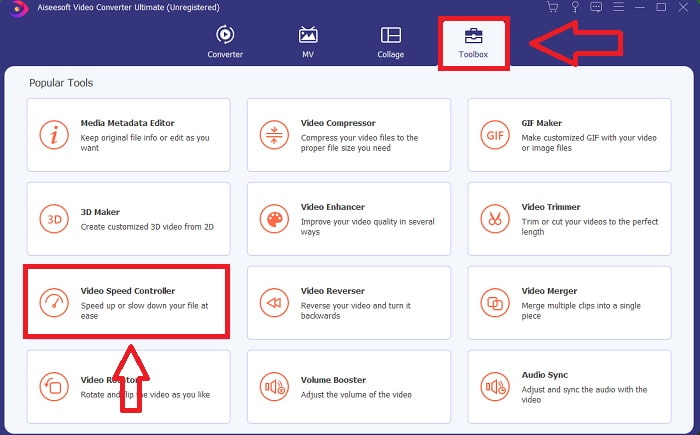
Step 2: Activate the software by clicking on the Toolbox icon in the menu bar and selecting Video Speed Controller from the list.
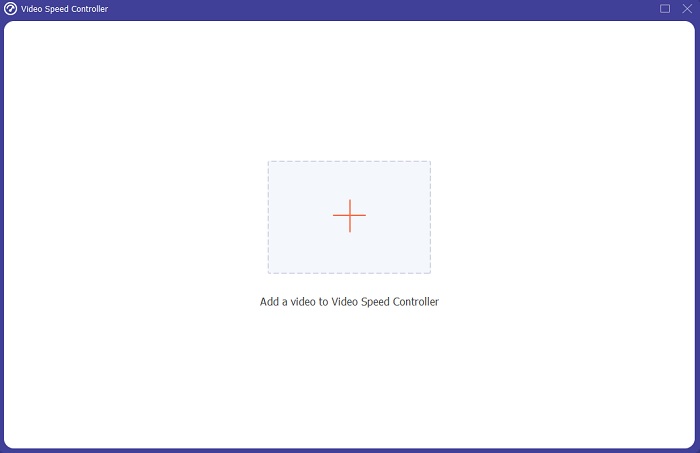
Step 3: To add the slow motion video, click the + button in your preference bar and then continue to edit the video.
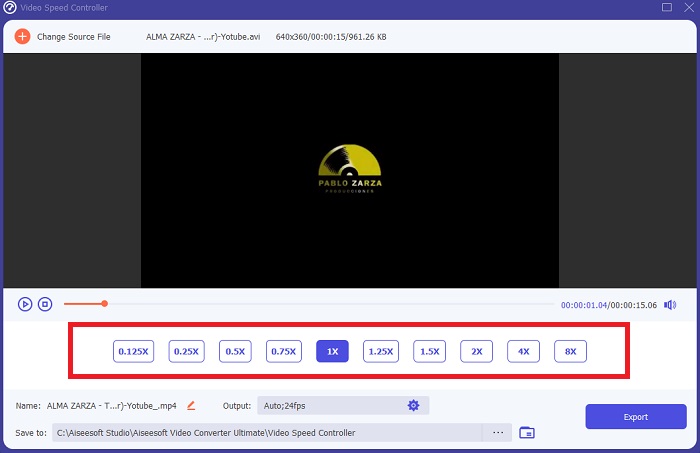
Step 4: Increase or decrease the video rate to adjust the playback speed.
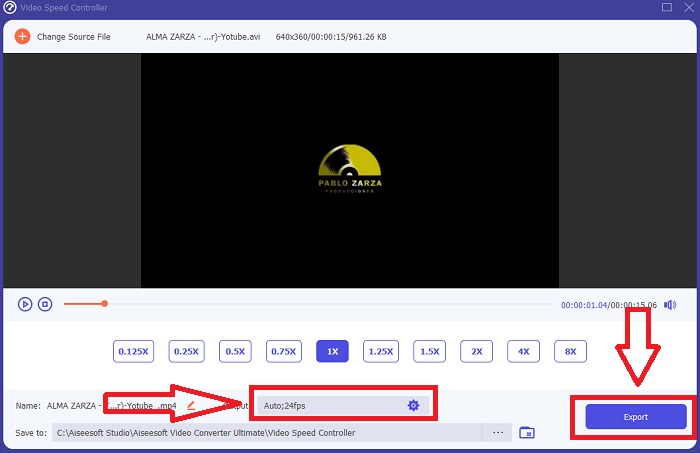
Step 5: The output format, resolution, quality, and so on can all be edited after the playback speed of your video clip has been adjusted. When you're ready to save your work, click Export and choose a location.
Část 2. Jak změnit zpomalené video na normální rychlost na iPhone/iPad pomocí fotografií
Slow-motion videos are one of the best options any content creators or videographers have in their arsenal to add a dramatic effect to any clips only using their mobile phone like iPhone. Since iPhone is one of the mobile phones that has a high-end quality of camera that can make a video captured at higher frames per second, so you can get yourself a satisfying clip to watch. However, videos with a lesser playback speed are not always the best approach in every video you are making – there are types that slow-motion would not suffice or are irrelevant. So, changing the slow-motion video to normal speed on your iPhone becomes your only option. To do this, here are the easy-to-follow steps:
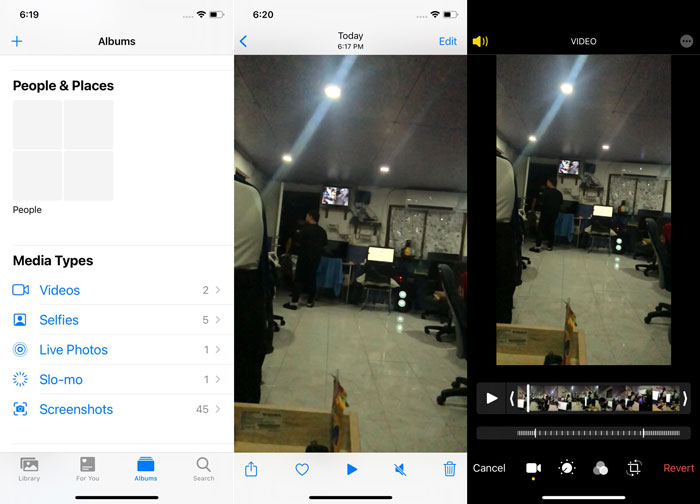
Step 1: Open the Photos app on your iPhone or iPad and go to the albums tab. Scroll to the bottom and tap Slo-mo from the Media Types section. To make a video full screen, tap on it.
Step 2: Select Edit in the upper right corner.
Step 3: A little slider with vertical white lines will appear. The slow-motion effect is represented by the lines spaced widely apart, while the tightly packed lines represent the normal-speed effect. Both parts are divided by two sliders. Drag a Slider from one end of the screen to the other. All of the wide-spaced lines will be perfectly aligned. This indicates that the video will now play at a normal speed. To see whether it is working, press the triangle play button. The once slow-motion video is now at normal playback speed. However, you can undo this action by selecting Edit, Revert, Revert to Original. You can also use the sliders to choose which parts of the footage to play at a slower or faster speed at your liking.
Související:
How to Fix Videos Not Playing on iPhone
Nejlepší video přehrávač pro iPhone
Část 3. Jak změnit zpomalené video na normální rychlost v systému Android pomocí Fotek Google
Android users may adjust the speed of a slow-motion video to normal for free, much like their iPhone counterparts. In this scenario, you will need to utilize the Google Photos application that came pre-installed on your phone, but you may alternatively use a third-party app. For the sake of accessibility and convenience, we will be using Google Photos to change the slow-motion video to normal speed on Android, and here is how:
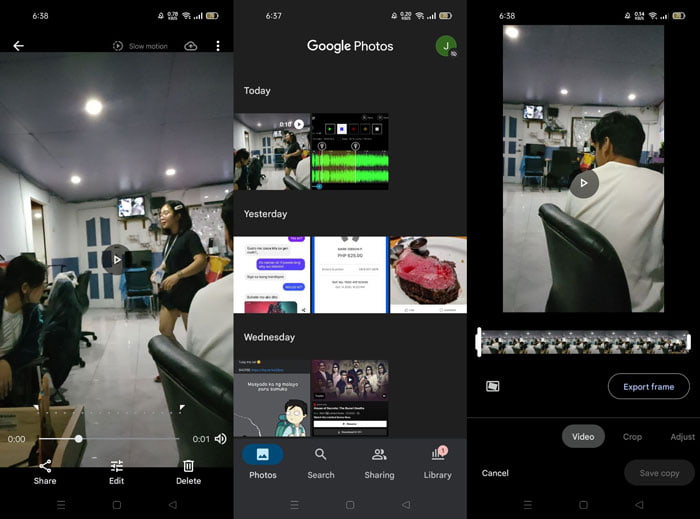
Step 1: Open the Google Photos app on your android phone and click on the video you wish to speed up. Select Edit on the bottom of the screen, and a playback speed controller will appear.
Step 2: Drag the Slider to increase the playback speed by 1.5x or 2x, depending on the rate of your slow-motion video.
Step 3: Click the triangle play button to check if the video is now at the speed of your liking. Once satisfied, select Done to save it.
Část 4. Časté dotazy o změně zpomaleného videa na normální rychlost
Jak převrátím zpomalené video?
Chcete-li změnit názor a znovu vytvořit z tohoto videa zpomalený klip, jednoduše otevřete video a klepněte na tlačítko Upravit ve spodní části obrazovky. Poté klikněte na Vrátit a vyberte Vrátit k originálu pro potvrzení vašeho rozhodnutí.
Můžete pomocí aplikace Fotky převést videa s nízkými snímky za sekundu na zpomalené?
Aplikace Fotky neumožňuje převést normální videa z iPhonu nahraná rychlostí 30 snímků za sekundu nebo 24 snímků za sekundu na zpomalené. Můžete to však provést pomocí aplikací třetích stran, jako je iMovie nebo jiné aplikace pro úpravu jablek.
Jsou Fotky Google nejlepší aplikací pro převod zpomalených videí na normální rychlost?
Jak by se dalo představit, používání této bezplatné aplikace má několik nevýhod. V první řadě je rychlost zpracování videa relativně pomalá, zejména při úpravě dlouhého videoklipu. Pokud navíc video rozdělíte před změnou rychlosti přehrávání, zvuk na pozadí nebo hlasové vyprávění se ztlumí. Bez ohledu na to je to skvělá bezplatná aplikace pro Android. Stále můžete používat aplikace třetích stran, ale většina těch pohodlnějších není zdarma.
Závěr
The versatility of videos can serve different needs, and merely changing the playback speed can satisfy different genres, whether for entertainment or educational purposes. The fact that it can be done easily nowadays with accessible applications and software will bring out our creativity and be of convenience to us depending on our preference. Although changing slow-motion video to normal speed online is also convenient, downloading software lessens the hassle of connectivity issues. This article can be of great help to those who are not yet well-versed with such methods and have the answers to their questions.
-
 VR video přehrávač - recenze 5 nejlepších VR video přehrávačů v roce 2021
 Může VLC hrát VR? Jaký je nejlepší VR video přehrávač? Jak přehrávat video v náhlavní soupravě VR? Zde můžete zodpovědět všechny vaše dotazy týkající se videopřehrávače VR.
-
 Jak hrát DVD na Windows Media Player v roce 2021
 Proč se moje DVD nepřehrává v programu Windows Media Player? Jak přehrávat DVD v přehrávači médií Windows 7? Tento příspěvek sdílí 3 způsoby přehrávání DVD s WMP nebo bez WMP.
-
 Otevřete soubor MKV v programu Windows Media Player
 Můžete přehrávat soubory MKV na Windows Media Player? Jak převést MKV na Windows Media Player? Zde najdete 3 způsoby, jak otevřít soubor MKV v programu Windows Media Player.
