


 Video Converter Ultimate
 Screen Recorder
 Oprava videa
 Bezpečné stažení
Jak převést M2TS na WMV ve Windows / Mac / Online (zcela zdarma k použití)
Některé fotoaparáty Canon a Sony používají jako výchozí výstupní formát M2TS. Videa M2TS mají velké velikosti souborů. Kompatibilita formátu M2TS také není dobrá. Pokud chcete importovat soubory M2TS do programu Windows Movie Maker pro další úpravy, musíte nejprve převést M2TS na WMV video.
Tento článek vám krok za krokem ukáže online i offline způsoby, jak převést video z formátu M2TS do formátu WMV. Díky tomu můžete formát videa M2TS na WMV snadno změnit v telefonu nebo v počítači.

Část 1: Jak převést M2TS na WMV v systémech Windows a Mac
Pokud chcete pouze změnit formát videa, stačí bezplatný video převodník M2TS na WMV. Nemusíte platit za další funkce, které nepotřebujete. Zde si můžete vybrat 2 freewarové programy pro převaděče M2TS na WMV.
Převod M2TS na WMV ve Windows zdarma
K převodu souborů M2TS do WMV ve vašem počítači s Windows můžete použít FVC Free M2TS Converter. Jde o dávkový převodník M2TS, který umí hromadně převádět soubory M2TS do WMV, MOV, MP4 a dalších formátů videa i audia. Vestavěné nástroje pro úpravu videa jsou také k dispozici zdarma. Před převodem můžete soubory M2TS upravit a přizpůsobit. Zde jsou hlavní funkce tohoto bezplatného softwaru pro převod M2TS do WMV.

Zdarma M2TS Converter
112 356+ stažení- Převod M2TS na WMV ve Windows 10/8/7 / Vista / XP zdarma.
- Podporujte dávkovou konverzi M2TS na WMV.
- 50x vyšší rychlost převodu.
- Komprimujte, slučujte a aplikujte další video efekty na soubory M2TS.
- Přidejte do svých souborů M2TS speciální motivy, například rodinu, narozeniny, svátky atd.
Free DownloadPro Windows 7 nebo novějšíBezpečné stažení
Free DownloadPro MacOS 10.7 nebo novějšíBezpečné stažení
Krok 1: Stáhněte, nainstalujte a spusťte FVC Free M2TS Converter. Kliknutím na Add File(s) importujte více než jeden videosoubor M2TS.

Krok 2: V seznamu output format vyhledejte a nastavte WMV jako výstupní video formát.

Krok 3: Pokud chcete video M2TS upravit, klikněte nahoře na Edit. Poté můžete v FVC Free M2TS Converter upravit název, autora a čas v úvodní a závěrečné části videa M2TS.

Krok 4: Klikněte na Convert a zdarma převedete M2TS do WMV ve Windows.
Převod M2TS na WMV na Macu zdarma
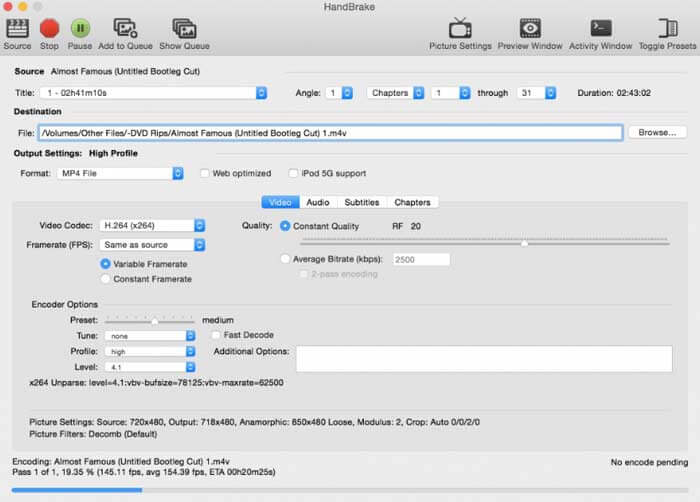
Pro uživatele počítačů Mac můžete použít HandBrake jako převodník M2TS na WMV zdarma. Zde jsou podrobné kroky pro bezplatný převod M2TS na WMV na Macu pomocí HandBrake.
Krok 1: Spusťte HandBrake. V kontextovém okně Source vyberte svůj soubor M2TS a klikněte na Open.
Krok 2: Rozbalte seznam Format. Jako video formát zvolte WMV.
Krok 3: Kliknutím na Browse změňte cílovou složku.
Krok 4: Klikněte na Start a dokončete převod videa z M2TS do WMV v systému Mac.
Část 2: Jak převést M2TS na WMV online
Pokud nechcete do počítače nic instalovat, můžete použít také online převodník videa. Tato část si jako příklad vezme FVC Free Online Video Converter.
Krok 1: Navštivte ve svém prohlížeči stránku FVC Free Online Video Converter.

Krok 2: Pokud ještě nemáte stažený FVC launcher, klikněte nejprve na Add Files to Convert pro stažení. Poté launcher nainstalujte a aktualizujte.

Krok 3: Otevřete a přidejte soubor M2TS. Poté před zahájením kliknutí na Convert zvolte formát WMV.

Krok 4: Po potvrzení cílové složky vyčkejte, než se vytvoří váš soubor WMV.
Část 3: Časté dotazy týkající se převodu M2TS na WMV
Může Android přehrávat soubory M2TS?
Ne. Jako aplikaci M2TS player můžete použít VLC Media Player. Nebo můžete převést M2TS do formátu WMV pro snadné přehrávání na zařízeních Android a iPhone.
Existuje nějaký rozdíl mezi MTS a M2TS?
Ve skutečnosti je odpověď ne. Mezi MTS a M2TS neexistuje žádný funkční rozdíl. Oba jsou soubory videa ve vysokém rozlišení spojené s AVCHD.
Je M2TS lepší než WMV?
M2TS je speciálně navržen pro videokamery. Soubory M2TS jsou tedy ve vysokém rozlišení a velké velikosti. Video můžete zmenšit převedením M2TS na WMV. Ve srovnání s M2TS je WMV běžným a široce podporovaným formátem videa. Pokud chcete komprimovat M2TS a přejít do populárního formátu videa, je to dobrý způsob, jak převést M2TS do formátu WMV.
To je vše k tomu, jak převést videa z M2TS do formátu WMV. Formát videa můžete změnit a zdarma použít základní video efekty ve Windows, na Macu i online. Je to zcela zdarma a bezpečné. Žádná skrytá rizika ani nákupy v aplikaci. Můžete tedy bez obav převádět soubory M2TS do formátu WMV.
-
 Jak převést M2TS na MOV na Windows / Mac
 Potřebujete převést M2TS na MOV pro přehrávání video souborů na řadě přehrávačů a platforem? Tento článek vám pomůže najít nejlepší online / offline metodu pro převod M2TS na MOV ve Windows / Mac.
-
 Jak převést soubory M2TS na MP3 zdarma
 Lze soubor M2TS převést na MP3? V tomto příspěvku jsme uvedli 6 nejlepších bezplatných a online způsobů, které vám pomohou převést M2TS na MP3, AAC, AIFF a další zvukové formáty.
-
 5 snadných způsobů, jak převést TS na AVI / MKV / MOV / WMV ve Windows / Mac
 Chcete rychle převést soubory TS na AVI / MKV / MOV / WMV? Tento článek ukazuje online a offline převaděče videa s kompletním průvodcem. Možná zde získáte nejlepší bezplatný převodník TS.
