


 Video Converter Ultimate
 Screen Recorder
 Oprava videa
 Bezpečné stažení
2 jednoduché způsoby, jak zdarma převést MTS na MP3
Pro různé potřeby chcete extrahovat zvukovou stopu z videa. Můžete například chtít převést video do formátu MP3, abyste zmenšili velikost souboru. V některých případech vše, co potřebujete, je hudba na pozadí filmu a můžete si z něj vybrat zvuk.

MTS je formát videozáznamu ve vysokém rozlišení, který podporuje HD 720p a 1080i. Je to přípona souborů AVCHD (Advanced Video Coding High Definition). Když získáte soubor MTS, nemůžete ho přímo přehrát v běžném přehrávači médií, video editoru ani na přenosných zařízeních iOS/Android. Proto je velmi užitečné převést MTS do MP3 nebo MP4 pro lepší přehrávání či úpravy. V tomto příspěvku vám ukážeme, jak zdarma převést MTS na MP3.
Část 1. Jak zdarma převést MTS na MP3 bez ztráty kvality
Na internetu je spousta nástrojů pro převod MTS na MP3, které vám pomohou extrahovat zvuk MP3 z videa MTS nebo M2TS. Ale můžete si všimnout, že u mnoha z nich, zejména u některých bezplatných, je pravděpodobnější výstup souboru MP3 nízké kvality.
S ohledem na to vám v první části doporučíme nejlepší bezplatný software pro převod MTS na MP3, Free Video Converter. Dokáže převést soubor AVCHD na MP3 při zachování zcela původní kvality zvuku. Nyní si jej můžete zdarma stáhnout a podle následujícího návodu z něj extrahovat zvukovou stopu MP3 z vašeho videa MTS/M2TS.
Free DownloadPro Windows 7 nebo novějšíBezpečné stažení
Free DownloadPro MacOS 10.7 nebo novějšíBezpečné stažení
Krok 1. Nejprve byste měli nainstalovat tento bezplatný převodník MTS na MP3 do počítače dvojitým kliknutím na tlačítko pro stažení výše. Po vstupu do hlavního rozhraní klikněte na Add File(s) a naimportujte soubor MTS, který chcete převést.
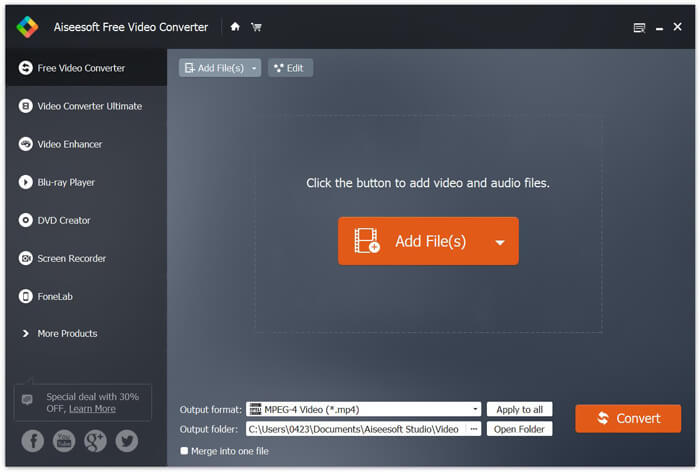
Krok 2. Klikněte na Output (výstupní) formát a jako výstupní formát zvolte MP3. V tomto kroku můžete také vybrat vhodnou složku pro uložený soubor MP3. Poté klikněte na tlačítko Convert a spusťte převod vašeho souboru AVCHD na MP3.
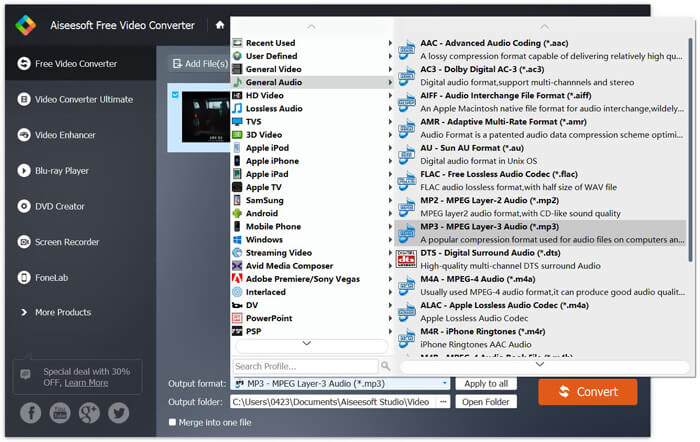
Díky přijetí pokročilé technologie zrychlení vám může poskytnout opravdu vysokou rychlost převodu z MTS na MP3. Ještě důležitější je, že tento bezplatný převod MTS na MP3 zajišťuje, že během převodu nedojde ke ztrátě kvality zvuku. Je také navržen s editačními funkcemi, které vám pomohou upravit zvukový soubor videa a upravit výstupní efekty.
Část 2. Jak zdarma převést MTS na MP3 pomocí online převaděče
Pokud máte soubor AVCHD menší velikosti a chcete z něj extrahovat zvukovou stopu MP3, můžete využít bezplatný online převodník. Jak jsme zmínili výše, existuje mnoho online nástrojů, které vám pomohou převést MTS na MP3. Pokud nevíte, který použít, představíme vám zde jeden populární online převodník MTS na MP3, FVC Free Online Video Converter.
FVC Free Online Video Converter je jedním z nejpopulárnějších nástrojů pro převod videa a zvuku, který vám pomůže snadno snadno převést MTS na MP3. Kromě převodu souboru AVCHD umožňuje také provádět další převody mediálních souborů. Další kroky vám ukáží, jak převést MTS na MP3 online pomocí tohoto online převaděče videa.
Krok 1. Otevřete prohlížeč a přejděte na oficiální stránky FVC Free Online Video Converter. Poskytuje speciální stránku pro převod MTS na MP3, https://www.free-videoconverter.net/free-online-video-converter/. Na tuto adresu můžete přejít a provést převod.
Krok 2. Najděte a klikněte na tlačítko Add Files to Convert (Přidat soubory k převodu), abyste stáhli a nainstalovali spouštěč. Po jeho aktivaci nahrajte soubor MTS, který chcete převést.

Krok 3. Ujistěte se, že výstupním formátem je MP3, a poté klikněte na tlačítko Convert (Převést), čímž spustíte extrakci zvuku MP3 z vašeho souboru AVCHD. Program poté automaticky zahájí převod MTS na MP3.

Po přečtení této stránky získáte dva jednoduché a bezplatné způsoby, jak převést MTS na MP3. Pokud chcete převést velký soubor AVCHD na MP3 bez jakékoli ztráty kvality zvuku, můžete se spolehnout na Free Video Converter. Nebo můžete použít FVC Free Online Video Converter pro práci s menším videem MTS/M2TS do 100 MB. Pokud máte stále nějaké dotazy, zanechte nám zprávu.
-
 Jak převést WMV na MP3 na počítači a online
 Najdete libovolný bezplatný software pro převádění videa od studia FVC. Je podporován jakýkoli video / audio formát, včetně MP4, MOV, TS, AVI, WMV, FLAC, MP3 atd.
-
 4 nejlepší způsoby, jak převést M4A na MP3 bez ztráty kvality zvuku
 Nemůžete hrát M4A a potřebujete jej převést na MP3? Existuje nějaký bezplatný způsob, jak převést M4A na MP3 online? Tento příspěvek sdílí 4 bezplatné způsoby, jak vám pomoci převést M4A na MP3 s iTunes, online a profesionálními převaděči zvuku.
-
 Jak převést soubory M2TS na MP3 zdarma
 Lze soubor M2TS převést na MP3? V tomto příspěvku jsme uvedli 6 nejlepších bezplatných a online způsobů, které vám pomohou převést M2TS na MP3, AAC, AIFF a další zvukové formáty.
