


 Video Converter Ultimate
 Screen Recorder
 Oprava videa
 Bezpečné stažení
7 snadných způsobů, jak rychle převést HEIC na PNG během několika sekund
Chcete, aby byl váš soubor HEIC široce kompatibilní s dalšími zařízeními? Máme pro vás přesně to, co hledáte! Tento článek vám ukáže nejlepší způsoby, jak převést váš soubor HEIC na PNG bez jakýchkoli potíží. Připoutejte se, protože se společně pustíme do zkoumání nejlepších způsobů, jak bez námahy převést HEIC na PNG.

Část 1. Proč převádět HEIC do formátu PNG
Formát souboru HEIC je formát obrázku vytvořený společností Apple. Je to obrazový formát, který zařízení Apple běžně používají. Přestože má kvalitní rozlišení, nezabere na vašem zařízení příliš místa. Soubory HEIC však nejsou kompatibilní se zařízeními jiných výrobců než Apple. Naproti tomu PNG, což je zkratka pro Portable Graphics Format, je formát obrazového souboru vytvořený jako náhrada za formáty GIF.
Je to nejpoužívanější obrazový formát, který je nekomprimovaný, což znamená, že má obrovskou velikost souboru. Nicméně téměř všechna zařízení podporují tento formát obrazového souboru. Pokud tedy chcete otevřít svůj obrázek HEIC na jiných zařízeních kromě Apple, je lepší jej převést do formátu souboru PNG.
Část 2. 5 snadných způsobů, jak převést soubor HEIC na soubor PNG online
Hledat nejlepší způsoby, jak převést HEIC na PNG, je docela těžké. Hledali jsme však nejlepší a nejjednodušší metody, jak změnit HEIC na formát souboru PNG.
Použijte FVC Free HEIC to PNG Converter
Nejlepší způsob, jak převést HEIC na PNG, je použít převodní nástroj. A nejlepší nástroj, který jsme na internetu našli, je FVC Free HEIC to PNG Converter. Tento převodník je online nástroj, který pohodlně převede váš soubor HEIC do formátu PNG. Kromě toho, pokud chcete dávkově převádět soubory HEIC na PNG, tento nástroj tuto funkci také nabízí.
Je také přístupný téměř ve všech běžných prohlížečích, což z něj činí nástroj bez omezení prohlížeče. Kromě toho má jednoduché softwarové rozhraní a nemá žádné omezení velikosti souboru, takže můžete převádět soubory HEIC, aniž byste přemýšleli o velikosti souboru. Pokud tedy máte zájem používat tento online převodník HEIC na PNG, postupujte podle jednoduchého průvodce níže.
Krok 1. Ve svém prohlížeči vyhledejte FVC Free HEIC to PNG Converter. Můžete také kliknout na tento odkaz, který vás zavede přímo na jejich webovou stránku. Takto vypadá první rozhraní:

Krok 2. Poté klikněte na tlačítko Add HEIC/HEIF File(s). Otevřou se složky v počítači, kde vyberete svůj soubor HEIC.
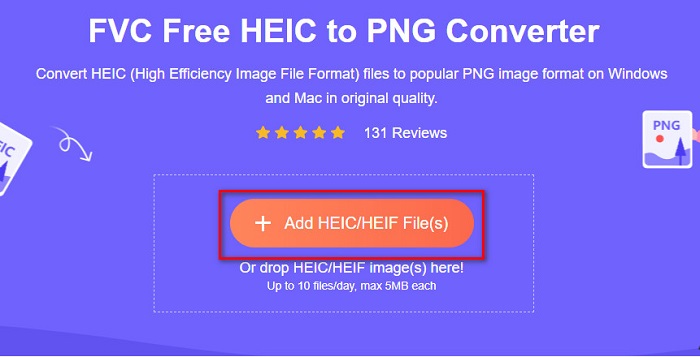
Krok 3. Znovu se otevřou složky v počítači, kde vyberete svůj soubor HEIC. Klikněte na Open. Poté se spustí převod HEIC na PNG.

Krok 4. Nakonec v rozhraní softwaru klikněte na tlačítko Download, abyste si stáhli svůj soubor PNG.

Jednoduché, že? Soubor HEIC můžete převést na soubor PNG pomocí následujících jednoduchých kroků.
Použijte Xconvert.com
Xconvert je bezplatný online převodník HEIC na PNG, který snadno převádí soubory HEIC na soubory PNG. Tento online převodník má snadno ovladatelné rozhraní, což je výhodné pro začátečníky. Navíc při použití tohoto online převodníku můžete změnit rozlišení obrázku. Jelikož je to však nástroj závislý na internetu, můžete při pomalém připojení zažít pomalejší proces převodu. Také obsahuje reklamy, které pro vás mohou být rušivé.
Krok 1. V prohlížeči vyhledejte Xconvert.com. Na jejich webu klikněte na tlačítko Add Files, poté se otevřou soubory v počítači a vy vyberete svůj soubor HEIC.

Krok 2. Váš obrázek bude nahrán do rozhraní softwaru. Po nahrání klikněte na tlačítko Convert umístěné v pravém dolním rohu rozhraní. Pak počkejte, než bude váš soubor připraven ke stažení, a poté pokračujte dalším krokem.
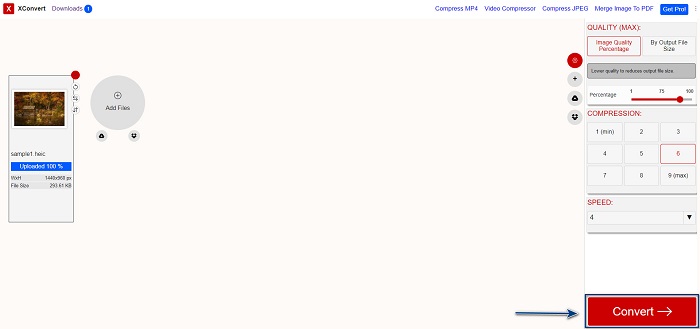
Krok 3. Až bude soubor připraven, klikněte na tlačítko Download a stáhněte si soubor PNG. Nad tlačítkem ke stažení také uvidíte výstupní velikost a dobu převodu.

Použijte Zamzar
Dalším způsobem, jak online převést HEIC na PNG, je použití online převodníku Zamzar. Tento převodník jste pravděpodobně viděli, když jste hledali nástroj pro převod HEIC na PNG. Tento převodník je dostupný téměř ve všech běžných prohlížečích. Má jednoduché uživatelské rozhraní, takže se snadno používá. Pokud však dojde během převodu k výpadku internetu, může se soubor poškodit. Přesto tento převodník používá mnoho uživatelů ke změně HEIC na PNG.
Krok 1. V prohlížeči, který používáte, vyhledejte Zamzar. Na jejich webové stránce klikněte na tlačítko Add Files. Otevřou se soubory ve vašem počítači a nahrajte obrázek HEIC.

Krok 2. Po nahrání souboru HEIC klikněte na tlačítko drop-down a jako výstupní formát souboru vyberte PNG.

Krok 3. Nakonec klikněte na tlačítko Convert Now, abyste převedli soubor HEIC do formátu PNG. Poté si stáhněte soubor PNG. Stačí pár vteřin počkat a je hotovo!

Použijte Conversion Tools.io
Conversion Tool je online převodník HEIC na PNG s jednoduchým uživatelským rozhraním. Dokáže rychle převést váš soubor HEIC na PNG. Kromě toho neobsahuje tolik reklam jako jiné online převodníky. Nevýhodou je však to, že můžete převést pouze deset souborů denně a existuje omezení velikosti souboru. Pokud ale převádíte malý soubor, může být tento nástroj pro vás vhodný.
Krok 1. V prohlížeči vyhledejte Conversion Tools.io. Poté klikněte na tlačítko Browse v hlavním rozhraní softwaru nebo svůj soubor HEIC na tlačítko Browse jednoduše přetáhněte.

Krok 2. Poté klikněte na tlačítko Run Conversion, aby se spustil převod souboru HEIC na soubor PNG. Potom počkejte, než se váš obrázek načte, a pokračujte dalším krokem.

Krok 3. Na závěr klikněte na tlačítko Download a stáhněte si soubor PNG.

Použijte CDKM
Posledním nástrojem, který vám představíme, je CDKM. Tento nástroj vám umožní převést soubory HEIC na PNG jen několika kliknutími. Převod v tomto online nástroji však může trvat několik sekund v závislosti na rychlosti vašeho internetu. Také obsahuje reklamy, které pro vás mohou být nepříjemné. Na druhou stranu nemá žádné omezení velikosti souboru, takže rozhodně stojí za vyzkoušení.
Krok 1. Ve svém prohlížeči vyhledejte online převodník CDKM. V hlavním rozhraní softwaru klikněte na tlačítko Choose Files. Otevřou se složky v počítači, kde vyberete soubor HEIC k nahrání.

Krok 2. Dále klikněte na tlačítko Start Conversion, aby se spustil proces převodu.

Krok 3. Nakonec trochu sjeďte dolů, uvidíte tlačítko Download. Klikněte na tlačítko Download a stáhněte si svůj soubor PNG.

Část 3. Převod HEIC na PNG na Macu
Zařízení Apple podporují formáty souborů HEIC a pomocí Macu můžete nativně otevřít soubor HEIC. Pokud však chcete převést soubor HEIC na PNG, můžete jej změnit pomocí aplikace Photo na Macu. Pokud tedy používáte Mac, raději si přečtěte tuto část.
Krok 1. Nejprve přetáhněte soubor HEIC do aplikace Photo App. Poté si náhled HEIC fotografie zobrazte a klikněte na File > Export > Export 1 Photo.

Krok 2. Poté v poli Photo Kind klikněte na požadovaný výstupní formát. Zvolte formát souboru PNG.

Krok 3. Poté klikněte na tlačítko Export a vyberte cílové umístění výstupního souboru. Uvidíte, že váš soubor HEIC byl změněn na formát PNG.

Část 4. Převod souboru HEIC na PNG na iPhone
Pokud používáte iPhone, můžete na svém zařízení otevřít soubor HEIC. Pokud však chcete převést soubor HEIC na PNG pomocí zařízení iPhone, máme pro vás způsob. Podle těchto jednoduchých a snadných kroků níže můžete převést HEIC na PNG bez námahy.
Krok 1. V aplikaci Photo App na iPhonu klepněte na tlačítko Select v horní části obrazovky. Poté vyberte soubor HEIC a klepněte na ikonu Share.
Krok 2. Přejeďte po obrazovce nahoru, zobrazí se možnost Copy Photo, na tu klepněte.
Krok 3. Nakonec přejděte do aplikace Files, klepněte na tlačítko browse a vyberte požadované cílové umístění výstupu (klepněte na iCloud Drive nebo On my iPhone). Poté tam vložte svůj soubor HEIC.

Po vložení souboru uvidíte, že váš soubor bude automaticky převeden na soubor PNG.
Část 5. Rozšířené znalosti o souborech HEIC a PNG
Pokud si stále nejste jisti, zda chcete převést soubor HEIC na PNG, poskytujeme vám srovnávací tabulku, která vám pomůže rozlišit rozdíly mezi těmito dvěma soubory. Navíc vám poskytuje jasný přehled o charakteristikách HEIC a PNG. Přečtěte si pozorně, abyste poznali rozdíl mezi soubory HEIC a soubory PNG.
| HEIC | PNG | |
| Kompatibilita | Tento formát souboru podporuje pouze zařízení Apple. | Téměř všechna zařízení podporují tento soubor, včetně zařízení Apple. |
| Velikost souboru | Malá velikost souboru. | Může dosáhnout velké velikosti souboru. |
| Kvalita obrazu | Vysoká kvalita obrazu. | Má dobrou kvalitu, ale ne lepší než soubor HEIC. |
| Komprimováno/Nekomprimováno | Stlačený | Nekomprimované |
| Úpravy | Při úpravách zachovává kvalitu obrazu. | Při úpravách může dojít ke snížení kvality. |
Část 6. Časté dotazy o převodu HEIC na PNG
Ovlivní převod HEIC na PNG velikost souboru?
Ano. Když převedete HEIC na PNG, zvětší se velikost souboru, i když nebude velká.
Můžete otevřít soubory PNG v aplikaci Adobe Photoshop?
Rozhodně. Soubory PNG můžete otevřít v aplikaci Adobe Photoshop, protože Adobe Photoshop podporuje formát souboru PNG.
Můžete otevřít soubor ve formátu PNG na zařízeních Apple nativně?
Ano. Když pořídíte snímky obrazovky ze svého iPhone, automaticky se uloží do složky fotoaparátu jako soubor PNG.
Závěr
A je to! Jsme na konci našeho malého dobrodružství. Tento článek vám přináší nejlepší řešení, jak převést soubor HEIC do formátu PNG. Všechny výše uvedené online převodníky HEIC na PNG dokážou váš soubor efektivně převést bez námahy. Kromě toho existují i další možnosti, které můžete použít, pokud jste uživatelem Macu nebo iPhonu. Pokud ale hledáte nejlepší převodník HEIC na PNG s vynikajícími funkcemi, pak je pro vás nejlepším řešením převodník FVC Free HEIC to PNG.
-
 Jak otevřít soubor HEIC na Windows, Mac a online
 Hledáte způsob, jak otevřít soubory HEIC? Tento článek vám poskytuje nejlepší řešení pro otevření souborů HEIC v systémech Windows, Mac a Online.
-
 JPG VS GIF: 3 jednoduché způsoby, jak převést JPG na GIF
 Chcete vědět, jaký je rozdíl mezi JPG a GIF? Nebo chcete přepnout JPG na animovaný formát GIF? Pak si přečtěte tento článek, abyste měli představu.
-
 5 nejlepších způsobů, jak změnit obrázek na animovaný GIF [Aktualizováno 2022]
 Potřebujete konvertor obrázku na GIF? Tento článek poskytne pět nejlepších převodníků, které na trhu najdeme. Pojďme tedy zjistit tyto nástroje přečtením tohoto článku.
