


 Video Converter Ultimate
 Screen Recorder
 Oprava videa
 Bezpečné stažení
Bezkonkurenční a dokonalé způsoby, jak převést AMV na MP4
Chcete si své video AMV užívat ve všech přehrávačích a programech? Pak je potřeba převést soubor AMV do formátu MP4. Nemusíte se ale bát! Poskytneme vám nejlepší řešení pro převod vašich video souborů. V tomto článku jsme již otestovali převodníky, které zde objevíte. Díky tomu se nemusíte obávat, zda jsou aplikace bezpečné. Navíc vám představíme funkce, které si při používání softwaru můžete užívat. Pokud jsme vás zaujali a patříte mezi uživatele, kteří chtějí převádět AMV na MP4, přečtěte si tento článek a osvojte si znalosti o převodu videí.

Část 1: Úvod do AMV a MP4
AMV
Přípona souboru: .amv
Vyvinul: MTV
Kategorie souboru: formát video souboru
Popis: Videa uložená ve formátu Actions Media Video, který podporují některé čínské přenosné přehrávače médií, jsou známá jako soubory AMV. Obsahují komprimované video s nízkým rozlišením (96x96 až 320x240 pixelů). Soubory AMV lze přehrávat jak pomocí softwaru pro stolní počítače, který je dodáván s AMV přehrávači, tak pomocí přehrávače VideoLAN VLC.
Asociované programy: K-Lite Codec Pack, VideoLAN a VLC Media Player
AMV
Přípona souboru: .mp4
Vyvinul: Moving Picture Experts Group (MPEG)
Kategorie souboru: formát video souboru
Popis: Video standardy AAC a MPEG-4 společně definují rozšíření MP4. V kontejneru může být obsažen jakýkoli typ média, včetně zvuku, videa, titulků a 2D a 3D grafiky. Téměř každý přehrávač může přehrávat soubory MP4 ve Windows, ale na Macu musíte nainstalovat zásuvný modul nebo převést soubor MP4 do jiného formátu. Skupina s názvem The Moving Picture Experts.
Asociované programy: Apple, QuickTime Player, VLC Media Player, Microsoft, Windows Media Player a VideoLAN.
Část 2: Vynikající postupy pro převod AMV na MP4 offline
Máme pro vás nejlepší řešení, pokud chcete převádět AMV na MP4 pomocí programu ke stažení. Můžete použít Video Converter Ultimate. Podporuje více než 100 video formátů, včetně AVI, MKV, WMV, MOV, FLV, M4V, SWF, MTS, M2TS a dalších. Tento nástroj má intuitivní rozhraní a jednoduché postupy, takže je vhodný pro všechny uživatele. Pomocí tohoto nástroje můžete převádět více souborů najednou, protože umožňuje hromadný (batch) převod. A pozor, jednou z nejvýraznějších funkcí při převodu je ultra rychlý převodní proces, který je až 30× rychlejší než u jiných převodníků. Také můžete své AMV video v tomto nástroji upravovat. Abyste objevili další funkce této aplikace, přečtěte si níže uvedené doplňující informace.
Funkce
◆ Převeďte různé formáty videa, jako jsou MP4, AMV, WMV, AVI, MKV, FLV, SWF, MOV a více než 100 dalších.
◆ Nabízí proces dávkové konverze pro konverzi více souborů současně.
◆ Poskytuje nástroje pro úpravu videa, jako je vylepšení videa, ořez, ořez, rotátor, korekce barev a další.
Postupujte podle jednoduchých pokynů níže a převeďte AMV na MP4 pomocí FVC Video Converter Ultimate.
Krok 1: Nejprve si do Windows nebo Macu stáhněte Video Converter Ultimate. Klikněte na tlačítko Download níže. Poté software nainstalujte a otevřete.
Zdarma ke staženíPro Windows 7 nebo novějšíBezpečné stažení
Zdarma ke staženíPro MacOS 10.7 nebo novějšíBezpečné stažení
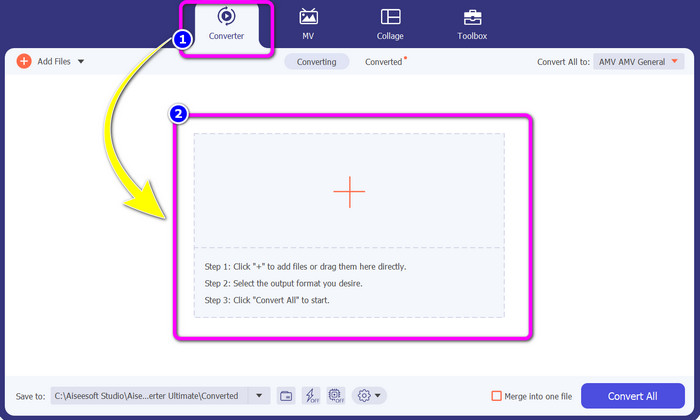
Krok 2: Zvolte panel Converter a klikněte na tlačítko se znakem Plus. Na obrazovce se zobrazí složka se soubory, kde vyberte AMV video, které chcete převést.
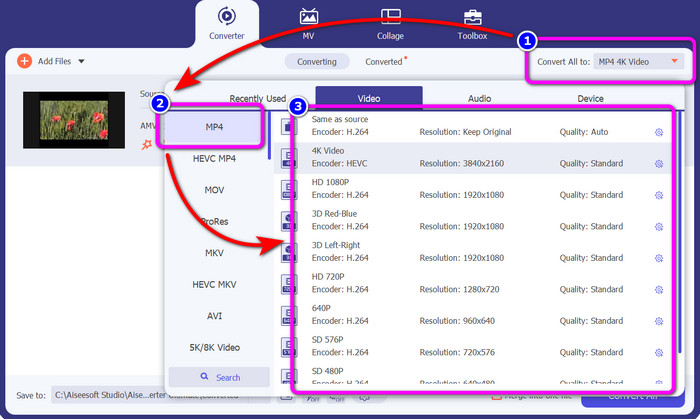
Krok 3: Stiskněte tlačítko Convert All to. Jakmile se zobrazí možnosti formátů, vyberte požadovaný výstupní formát, soubor MP4. Poté můžete zvolit rozlišení videa až do 4K. Zvolte rozlišení, které preferujete, nebo můžete vybrat stejné rozlišení jako u původního videa.
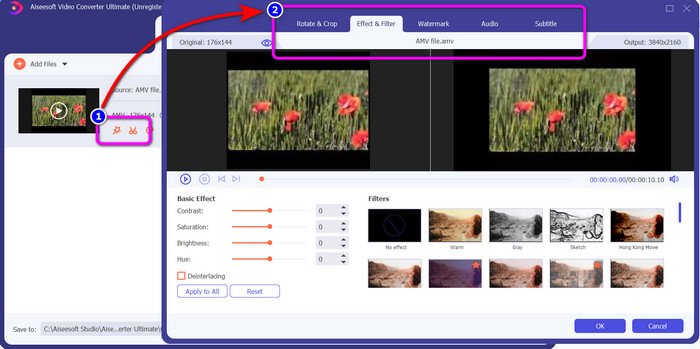
Krok 4: Pokud chcete video upravit, klikněte na ikonu Edit. Poté můžete své video upravovat – měnit, přidávat či odebírat vodoznaky, přidávat efekty nebo filtry a také video otáčet a ořezávat. Pak klikněte na OK. Tímto způsobem můžete své video vylepšit.
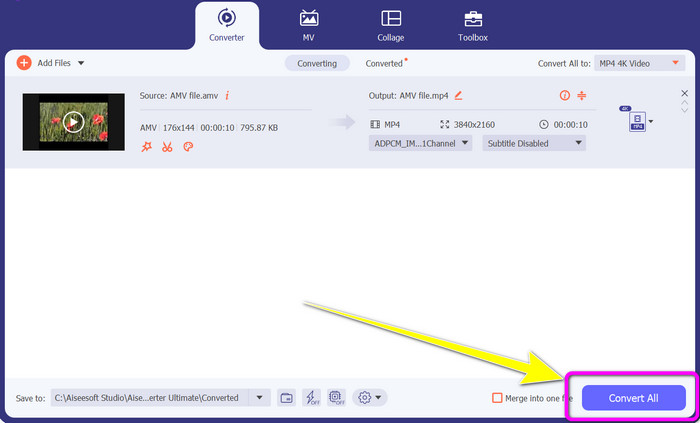
Krok 5: Po úpravě videa klikněte na tlačítko Convert All, čímž spustíte proces převodu. Poté si finální výstup uložte do počítače. Otevřete převedené video v počítači a prohlédněte si konečný výsledek. Klikněte sem a zjistěte, jak převést DV na MP4.
Část 3: Nejjednodušší způsob, jak převést AMV na MP4 online zdarma
Dalším způsobem, jak převést AMV na MP4 online, je použít FVC Free Video Converter Online. Tento nástroj má jednoduchý postup i rozhraní, takže je vhodný jak pro zkušené, tak i nezkušené uživatele. Videa můžete převádět několika málo kliknutími. Tento převodník navíc podporuje mnoho video formátů, jako jsou AVI, MP4, M4V, FLV, MOV, WMV, MKV a další. Můžete také provádět hromadný převod a převádět více souborů současně. Kromě toho můžete při převodu měnit rozlišení videa. Je také možné upravit datový tok (bitrate) a snímkovou frekvenci (frame rate) videa. Tuto online aplikaci můžete využívat zdarma a svá videa stahovat bez nežádoucích prvků, jako jsou vodoznaky, loga, nálepky, text a podobně. Je rovněž dostupná ve všech prohlížečích, včetně Google Chrome, Safari, Internet Explorer, Microsoft Edge atd.
Funkce
◆ Převod různých video formátů, včetně MP4, AMV, FLV, AVI, MOV, VOB, MKV a dalších.
◆ Nabízí proces dávkové konverze pro rychlejší postup.
◆ Upravte datový tok, snímkovou frekvenci a rozlišení videa.
◆ Převod zvukových formátů jako MP3, FLAC, WAV, AAC, AC3 atd.
◆ Upravte datový tok a vzorkovací frekvenci zvuku.
Pomocí níže uvedených jednoduchých postupů převeďte AMV na MP4 pomocí FVC Free Video Converter Ultimate.
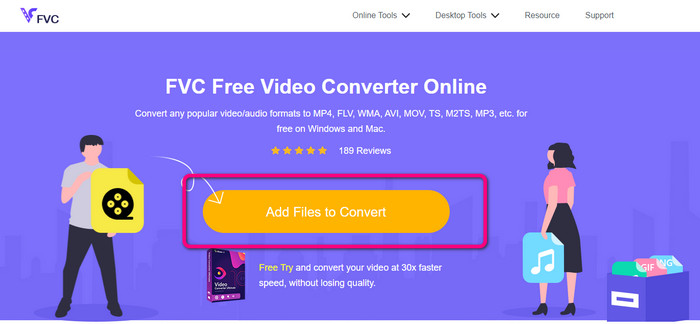
Krok 1: V prohlížeči přejděte na web FVC Free Video Converter Online. Stiskněte tlačítko Add Files to Convert a nahrajte AMV video, které chcete převést.
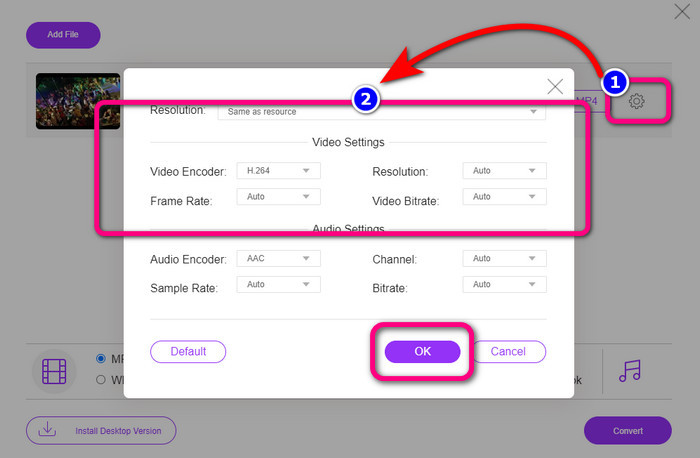
Krok 2: Po přidání AMV videa klikněte na ikonu Setting a upravte snímkovou frekvenci, datový tok (bitrate) a rozlišení videa. Poté stiskněte OK.
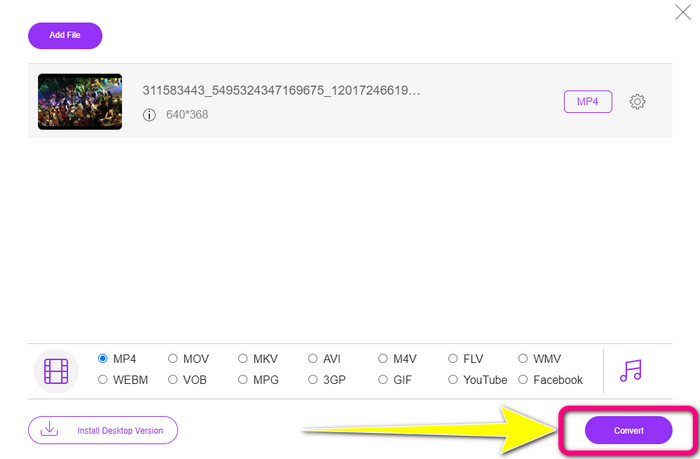
Krok 3: V dolní části rozhraní vyberte formát souboru MP4. Poté klikněte na tlačítko Convert. Tento nástroj můžete také použít k převodu AMV na MKV.
Část 4: Časté dotazy o převodu AMV na MP4
1. Je AMV totéž jako WMV?
Nejsou stejní. AMV je formát video souborů kompatibilní s MP4 a S1 MP3 přehrávačem. Ve srovnání s jinými video formáty, jako je WMV, je menší. Ke hraní nepotřebuje velký výpočetní výkon.
2. Co je lepší, AVI nebo AMV?
Soubor AVI můžete použít, pokud chcete přehrát video kdekoli. Formát souboru AMV je však dobrou volbou, pokud dáváte přednost menší velikosti souboru.
3. Jak převedu video soubory do MP4?
Můžete použít Video Converter Ultimate. Podporuje téměř všechny video formáty a video soubory můžete převádět rychleji.
Závěr
Převod AMV na MP4 je snadný, pokud použijete dva výše zmíněné převodníky. Nástroje mohou využívat jak pokročilí, tak i méně zkušení uživatelé, protože oba nabízejí intuitivní rozhraní a jednoduché postupy. Proto neváhejte a použijte Video Converter Ultimate a FVC Free Video Converter Online hned teď!
-
 Úspěšné metody pro okamžitý převod DIVX na MP4
 Jak převedu DIVX na MP4? Pokud hledáte to nejlepší řešení, jste ve správném článku. Ukážeme vám, jak snadno převést DIVX na MP4
-
 Jak převést F4V na MP4 nejúčinnějšími metodami
 Nejsou vaše videa F4V v pěkné kvalitě? Poté jej převeďte do souboru MP4. Tento příspěvek nabídne nejlepší způsob, jak převést F4V na MP4 online a offline
-
 Pět populárních přístupů k převodu Xvid do formátu MP4
 V tomto článku se podívejte na tyto úžasné metody, jak převést Xvid do formátu MP4. Také se naučíte nejlepší aplikace, které můžete při převodu použít
