


 Video Converter Ultimate
 Screen Recorder
 Oprava videa
 Bezpečné stažení
Jak převést MP4 na 3GP online a offline
MP4 je populární formát videa, který lze přehrávat na přehrávačích MP4, mobilních telefonech a tabletech. Filmy, které stahujeme z webových stránek, obvykle zůstávají ve formátu MP4. Některé mobilní telefony ale podporují pouze přehrávání videí 3GP. Tento článek vám ukáže 3 bezplatné převaděče MP4 na 3GP a můžete bez problémů převádět MP4 na 3GP.

Část 1. Jak převést MP4 na 3GP v systémech Windows a Mac
Pokud chcete převést MP4 na 3GP offline, můžete použít desktopový převodník MP4 na 3GP. FVC Free FLV to 3GP Converter je bezplatný a snadno použitelný software pro převod videí pro Windows a Mac. Umí převádět různé formáty videa jako FLV, MP4, MOV, MKV, MTS, M2TS atd. na 3GP bez námahy. Kromě toho nabízí editační funkce pro přidání motivů, úpravu autora, času a poskytovatele na začátku/konci videa.

- Převádějte videa ve formátu MP4, MKV, AVI, MOV, MP3, AAC, AIFF atd. Na 3GP.
- Exportujte videa 3GP a bezztrátový zvukový soubor ze souboru MP4 jedním kliknutím.
- Umožněte uživatelům upravit poskytovatele, název, autora, čas a přidat téma.
- Dávkový převod MP4 na 3GP pro hraní na některých mobilních telefonech.
Zdarma ke staženíPro Windows 7 nebo novějšíBezpečné stažení
Zdarma ke staženíPro MacOS 10.7 nebo novějšíBezpečné stažení
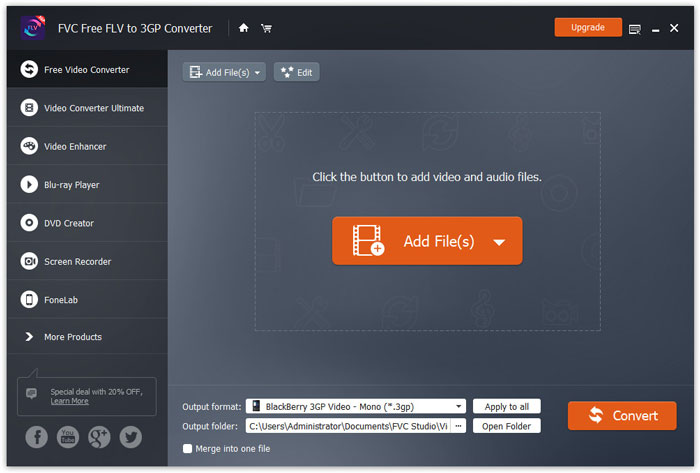
Krok 1. Zdarma si stáhněte, nainstalujte a spusťte FVC Free FLV to 3GP Converter ve Windows nebo na Macu. Kliknutím na tlačítko Add Files načtěte soubory MP4 z počítače. Můžete převádět více souborů MP4 najednou.
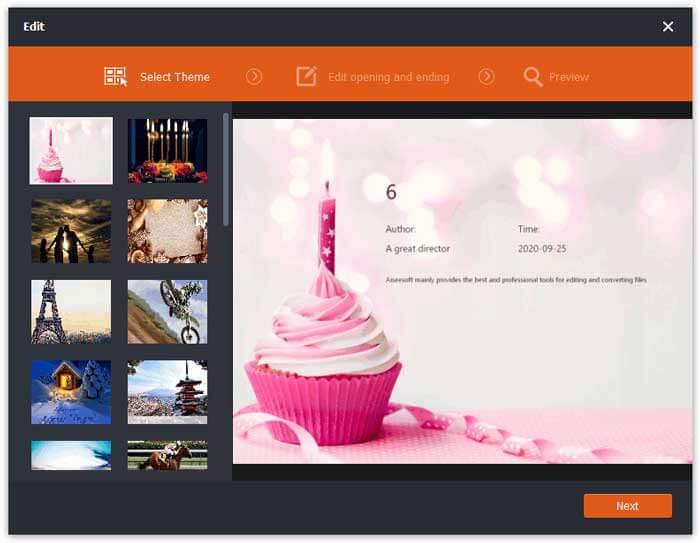
Krok 2. Klikněte na svůj soubor MP4 a poté na tlačítko Edit. Můžete přidat motiv k souboru MP4 a upravit úvodní a závěrečný obsah. Pak klikněte na Next pro náhled a uložení změn.
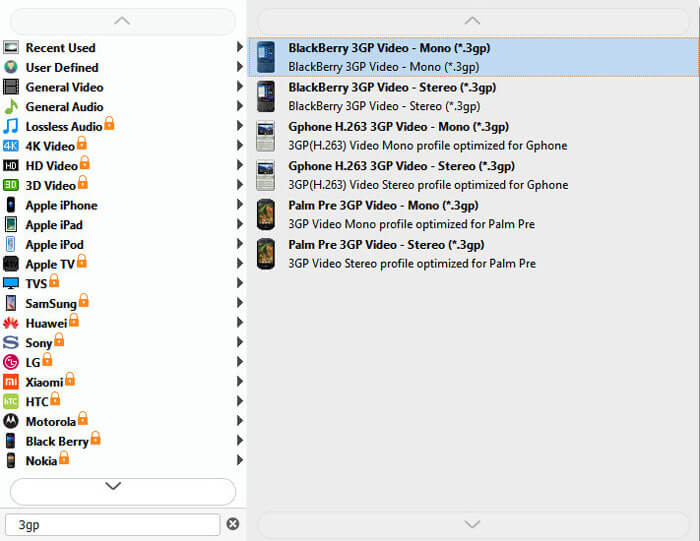
Krok 3. Vyberte 3GP z rozbalovacího seznamu Output format ve spodní části. Můžete zvolit BlackBerry 3GP Video - Mono (*.3gp) nebo jinou možnost podle potřeby.
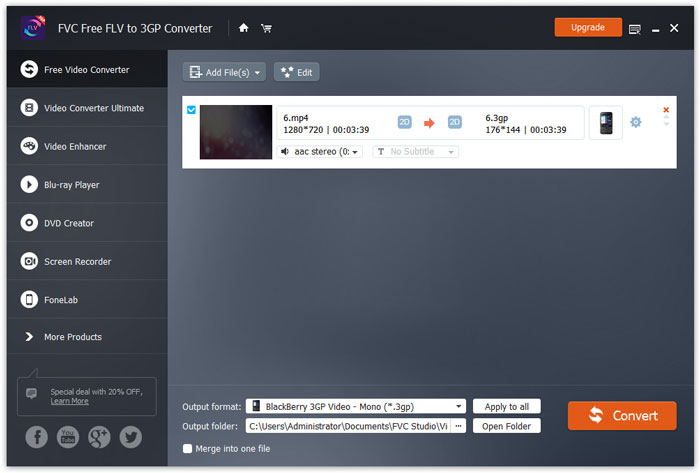
Krok 4. Nakonec vyberte výstupní složku v počítači a klikněte na tlačítko Convert pro zahájení převodu MP4 na 3GP.
Část 2. Export 3GP z MP4 se 2 online převaděči 3GP
Ve srovnání s instalací stolního převaděče 3GP je používání webového převaděče pro převod MP4 na 3GP mnohem jednodušší a jednodušší. V této části budeme sdílet 2 online převaděče 3GP, které vám pomohou bez problémů převést MP4 na 3GP.
1. FVC bezplatný online video převodník
FVC Free Online Video Converter je známá platforma pro převod videí, kde můžete převádět populární video a audio formáty do 3GP, MKV, MOV, WMV, AVI, MP3 a dalších.
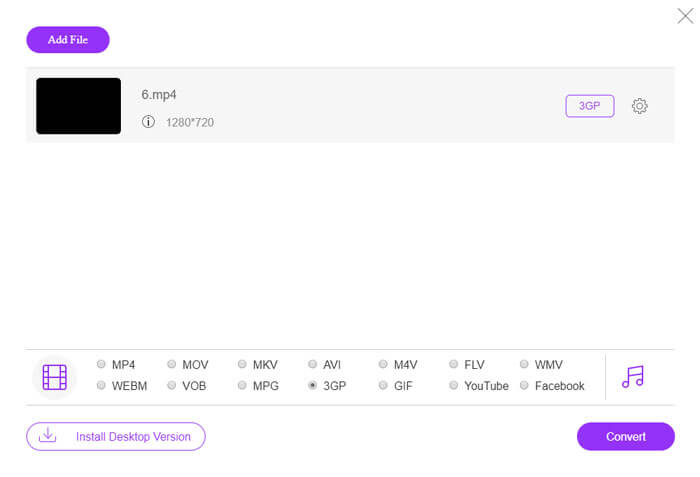
Krok 1. Přejděte na oficiální web FVC Free Video Converter. Klikněte na tlačítko Add Files to Convert pro stažení a instalaci spouštěče.
Stáhněte si desktopovou verzi a převádějte soubory hromadně.

Krok 2. Vyberte soubory MP4 z místního počítače. Kliknutím na ikonu ozubeného kola můžete upravit datový tok videa, vzorkovací frekvenci, snímkovou frekvenci, rozlišení a hlasitost.

Krok 3. Nastavte výstupní formát na 3GP ve spodní části. Poté klikněte na tlačítko Convert a začněte převádět MP4 na 3GP. Můžete hromadně převést několik souborů MP4 na 3GP současně.
2. Zamzar
Zamzar je online video převodník, audio převodník, převodník obrázků a eBook převodník. Je vhodné převést MP4 do různých dalších formátů pomocí Zamzaru. Následují jednoduché kroky pro převod MP4 na 3GP.
Krok 1. Přejděte na zamzar.com/convert/mp4-to-3gp/ a klikněte na tlačítko Add Files pro nahrání souborů MP4.
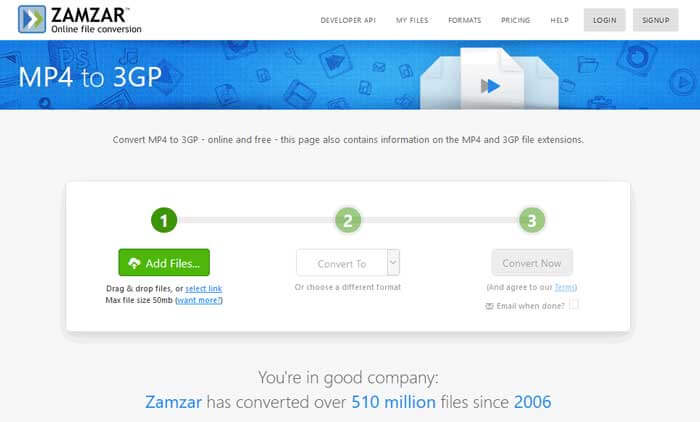
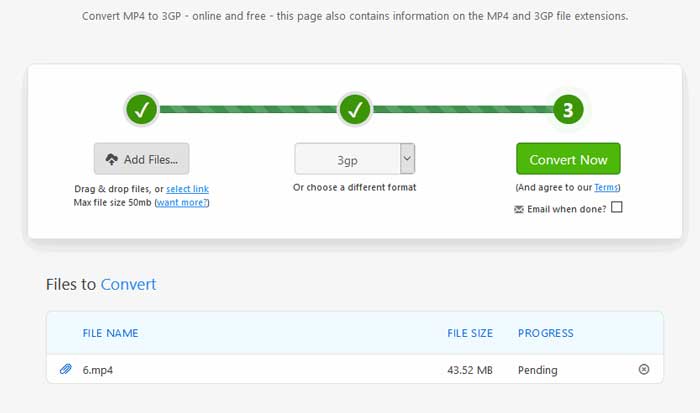
Krok 2. Můžete zvolit jiný výstupní formát. Obvykle je 3gp nastaveno jako výchozí výstupní formát. Klikněte na tlačítko Convert Now pro spuštění převodu MP4 na 3GP.
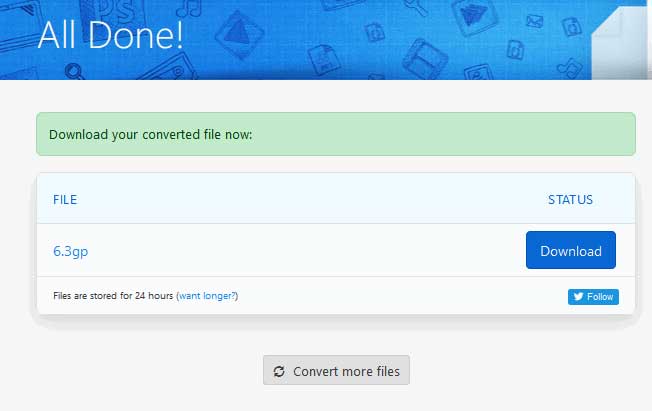
Krok 3. Poté budete přesměrováni na jinou stránku. Kliknutím na tlačítko Download uložíte převedený soubor 3GP do počítače.
Co když má váš soubor MP4 velkou velikost? Podívejte se jak komprimovat soubory MP4 zde.
MP4 vs. 3GP
Formát MP4, vydaný skupinou Moving Picture Experts Group (MPEG) v roce 2001, vám může pomoci uložit data videa, zvuku, titulků a obrázků do samostatných stop. Je to zkratka pro MPEG-4 Part 14. Navíc je to jeden z nejpopulárnějších formátů používaných pro streamování a sdílení videí.
Projekt partnerství 3. generace (3GPP) vytvořil formát 3GP/3GPP jako formát multimediálního kontejneru. Ve skutečnosti je založen na formátu mediálního souboru ISO. Často jej používáme k ukládání video/audio streamů, které jsou přenášeny mezi 3G mobilními telefony a online.
Část 3. Nejčastější dotazy týkající se převodu MP4 na 3GP
1. Je 3GP lepší než MP4?
3GP je navržen pro mobilní telefony v sítích 3G. Soubory 3GP můžete přehrávat v přehrávačích jako QuickTime, VLC a RealPlayer. MP4 je mnohem kompatibilnější než 3GP. Je univerzálně podporován mnoha přenosnými multimediálními přehrávači a chytrými telefony.
2. Co je 3GP?
3GP je formát multimediálního kontejneru definovaný 3. generací. Může ukládat videa a zvukové streamy přehrávané na mobilních telefonech 3G, ale lze jej přehrávat také na některých telefonech 2G nebo 4G.
3. Jak převést MP4 na FLV?
S pomocí FVC Free Online Video Converter můžete snadno převést MP4 na FLV online. Přejděte na tuto online stránku a klikněte na tlačítko Add Files to Convert pro instalaci spouštěče. Poté vyberte soubory MP4 z počítače a jako výstupní formát zaškrtněte FLV. Klikněte na tlačítko Convert a převeďte MP4 na FLV.
Závěr
Mluvili jsme hlavně o 3 metodách převodu MP4 na 3GP ve Windows a Mac. Pokud dáváte přednost online řešení, můžete vyzkoušet online video konvertor FVC Free nebo Zamzar online. Chcete-li upravit soubor MP4 pro další dokonalost, můžete místo toho použít převodník Free FLV to 3GP Converter. Pokud máte nějaké lepší řešení, neváhejte zanechat komentář.
-
 Nejlepší 3 způsoby, jak rychle převést MP4 na VOB
 Jak převést MP4 na VOB na Windows PC a Mac? Chcete-li tento problém vyřešit, bude tento příspěvek sdílet 3 nejlepší způsoby, jak vám zdarma převést MP4 na VOB.
-
 Zdarma | 3 nejlepší metody pro převod MP4 na WMV bez ztráty kvality
 Tento příspěvek sdílí, jak převést video MP4 do formátu WMV na počítačích Mac nebo Windows. Nabízíme vám také několik možností, včetně stolního softwaru a webových online převaděčů. Jste připraveni znát nejlepší nástroje pro převod MP4 na WMV?
-
 3 metody převodu MP3 na MP4 pomocí obrázku
 Jak převést MP3 na MP4 ve vysoké kvalitě? Tento příspěvek ukazuje 3 efektivní a bezplatné metody pro změnu MP3 na MP4 s obrázky ve Windows a Mac.

