


 Video Converter Ultimate
 Screen Recorder
 Oprava videa
3 Online a offline převaděče MPG na MP4 Musíte se pokusit převést soubory MPG
MP4 je v současnosti jedním z nejběžnějších formátů souborů, se kterými se na internetu setkáte. Ačkoli mají MPG a MP4 mnoho podobností, existují mezi nimi i rozdíly. A pokud chcete převést svůj soubor MPG na formát MP4, otestovali jsme převodníky videa, které jsou dnes populární. Navíc jsme pro vás vybrali ty nejlepší převodníky MPG na MP4, které stojí za to vyzkoušet!

Část 1. Proč potřebujete převést MPG na MP4
Jaký význam má převod MPG na MP4? Formáty MPG a MP4 se často používají pro videa na internetu. Jaký je mezi nimi rozdíl? MPG neboli MPEG je původní formát, který používá kodek MPEG. Jde o enkodér, který poskytuje vysoce kvalitní výstup videa.
Na druhou stranu je MP4 jedním z nejběžnějších formátů video souborů a využívá moderní kompresi videa. Který je tedy lepší? Vysoká kompresní schopnost MP4 umožňuje soubory komprimovat na menší velikosti než jakýkoli jiný formát video souborů, jako je MPG.
Část 2. 3 způsoby, jak převést MPG na MP4
Zde jsou vynikající video konvertory, které můžete používat online i offline, a naučte se, jak změnit MPG na MP4.
1. Použijte Video Converter Ultimate
Video Converter Ultimate je převodník multimediálních souborů, který vám umožní snadno převést soubor MPG do formátu MP4. Tento převodník má uživatelsky přívětivé rozhraní, ale vytváří působivé výstupy. Nabízí funkce, díky nimž můžete svůj soubor MPG upravovat, vylepšovat a komprimovat. Navíc v něm můžete soubory MPG převádět na MP4 hromadně.
Video Converter Ultimate má také možnost, kde můžete kolážovat obrázky a videa. Také, pokud chcete vytvořit GIF, tento konvertor má tuto funkci. Navíc při použití tohoto konvertoru můžete převádět velké soubory, aniž byste zničili jejich kvalitu. Přestože se jeho funkce zdají být profesionální, můžete je používat rychle, protože se používají pouze snadno.
Krok 1. Chcete-li si tento převodník stáhnout, klikněte na tlačítko pro stažení níže. Postupujte podle instalačního procesu a poté aplikaci otevřete.
Zdarma ke staženíPro Windows 7 nebo novějšíBezpečné stažení
Zdarma ke staženíPro MacOS 10.7 nebo novějšíBezpečné stažení
Krok 2. Po spuštění převodníku klikněte na tlačítko Add Files nebo na tlačítko + a nahrajte svůj soubor MPG. Zobrazí se soubory v počítači, kde ve složkách vyhledáte svůj soubor. Poté kliknutím na Open přidáte soubor do fronty.
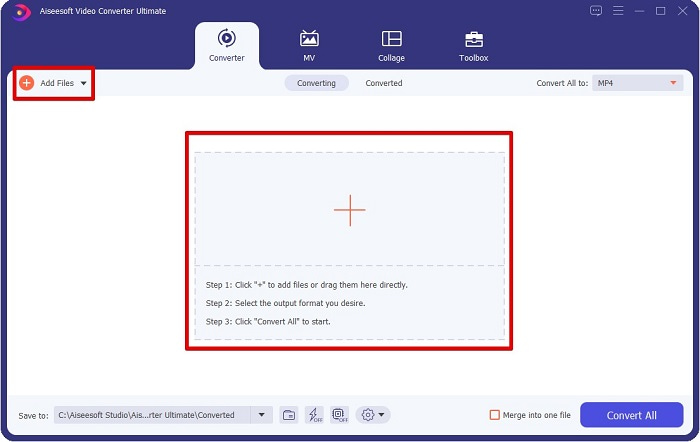
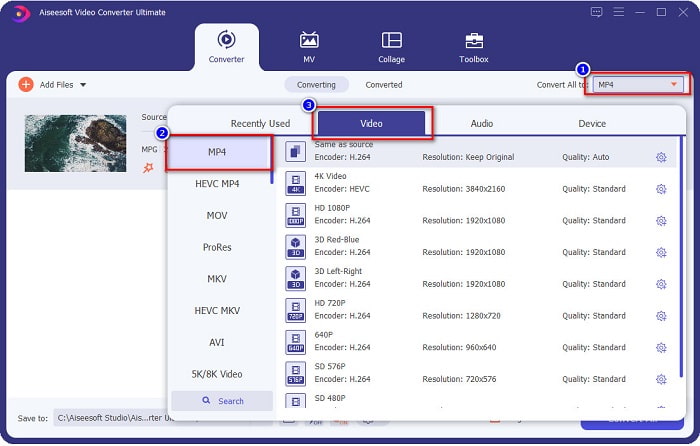
Krok 3. Chcete-li změnit formát souboru MPG, klikněte na Convert All to v pravém horním rohu obrazovky. Po zobrazení seznamu formátů souborů vyberte formát MP4.
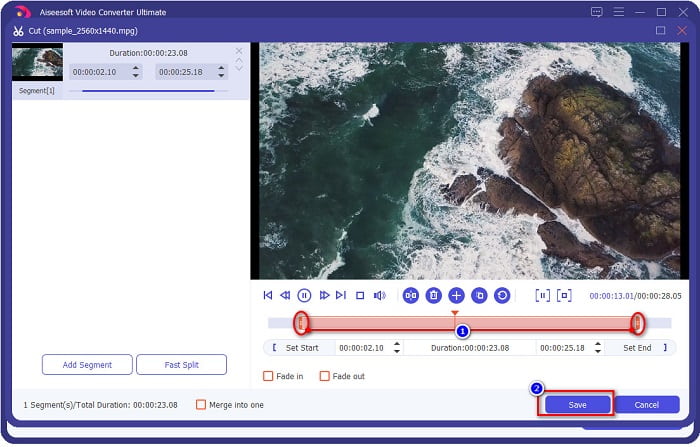
Pokud chcete zkrátit délku videa, klikněte na tlačítko scissor a video ořízněte. Přetažením tlačítek play head můžete upravit délku videa. Pro dokončení klikněte na Save.
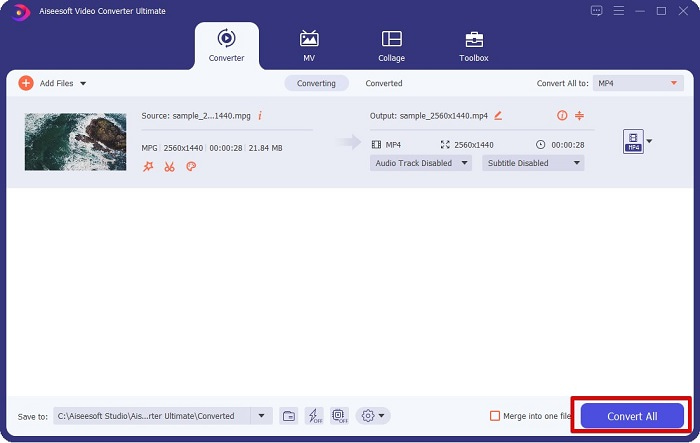
Krok 4. Jakmile jste vybrali požadovaný formát souboru, klikněte na Convert All, čímž převedete soubor MPG na MP4. Chvilku vyčkejte a váš soubor MPG bude převeden na MP4. Těmito jednoduchými kroky jste snadno převedli svůj soubor MPG na MP4.
2. Použijte bezplatný online konvertor
FVC Free Online Video Converter vám umožní zdarma převést soubor MPG do formátu MP4 bez registrace. Jde o bezplatný online převodník videa, který umožňuje převod bez omezení. Navíc v něm můžete online převádět i velké soubory. Nemusíte nic stahovat, protože k němu přistupujete přes internet. Jeho nevýhodou však je, že je závislý na připojení – rychlost převodu tedy záleží na rychlosti internetu. Přesto tento převodník používá mnoho uživatelů a je ověřeně skvělým nástrojem pro převod videa.
Zde je seznam kroků pro převod v FVC Free Online Video Converter:
Krok 1. Otevřete prohlížeč a vyhledejte FVC Free Online Video Converter.
Krok 2. Jakmile jste na webové stránce, klikněte na Add Files to Convert. Zobrazí se textové pole, v němž si nejprve musíte stáhnout spouštěč. Po stažení spouštěče budete přesměrováni do svých souborů, kde vyberete soubor MPG, který chcete převést.
Stáhněte si desktopovou verzi a převádějte soubory hromadně.
Krok 3. Po výběru souboru MPG uvidíte první rozhraní se seznamem dostupných videoformátů. Před online převodem souboru MPG na MP4 zvolte MP4.
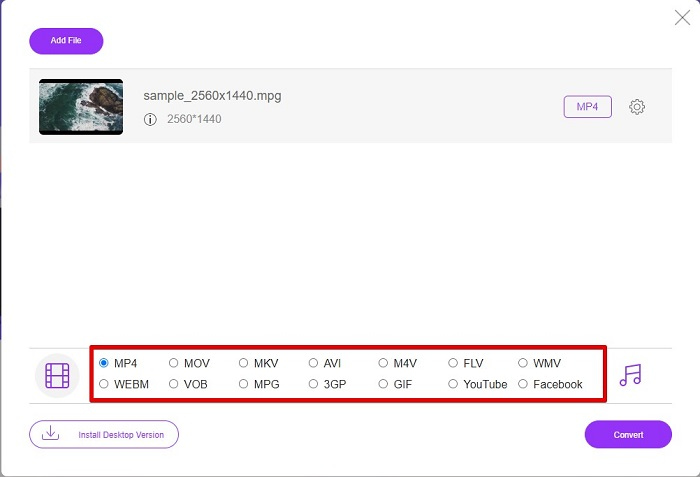
Krok 4. Kliknutím na tlačítko Convert spusťte převod. Otevře se nové okno, ve kterém zvolíte, kam v počítači chcete převedený soubor uložit, a poté kliknete na select folder.
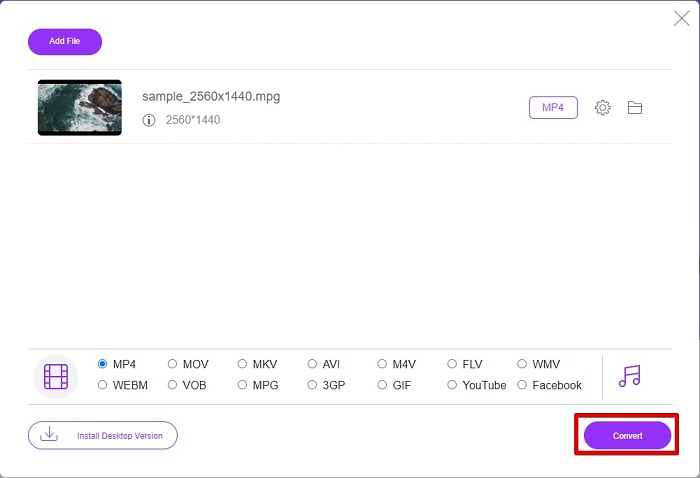
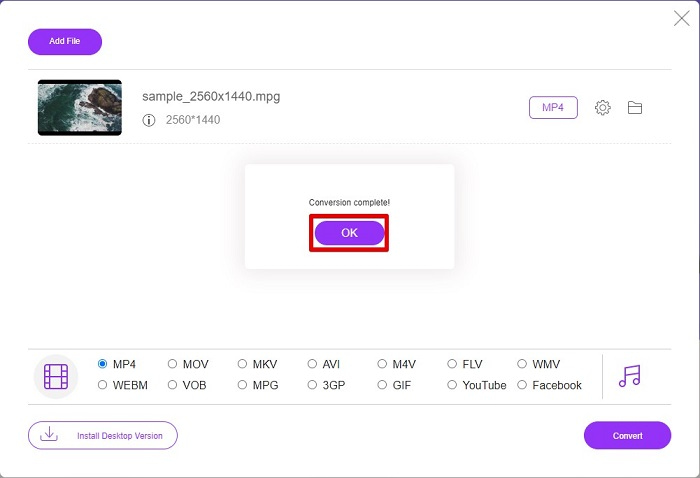
Krok 5. Nakonec se spustí převod souboru a po jeho dokončení klikněte na OK pro ukončení. A je to! Máte hotovo – převod je jednoduchý jako 1-2-3!
3. Použijte ConvertFiles.com
ConvertFiles.com je bezplatná online konvertorová aplikace pro převod vašeho MPG souboru na MP4. Umožňuje převádět formáty souborů, až 300 různých formátů souborů. A pokud hledáte online převodník MPG na MP4, který vám umožní převádět dokumenty, kresby, videa, prezentace a další. Při používání tohoto online převodníku se však setkáte se spoustou rušivých reklam. Přesto tento online převodník stále stojí za vyzkoušení a osvědčil se jako slibný.
Zde je návod, jak převést soubor MPG do formátu souboru MP4:
Krok 1. Ve svém prohlížeči vyhledejte ConvertFiles.com, abyste stránku navštívili přímo.
Krok 2. Vyberte soubor MPG kliknutím na obdélníkové tlačítko nebo na tlačítko Browse vedle Choose a local file. Najděte svůj soubor MPG a vyberte jej.
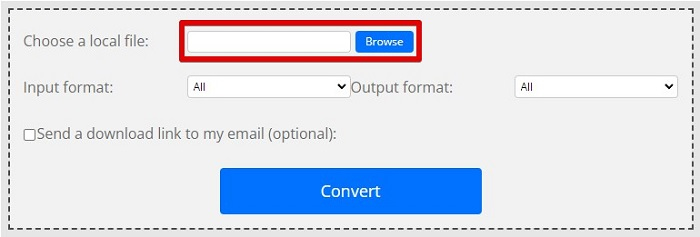
Krok 3. Po výběru souboru MPG, který chcete převést, zvolte v části výstupního formátu formát .mp4 kliknutím na tlačítko drop-down.
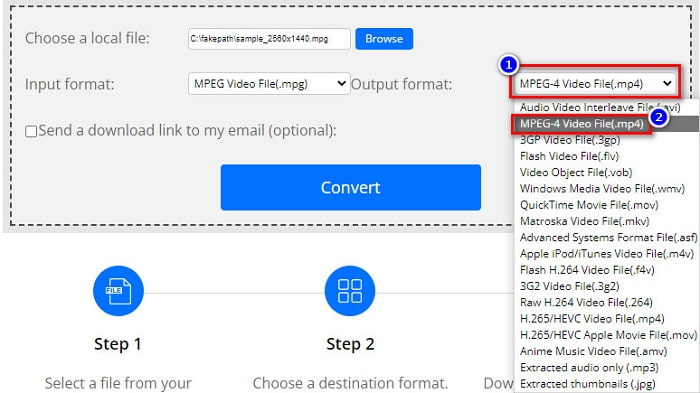
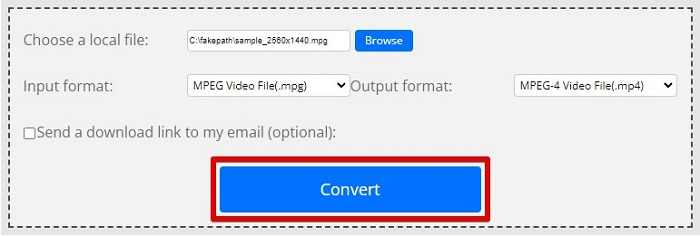
Krok 4. Jakmile jste vybrali požadovaný formát souboru, můžete spustit převod kliknutím na Convert.
Spotřeba paliva vs. MP4
MPG, vytvořený Moving Picture Experts Group (MPEG), je běžný digitální video formát pro ukládání informací o videu, zvuku a metadatech. Je to docela užitečné při vytváření filmů pro sdílení na internetu. Tyto soubory v MPG obvykle obsahují MPEG-1 nebo MPEG-2 video/audio kompresi.
Formát MP4, vydaný skupinou Moving Picture Experts Group (MPEG) v roce 2001, vám může pomoci uložit data videa, zvuku, titulků a obrázků do samostatných stop. Je to zkratka pro MPEG-4 Part 14. Navíc je to jeden z nejpopulárnějších formátů používaných pro streamování a sdílení videí.
Část 3. Časté dotazy o formátu MPG a MP4
Mohu převést soubory MPG na MP4 bez ztráty kvality?
Ano. Video Converter Ultimate vám umožňuje převést vaše MPG do formátu MP4, aniž by došlo ke ztrátě kvality, a to navzdory velikosti souboru.
Kde mohu přehrávat soubory MPG?
Soubory MPG jsou široce podporované. Proto tento formát dokáže otevřít mnoho přehrávačů médií, včetně Microsoft Windows Media Player a VideoLAN VLC Media Player. Více informací najdete v tomto článku: Nejlepší 4 MPG/MPEG přehrávače pro Windows/Mac/Android/iPhone [2021]
Mohu převést MP4 na MPG?
Ano. MPG můžete převést do formátu MP4 pomocí převaděčů souborů, které jsme uvedli výše.
Závěr
Převodníky uvedené výše se ukázaly jako spolehlivé. Snadno se používají a jsou zdarma! Pokud však chcete převodník souborů, který zvládne převést váš soubor MPG do formátu MP4 a zároveň nabízí skvělé funkce pro vylepšení vašich souborů, pak je Video Converter Ultimate tou nejlepší volbou. A pokud hledáte online převodník bez reklam, který si poradí i s velkými soubory, vyzkoušejte FVC Free Online Converter.
-
 3 snadné způsoby, jak převést MPG na MOV na vašem Mac/Windows/Online
 Chcete převést své MPG soubory a později je přenést na iOS, iPod, iPad nebo Mac? Tento článek vám pomůže zjistit, jak převést MPG na MOV pomocí kroků.
-
 Jak převést MPG na FLV bez ztráty kvality [Osvědčeno]
 Na tomto přehrávači médií musíte sledovat svůj oblíbený film, ale nepodporuje MPG. Pokuste se převést svůj MPG soubor na FLV pomocí těchto převodníků, které tento článek představuje.
-
 2 Ultimate MPG převodníky pro převod MPG do WMV zdarma
 Chcete zdarma převést MPG do WMV? V tom případě máte štěstí, protože jsme zjistili, že existují dva nástroje, které můžete použít k převodu souborů MPG.

