


 Video Converter Ultimate
 Screen Recorder
 Oprava videa
 Bezpečné stažení
Návod, jak upravit metadata MKV na ploše tím nejjednodušším způsobem
MKV je přípona, která je velmi populární pro multimediální kontejnerový formát Matroska. Co dělá MKV populárnějším než jiné formáty? Mnoho uživatelů si myslelo, že MKV je komprese videa používaná na zvuk a obraz, což není pravda. Tento formát se stal populárním díky své flexibilitě v používání kodeků pro zvuk, video a titulky, přičemž je všechny uchovává v jednom souboru. Díky těmto vlastnostem se formát stal „odolný vůči budoucnosti“, což znamená, že tento formát souboru nikdy nezastará, včetně zde uložených metadat. Pokud tedy chcete do svého souboru MKV přidat, odstranit nebo upravit metadata, měli byste pokračovat ve čtení tohoto článku a naučit se jak rychle upravit metadata MKV.

Část 1. Jak upravit metadata souboru MKV pomocí 3 nejlepších softwaru na ploše
FVC Video Converter Ultimate – Nejvýkonnější MKV Tag Editor na Windows a Mac
FVC Video Converter Ultimate je nejlepší editor metadat MKV, který si můžete stáhnout v obou operačních systémech a dotáhnout práci do konce jako profesionál. Tento špičkový software si s MKV soubory snadno poradí a otevře je, abyste v nich mohli změnit metadata, pokud je chcete upravit. Díky široké podpoře formátů videa a audia nebylo nahrávání jakéhokoli multimediálního formátu, jako je MKV, nikdy tak snadné. Při používání softwaru zažijete snadný proces učení a rychle pochopíte, jak jej celý používat. Chcete nástroj používat, ale nemáte žádný návod, o který byste se mohli opřít? Naštěstí vám informace, které uvádíme níže, pomohou zvládnout úkol jako profesionál; přečtěte si podrobnosti níže a zjistěte, jak změnit název souboru MKV za méně než minutu.
Krok 1. Nejprve kliknutím na tlačítko Stáhnout okamžitě stáhnete software do počítače a vyberete, jaký software aktuálně používáte. Poté jej nainstalujte do počítače a spusťte, abyste mohli ke svým MKV souborům přidávat metadata.
Zdarma ke staženíPro Windows 7 nebo novějšíBezpečné stažení
Zdarma ke staženíPro MacOS 10.7 nebo novějšíBezpečné stažení
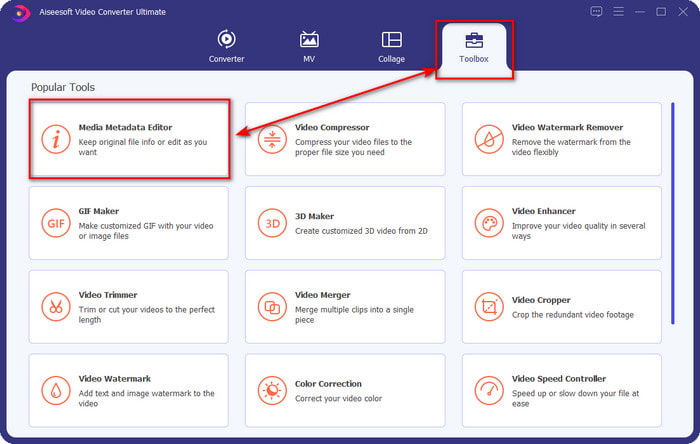
Krok 2. Jakmile nástroj spustíte, musíte přejít do části Toolbox a v seznamu níže vyhledat Media Metadata Editor.
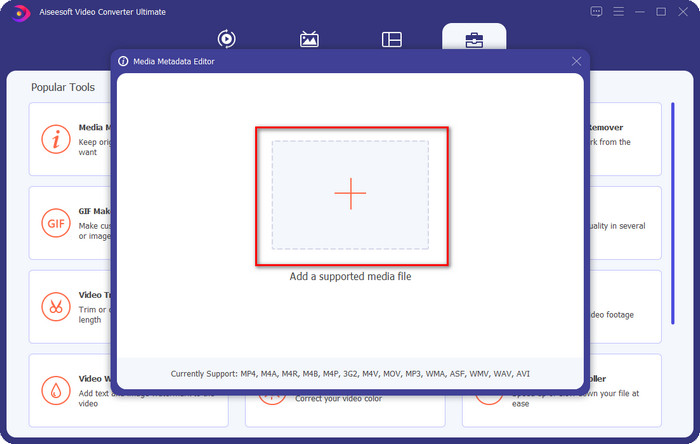
Krok 3. Pro přidání souboru MKV klikněte na tlačítko +, které se zobrazí na obrazovce, najděte v složce soubor .mkv a kliknutím na Open přejděte k dalšímu kroku.
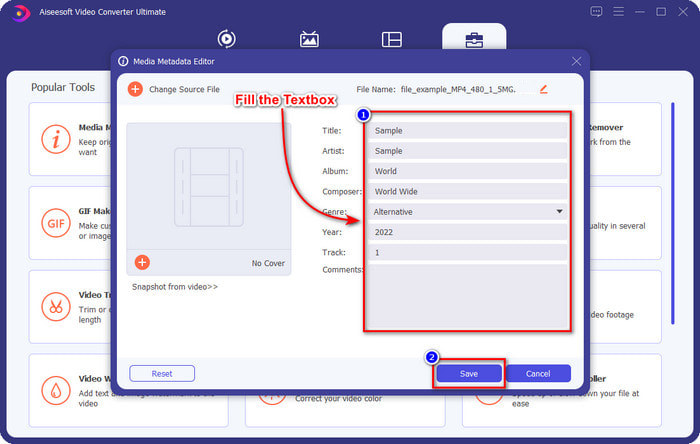
Krok 4. V této části již můžete přidat metadata, která ve svém MKV potřebujete, vyplnit je podle svých představ a kliknout na Save, pokud máte vše hotovo a jste připraveni změny použít. Tím jste ke svému souboru MKV přidali tagy, díky nimž rychle zjistíte, co se v souboru nachází.
VLC Media Player – bezplatný editor metadat MKV
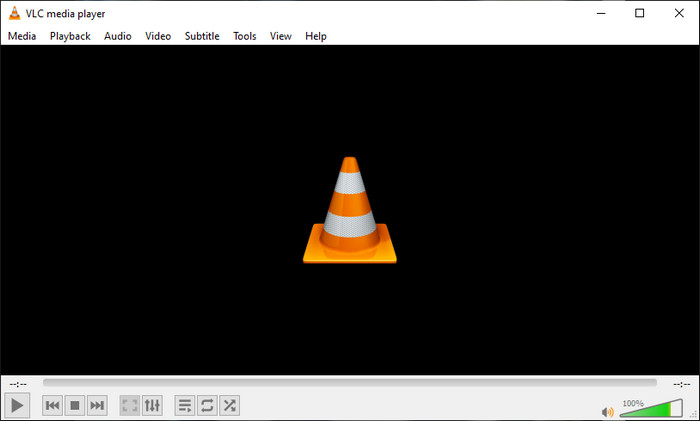
VLC Media Player dokáže vaše MKV soubory snadno přehrávat i upravovat jejich tagy. Tento nástroj je open source, takže se nemusíte obávat, pokud si software stáhnete do počítače, protože můžete naplno využít všechny jeho možnosti zdarma, i když můžete přispět darem, pokud chcete. Přestože tento nástroj není tak dobrý jako ostatní editory metadat v tomto seznamu, je stále považován za spolehlivý nástroj, který můžete ve svém zařízení používat. Kromě toho můžete do svého MKV souboru volně přidat základní informace, jako je jméno autora, název, interpret, album atd. Postupujte podle kroků a naučte se, jak upravit metadata MKV pomocí tohoto přehrávače médií jako editoru metadat.
Krok 1. Stáhněte a poté otevřete VLC ve svém počítači.
Krok 2. Přejděte do nabídky Tools a klikněte na Media Information. Pokud chcete jednodušší způsob, můžete místo toho použít klávesovou zkratku CTRL + I. Ať už zvolíte jakoukoli cestu, jejich funkce jsou stejné.
Krok 3. Zadejte požadované informace a kliknutím na Close metadata automaticky uložte.
MKVToolNix GUI – Vyhrazený editor značek MKV
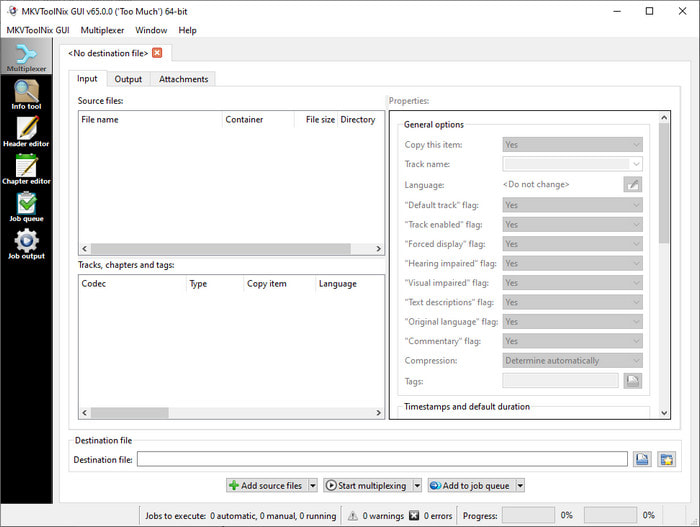
MKVToolNix GUI je specializované řešení pro práci se soubory MKV; i když můžete nahrát i jiné formáty, software je převede na MKV. Tento nástroj je známý jako komplexní řešení pro práci s MKV, protože podporuje sadu nástrojů, což znamená, že kromě úprav metadat nabízí i další funkce. Díky svému přímočarému grafickému rozhraní se toho na používání nemusíte mnoho učit; v podstatě se jej můžete naučit ovládat během několika minut. Přestože je nástroj jednoduchý, někteří uživatelé, kteří již používají vyspělejší editory metadat, jeho rozhraní porovnali s jinými a řekli, že pro ně není dostatečně intuitivní. I přes všechny tyto výhrady není pochyb o tom, že se s pomocí tohoto nástroje můžete naučit, jak změnit název souboru MKV.
Krok 1. Stáhněte software do počítače, otevřete jej, klikněte na Add Source File a vyhledejte v složce soubor MKV.
Krok 2. Stiskněte Output a zde změňte metadata.
Krok 3. Pokud jste toto všechno dokončili, můžete nyní soubor uložit kliknutím na Start Multiplexing.
Část 2. Nejčastější dotazy o editoru metadat MKV
Mohu převést VOB na MKV?
Soubor VOB můžete na MKV převést snadno kliknutím na tento odkaz; otevře se nové okno, které vám přímo pomůže převést VOB na MKV. Pokud chcete více informací o VOB a MKV, je pro vás tento článek ten pravý.
Proč mají moje soubory MKV větší velikost souboru?
Důvod, proč jsou vaše MKV soubory velké, je ten, že tento formát neobsahuje pouze video a audio. Obsahuje také více prvků, jako jsou titulky, metadata, variabilní datový tok a mnoho dalšího. Co tedy dělat, pokud chcete soubor MKV zkomprimovat, aby byl menší, aniž by se zničila kvalita? Spolehlivých video kompresorů není mnoho, a proto jsme udělali průzkum, abychom vám pomohli komprimovat MKV bez ztráty kvality snadno a pohodlně.
Jaké jsou nevýhody formátu MKV?
Přestože je formát souboru znám, některé přehrávače médií a editory stále zvládnou formát z důvodu problému s kodekem a prvky. Formát má také obrovskou velikost a ne každý software podporuje nahrávání velkého souboru, protože jeho import a export by zabral spoustu času. Velikost souboru se také zvětší, protože je součástí souboru, stejně jako jiný formát, do kterého jste přidali metadata. I když má svou slabinu, je stále konkurenceschopný, pokud jde o ukládání mediálních souborů a jejich bezpečné uchovávání pro budoucí účely.
Závěr
Není to úžasné? Co vám tyto tři stolní software mohou nabídnout? Druhý je přehrávač médií, zatímco druhý je vyhrazený editor pro MKV, ale který nástroj byste měli použít? Pokud chcete to nejlepší, rádi vám přineseme ten nejlepší nástroj. Naučit se upravovat metadata MKV pomocí FVC Video Converter Ultimate se stalo snadným a efektivním. Tak na co čekáš? Mějte nástroj na dosah a použijte jej k opravě metadat v souborech MKV jako profesionál na pár kliknutí.
-
 2 nejlepší způsoby úpravy metadat OGG, které byste měli vyzkoušet zdarma
 Potřebujete upravit metadata OGG? Úpravu značek snadno zvládnete pomocí správného softwaru. Pokud jej nemáte, přečtěte si tento článek.
-
 Absolutní přehled o Pentaho Metadata Editoru [Aktualizováno 2022]
 Nenašli jste spolehlivý článek o Pentaho Metadata Editor? Naštěstí jsme nástroj zkontrolovali sami, abychom vám poskytli fakta, která o nástroji budete vědět.
-
 Tipy a triky o editoru metadat VLC, který musíte znát v roce 2022
 Chcete použít VLC jako editor metadat? V tomto případě si můžete přečíst tento článek, protože poskytujeme nezaujatou recenzi editoru metadat VLC.
