


 Video Converter Ultimate
 Screen Recorder
 Oprava videa
 Bezpečné stažení
100% bezplatné způsoby komprese velikosti souboru M4V z GB na MB
Formát souboru M4V, podobný MP4, je skvělý video kontejner od společnosti Apple. Soubory M4V můžete přehrávat téměř ve všech populárních přehrávačích, jako jsou iTunes, QuickTime, VLC Media Player, RealPlayer a další. Někdy však možná zjistíte, že vaše video M4V je příliš velké na uložení nebo sdílení. V této situaci musíte zmenšit velikost souboru.
Pokud nevíte, jak komprimovat M4V, můžete vyzkoušet níže uvedené možnosti.

Část 1. Jak komprimovat M4V online zdarma
Jak jsme již zmínili, může být trochu obtížné upravovat a sdílet velký videosoubor na YouTube, Facebooku, Instagramu nebo jiných streamovacích webech. Protože tyto weby mají obvykle přísně omezené velikosti videa, které nahráváte. Kromě toho mohou velké soubory zabírat hodně místa na vašem počítači, diskové jednotce, telefonu, flash disku, paměťové kartě atd.
Proto když máte velký soubor M4V, je lepší jeho velikost zmenšit pomocí profesionálního video kompresoru. Pokud hledáte bezplatný program, proč nevyzkoušet FVC Free Video Compressor? Je zcela zdarma k použití. Navíc jde o online nástroj pro kompresi, což znamená, že můžete zkomprimovat jakékoli video na požadovanou velikost bez instalace objemného softwaru do počítače.
Můžete jej použít v jakémkoli běžném prohlížeči, jako je Google Chrome, Mozilla Firefox a Microsoft Edge. K komprimovanému videu nebude přidán žádný vodoznak. Dokonce si můžete vychutnat video ve vysoké kvalitě obrazu.
Tady jsou kroky, jak komprimovat velké soubory M4V online.
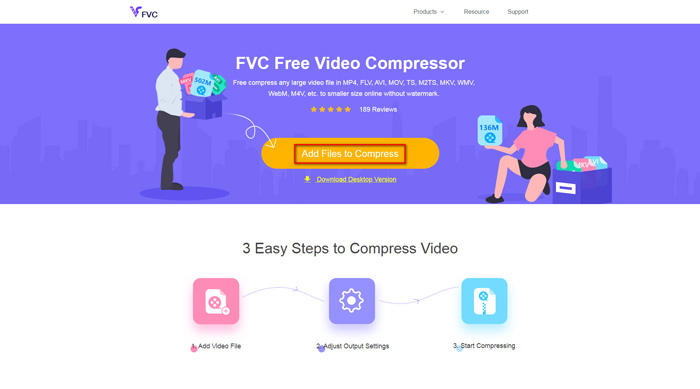
Krok 1. V prohlížeči přejděte na webovou stránku FVC Free Video Compressor. V banneru uvidíte tlačítko Add Files to Compress. Klikněte na něj a podle pokynů si do počítače stáhněte a nainstalujte spouštěč FVC.
Krok 2. Poté musíte vybrat soubor M4V, který chcete komprimovat. Pak můžete posunutím jezdce za polem Size snadno upravit a nastavit přesnou velikost souboru, kterou potřebujete. Podle potřeby můžete také samostatně změnit rozlišení a datový tok (bitrate).
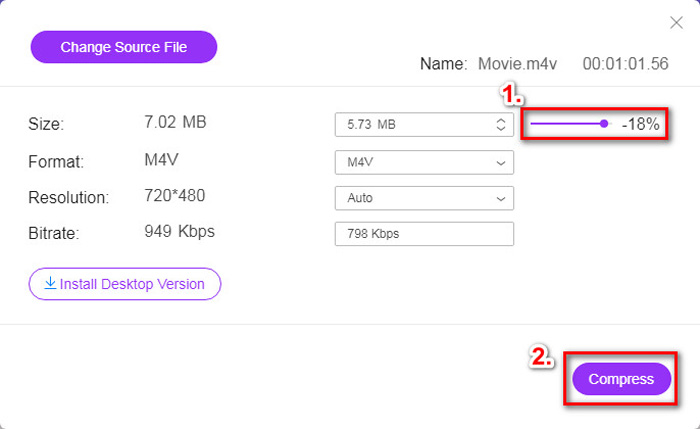
Krok 3. Pokud chcete komprimovat M4V do MP4, měli byste zde jako výstupní formát zvolit MP4. Pokud ne, můžete rovnou kliknout na Compress v pravém rohu. Vyberte složku pro uložení komprimovaného videa a několik vteřin vyčkejte, než získáte požadované video.
Část 2. Jak zmenšit velikost souboru M4V v systému Mac / Windows
Protože M4V je formát vyvinutý společností Apple, můžete k jeho kompresi v systému Mac použít také výchozí přehrávač Apple, QuickTime Player. QuickTime Player navíc nabízí i verzi pro Windows. Měli byste si však uvědomit, že nejnovější verze pro Windows je QuickTime 7.7.9, vydaná v roce 2016. Pokud tedy hledáte nově vydaný program, můžete vyzkoušet FVC Free Video Compressor, který si poradí i s 4K videi.
Chcete-li zmenšit velikost souboru M4V v QuickTime, postupujte podle následujících pokynů.
Krok 1. Otevřete soubor M4V, který čeká na kompresi, v aplikaci QuickTime.
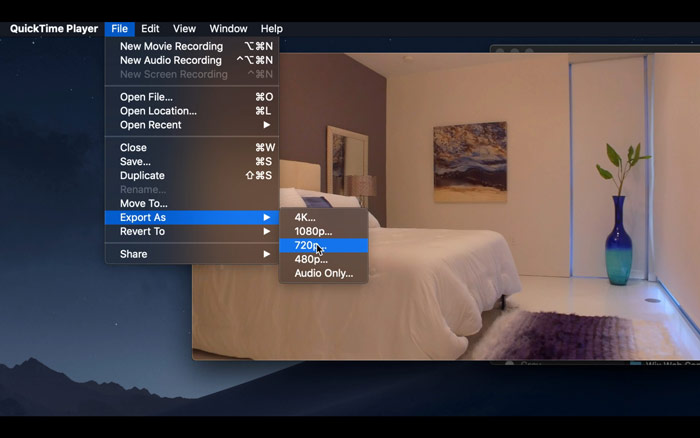
Krok 2. V levém horním rohu najděte nabídku File. Klikněte na ni a v seznamu vyhledejte možnost Export As. Poté zvolte rozlišení, které je nižší než u původního videa, abyste video zkomprimovali. Koneckonců nechceme jeho velikost zvětšovat.
Krok 3. Pokud nechcete měnit umístění uložení, můžete rovnou kliknout na Save. Vyčkejte, prosím, než se video vyexportuje.
Část 3. Nejčastější dotazy týkající se komprese M4V
1. Mohu jen přejmenovat M4V na MP4?
Ne, pokud máte na mysli převod M4V na MP4 pouhým přejmenováním přípony na .mp4. Jejich kódování totiž není stejné. Pro převod M4V na MP4 byste se měli spolehnout na profesionálnější nástroj.
2. Přijímá YouTube formát M4V?
Je smutné, že YouTube podporuje pouze omezený počet formátů souborů, které neobsahují M4V. Pokud tedy chcete nahrát své video M4V na YouTube, měli byste jej převést do formátu podporovaného YouTube, jako je MP4.
3. Jak sloučit více videí M4V do jednoho?
Pokud máte několik video souborů M4V, které potřebujete spojit do jednoho, můžete zkusit FVC Free Online Video Merger a sloučit různé video soubory.
Závěr
Nyní máte 2 jednoduché a bezplatné způsoby, jak komprimovat soubor M4V. Pokud jste uživatel Macu, můžete ke zmenšení velikosti videa použít QuickTime Player. Pokud vám ale nevyhovují pevně daná rozlišení, která QuickTime nabízí, nebo používáte počítač se systémem Windows, můžete dát šanci nástroji FVC Free Video Compressor.
-
 Převaděč M4V na MP3 - 4 nejlepší metody pro extrakci MP3 ze souborů M4V
 Pokud chcete snadno extrahovat zvuk MP3 z videí M4V, můžete se dozvědět více o 4 nejlepších převaděčích M4V na MP3 a získat z článku požadované zvukové soubory.
-
 4 způsoby, jak převést filmy QuickTime na MP4 zdarma v telefonu / počítači
 Přečtěte si a získejte 4 způsoby, jak převést QuickTime na videa MP4 zdarma v telefonu nebo počítači. Můžete snadno změnit formát souboru z MOV na MP4 ve Windows / Mac / iPhone / Android / online.
-
 4 nejlepší převaděče MP4 na M4V pro snadnou přeměnu videí MP4 na M4V
 Pokud potřebujete změnit soubory MP4 na M4V, měli byste se dozvědět více podrobností o rozdílech mezi těmito dvěma formáty, stejně jako nejlepší převaděče MP4 na M4V z článku.
