


 Video Converter Ultimate
 Screen Recorder
 Oprava videa
6 nejlepších regulátorů rychlosti videa pro Windows/Mac/Android/iOS
Zrychlení nebo zpomalení videa může vytvořit neuvěřitelnou iluzi, pokud jste unavení z běžných efektů. Tato technika úpravy videa je jednoduchá, ale účinná. Když budete hledat na internetu, najdete mnoho různých možností ovladačů rychlosti a víme, že je těžké si vybrat. Pokud si však přečtete tento článek, zrecenzujeme aplikace pro ovládání rychlosti, které můžete použít ke změně rychlosti přehrávání. Zajímá vás, které aplikace pro ovládání rychlosti jsou ty nejlepší? V tom případě pokračujte ve čtení a zjistěte více o tom, jaký ovladač rychlosti videa máte k dispozici na svých platformách.

Část 1. Top 6 regulátorů rychlosti videa pro Windows, Mac, Chrome, iOS a Android
Top 1. Video Converter Ultimate (Windows a Mac)
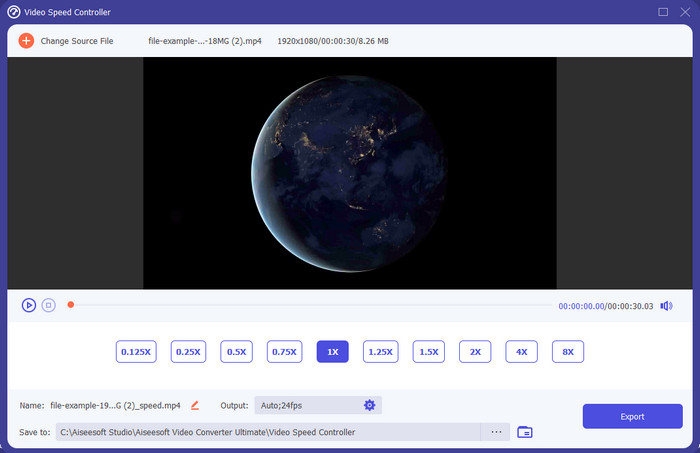
Potřebujete ovladač rychlosti videa, který je velmi účinný a efektivní při zrychlování a zpomalování videa? V tom případě je Video Converter Ultimate řešením tohoto typu problému. Je to nejpřístupnější nástroj, který můžete použít ke změně rychlosti videa bez námahy, ať už ho potřebujete zrychlit, nebo přehrávat ve zpomaleném záběru. I když změníte rychlost, původní kvalita videa zůstane zachována, mění se pouze pohyb videa, protože upravujete rychlost.
Kromě toho můžete dělat mnoho věcí, jako je převádění, slučování, řezání a další; v podstatě je to nástroj typu vše v jednom. Chcete znát další nabídky, které můžete mít s touto zrychlenou video aplikací? Pokud ano, přečtěte si funkce nástroje, abyste se dozvěděli více, nebo si software můžete hned teď stáhnout na plochu a vyzkoušet ho.

Video Converter Ultimate
5 689 200+ stažení- Dokáže přesně měnit snímky videa nahoru nebo dolů v jakémkoli formátu videa, jako je MP4.
- K dispozici je mnoho funkcí a efektů pro úpravu videa.
- Je flexibilní na všech platformách, jako je Windows nebo macOS.
- Díky ultra rychlému procesu budete proces stahování nebo exportu hotový během mrknutí oka.
- Export nebo stahování videa, které upravujete, nebude mít vodoznak.
Zdarma ke staženíPro Windows 7 nebo novějšíBezpečné stažení
Zdarma ke staženíPro MacOS 10.7 nebo novějšíBezpečné stažení
Klady
- Změňte snímek na snímek videa, i když jste profesionál nebo ne.
- Snadno pochopitelné možnosti přehrávání videa.
- Vynikající schopnost sdílení na sociálních sítích.
- Je zdarma ke stažení, ale nabízí nákupy v aplikaci.
Nevýhody
- Pokud chcete mít plnou kapacitu nástroje, musíte si jej zakoupit.
Nahoru 2. Clipchamp (Windows)
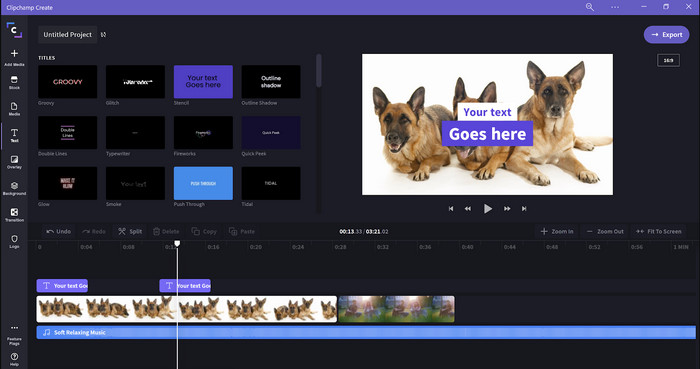
Clipchamp je editor rychlosti videa, který můžete používat ve Windows. Tento nástroj nabízí méně strmou křivku učení, takže pokud s úpravami začínáte, možná ho budete chtít vyzkoušet. Podporuje také několik funkcí, které byste rádi použili. Hlavní nevýhodou tohoto nástroje je však výstupní kvalita videa. Soubor můžete exportovat pouze v kvalitě 480p, což je ve srovnání s jinými bezplatnými nástroji nízké rozlišení. Pokud ale potřebujete exportovat v 720p nebo 1080p, můžete si předplatit placenou verzi. Celkově je nástroj skvělý, ale stále nedosahuje úrovně prvního editoru.
Klady
- Jednoduché GUI a snadné použití.
- Nabízí další funkce pro úpravy.
- Snadno ovládejte přehrávání videa.
Nevýhody
- U bezplatné verze je konečný výstup 480.
- Někdy se nástroj stal při plnění úkolu nepružný.
Top 3. Ovladač rychlosti videa (Chrome)

Chcete použít rozšíření ovladače rychlosti videa v prohlížeči Chrome? Pak můžete využít Video Speed Controller. Tento nástroj je dostupný v jakémkoli prohlížeči Chrome a umožňuje zrychlit nebo zpomalit video, na které se díváte. Je snadno použitelný pro každého a zároveň je bezpečný, protože jde o rozšíření pro Chrome. Pokud však video exportujete, přehrávání zůstane stejné, i když jste rychlost měnili. Nástroj totiž funguje pouze na videu, které právě sledujete v prohlížeči Chrome, a ne mimo něj. Ještě jedna informace: jakmile s tímto rozšířením video zrychlíte, budou se všechna videa přehrávaná v Chromu pouštět ve stejné rychlosti.
Klady
- Bodový regulátor rychlosti, který můžete použít v Chrome.
- Schopnost snadno přetočit nebo resetovat rychlost přehrávání videa v prohlížeči Chrome.
- Podporuje příkaz short-keys.
Nevýhody
- Panel ovladače videa není vidět.
- Rychlost videa nemůžete změnit mimo Chrome.
Top 4. Accelerate pro Safari (iOS a Mac)
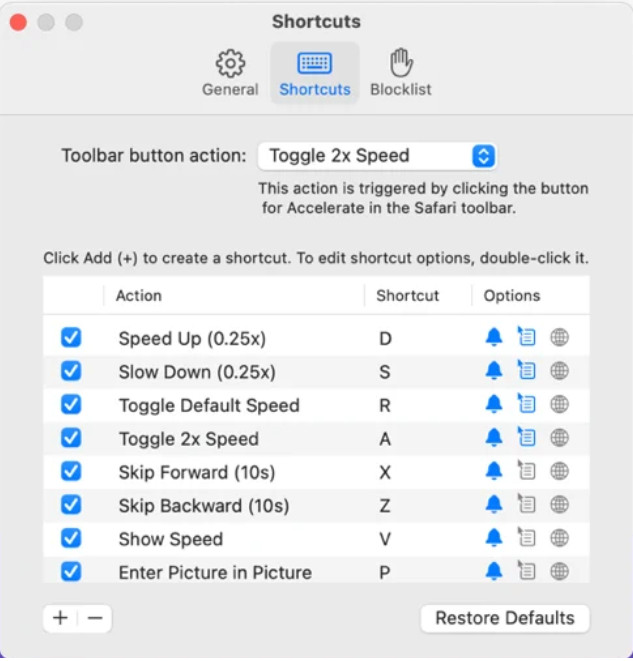
Potřebujete ovladač rychlosti videa v Safari? Accelerate for Safari je dostupné v každém prohlížeči Safari na zařízeních Apple. Tento nástroj dokáže měnit rychlost přehrávání každého videa v HTML5 v Safari. Stejně jako výše uvedené rozšíření pro Chrome, i toto je omezeno na zařízení Apple. Pokud tedy používáte Apple, možná se vám toto rozšíření pro ovládání rychlosti bude hodit k urychlení nebo zpomalení videa. Navíc můžete použít klávesové zkratky na klávesnici, abyste nástroji zadali příkaz ke změně rychlosti přehrávání.
Klady
- Je bezpečné jej používat ve všech Safari.
- Podporuje také funkce Picture-in-Picture a AirPlay.
- K ovládání nástroje jsou k dispozici klávesové zkratky.
Nevýhody
- Nepodporuje jiný webový prohlížeč než Safari.
- Omezeno na videa HTML 5.
Top 5. Pomalu Rychle Pomalu – ovládejte rychlost svých videí (iOS)
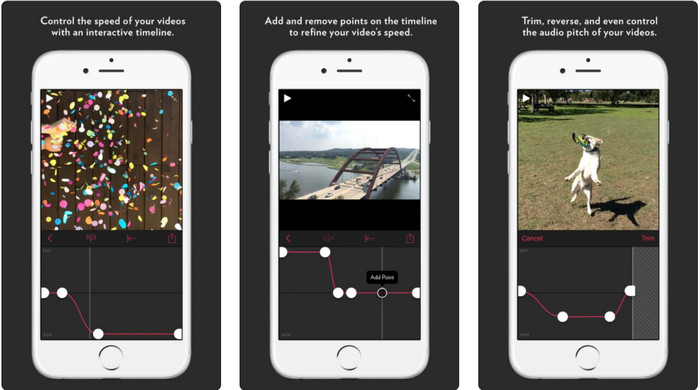
Pro ovladač rychlosti videa na iPhonu můžete použít Slow Fast Slow. Tento nástroj pomáhá uživatelům iOS okamžitě měnit rychlost přehrávání videa, nejlépe funguje u zpomalených záběrů. Kromě toho má velmi interaktivní vestavěnou časovou osu pro úpravu rychlosti. Podporuje také další funkce, jako je úprava výšky tónu a převrácení klipu. Tento nástroj však vyžaduje systém iOS 10, takže pokud váš systém není verze 10, nemůžete jej používat.
Klady
- Podporuje další funkce pro vaše video.
- Uživatelsky přívětivý.
- Dokáže zpomalit videa až na 1/16 rychlosti.
Nevýhody
- Nepodporuje 4k výstup a výběr FPS.
- Na některých nových iOS zařízeních to nefunguje.
Top 6. Video Speed Controller Pro (Android)
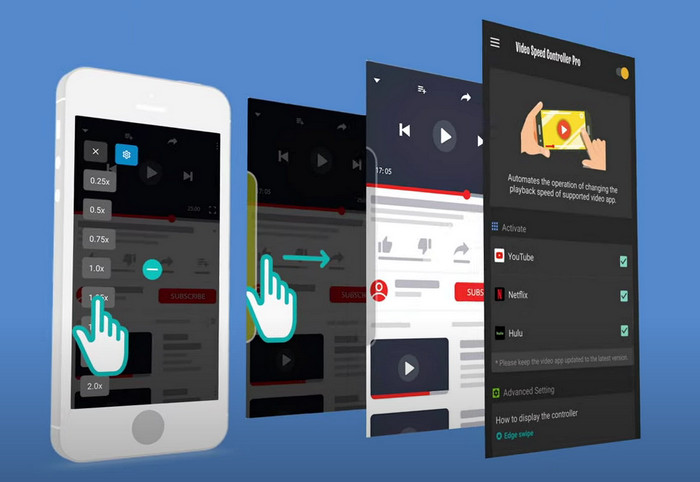
Pokud potřebujete ovladač rychlosti videa v systému Android, tak hádejte co? Můžete použít Video Speed Controller Pro po jeho instalaci z Obchodu Play. S pomocí tohoto nástroje můžete snadno zrychlit jakákoli videa přehrávaná ve vašem zařízení se systémem Android. Tento nástroj funguje podobně jako rozšíření ovladače rychlosti v Androidu. I když umí video zrychlit, maximální rychlost je pouze 2×. Pokud ale potřebujete zrychlit sledování videí, můžete jej používat na YouTube, Netflixu a dalších video platformách v Androidu.
Klady
- Použití je jednoduché.
- Samotný nástroj je na místě.
- K dispozici je panel nabídek, který odhaluje možnosti přehrávání.
Nevýhody
- Možnosti rychlosti přehrávání jsou omezené.
- Někdy to nefunguje dobře.
Část 2. Srovnávací tabulka
| Funkce | Video Converter Ultimate (Windows a Mac) | Clipchamp (Windows) | Ovladač rychlosti videa (Chrome) | Accelerate pro Safari (iOS a Mac) | Pomalu Rychle Pomalu – ovládejte rychlost svých videí (iOS) | Video Speed Controller Pro (Android) |
| Kontrola rychlosti |  | | | | | |
| Vysoce kvalitní video výstup | |  | | | | |
| Funkce úprav | | | | | | |
| Ultra-rychlý proces exportu | | | | | | |
Část 3. Nejčastější dotazy o regulátoru rychlosti videa
Proč musím používat regulátor rychlosti?
V některých případech budete muset sledovat video vysokou rychlostí nebo zpomalit. Skvělým příkladem sledování zrychleného videa je okamžité dokončení videa, které sledujete, nebo podobně. Zrychlení videí je pro tyto uživatele velkým pomocníkem. Zatímco slow-mo, toto se obvykle používá pro okamžité přehrávání rychlých sportů, jako jsou závody, basketbal, volejbal a další. Ať už z těchto dvou, budete potřebovat účinný regulátor rychlosti, abyste mohli ručně přepsat normální rychlost podle vašich potřeb.
Mohu zrychlit videa na Tiktoku?
Ano, v TikToku můžete natáčet videa ve zrychleném režimu. Ale nemůžete v TikToku sledovat videa ve vysoké rychlosti. Pokud tedy potřebujete vhodný nástroj na zrychlení videa, klikněte a přečtěte si tento článek, abyste zjistili, jak zrychlit video na TikToku.
Jak zpomalit videa?
Na rozdíl od zrychlení videa můžete pomocí editorů dostupných na trhu vytvořit zpomalený záběr. Jaký nástroj byste měli použít? Žádné obavy, představíme vám nejlepší software pro zpomalená videa, který můžete použít k vytvoření slow-motion efektu. Pokud potřebujete vědět víc, můžete kliknout na tento odkaz.
Závěr
Dnes už máte přehled o placených i bezplatných aplikacích pro zrychlení videa na různých platformách. Ovladače rychlosti nabízejí jedinečné možnosti, jak různým uživatelům pomoci se zrychlením videí. Pokud si to pečlivě přečteme, vidíme, že FVC Video Converter Ultimate poskytuje vše, co uživatelé potřebují. Pokud si tedy chcete stáhnout tento špičkový nástroj do svého počítače, klikněte na tlačítko Stáhnout a užijte si maximální možnosti, které nástroj nabízí.
-
 Jak zrychlit video pomocí 5 nejlepších dostupných softwarů [Windows/Mac/Linux]
 Chcete vědět, jak snadno zrychlit video? Pak si přečtěte tento zápis, když vysvětlujeme, jak efektivně zrychlit na Windows, Mac a Linux.
-
 Nejjednodušší způsoby, jak zrychlit video na vašich zařízeních Android [2021]
 Věděli jste, že na svém Androidu můžete zrychlit video? Pokud tedy chcete vědět, jak zrychlit video na telefonu Android, přečtěte si tento zápis.
-
 Skvělé tipy roku 2021: Jak zrychlit video na iMovie
 Váš přítel vám navrhuje iMovie, aby vám pomohl s vaším problémem, jak zrychlit video pomocí operačního systému iOS, ale nevíte, co dělat? Zjistěte více o tom, když si přečtete více v tomto článku.
