


 Video Converter Ultimate
 Skærmoptager
 Video reparation
Lær at bruge Premiere Pro til at fremskynde en video med 2 Premiere-alternativer
Premiere Pro er et af Adobes førsteklasses programmer til professionel videoredigering. Ydelsen i dette værktøj er også blevet rost af mange brugere, der allerede anvender det. Vi vil faktisk lære dig, hvordan du kan speede dine videoer op ved hjælp af dette værktøj. På den måde skal du ikke igennem en masse opsætninger eller alt muligt andet, før du kan komme i gang. Lad os nu vise dig, hvordan man spedder en video op i Premiere Pro, og hvilke alternativer der findes.

Del 1. Sådan gør du en video hurtigere i Premiere Pro
Den førsteklasses videoredigeringssoftware, du vil elske at købe og bruge, er Adobe Premiere Pro. Dette værktøj er en komplet pakke, som en professionel helt sikkert vil kunne lide at bruge. Softwaren kan nemlig håndtere tung og krævende redigering, som du vil sætte pris på, hvis du er pro-bruger. Hvis du vil have et imponerende resultat, skal du også lære at bruge dette værktøj. Men at lære at bruge Premiere Pro vil uden tvivl tage meget af din tid, så hvis du er en travl person, bør dette være din sidste udvej. Er du derimod opsat på at lære det og har masser af fritid, så bør du prøve det.
Derudover, hvis du vil bruge dette værktøj, skal du bruge en stor mængde penge, fordi det bogstaveligt talt er dyrt sammenlignet med de andre videoredigeringsværktøjer. Så nu, hvis du vil lære om, hvordan du bruger Adobe Premiere Pro cc 2018 eller nyere version til at fremskynde video, så følg de forenklede trin nedenfor.
Trin til, hvordan man spedder en video op i Adobe Premiere Pro:
Trin 1. Køb og download Adobe Premiere Pro fra dets officielle hjemmeside. Start derefter programmet for at begynde at sætte farten op.
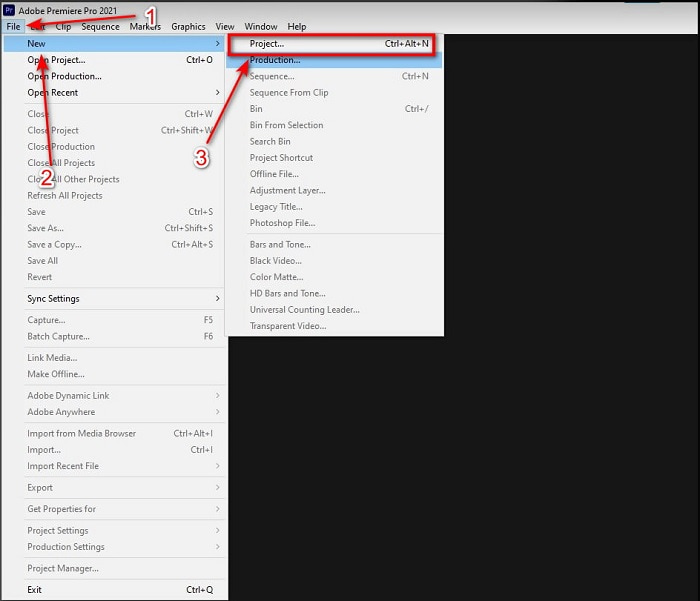
Trin 2. Klik på File, gå derefter til New og Project. Vent, til et vindue som dette dukker op, og klik på OK for at fortsætte. Åbn mappen og find videoen, træk og slip filen i Media Browser for at placere den ved siden af Timeline.
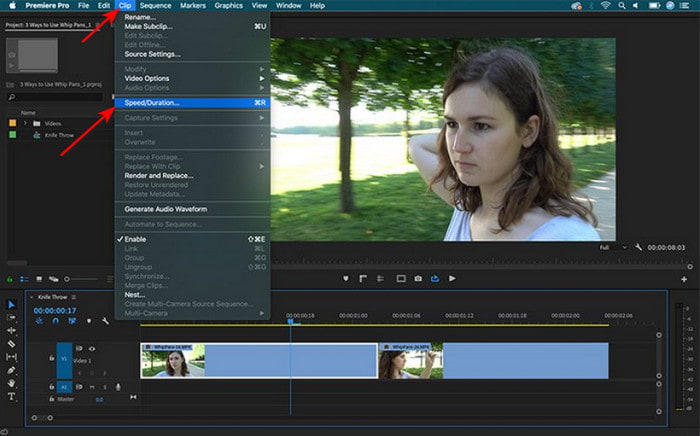
Trin 3. Klik på den video, du indsatte på tidslinjen, og klik på Clip øverst. Under den finder du Speed/Duration, og klik på den. Ændr hastighedsprocenten efter dine ønsker, og klik på OK for at gemme opspeedningen. For at gemme filen klikker du på knappen Export.
Del 2. 2 af de bedste Premiere Pro-alternativer til at fremskynde videoer
1. Video Converter Ultimate
Hvis det er et problem for dig at sætte farten op, kan dette være løsningen: Video Converter Ultimate. I modsætning til andre videoredigeringsprogrammer er dette enestående værktøj det bedste til alle former for redigering, konvertering, GIF-fremstilling, forstærkning, omvendt afspilning, hastighedsændring og meget mere. Mange brugere elsker allerede denne software, da den tilbyder avancerede funktioner som Adobe Premiere Pro, men i en forenklet udgave. Derudover kan vi ikke finde et andet værktøj, der giver så avancerede funktioner og samtidig er så let at bruge. Der findes grundlæggende ikke noget som Video Converter Ultimate. Selvom dette værktøj er betalingssoftware, er det stadig hver en øre værd, du bruger på det, og det er meget billigt. Hvis du nu vil vide, hvordan man bruger et alternativ til hvordan man spedder en video op i Premiere Pro, så følg trinene nedenfor nøje.
Trin til, hvordan man spedder videoer op ved hjælp af Video Converter Ultimate:
Trin 1. Download softwaren til din computers drev, og installer den derefter for at fortsætte.
Gratis download til Windows 7 eller nyere Sikker download
Gratis download til MacOS 10.7 eller nyere Sikker download
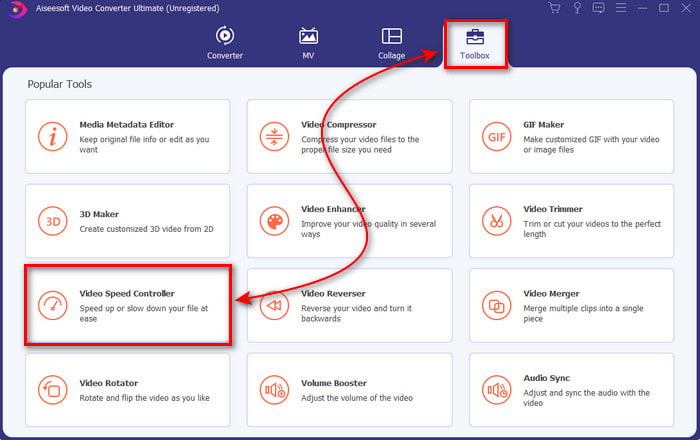
Trin 2. Start værktøjet, klik derefter på Toolbox, og find Video Speed Controller.
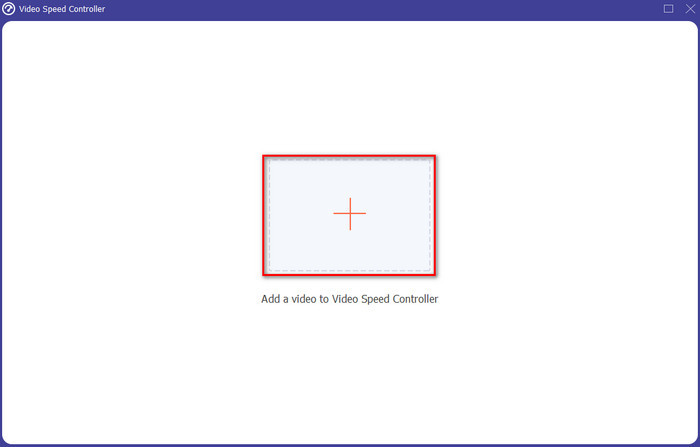
Trin 3. For at tilføje den video, du vil sætte farten op på, skal du klikke på +-knappen. Find derefter filen i mappen, og klik på Open for at indsætte videofilen.
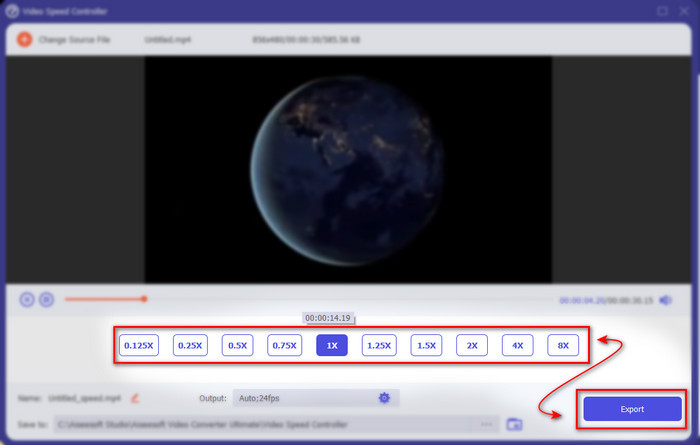
Trin 4. Vælg derefter den hastighed, du vil have på din video, ved at klikke på box-indstillingerne. Hvis du nu er tilfreds med hastigheden på din video, så klik på Export for at gemme den direkte på din computer.
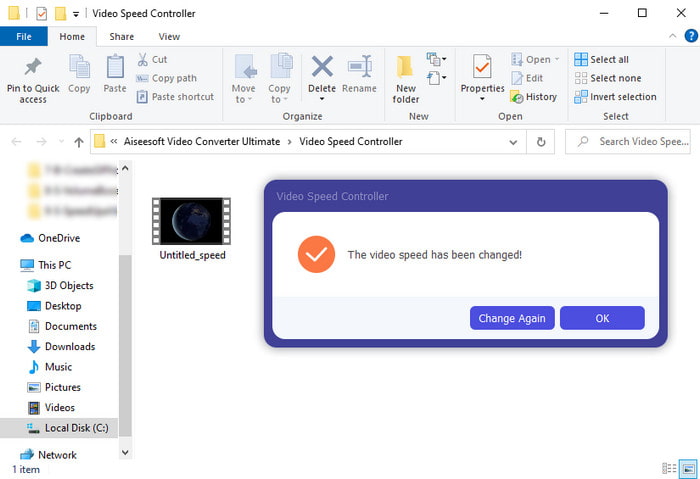
Trin 5. En mappe dukker op, når eksporten er færdig. Klik på filen, du tidligere har speedet op, og bliv imponeret over, at hastighedsændringen ikke har kostet nogen billedkvalitet.
2. iMovie
Hvis du har en Mac, er det oplagt at bruge dette værktøj, fordi det allerede er forudinstalleret på din Mac. iMovie er et af de populære videoredigeringsprogrammer, du vil kunne lide at bruge, på grund af de gratis funktioner, det tilbyder. Hvis du er Windows-bruger, skal du dog ikke regne med at kunne bruge dette værktøj, for det er ikke tilgængeligt på din PC. Selvom værktøjet er gratis, er der stadig nogle ulemper, såsom at større redigeringsfunktioner, du gerne vil bruge, ikke er tilgængelige i dette program. Men hvis du har et stramt budget, bør dette være dit foretrukne valg som Mac-bruger. Hvis du også vil opnå noget i stil med Premiere Pro speed up video, så følg trinene nedenfor.
Sådan speedes videoer op i iMovie:
Trin 1. Åbn iMovie på din Mac, og klik på File, derefter Import Media, og vælg filen for at fortsætte.
Trin 2. Træk den video, du indsatte tidligere, ned på Timeline. Klik derefter på videofilen på tidslinjen for at kunne justere hastigheden. Klik på højre side på Speed, og vælg i rullemenuen, hvilken hastighed du vil anvende.
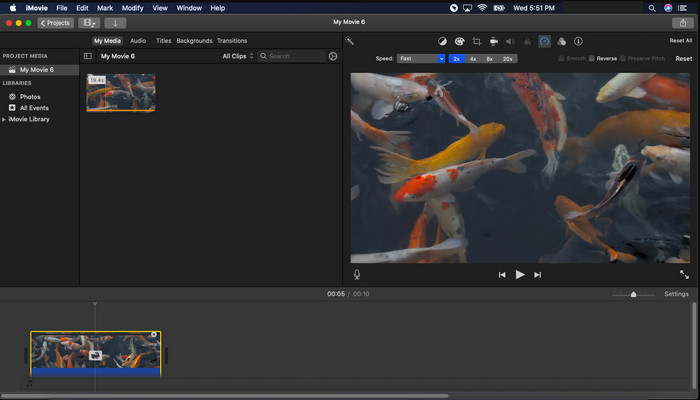
Trin 3. Når du har anvendt hastighedsforøgelsen, skal du klikke på Export og Export File for at gemme den speedede version af videoen.
Del 3. Ofte stillede spørgsmål om Premiere Pro Speed Up
Kan jeg bremse en video på Premiere Pro?
Ja, helt bestemt. Følg blot den samme fremgangsmåde som ovenfor, men ændr nu procenten til under hundrede for at gøre videoen langsommere. Eller du kan klikke her for at lære, hvordan man i detaljer sætter en video ned i tempo.
Hvor hurtigt kan jeg indstille videoen på Premiere Pro?
Den maksimale procentdel, du kan indstille på videoens hastighed, er 10.000% procent. Så hvis du vil vide, om det er ægte, så tjek det selv og indstil hastigheden til 10.000%.
Har Adobe Premiere Pro et systemkrav?
Faktisk ja, der er minimumskrav, Adobe-software skal kunne bruge værktøjet korrekt. Ligesom på denne liste nedenfor: GPU: Intel® i5-4590 / AMD FX 8350 tilsvarende eller seneste; RAM: 8 GB ram eller endnu mere; operativsystem: Microsoft Windows eller macOS; skærmen skal være 1920 x 1080 eller højere.
Konklusion
Efterhånden som vi nærmer os en ende, er det nu mere klart for os, at selv en simpel hastighedsstigning kan gøres med premiere pro. Premiere pro'en er dog super dyr, så vi lister nogle overkommelige software, du ville elske at bruge til at fremskynde. Ligesom Video Converter Ultimate, fordi denne software giver avancerede redigeringsfunktioner, selvom din computer er lav. Så hvis du vil vide, hvordan du nemt kan fremskynde en video i Premiere Pro, så download Video Converter Ultimate for at opleve den samme funktion, men i en nem version.
-
 [4 måder] Sådan gør du nemt dine videoer online hurtigere
 Vil du fremskynde en video online? Læs denne artikel for at vide mere om at fremskynde en video på forskellige mulige måder.
-
 Nemmere måder at fremskynde videoer i MP4-format [offline og online]
 Vil du fremskynde din video, men den er i MP4-format? Denne artikel kan hjælpe dig med at kende forskellene i, hvordan du kan fremskynde din video enten online eller offline.
-
 Top 4 videoafspillere med Speed Controller i 2021
 Har du ikke lagt mærke til afspilningshastigheden for hver medieafspiller, når du afspiller en video? Denne artikel er egnet til dig at lære alt om videoafspillere med hastighedskontrol.
