


 Video Converter Ultimate
 Skærmoptager
 Video reparation
 Sikker download
Lær hvordan du konverterer HEIC til GIF med de bedste og gratis konvertere
Vil du lave dine HEIC‑billeder om til animerede GIF’er? Så har vi en løsning til dig. HEIC‑filer er billedfiler i høj kvalitet, som ikke optager meget lagerplads. Og som udgangspunkt er HEIC‑billeder bare statiske billeder. For at lave en billedfil om til animerede billeder skal du derfor konvertere din HEIC‑fil til GIF‑format. GIF‑formater kan være statiske eller animerede billeder. Læs derfor denne artikel for at finde den bedste HEIC til GIF‑løsning til at konvertere din fil uden kvalitetstab.

Del 1. 4 bedste værktøjer til at konvertere HEIC til GIF
Når det kommer til bekvemmelighed, er det sikkert, at online-konvertere er de bedste, fordi du ikke behøver at downloade noget. Og hvis du leder efter de bedste online HEIC til GIF-konvertere, har vi prøvet nogle af de bedste HEIC til GIF-konvertere, der er tilgængelige på internettet. Så i denne del kender du de tre bedste online HEIC til GIF-konvertere.
Aiseesoft gratis billedkonvertering online
Hvis du er på udkig efter den bedste online HEIC til GIF‑konverter, er dette værktøj det, du leder efter. Aiseesoft Free Image Converter Online er et gratis onlineværktøj, der gør det muligt at konvertere HEIC‑billeder til GIF, PNG og JPG. Det er kendt for at være den hurtigste online HEIC til GIF‑konverter, du kan finde på internettet. Derudover indeholder det – i modsætning til andre online konvertere – ikke reklamer og har en hurtig indlæsningsproces.
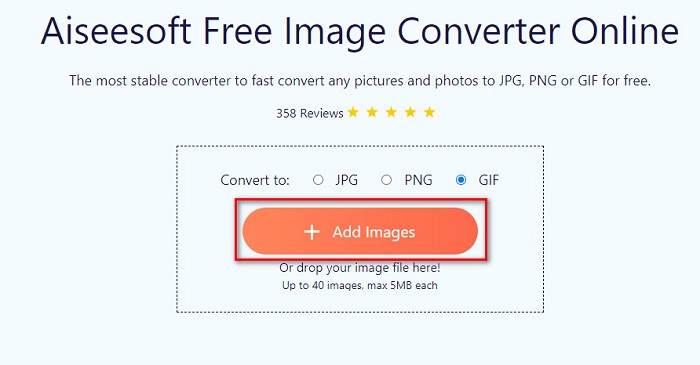
Trin 1. Søg efter Aiseesoft Free Image Converter Online, eller klik på dette link for at gå direkte til deres webside. Klik derefter på knappen Add Images i hovedvinduet.
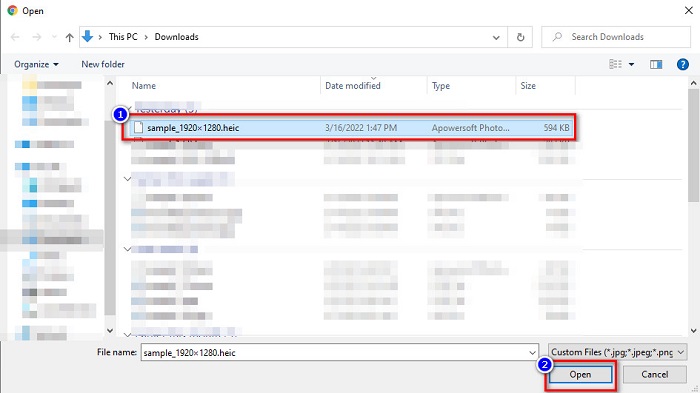
Trin 2. Så vises dine computerfiler. Find dit HEIC‑billede, og klik på Open.
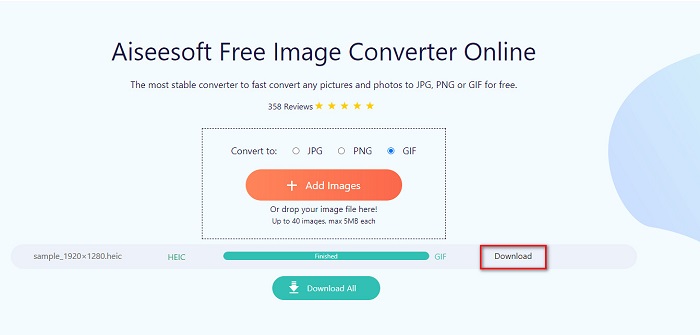
Trin 3. Klik på knappen Download for at hente dit GIF‑billede som sidste trin.
Fordele
- Det har en ultrahurtig konverteringsproces.
- Den indeholder ikke forstyrrende annoncer.
- Det kan konvertere enhver billedfil til PNG, JPG og GIF.
- Tilgængelig på alle webbrowsere, inklusive Google, Firefox og Safari.
Ulemper
- Du kan opleve en langsom konverteringsproces, når din internetforbindelse er langsom.
CloudConvert
En af de mest brugte konvertere på internettet er CloudConvert. Denne konverter kan nemt konvertere HEIC til GIF‑filer på grund af dens enkle brugergrænseflade. Derudover understøtter den mange billedformater, herunder HEIC, GIF, BMP, JPG, ICO og flere. Du kan også justere dit billedes opløsning, filstørrelse og kvalitet. Selvom det er en webbaseret app, indeholder den ikke reklamer.
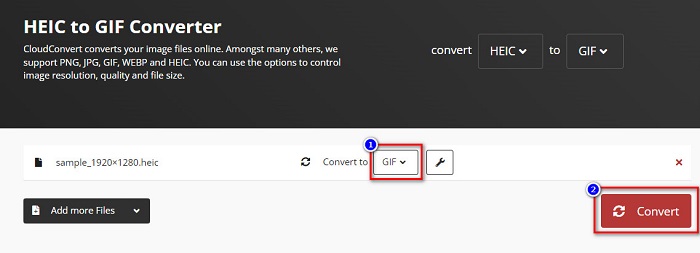
Trin 1. Søg i din browser efter CloudConvert HEIC to GIF converter. Klik derefter på knappen Select i programmets hovedvindue. Dine computerfiler vises, så du kan vælge den HEIC‑fil, du vil uploade.
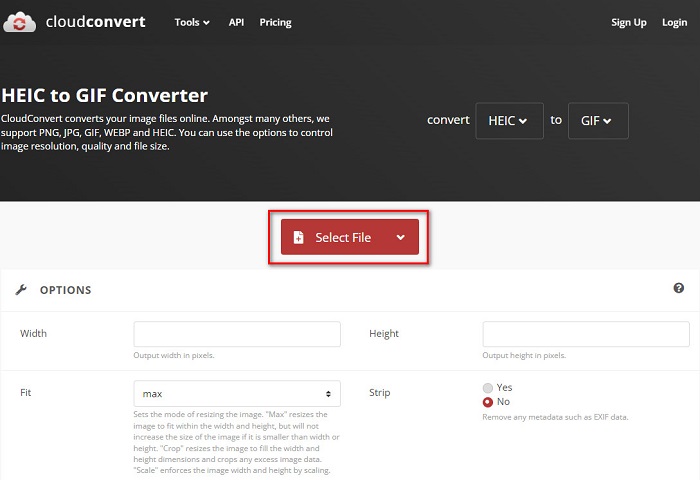
Trin 2. Klik derefter på drop-down-knappen ved siden af Convert to, og vælg det outputformat, du ønsker. Klik bagefter på knappen Convert for at begynde at konvertere din HEIC‑fil til GIF‑format.
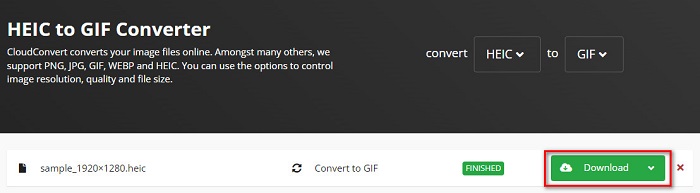
Trin 3. Til sidst klikker du på knappen Download for at hente din GIF‑fil, når konverteringen er færdig.
Fordele
- Det har en hurtig konverteringsproces.
- Den indeholder ikke irriterende annoncer.
- Det understøtter forskellige filformater, herunder HEIC, GIF, JPG, PNG osv.
- Tilgængelig på næsten alle søgemaskiner som Google og Safari.
Ulemper
- Når internetforbindelsen er langsom, kan du opleve at have en langsom konverteringsproces.
OnlineKonverter Gratis
En anden online HEIC til GIF‑konverter, der er værd at prøve, er OnlineConvertFree. Denne konverter har en brugervenlig grænseflade og en hurtig konverteringsproces. Desuden har dette værktøj funktioner til at komprimere og ændre størrelsen på din fil, hvis du er på udkig efter netop det.
Den indeholder dog annoncer, der er foruroligende for mange brugere. Ikke desto mindre kan denne konverter stadig bekvemt konvertere HEIC til GIF.
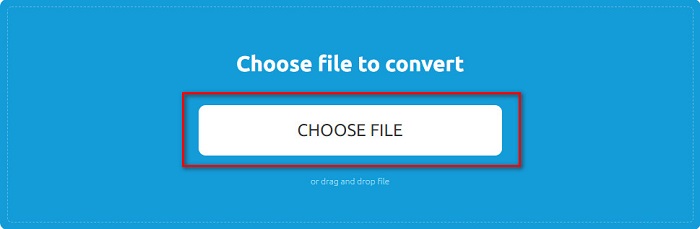
Trin 1. Søg først efter OnlineConvertFree i din browser. Klik derefter på Choose Files i programmets hovedvindue. Så vises dine computerfiler, hvor du vælger din HEIC‑fil og uploader den.
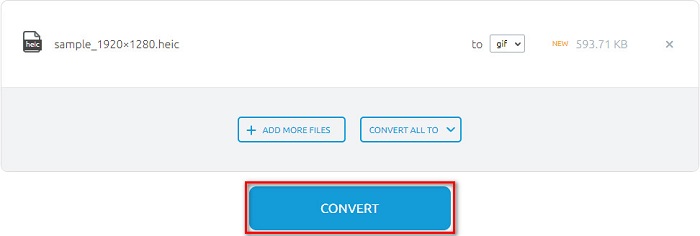
Trin 2. Klik dernæst på Convert button for at konvertere din HEIC‑fil til en GIF‑fil. Derefter vises et nyt vindue.
Trin 3. Rul til sidst ned, og klik på knappen Download for at hente din GIF‑fil.

Fordele
- Den har en enkel brugergrænseflade.
- Det er sikkert at bruge.
Ulemper
- Den indeholder annoncer.
CDKM
CDKM er et onlineværktøj, der hjælper dig med at konvertere HEIC til GIF-filer. Denne online konverter er et letanvendeligt værktøj, som gør det til et begyndervenligt værktøj. Desuden understøtter det standard filformater som HEIC, GIF, PNG, JPG og SVG. Denne konverter indeholder dog annoncer, der kan være forstyrrende for dig. Ikke desto mindre kan det konvertere din fil hurtigt, så det er en must-prøv konverter.
Trin 1. Søg efter CDKM i din browser, og gå til deres webside. Klik på knappen Choose Files i programmets hovedvindue. Når dine computer‑mapper vises, vælger du din HEIC‑fil og uploader den til hovedvinduet.
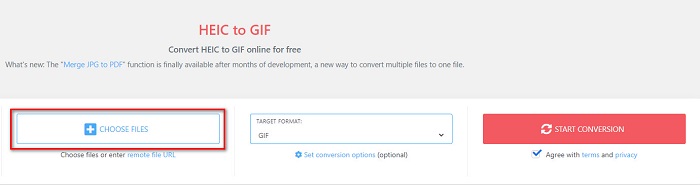
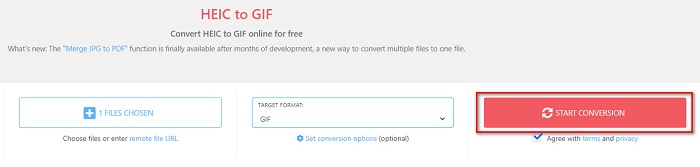
Trin 2. Klik derefter på knappen Start Conversion for at konvertere din HEIC‑fil til en GIF‑fil. Gå så videre til næste trin.
Trin 3. Download derefter din GIF‑fil ved at klikke på knappen Download nedenunder.

Del 2. Sammenligningsdiagram mellem HEIC og GIF
HEIC er et billedfilformat, som Apple har udviklet. Når du tager et foto med en Apple‑enhed, vil du se, at filendelsen på dit billede er .heic. Disse billedfiler har desuden høj kvalitet og lille filstørrelse, hvilket gør formatet populært. HEIC‑filer er dog ikke kompatible med mange enheder. Det er nemt at åbne og se HEIC‑filer på Apple‑enheder. Men du skal konvertere dem til andre formater, hvis du vil se dem på andre platforme.
På den anden side er GIF-filer tabsfri billedformater, der er animerede. Disse billedformater kan være animerede eller statiske billeder. Ydermere understøtter næsten alle medieplatforme GIF-formater.
| HEIC | GIF | |
| Komprimeret/ukomprimeret | Komprimeret | Komprimeret |
| Tilgængelighed | Tilgængelig på Apple-enheder. | Tilgængelig på alle medieplatforme |
| Tabsfri/Ikke | Tabsfri | Tabsfri |
| Billede kvalitet | Høj billedkvalitet | Har lavere kvalitet sammenlignet med HEIC-billeder |
| Bruges bedst til | Bruges bedst til at tage billeder | Bruges bedst til at animere korte videoklip. |
Del 3. Ofte stillede spørgsmål om konvertering af HEIC til GIF
Kan du afspille animeret GIF på en Mac-enhed?
Ja. En Mac‑enhed kan afspille animerede GIF’er; men der er tilfælde, hvor den ikke kan, og så skal du bruge en online‑fremviser, hvis den ikke kan afspille dem.
Kan jeg konvertere JPG-billeder til GIF'er?
Der findes mange måder at konvertere JPG til GIF på. De online konvertere, der er nævnt ovenfor, giver dig mulighed for at konvertere JPG‑billedfiler til GIF’er.
Kan du gemme GIF'er på din iPhone?
Heldigvis understøtter iPhone-enheder GIF-filer. Derfor kan du gemme GIF'er på din iPhone. Men hvis du ikke kan gemme en GIF-fil, skal du sørge for at genstarte din iPhone og prøve at downloade igen.
Konklusion
Som vist ovenfor findes der masser af måder at konvertere HEIC til GIF på. Men ikke alle online konvertere tilbyder en ultrahurtig konverteringsproces. Hvis du derfor leder efter den bedste online HEIC til GIF‑konverter, bør du bruge Aiseesoft Free Image Converter Online.
-
 Hvad er VOB -fil og hvordan man vender VOB -fil til GIF gratis
 Vil du vide mere om VOB -filer, og hvordan du deler dem, efter at de er blevet revet? eller Hvorfor skal du konvertere VOB til GIF? Læs derefter denne artikel omhyggeligt.
-
 Top 3 konvertere du ikke bør gå glip af for at konvertere PNG til animeret GIF
 Vil du bringe din PNG til live? Prøv derefter at konvertere PNG til GIF-animeret format med de tilgængelige tilgængelige værktøjer og trin til, hvordan du gør det.
-
 5 bedste måder at ændre billede til animeret GIF [Opdateret 2022]
 Har du brug for et konverterbillede til GIF? Denne artikel vil give de fem bedste konvertere, vi kan finde på markedet. Så lad os finde ud af disse værktøjer ved at læse denne artikel.
