


 Video Converter Ultimate
 Bildschirm recorder
 Videoreparatur
Lernen Sie die 3 Möglichkeiten kennen, wie Sie VOB online und offline in AVI konvertieren
VOB-Dateien werden zum Speichern privater Streams verwendet und verwenden verlustbehaftete Videokomprimierung wie MPEG-2. Außerdem haben sie fast die gleiche Struktur, wenn wir die beiden vergleichen würden. .vob-Dateien haben jedoch eine Einschränkung und Spezifikation, bevor Sie sie überhaupt verwenden können. Aus diesem Grund können Sie eine VOB-Datei nicht einfach auf Ihrem lokalen Mediaplayer abspielen. Um Ihre Zeit bei der Suche nach dem Öffnen zu sparen, schlagen wir vor, dass Sie es konvertieren müssen, indem Sie unten einen Konverter auswählen. In diesem Fall präsentieren wir Ihnen den besten Konverter, den wir finden können, und lernen, wie Sie VOB online oder offline mit den Tools auf der Liste in AVI konvertieren.
Teil 1. Wie man VOB online in AVI umwandelt
Wenn Sie nur über ein begrenztes Budget verfügen, empfehlen wir Ihnen, ein kostenloses Tool zu verwenden. Bei unserer Recherche im Internet haben wir herausgefunden, dass es ein Tool gibt, das als bester Online‑Konverter gilt, nämlich der FVC Free Video Converter. Darüber hinaus bietet dieses Tool für alle Nutzer, die es bereits verwendet haben, besondere Einfachheit, und alle sind beeindruckt davon, wie gut dieses Tool funktioniert. Wenn also auch Sie davon beeindruckt sein möchten, wie gut dieser Konverter ist, dann versuchen Sie, Ihre VOB‑Datei in das AVI‑Format zu konvertieren, indem Sie die unten beschriebenen Schritte befolgen.
Schritt 1. Um direkt zur Website des Konverters zu gelangen, klicken Sie auf diesen Link.
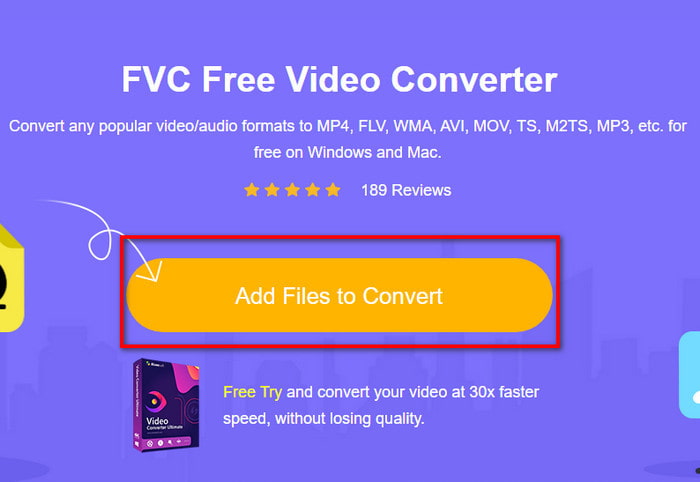
Schritt 2. Klicken Sie auf der Website auf Add Files to Convert, um das Installationsprogramm herunterzuladen. Keine Sorge, es sind nur wenige KB. Klicken Sie anschließend noch einmal darauf, um das Tool zu starten, und suchen Sie die Datei im Ordner. Wenn Sie sie gefunden haben, klicken Sie auf Open.
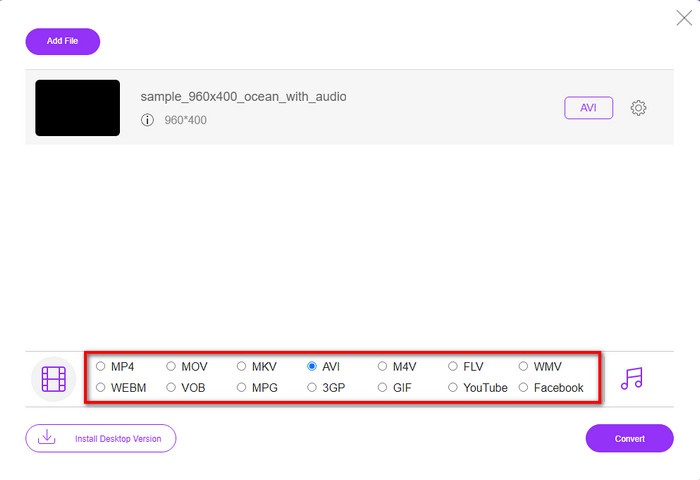
Schritt 3. Eine neue Oberfläche von FVC wird auf Ihrem Bildschirm angezeigt. Wählen Sie in der Liste unten das AVI‑Format oder ein anderes Format, in das Sie konvertieren möchten.
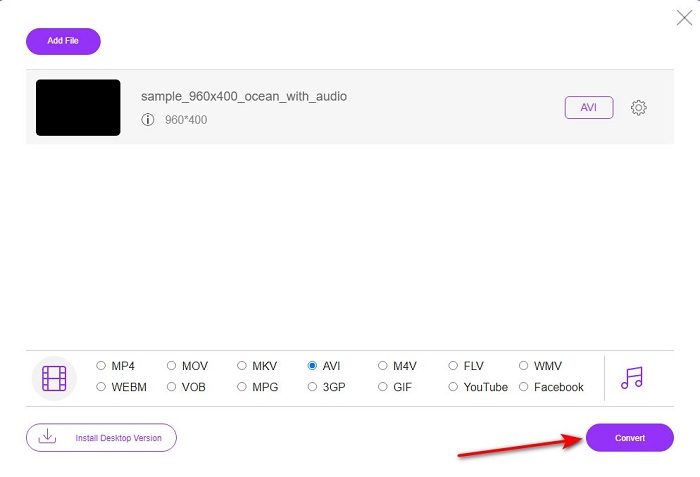
Schritt 4. Nachdem Sie das Format gewählt haben, starten Sie die Konvertierung der Datei, indem Sie auf Convert klicken.
Schritt 5. Dies dauert schätzungsweise weniger als eine Minute. Wenn der Konvertierungsvorgang abgeschlossen ist, wird ein Ordner mit der neu konvertierten Datei angezeigt.
Teil 2. So konvertieren Sie VOB in AVI unter Windows und Mac
Verwenden Sie den phänomenalen Konverter: FVC Video Converter Ultimate
Wenn Sie einen VOB-zu-AVI-Konverter herunterladen möchten, dann muss dies die beste Wahl sein, die Sie gerne treffen würden. FVC Video Converter Ultimate macht seinem Namen als ultimatives Tool alle Ehre, das jede ultimative Situation löst, die Ihnen einfällt, insbesondere beim Konvertieren. Diese Software unterscheidet sich stark von den beiden genannten Tools. Vielleicht denken Sie warum, und das liegt nur daran, dass es jedem perfekt passt, egal ob Sie ein Profi oder ein Anfänger sind. Die Gesamtleistung, die wir erleben, wenn wir dieses Tool ausprobieren, ist bereits erstaunlich und wir sind beeindruckt, wie schnell die Konvertierung durchgeführt werden kann. Und jetzt, wenn Sie die phänomenale Konvertierung erleben möchten, über die wir sprechen, folgen Sie den unten angegebenen Schritten.
Schritt 1. Bevor Sie es verwenden können, müssen Sie es zunächst herunterladen. Installieren Sie es nach dem Herunterladen, führen Sie die Grundeinstellungen durch und klicken Sie auf Start Now.
Gratis DownloadFür Windows 7 oder neuerSicherer Download
Gratis DownloadFür MacOS 10.7 oder neuerSicherer Download
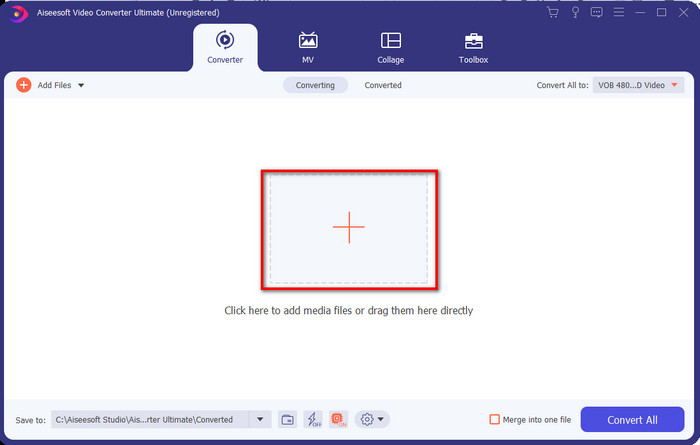
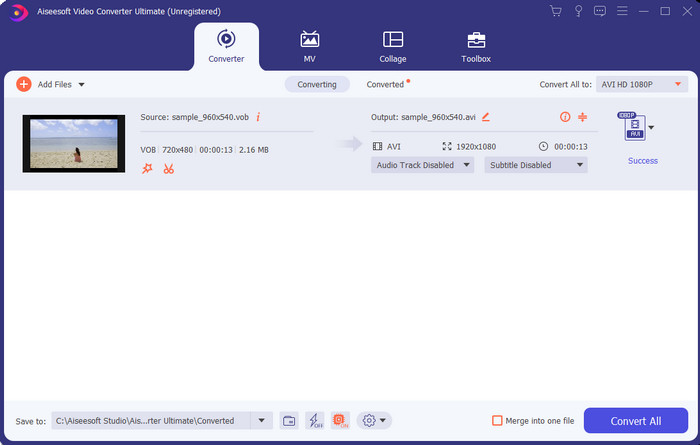
Schritt 2. Sobald die Installation abgeschlossen ist, öffnen Sie die Software. Dann erscheint eine Oberfläche wie diese auf Ihrem Bildschirm. Klicken Sie in der Mitte der Oberfläche auf die +‑Schaltfläche, und ein Ordner wird angezeigt. Klicken Sie auf Open, um mit dem nächsten Schritt des Vorgangs fortzufahren.
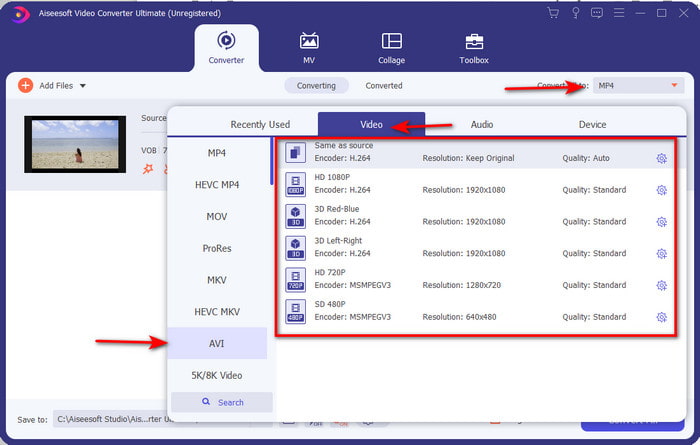
Schritt 3. Klicken Sie oben links in der Oberfläche auf die Schaltfläche Convert All to und wählen Sie im Bereich „Video“ das AVI‑Format aus.
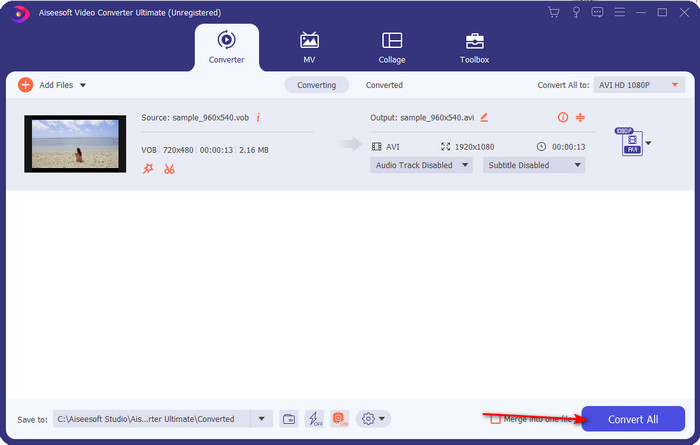
Schritt 4. Wenn Sie die Formatwahl abgeschlossen haben, klicken Sie auf Convert All, um die Konvertierung zu starten.
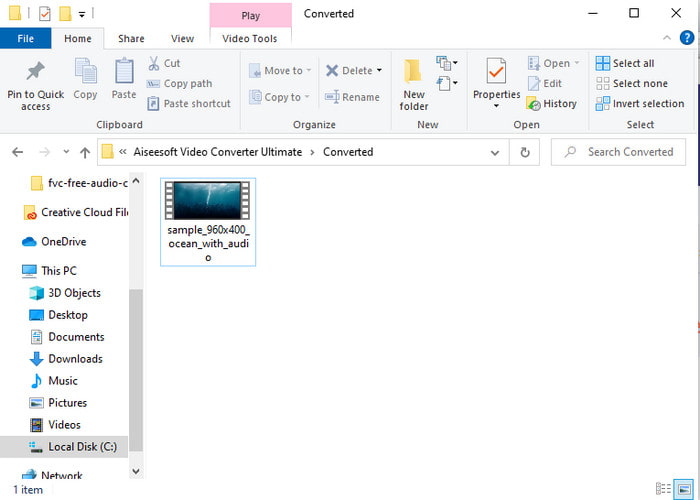
Schritt 5. Sie müssen sich keine Sorgen über lange Wartezeiten machen, denn der Vorgang ist in wenigen Sekunden erledigt. Anschließend wird automatisch ein Ordner auf Ihrem Bildschirm geöffnet, der die eben konvertierte Mediendatei enthält. Klicken Sie darauf, um sie anzusehen und die neue Version Ihrer .vob‑Datei zu genießen.
Verwenden Sie das kostenlose Tool: HandBrake
Wenn Sie nach einem kostenlosen Tool suchen, dann hilft Ihnen HandBrake dabei – und wie beim FVC Video Converter Ultimate ist dafür keine Internetverbindung während der Nutzung erforderlich. Außerdem ist es für jeden kostenlos herunterzuladen und zu verwenden, egal ob zu Hause, bei der Arbeit oder anderswo auf dem Desktop. Allerdings müssen Sie vor der Nutzung zusätzlich eine separate Datei namens .NET 5.0 herunterladen. Einige Nutzer empfinden dies als etwas lästig, weil nach dem Download des Tools noch eine weitere Datei heruntergeladen werden muss. Wenn Sie jedoch kostenlos und dennoch effektiv konvertieren möchten, versuchen Sie, mit HandBrake VOB in AVI zu konvertieren, und folgen Sie den folgenden Schritten.
Schritt 1. Installieren Sie das Tool zunächst auf Ihrem Computerlaufwerk.
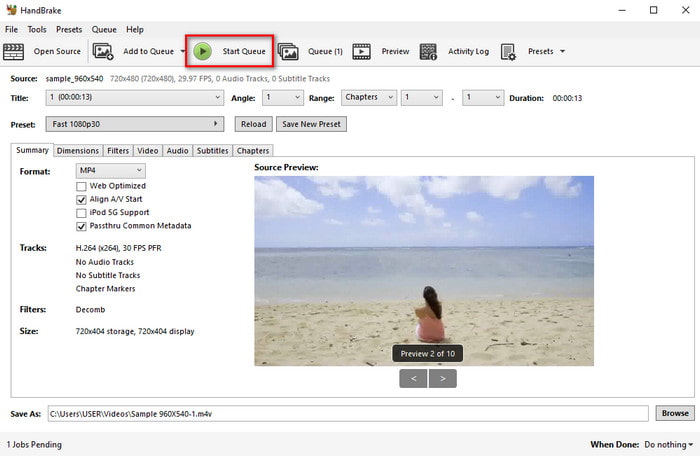
Schritt 2. Klicken Sie auf „File“ und suchen Sie die .vob‑Datei in Ihrem Ordner.
Schritt 3. Klicken Sie auf Format, wählen Sie ein verfügbares Format aus der Liste und klicken Sie dann auf Start Queue.
Teil 3. Welches ist der beste Konverter zum Konvertieren von VOB-Dateien in das AVI-Format?
| Merkmale | FVC Free Video Converter | FVC Video Converter Ultimate | Handbremse |
| Konvertierungsformat |  | | |
| Hardware- und Konvertierungsbeschleunigung |  | | |
| Internetverbindung | | | |
| Video Enhancer oder Bearbeitung | | | |
| Programm unterstützt | Webbasiertes Tool | Desktop-basiertes Tool | Desktop-basiertes Tool |
Teil 4. FAQs zu VOB und AVI
Welche anderen Dateien kann VOB enthalten?
VOB ist ein Multiplex-DVD-Format und kann daher nicht nur Videos und Audio, sondern auch Untertitel, Navigationsinhalte und Menüs enthalten.
Warum kann ich keine VOB-Dateien auf meinem Media Player abspielen?
Einer der Gründe, warum VOB auf Ihrem Media Player nicht abgespielt werden kann, ist, dass dieses Format nur von wenigen Media Playern unterstützt wird. Sie können hier klicken, um verfügbare VOB‑Player zu erhalten. Wenn dieses Problem weiterhin besteht, ist eine mögliche Lösung, die Datei mit einem der oben genannten Konverter umzuwandeln.
Warum sind VOB-Dateien zu groß?
Der einzige Grund, warum dieses Format so groß ist, ist, dass es andere Daten enthält, die eine DVD haben sollte. Auch können wir die Möglichkeit der Länge des Videos nicht auslassen. Oder klicken Sie hier, um zu erfahren, wie Sie VOB-Dateien komprimieren.
Fazit
Wenn Sie also die VOB-Datei konvertieren möchten, können Sie dies ganz einfach mit Hilfe der oben verfügbaren Tools tun. Abgesehen davon ist der FVC Video Converter Ultimate der Konverter, der sich wirklich von den anderen erwähnten Online- und Offline-Tools abhebt. Weil Sie VOB unter Windows und sogar auf dem Mac problemlos in AVI konvertieren können. Wenn Sie immer noch keine Ahnung haben, was Sie verwenden sollen, empfehlen wir Ihnen dringend, das phänomenale Tool herunterzuladen, um eine explizite Ausgabe zu erleben und zu staunen.
-
 VOB zu MP4 - 3 Möglichkeiten zum kostenlosen Konvertieren von VOB-Dateien in MP4 in großen Mengen
 In diesem Artikel werden 3 kostenlose VOB-zu-MP4-Konverter und die dazugehörigen Tutorials vorgestellt. Sie können VOB kostenlos unter Windows / Mac / Online kostenlos in MP4-Dateien konvertieren.
-
 Die besten Möglichkeiten, VOB in FLV umzuwandeln [Kostenlos & Online inklusive]
 Möchten Sie eine VOB-Datei in eine FLV-Datei konvertieren? Sie können die Aufgabe einfach mit Desktop- oder Online-Konvertern erledigen. Lesen Sie diese Anleitung und erfahren Sie, wie Sie VOB einfach und schnell in FLV umwandeln.
-
 Was ist eine VOB-Datei und wie man eine VOB-Datei kostenlos in GIF umwandelt?
 Möchten Sie mehr über VOB-Dateien erfahren und wie Sie sie nach dem Rippen freigeben können? oder Warum müssen Sie VOB in GIF konvertieren? Dann lesen Sie diesen Artikel aufmerksam durch.
