


 Video Converter Ultimate
 Bildschirm recorder
 Videoreparatur
2 schnelle und einfache Möglichkeiten zum Konvertieren von M2TS in AVI mit den bereitgestellten Schritten
Wenn wir weiter in die Zukunft schreiten, erhalten viele Formate nicht mehr viel Unterstützung, etwa M2TS. Dieses Format verwendet noch immer den alten Blu-ray-Audio-Video-Container, der einen MPEG‑2‑Stream zur Übertragung der Daten nutzt. Auf manchen Geräten wie iPhone, iPod und sogar vielen Android-Geräten können Sie dieses Format nicht wiedergeben, da sie die Struktur des Formats nicht erkennen. Wenn Sie jedoch weiterhin Dateien mit dieser Erweiterung haben und sie ansehen möchten, empfehlen wir, das Format in AVI zu konvertieren. Schauen wir uns also an, welcher Weg am besten geeignet ist, um Ihnen bei Ihrem Vorhaben zu helfen, eine M2TS-Datei zu konvertieren. Wenn Sie diesen Artikel in Ruhe weiterlesen, lernen Sie außerdem, wie Sie M2TS in AVI konvertieren – online oder offline.

Teil 1. M2TS vs. AVI
Wie wir bereits erklärt haben, waren M2TS-Dateien früher ein Container auf Blu-ray, der verschiedene Videos, Audio und einen anderen Stream in einem einzigen Container unterstützt. Wenn Ihre Dateierweiterung auf Ihrer Blu-ray oder AVCHD in diesem Format vorliegt, können Sie auch davon ausgehen, dass die Qualität ausgezeichnet ist. Obwohl dieses Dateiformat gute Leistungen erbringt, ist die Unterstützung, die es auf einigen Mediaplayern erhält, immer noch mager. Ein weiterer Grund ist, dass Sie, wenn Sie diese Art von Dateierweiterung abspielen möchten, Plug-in-Play, einen Codec und einige Komponenten benötigen, um das Video in diesem Format anzusehen. Anders als wenn Ihre Dateierweiterung .avi ist. Dieses Format gewinnt Fans im gesamten Web, weil die Videoqualität, die dieses Format enthalten kann, sehr gut ist. Die Dateigröße ist jedoch ein großes Problem, da es keinen geeigneten Codec gibt, um Ihre Dateigröße zu reduzieren. Aber wenn wir M2TS und AVI vergleichen, sind beide ausgezeichnet. Dennoch sind die Unterstützungen unterschiedlich, und die Flexibilität des AVI-Formats kann Ihnen helfen.
Teil 2. Der erste Weg ist die Online-Konvertierung von M2TS in AVI mit dem einfachsten Web-Tool
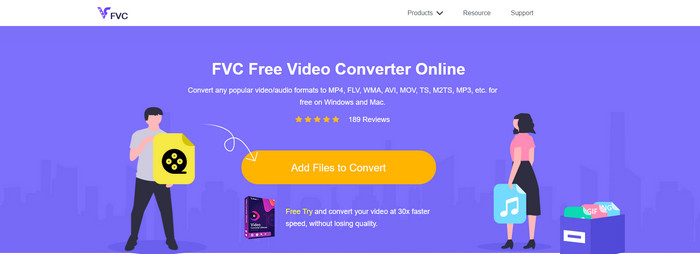
Vielleicht fragen Sie sich, ob Sie M2TS kostenlos in AVI umwandeln können – dann ist der FVC Free Video Converter genau das Richtige für Sie. Dieses Online-Tool gehört zu den besten Konvertern, die Sie im Internet finden können. Wenn Sie außerdem Probleme bei der Umwandlung Ihres Formats haben, bietet es dafür ebenfalls eine Lösung: Sie können Bitrate, Auflösung und Bildrate ändern. Obwohl das Tool eine mittlere Bandbreite verschiedener Formate unterstützt, verfügt es dennoch nicht über erweiterte Funktionen, um das Endergebnis so herausragend zu machen, wie es etwa der FVC Video Converter Ultimate für Sie tun kann. Wenn Sie jedoch nichts bezahlen möchten und über eine Internetverbindung verfügen, sollte dies Ihre erste Wahl sein, um das Format in eine neue Version umzuwandeln.
Vorteile
- Es muss keine Software heruntergeladen werden, da über das Internet darauf zugegriffen werden kann.
- Es unterstützt mittlere Varianten des Formats, das Sie auswählen können.
- Kostenlos und werbefrei auf der Oberfläche der Website.
Nachteile
- Es benötigt eine Internetverbindung, um darauf zugreifen zu können.
- Einige Formate werden hier nicht unterstützt, und die Formatunterstützung ist eingeschränkt.
Schritte zur Verwendung des Online-Konverters im Web
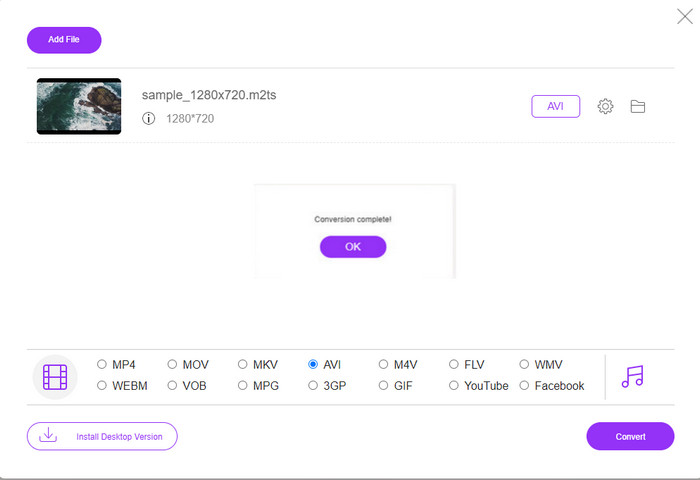
Schritt 1. Klicken Sie auf diesen Link, um die Hauptseite des Online-Konverters zu öffnen. Sie müssen sich keine Sorgen machen, denn dieser Link ist sicher – wir haben ihn selbst ausprobiert.
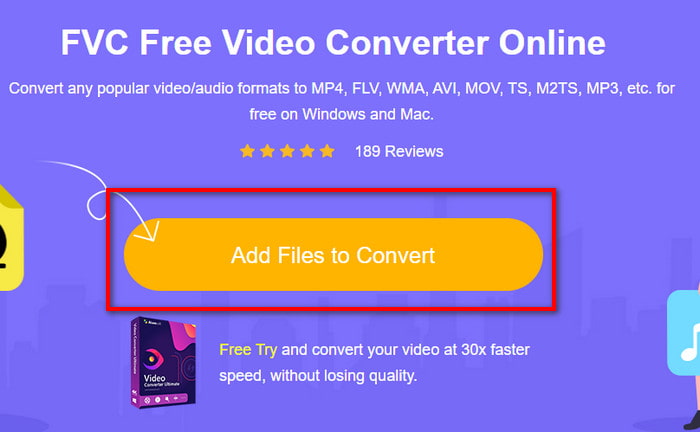
Schritt 2. Klicken Sie dann auf Dateien zum Konvertieren hinzufügen. Es öffnet sich ein Ordnerfenster auf Ihrem Bildschirm. Wählen Sie die Datei mit der Endung .m2ts aus und klicken Sie auf Öffnen.
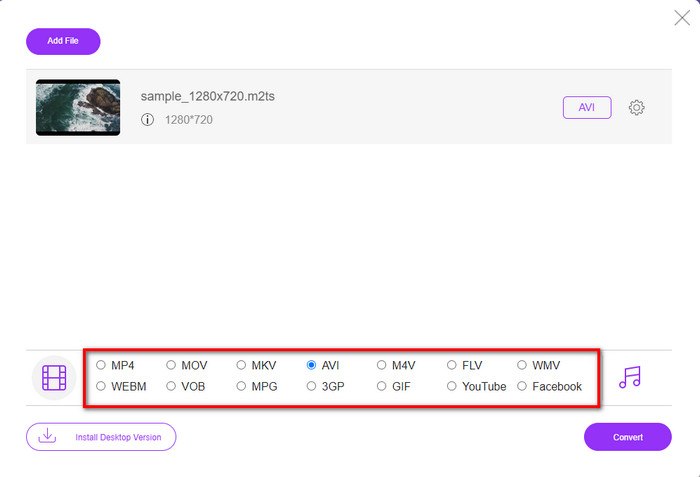
Schritt 3. Nachdem Sie die Datei eingefügt haben, erscheint eine Oberfläche auf Ihrem Bildschirm, unter der verschiedene Formatoptionen angezeigt werden. Wählen Sie das AVI-Format aus der Liste.
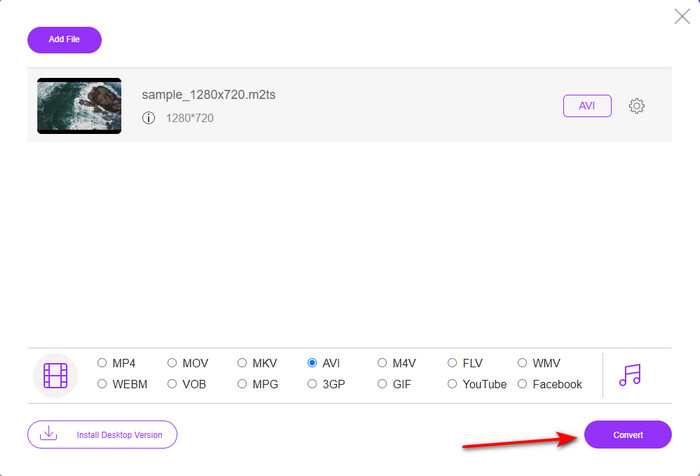
Schritt 4. Sobald Sie das Format gewählt haben, klicken Sie auf Konvertieren, um die Umwandlung in das AVI-Format zu starten.
Schritt 5. Die Konvertierung des Formats dauert etwa eine Minute; anschließend erscheint ein Ordnerfenster mit der zuvor konvertierten Datei.
Teil 3. Der zweite Weg besteht darin, das ultimative Tool zu verwenden, um M2TS offline in AVI zu konvertieren
Wenn Sie ein Tool möchten, das deutlich leistungsstärker ist als die üblichen Online- oder Offline-Konverter, dann ist FVC Video Converter Ultimate das perfekte Programm für Sie. Dieses Tool erledigt die unterschiedlichsten Aufgaben mit Bravour – ob Bearbeiten, GIF-Erstellung, Formatumwandlung, Lautstärkeanhebung und vieles mehr. Viele erweiterte, dabei aber einfach zu nutzende Funktionen wurden bereits integriert, um den bestmöglichen Output für die Nutzer zu liefern. Es stimmt: Sie müssen Kunde werden, bevor Sie auf dieses ultimative Tool zugreifen können. Doch keine Sorge – es ist nicht teuer und arbeitet im Vergleich zu anderen Konvertern ausgesprochen leistungsfähig. Außerdem unterstützt das Programm alle gängigen Formate und somit mit Sicherheit auch das Dateiformat, das Ihre Geräte oder Ihr Desktop verwenden. Wenn Sie zudem den bestmöglichen Konvertierungsprozess erleben möchten, folgen Sie den unten angegebenen Schritt-für-Schritt-Anleitungen zur Nutzung dieses M2TS-zu-AVI-Konverters.
Vorteile
- Es unterstützt viel mehr erweiterte Funktionen, die Sie gerne verwenden würden.
- Kann eine Datei aufgrund der Hardwarebeschleunigung und der schnellen Konvertierung, die dieses Tool bietet, innerhalb weniger Sekunden konvertieren.
- Verfügbar auf allen Plattformen und unterstützt alle Formate.
Nachteile
- Um auf das Tool zugreifen zu können, müssen Sie bezahlen.
- Es muss zuerst auf Ihr Computerlaufwerk heruntergeladen werden.
Schritte, um das M2TS‑Videoformat offline in das AVI‑Format zu konvertieren
Schritt 1. Laden Sie die Software für Ihr System herunter, indem Sie unten auf die Download-Schaltfläche klicken. Installieren Sie sie anschließend, führen Sie die Ersteinrichtung durch und öffnen Sie das Programm.
Gratis DownloadFür Windows 7 oder neuerSicherer Download
Gratis DownloadFür MacOS 10.7 oder neuerSicherer Download
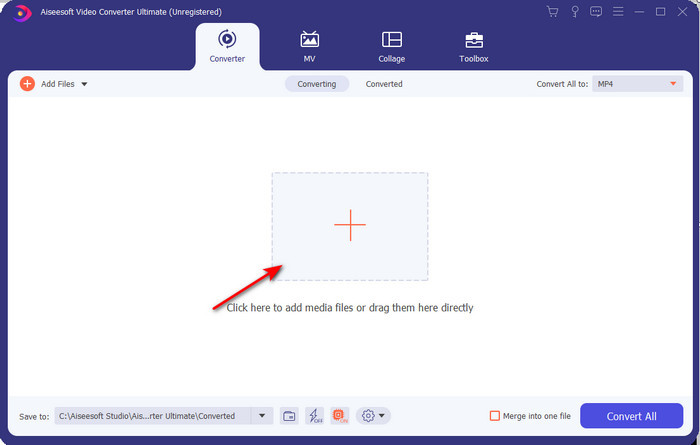
Schritt 2. Starten Sie die Software, klicken Sie auf die Schaltfläche +, um die .m2ts-Datei aus dem Ordner zu wählen, und klicken Sie auf Öffnen.
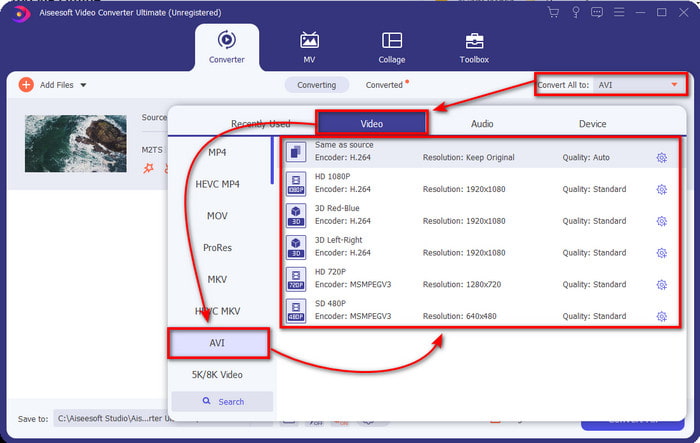
Schritt 3. Oben rechts in der Oberfläche sehen Sie das Menü Alle konvertieren in. Klicken Sie darauf. Nach dem Klick erscheint ein Untermenü – suchen Sie in der Liste das Format AVI.
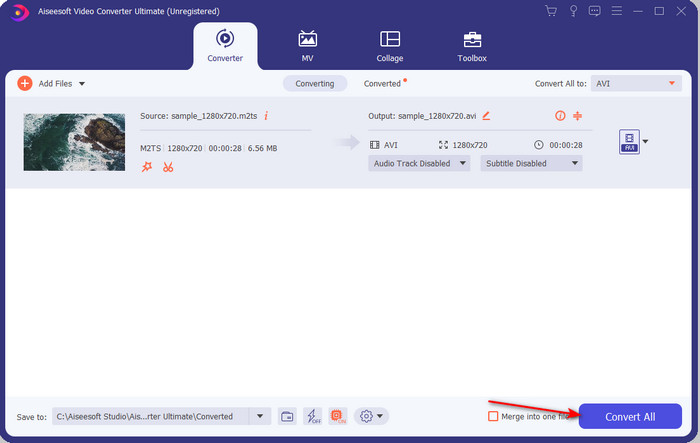
Schritt 4. Wenn Sie das Format ausgewählt haben, starten wir die Konvertierung, indem Sie auf Alle konvertieren klicken.
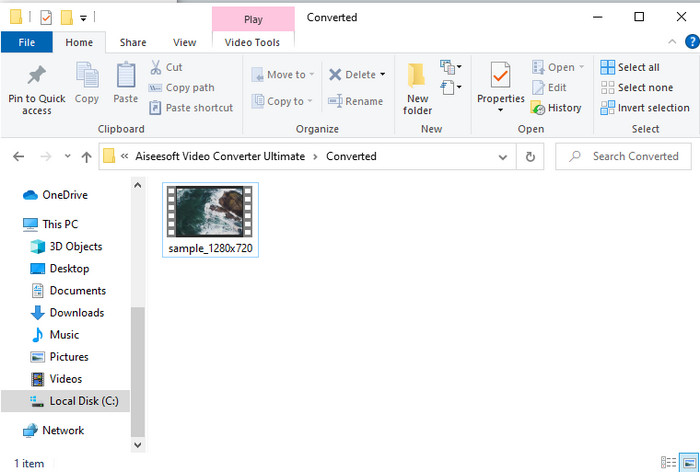
Schritt 5. Sobald die Konvertierung abgeschlossen ist, öffnet sich ein Ordnerfenster auf Ihrem Bildschirm. Klicken Sie anschließend auf die Datei, um die konvertierte .m2ts-Datei anzusehen.
Teil 4. FAQs zu M2TS und AVI
Bleibt nach der Konvertierung von M2TS in AVI die Qualität erhalten?
Nach der Konvertierung von M2TS in AVI sollte die Qualität des Videos erhalten bleiben. Es besteht jedoch die Möglichkeit, dass sich die Qualität ändert, wenn Sie die Qualitätsausgabe auf mittel oder niedrig einstellen. Dies kann vermieden werden, wenn Sie es auf 1080 oder 4k einstellen, aber die Dateigröße ist größer im Vergleich zu denen mit niedriger Qualität.
Warum kann ich M2TS nicht auf meinem Windows Media Player abspielen?
Es gibt im Grunde nur einen Grund, warum Sie eine Datei mit der Endung .m2ts nicht abspielen können: Sie wird nicht unterstützt. Wenn Sie Ihre .m2ts-Datei dennoch ansehen möchten, müssen Sie sie daher konvertieren oder einen anderen Media-Player eines Drittanbieters finden, der M2TS-Dateien wiedergeben kann.
Unterscheiden sich MTS und M2TS?
Wenn wir diese beiden Formate miteinander vergleichen würden, könnten Sie davon ausgehen, dass es keinen großen Unterschied gibt. Beide nutzen das AVCHD‑Videoformat, das Ihre Videoqualität so hoch wie möglich erhält. Um weitere Informationen über MTS- und M2TS-Dateien zu erhalten, lesen Sie den Beitrag Was ist der Unterschied zwischen MTS und M2TS.
Fazit
Gemeinsam haben wir nun die verschiedenen Techniken gefunden, wie Sie Ihre M2TS-Datei in AVI konvertieren können. Als wir jedes Tool einzeln untersucht haben, fanden wir heraus, dass der FVC Video Converter Ultimate beim Konvertieren von Dateien eine gute Leistung erbringt. Am Ende empfehlen wir Ihnen also, den phänomenalen Konverter für eine einfachere Konvertierung herunterzuladen und den schnellsten Konvertierungsprozess aller Zeiten zu erleben.
-
 So konvertieren Sie M2TS zu MKV Free & Online
 Möchten Sie M2TS in MKV konvertieren und dabei die ursprüngliche Qualität beibehalten? Dieser Beitrag zeigt Ihnen kostenlose und Online-Methoden, um M2TS verlustfrei auf MKV umzustellen.
-
 [2021] Top 6 kostenlose und Online-Möglichkeiten zum Konvertieren von M2TS in MP3
 Kann eine M2TS-Datei in MP3 konvertiert werden? In diesem Beitrag haben wir die sechs besten kostenlosen und Online-Möglichkeiten aufgelistet, mit denen Sie M2TS in MP3-, AAC-, AIFF- und weitere Audioformate konvertieren können.
-
 So konvertieren Sie M2TS kostenlos in MOV [Online & Offline]
 Müssen Sie M2TS in MOV konvertieren, um Videodateien auf einer Reihe von Playern und Plattformen abzuspielen? Dieser Artikel hilft Ihnen dabei, die beste Online- / Offline-Methode zum Konvertieren von M2TS in MOV unter Windows / Mac zu finden.
