


 Video Converter Ultimate
 Bildschirm recorder
 Videoreparatur
Offline- und Online-Tools zum Konvertieren von TRP in FLV, die Sie kennen sollten
TRP is a file format for storing recorded television files. Because few players can handle this file type in its original version, you may need to convert your file to another format before viewing it. To support the conversion of TRP files to FLV files, you'll need to employ the right software tool. Luckily, doing this is much easier by using our software or its online counterpart that will cause you no inconvenience during the whole conversion process. Follow the steps that we will provide to convert your TRP videos to FLV format successfully.

Teil 1. Offline-Methode zum Konvertieren von TRP in FLV
A TRP file format is mostly uncommon to all video consumers and not frequently used by creators. With this fact, most software and online tools do not support this type of video file. That is why Video Converter Ultimate is one to consider in times of any need to convert videos from one format to another. This software can convert your TRP file to any format of your choice in one click.
Dieses Videokonverter-Tool bietet erweiterte Bearbeitungsfunktionen und verfügt über eine grafische Benutzeroberfläche, die einfach zu bedienen ist, auch wenn Sie keine technischen Kenntnisse oder Fähigkeiten haben. Mit Hilfe dieser Anwendung können Sie Dateien konvertieren und von superschnellen Konvertierungszeiten und qualitativ hochwertiger Ausgabe profitieren. Hier stellen wir Ihnen die einfachen Schritte vor, die Sie befolgen müssen:
Step 1: Download the .exe file by clicking the Free Download button below according to what OS you are using. When you finish downloading, open it and start the installation process. Wait for it to finish installing, then launch the software.
Gratis DownloadFür Windows 7 oder neuerSicherer Download
Gratis DownloadFür MacOS 10.7 oder neuerSicherer Download
Step 2. An interface will appear once the software starts. From there, click the + button in the middle and begin importing the video file you wish to convert or just drag and drop the file.
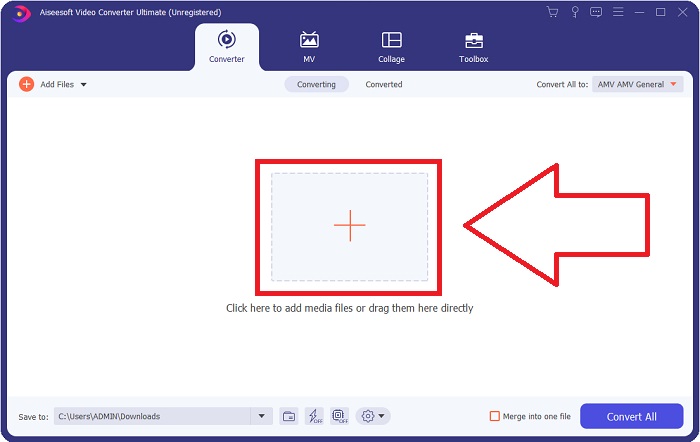
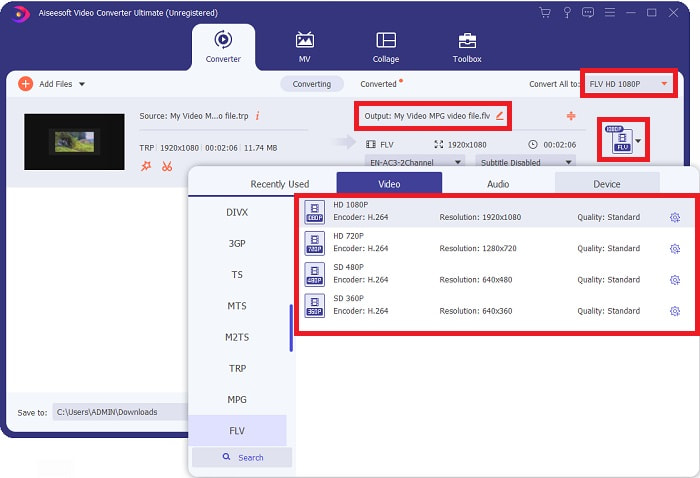
Step 3: You will see the current format of your video's current format on the right side of the file. To choose which format the video will be converted to, click on it, and all the available formats will appear. Look for FLV or just type it in the search bar. There are also video qualities on the right for you.
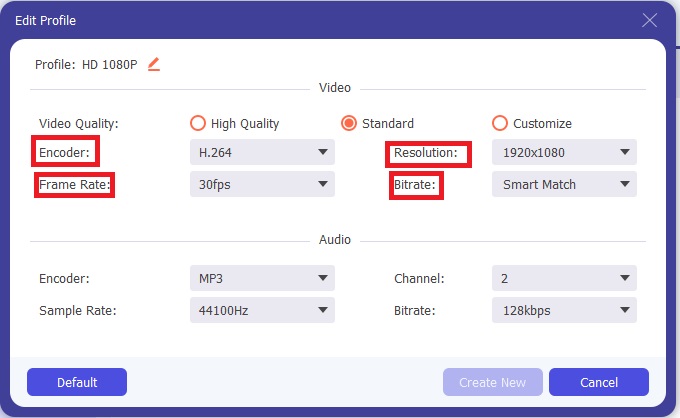
Step 4: For the additional functions we are talking about, click on the gear icon on the right of the video quality you chose, and another interface will appear. From there, you can edit a bunch of video and audio settings that suit your needs. Click the Create New button to keep the changes.
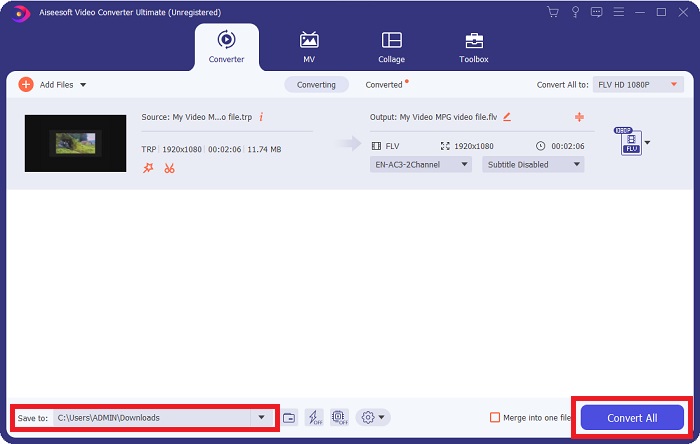
Step 5: Once you finish adjusting with all the editing, click the Convert All button on the bottom right corner of the interface to start the conversion process and wait for it to finish.
Teil 2. Online-Methode zum Konvertieren von TRP in FLV
Converting video files is another thing to consider if you want to get the job done by visiting a web tool and not installing the full software. In this case, we also have the online counterpart of the software - FVC Free Video Converter Online. It still provides the additional options on the software but not all the features. However, it still does its purpose in a considerable amount of time needed to do so. To use this web tool, follow the steps below:
Step 1: Go to the converter properly by clicking this link. From there, you can start by downloading the launcher you need to import your files. Click the Add Files to Convert button in the middle of the page to begin the process.
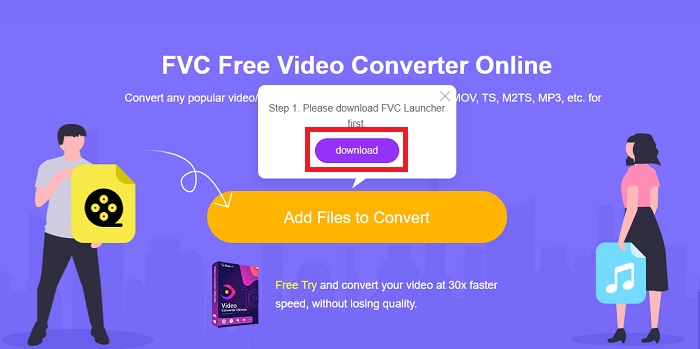
Step 2: Click the said button again and upload the video file you wish to convert. After you import a file, a new interface will appear that shows all the available formats for you to choose. In this case, select FLV.
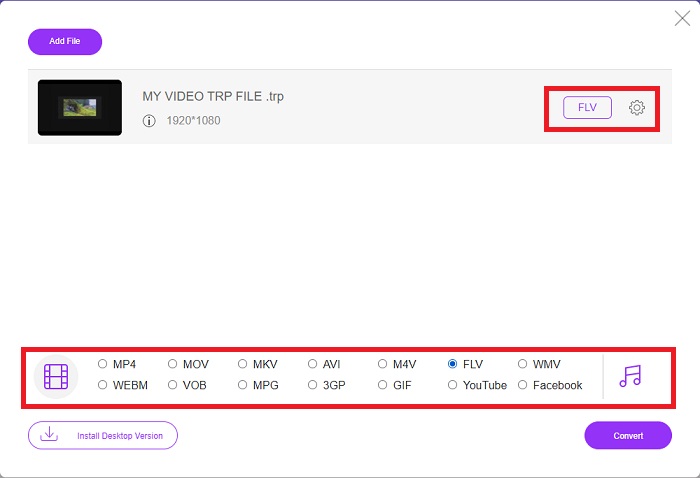
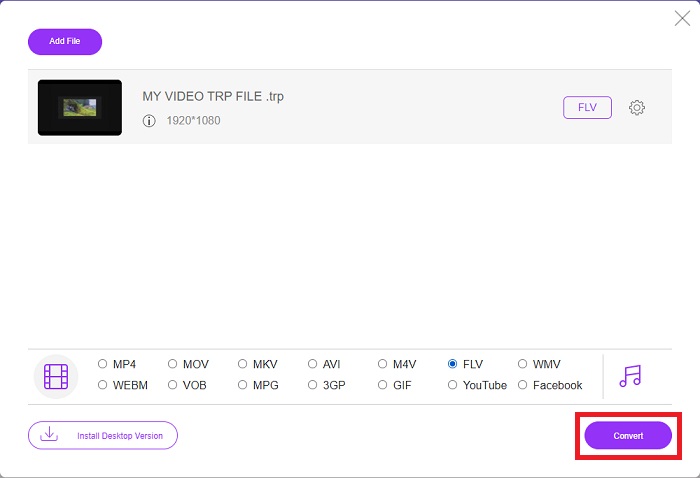
Step 3: For the additional options, just like in the software itself, click on the gear icon on the right. The video and audio settings will appear to further edit your video in terms of resolution, frame rate, and many more. Once done, click OK to save the changes. Finally, start the conversion process by clicking the Convert button in the lower right corner.
Verwandt:
Teil 3. Erweitertes Wissen über TRP und FLV
Um mehr über die beiden genannten Formate zu erfahren, stellen wir Ihnen kurze Informationen sowie einen Vergleich der beiden zur Verfügung.
TRP-Dateien sind normalerweise mit VLC von VideoLAN verknüpft. Die TRP-Dateinamenerweiterung kann mit MPEG-2 Teil 1 hochauflösende Filme aufnehmen. TRP-Dateien können Datenpakete enthalten und speichern, die als digitales Video und Audio über digitale Videoübertragungsnetze, Funkfrequenzen oder lineare Aufnahmegeräte wie Videorecorder gesendet werden. Mehrere Audio- und Videostreams sowie Fehlerkorrekturcode sind in einer TRP-Datei enthalten. Benutzer können auch Metadaten wie Aufnahmezeit, Kamera-ID und Quelle in den Inhalt der Datei aufnehmen.
Andererseits steht eine Datei mit der Endung .flv für Flash Video. Die FLV-Dateierweiterung bezieht sich auf eine Video- oder Audiodatei, die mit Adobe Flash Player oder Adobe Air über das Internet gesendet wird. Flash-Video ist seit langem das primäre Videoformat für fast alle eingebetteten Videos im Internet, einschließlich Videos auf YouTube, Hulu und verschiedenen anderen Websites. Streaming-Anbieter und Software-Entwickler hingegen haben seit der formellen Einstellung von Adobe Flash zugunsten von HTML5 und anderen Formaten aufgegeben.
| TRP | FLV | |
| Dateierweiterung | .trp | .flv |
| Entwickler | VideoLAN-Projektteam | Adobe Systems Incorporated |
| Unterstützende Programme | ◆ SMPlayer ◆ VLC-Mediaplayer ◆ Apple QuickTime-Player | ◆ RealPlayer ◆ Apple QuickTime-Player ◆ Mplayer ◆ VLC-Mediaplayer |
Teil 4. Häufig gestellte Fragen zur Konvertierung von TRP in FLV
Wie öffne ich das TRP-Videoformat mit VLC?
Nachdem der VLC Media Player auf Ihrem Computer installiert wurde, suchen Sie die TRP-Videodatei auf Ihrer Festplatte und wählen Sie sie mit der rechten Maustaste aus. Wählen Sie „VLC Media Player“ aus dem Dropdown-Menü „Öffnen mit“. Das System öffnet die Videodatei, die von diesem Programm abgespielt wird, sobald es gestartet wird.
Wie konvertiere ich eine FLV-Datei in Windows Media Player?
Sie müssen zuerst die FLV-Datei auswählen, die Sie konvertieren möchten. Sie können WMV als Format auswählen, in das Sie Ihre FLV-Datei konvertieren möchten. Um Ihre FLV-Datei zu konvertieren, wählen Sie „Konvertieren“ aus dem Dropdown-Menü.
Kann ich TRP überall spielen?
Das Konvertieren von TRP in weithin bekannte MP4-, AVI-, MOV-, MKV-, FLV-, WMV- und andere Formate ist eine empfohlene Option, wenn Sie TRP-Dateien überall und auf oder auf jedem Gerät oder Mediaplayer abspielen möchten.
Fazit
Insgesamt ist Video Converter Ultimate und sein Online-Tool-Pendant genau das, wonach Sie suchen, um den gesamten Konvertierungsprozess zu erledigen und gleichzeitig alle notwendigen Funktionen bereitzustellen, die Sie benötigen. Es verursacht keine Unannehmlichkeiten und ist außerdem zu jeder Tageszeit verfügbar, wenn Sie die Software auf Ihrem Desktop installiert haben. Sie werden nie wissen, wann Sie einen Konverter wie diesen benötigen, daher empfehlen wir Ihnen, diese Software zu verwenden.
-
 Einfachste Anleitung zum Konvertieren von TRP in AVI unter Windows und Mac
 Vielleicht sind Sie mit dem TRP-Videoformat nicht vertraut und fragen sich, wie Sie TRP in AVI konvertieren sollen? Lesen Sie diesen Artikel weiter, um die Details zu erfahren, die das Problem betreffen.
-
 3 Lösungen zum Konvertieren von MTS in FLV kostenlos und online
 Möchten Sie MTS in FLV konvertieren? Hier sind 3 kostenlose MTS-zu-FLV-Konverter-Software, die Sie versuchen können, MTS in FLV unter Mac OS X und Windows 10/8/7 zu konvertieren.
-
 Die besten Möglichkeiten, VOB in FLV umzuwandeln [Kostenlos & Online inklusive]
 Möchten Sie eine VOB-Datei in eine FLV-Datei konvertieren? Sie können die Aufgabe einfach mit Desktop- oder Online-Konvertern erledigen. Lesen Sie diese Anleitung und erfahren Sie, wie Sie VOB einfach und schnell in FLV umwandeln.
