


 Video Converter Ultimate
 Bildschirm recorder
 Videoreparatur
Finden Sie die 4 besten Offline- und Online-SWF-zu-FLV-Konverter für Windows und Mac heraus
Ich suche derzeit nach einer Lösung, um meine SWF-Dateien auf Video-Sharing-Sites wie Youtube, Facebook, MySpace und mehr hochzuladen. Können Sie mir helfen, dieses Problem am schnellsten zu lösen?
Dieses Problem ist häufig, besonders wenn Ihr Video die Dateierweiterung .swf hat. Dieses Format ist zwar im Web üblich, aber das Teilen der Datei auf einer Video‑Sharing‑Plattform funktioniert nicht. Wenn Sie Ihre SWF‑Dateien teilen möchten, müssen Sie das Format daher in ein weit verbreitetes wie FLV konvertieren. Sehen wir uns nun vier versteckte Perlen unter den Offline‑ und Online‑SWF‑zu‑FLV‑Konvertern an, die Sie verwenden können, indem Sie diesen Artikel lesen.

Teil 1. Konvertieren Sie SWF kostenlos online in FLV mit dem FVC Free Video Converter Online
FVC Free Video Converter Online ist der unerreichte Videokonverter, mit dem Sie SWF kostenlos online in FLV umwandeln können. Dieses Online‑Tool ist darauf spezialisiert, Dateien in ein neues Format zu konvertieren, ohne dass Sie das Programm auf Ihren Desktop herunterladen müssen. Neben der Konvertierung können Sie auch die Video‑ und Audioeinstellungen nach Ihren Bedürfnissen anpassen. Möchten Sie wissen, wie Sie diesen leichtgewichtigen Web‑Konverter verwenden? Dann kopieren Sie die unten aufgeführten Schritte.
Schritt 1. Klicken Sie auf diesen Link, um eine neue Registerkarte zu öffnen, die Sie auf die offizielle Webseite des FVC Free Video Converter Online führt.
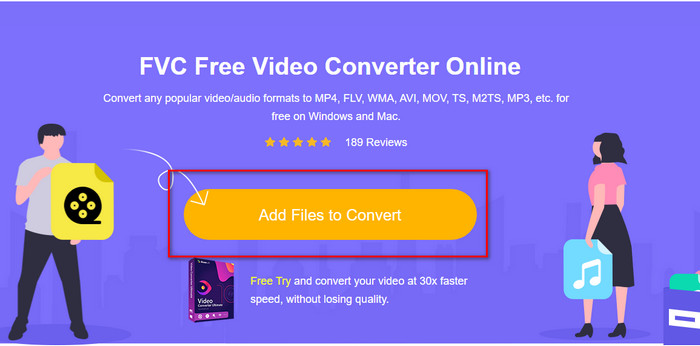
Schritt 2. Klicken Sie auf der Website auf Add Files to Convert, danach öffnet sich ein Computerordner; wählen Sie die .swf‑Datei aus und drücken Sie auf Open.
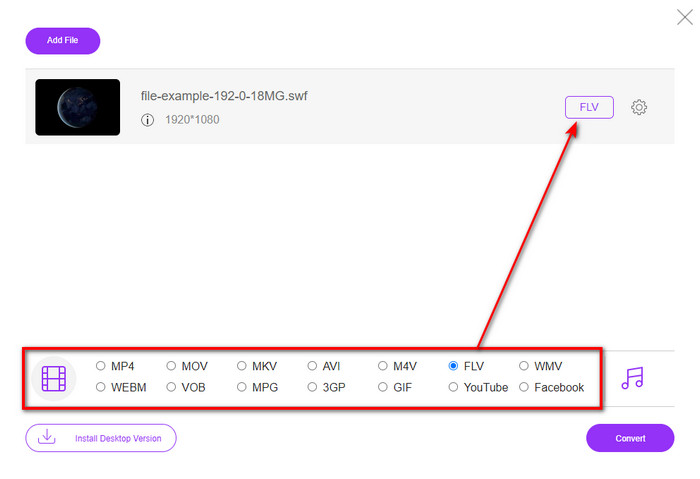
Schritt 3. Nachdem Sie die Datei eingefügt haben, wählen Sie in der Formatliste das FLV‑Format aus.
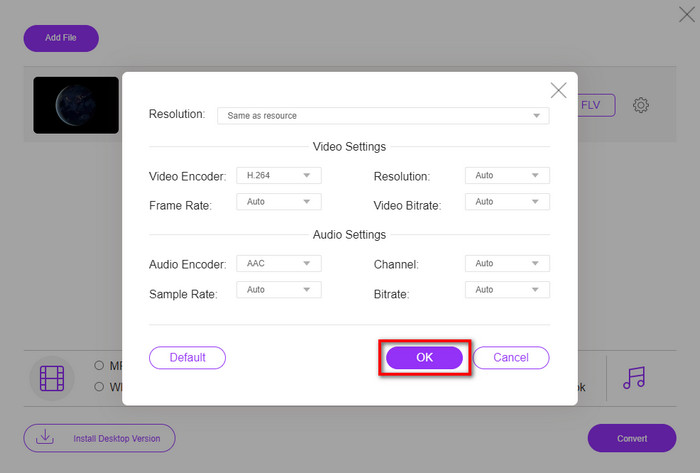
Um die Video‑ und Audioeinstellungen zu ändern, klicken Sie auf die Zahnrad-Schaltfläche.
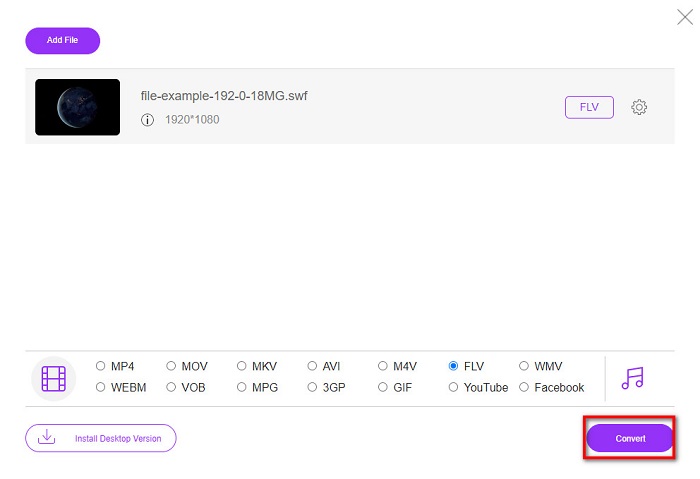
Schritt 4. Um den Konvertierungsvorgang zu starten, klicken Sie auf die Schaltfläche Convert.
Teil 2. Konvertieren Sie SWF in FLV mit FFmpeg
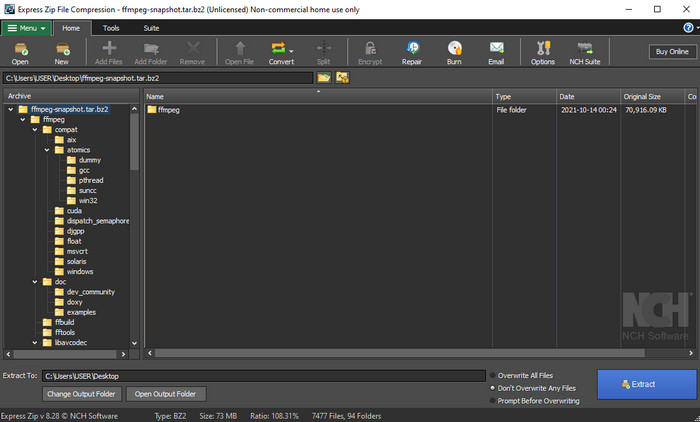
FFmpeg verfügt über eine eigene Bedienoberfläche und Befehle, um SWF kostenlos in FLV zu konvertieren. Wenn Sie diesen Konverter kennen, wissen Sie bereits, wie man ihn benutzt; allerdings ist er nicht jedem bekannt. Kurz erklärt: Dieser Konverter ist kein typischer Videokonverter, wie man ihn aus dem Web oder als Download kennt. Anstatt Schaltflächen zu verwenden, brauchen Sie Befehlszeilen, um diesen Konverter zu steuern.
Schritt 1. Laden Sie den FFmpeg‑Konverter auf Ihr Laufwerk herunter und öffnen Sie ihn.
Schritt 2. Öffnen Sie die Eingabeaufforderung auf Ihrem Computer.
Schritt 3. Navigieren Sie in der Eingabeaufforderung zu dem Ordner, in dem sich Ihre SWF‑Datei befindet, und fügen Sie sie ein. Kopieren Sie diesen Befehl und fügen Sie ihn in die Eingabeaufforderung ein: ffmpeg -i input.swf -vn -ar 44100 -ac 2 -b:a 192k output.flv und drücken Sie Enter, damit der Vorgang startet.
Teil 3. Konvertieren Sie SWF in FLV in Flash
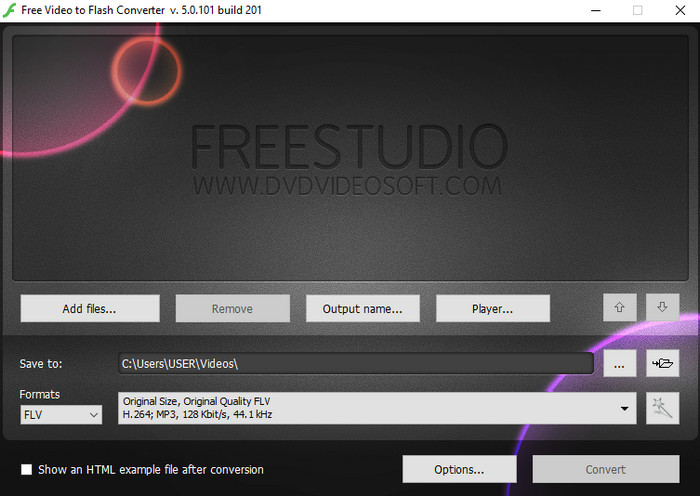
Free Video to Flash Converter ist ein kostenloser Konverter zum Herunterladen für Windows. Dieser Konverter bietet zwei Formate zur Auswahl. Er ist ausschließlich dafür gedacht, Dateien in FLV‑ oder SWF‑Format umzuwandeln. Wenn Sie also Ihre SWF‑Dateien in AVI, MP4, MOV, MKV und andere Formate konvertieren möchten, ist das hier nicht möglich. Lassen Sie uns ohne weitere Verzögerung lernen, wie man SWF in FLV in Flash konvertiert.
Schritt 1. Laden Sie die offizielle Software des Flash Converters auf Ihren Windows‑PC herunter und starten Sie die Anwendung.
Schritt 2. Klicken Sie auf Add Files, um die Datei in den Konverter zu laden. Drücken Sie dann auf Formats, suchen Sie FLV und wählen Sie außerdem die gewünschte Qualität aus.
Schritt 3. Starten Sie die Konvertierung, indem Sie unten rechts in der Benutzeroberfläche auf die Schaltfläche Convert klicken.
Teil 4. So konvertieren Sie SWF in FLV mit Hilfe des besten SWF-Konverters für Windows und Mac
Sind Sie mit den ersten drei oben vorgestellten Online‑ und Offline‑SWF‑zu‑FLV‑Konvertern noch nicht zufrieden? Dann versuchen Sie den FVC Video Converter Ultimate. Dieser Konverter übertrifft die Erwartungen aller Nutzer, insbesondere was die Geschwindigkeit des Konvertierungsprozesses angeht. Neben der beeindruckenden Konvertierungsgeschwindigkeit bietet er auch erweiterte Bearbeitungsfunktionen zur Verbesserung Ihres Videos sowie eine Toolbox für andere Zwecke. Außerdem versprechen die unten aufgeführten Schrittanleitungen einen hundertprozentigen Erfolg bei der Konvertierung Ihrer Datei.
Schritt 1. Bevor Sie das Tool verwenden, müssen Sie es auf Ihr Windows‑ oder Mac‑Laufwerk herunterladen, dem Installationsprozess folgen und das Programm starten.
Gratis DownloadFür Windows 7 oder neuerSicherer Download
Gratis DownloadFür MacOS 10.7 oder neuerSicherer Download
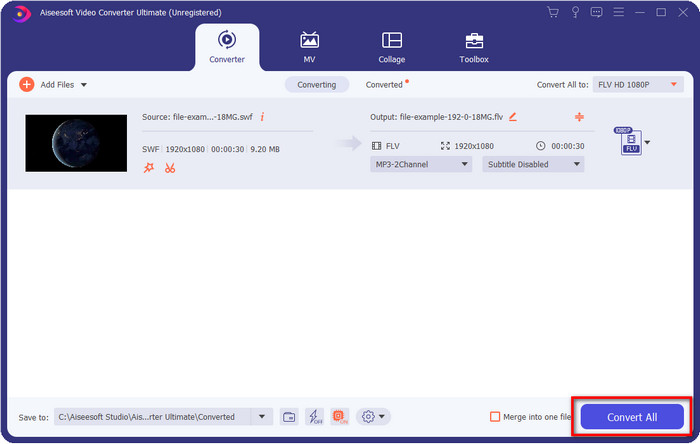
Schritt 2. Sobald es auf Ihrem System läuft, klicken Sie auf Add Files, um die SWF‑Dateien hochzuladen, die Sie konvertieren möchten.
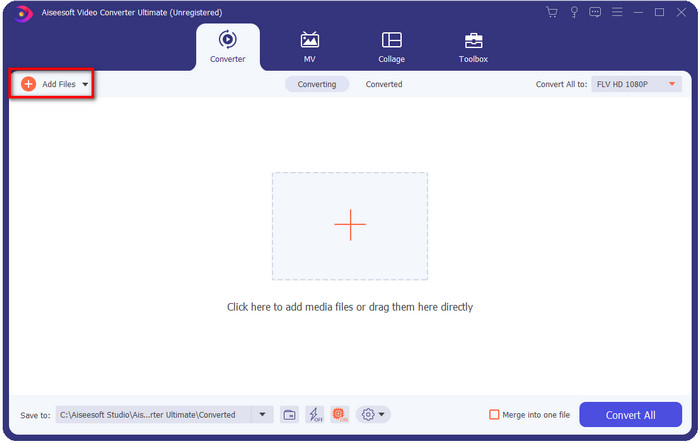
Schritt 3. Klicken Sie auf die Option Convert All to und wählen Sie das Format FLV aus. Sie können außerdem die Qualität wählen, z. B. für hochauflösendes Video oder um die Originalversion beizubehalten.

Wenn Sie die Ausgabe Ihres Videos noch weiter verbessern möchten, klicken Sie auf die Zauberstab-Schaltfläche. Sie führt Sie zu verschiedenen Bearbeitungsoptionen wie Crop, Rotate, Add Effects, Subtitle, Audio und Watermark. Um die von Ihnen vorgenommenen Änderungen zu speichern, klicken Sie auf OK.
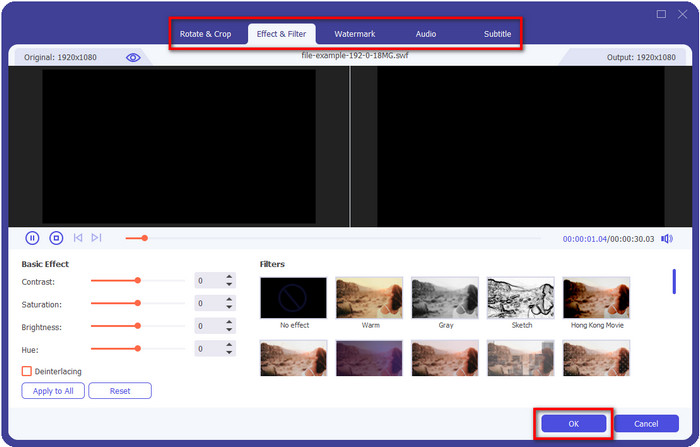
Schritt 4. Klicken Sie auf Convert All und der Vorgang beginnt. Die Konvertierung von SWF zu FLV dauert nur kurze Zeit; nach der Konvertierung wird ein Ordner mit der FLV‑Datei auf Ihrem Bildschirm angezeigt.
Teil 5. Erweiterte Kenntnisse von SWF und FLV
ShockWave File oder SWF ist ein Adobe-Format, aber Macromedia hat es erstellt. Es ist dafür bekannt, vektorbasierte Animationen und Sounds, die im Internet verwendet werden, beizubehalten. Da es sich um eine Vektorbasis handelt, können Sie außerdem die Grafikskalierung einfach anpassen oder vergrößern. Abgesehen von der Vektoranimation ist die Dateigröße so gering, dass das Video schneller geladen werden kann, selbst wenn Sie eine langsame Internetverbindung haben. Das Format wird jedoch nicht unterstützt, wenn Sie sie auf den Videoplattformen teilen möchten.
Obwohl FLV auch unter Adobe ist, ist dieses Format besser als SWF. Das FLV- oder FlashVideo-Format ist das Standard-Videoformat auf den meisten Websites. Dieses Format kann zwei verschiedene Codecs enthalten, die für Video und Audio bestimmt sind. Und genau wie die SWF-Datei ist dieses Format klein, um die Datei schneller im Internet zu laden; Nachdem Sie die FLV-Datei auf Ihr Laufwerk heruntergeladen haben, können Sie sie auf Ihrem Media Player abspielen, auch wenn sie noch nicht vollständig ist.
Es wäre hilfreich, wenn Sie die SWF-Datei in FLV konvertieren, da die SWF-Datei viele Mängel aufweist, die Sie im FLV-Format finden können. Besonders wenn die Videodatei lang ist, da .swf nur ein begrenztes Bild pro Sekunde enthalten kann, besteht die Möglichkeit, dass Sie sie nicht verwenden können. Aber FLV kann problemlos lange Videos speichern. Wenn Sie sich außerdem auf die Qualität konzentrieren möchten, hat FLV eine bessere Qualität als SWF.
Teil 6. Häufig gestellte Fragen zur Konvertierung von SWF in FLV
Unterstützt die SWF-Datei Transparenz?
Wie PNG und GIF unterstützt auch dieses Format Graustufen mit echten Farben oder weist eine Farbe zu, um es transparent zu machen.
Wo kann ich SWF-Videos ansehen?
Derzeit können Sie SWF‑Dateien nicht mit Ihrem Standard‑Mediaplayer abspielen, da sie nicht unterstützt werden. Sie können jedoch auf diesen Link klicken und mehr über die Top 4 SWF Media Player für Windows und Mac erfahren.
Kann ich die .swf-Datei meines Telefons speichern?
Das Speichern von SWF-Dateien auf Ihrem Telefon ist möglich, das Abspielen auf Ihrem lokalen Mediaplayer jedoch nicht. Weil dieses Format nicht für die Telefonkompatibilität, sondern für das Web gedacht ist. Wenn Sie also eine Datei mit dieser Erweiterung herunterladen, können Sie damit rechnen, dass Sie sie nicht verwenden können. Sie können es jedoch auf Ihrem Telefon in ein abspielbares Format wie MP4 konvertieren.
Fazit
Dieser Artikel stellt Ihnen bislang verborgene Konverter‑Perlen vor, mit denen Sie SWF in FLV umwandeln können, ohne die Qualität der SWF‑Dateien zu verringern. Während wir all diese Konverter gesammelt haben, stellten wir fest, dass FVC Video Converter Ultimate genau der versteckte Schatz ist, den Sie für dieses Problem suchen. Er liefert die beeindruckendsten Ergebnisse und den schnellsten Konvertierungsprozess im Vergleich zu allen genannten Tools. Jetzt müssen Sie nur noch den Schatz auswählen, den Sie für Ihr Konvertierungsproblem nutzen möchten – indem Sie das Tool herunterladen oder im Web aufrufen.
-
 Hilfreiche DV-zu-FLV-Konverter zum Konvertieren von DV in FLV [2022]
 Wenn Sie nach den besten und einfachsten Tools zum Konvertieren von DV in FLV suchen, finden Sie hier den besten Artikel zum Lesen. Verschaffen Sie sich einen hervorragenden Einblick, indem Sie alle Informationen dieses Artikels durchforsten.
-
 So konvertieren Sie MPG in FLV ohne Qualitätsverlust [Bewährt]
 Sie müssen Ihren Lieblingsfilm auf diesem Mediaplayer ansehen, aber er unterstützt kein MPG. Versuchen Sie, Ihre MPG-Datei mit diesen in diesem Artikel vorgestellten Konvertern in FLV zu konvertieren.
-
 Konvertieren Sie TRP in FLV mit den einfachsten Offline- und Online-Methoden
 Möchten Sie Ihre TRP-Videodatei schnell und problemlos in FLV konvertieren? Lesen Sie diesen Artikel, um Ihnen die beste Software und den besten Online-Service bereitzustellen, die der jeweiligen Situation am besten entsprechen.
