


 Video Converter Ultimate
 Bildschirm recorder
 Videoreparatur
Finden Sie heraus, wie Sie mit den 2 besten Konvertern MPG in WMV konvertieren
If we compare MPG files with the other formats, they are outdated. Furthermore, many users ask how to convert MPG to WMV for free without losing the quality of the video. So now, let's not wait anymore longer, and let's discuss the tools you can use to convert your .mpg files and more details about the two formats. Keep the ball rolling and the pace as we proceed to the converters you can use.

Teil 1. Konvertieren Sie MPG kostenlos online in WMV
If you wish to convert MPG to WMV online, you must consider boundaries, especially the file size. Since MPG files are big depending on the bitrate, so you will need an online converter that doesn't limit the file size. FVC Free Video Converter Online doesn't limit the size you can upload and the times you convert. Although the tool has no limitations, it still lacks supported formats you can choose from. However, suppose you don't want to spend a penny on your conversion. In that case, you must select this converter because this is the only online converter that provides excellence in your conversion needs. Want to know how to use this online MPG converter? If so, continue reading the succeeding details below and learn how to use this online converter.
Step 1. First, you can click this link, and a new tab will automatically open.
Step 2. Tick the Add Files to Convert button to allow the tool to run into your system. After that, you can choose the .mpg file you want to convert on the computer folder that will pop up on your screen. Once you've already selected the file, click Open to upload it.
Laden Sie die Desktop‑Version herunter, um Dateien stapelweise zu konvertieren.
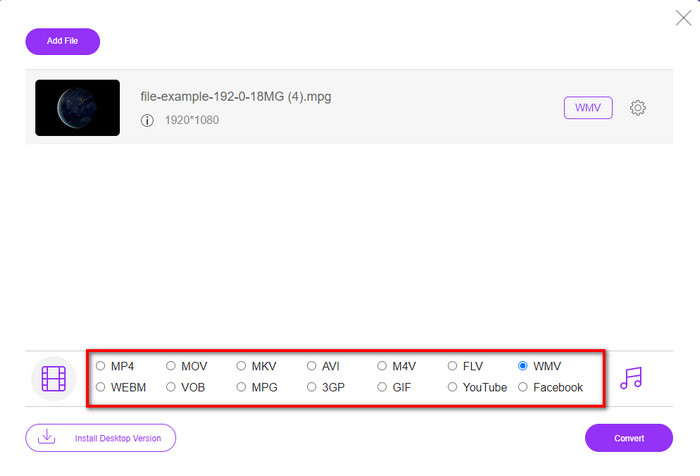
Step 3. Under there is a setlist of the format you can choose on; click MKV to proceed to the last step.
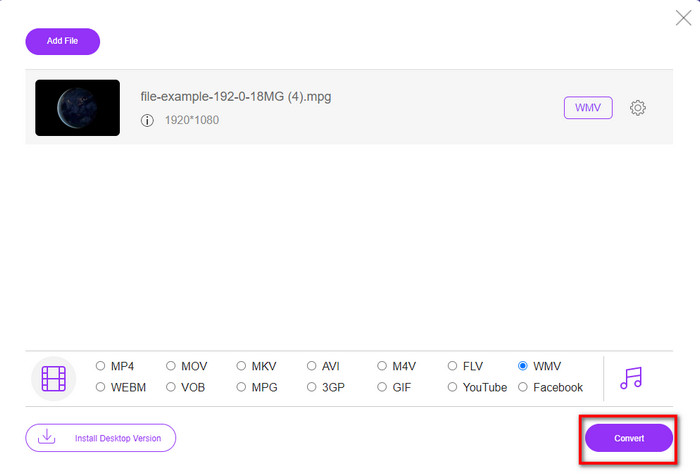
Step 4. Start converting your file by clicking the Convert button below.
Teil 2. Konvertieren Sie MPG in WMV unter Windows 11/10 ohne Qualitätsverlust [empfohlen]
Still not satisfied with the converter online? What if we tell you that you can use an MPG to WMV converter free download instead of much faster with other functions. FVC Video Converter Ultimate will help you with many problems regarding your videos, especially converting the format. Although the tool can convert, there are many areas we need to explore in this tool. Want to know more about these? Then read the key features available below.

FVC Video Converter Ultimate
4.255.366+ Downloads- Es unterstützt die Konvertierung von MPG, WMV, AVI, MP4, MOV, MKV, FLV, M4V usw. in über 200 Formate.
- Es ist unkompliziert zu bedienen und hat eine sehr intuitive Benutzeroberfläche, die viele Benutzer lieben.
- Ideal zum Bearbeiten Ihres Videos, z. B. zum Schneiden, Zusammenführen, Zuschneiden, Erstellen von GIFs und vielem mehr.
- Ultraschnelle Konvertierung und Hardwarebeschleunigung stehen für einen blitzschnellen Konvertierungsprozess zur Verfügung.
- Zugänglich auf allen Plattformen wie Windows und macOS.
- Konvertieren Sie mehrere MPG- oder WMV-Dateien auf einmal, wobei die Batch-Konvertierung unterstützt wird.
Gratis DownloadFür Windows 7 oder neuerSicherer Download
Gratis DownloadFür MacOS 10.7 oder neuerSicherer Download
Sie können all diese Funktionen haben, wenn Sie dieses ultimative Tool haben. Aber vorher lesen wir den vollständigen Umfang und die Schritte zur Verwendung dieser Option, um MPG in WMV zu konvertieren.
Step 1. You can click the download button below and select which platform you are using. After downloading, install the converter next, and run the tool.
Gratis DownloadFür Windows 7 oder neuerSicherer Download
Gratis DownloadFür MacOS 10.7 oder neuerSicherer Download
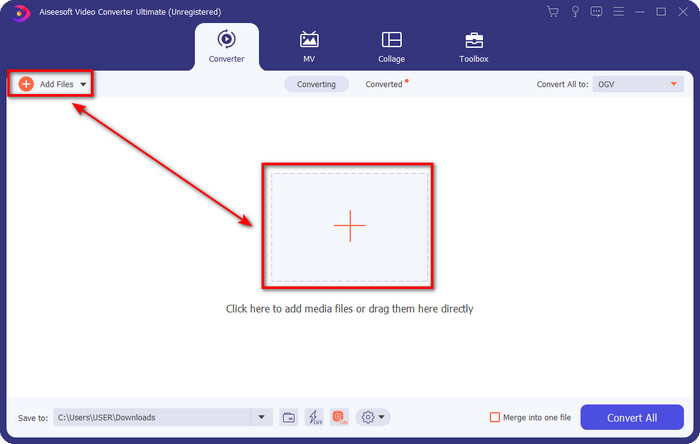
Step 2. To upload the MPG file, you can click the Add Files or the + button in the middle. Instantly a folder will show, select the file, and press Open to proceed.
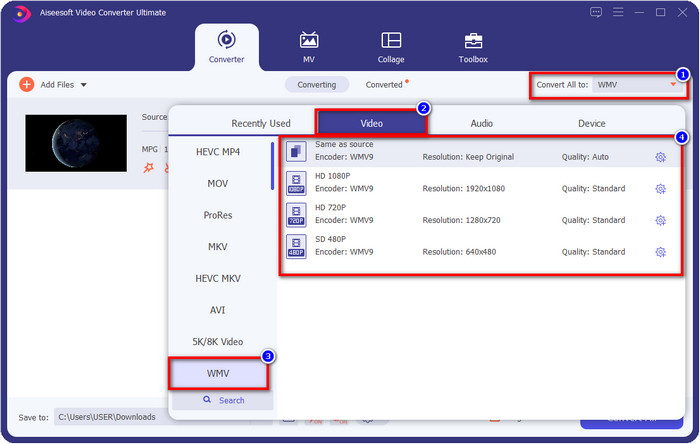
Step 3. Before you convert the file, you will need to select the format in the setlist by clicking the Convert All to button. Select WMV format, then choose the encoder you want to have.
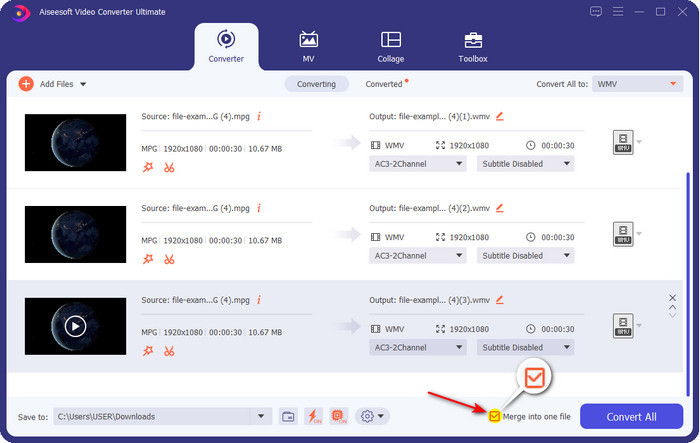
Optional. Need to merge different sets of MPG files? In that case, you can tick the box to join the final output.
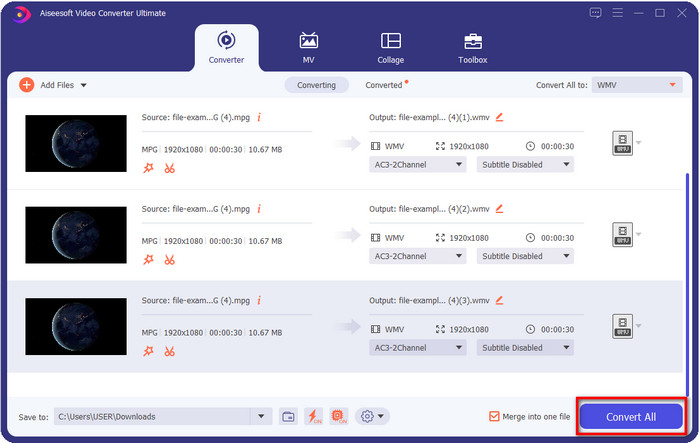
Step 4. Hit Convert All to start the converting process. After converting MPG to WMV, a computer folder will show on your screen.
Teil 3. Was ist der Unterschied zwischen MPG und WMV
MPG and WMV are both media containers for audio and video. Even though these formats mentioned can store still there are many differences between the two formats. Do you want to know more? The following details will discuss the MPG and WMV more and what you need to reconsider before choosing a free online or offline MPG to WMV converter.
MPG is known for being one of the first formats developed in the early years. This format uses two types of encoder that is under MPEG, and that is the MPEG-1 and the MPEG-2. It uses two compressors to suffice the needs that MPEG-1 can't do, which means the MPEG-2 is a backup for the MPG. Furthermore, it is said to be one of the high-quality videos before, but many formats have become better; a great example is the WMV. To play your MPG files, you can read on the best MPG/MPEG players.
WMV kann auch einen Zwei-Windows-Kompressor verwenden und viele in einer einzigen Datei. Es ist allen Windows-Benutzern bekannt, da es ein erstklassiges Format ist, das unter Windows verfügbar ist. Obwohl es zwei oder mehr Kompressoren verwendet, zerstört es dennoch nie die Qualität nach der Verwendung eines Codecs. Außerdem ist dieses Format besser mit allen Windows-Desktops kompatibel und eignet sich hervorragend für Video-Streaming.
MPG vs. WMV
MPG wurde von der Moving Picture Experts Group (MPEG) entwickelt und ist ein gängiges digitales Videoformat zum Speichern von Video-, Audio- und Metadateninformationen. Es ist sehr nützlich, wenn Sie Filme erstellen, die im Internet geteilt werden sollen. Diese Dateien in MPG enthalten normalerweise MPEG-1- oder MPEG-2-Video-/Audiokomprimierung.
WMV wurde von Microsoft produziert und war in den 2000er Jahren eines der gängigsten Videoformate. Es kann über das Internet angesehen und von verschiedenen Mediaplayern unter Windows abgespielt werden. Und es ist auch das Standard-Videodateiformat von Windows Media Player. Aber es wurde in letzter Zeit von anderen Formaten übernommen.
Teil 4. Häufig gestellte Fragen zur MPG-zu-WMV-Konvertierung
Wie konvertiert man MPG in WMV mit Windows Media Player?
First, you can't convert format on Windows Media Player, but you can rip the CD and change the format if you want to save it into your desktop. To begin with, open the Windows Media Player on your PC, click Organize, then Options. Under it, click Rip Music, choose the format by clicking the dropdown button, and press OK. Now you can insert the CD, and it will automatically rip the file from the CD.
Wo kann ich meine MPG-Videodatei ansehen?
You can use the native media player on Windows to play the .mpg file, which is the Windows Media Player. But if you want a much better option, click and read this article to know more about the possible MPG/MPEG player available on all platforms.
Wie konvertiere ich MPG in WMV in Windows Movie Maker?
Although the Windows Movie Maker is for editing, you can change the format here. Still, it is not the typical converting process you will expect like the other converters online and offline. Moreover, this editor is only available on Windows 10 and less, so if you have the latest version of Windows, you can't download this editor. To convert your MPG video to WMV format, follow the succeeding steps. Open the editor and drag the file to the blank interface. Click File, then Save Movie, choose the device settings you want, and wait for the process to end. Thus, all of the files you render will save as .wmv.
Fazit
All of the tools presented above are assured to help you change MPG to WMV as we try them ourselves to make sure that all of the details in this article will only state facts. Suppose you don't want to download a converter on your device to save some space, then we recommend using the FVC Free Video Converter Online. However, suppose you want to add a professional touch that the online converter can't provide. In that case, FVC Video Converter Ultimate is the perfect tool for the job. Still, were you not convinced with the ultimate tool? In that case, you need to download the software on your desktop to use and have the ultimate experience in converting.
-
 [2022] Hot Picks von MPG to AVI Converter, um Ihnen bei der Konvertierung von MPG in AVI zu helfen
 Haben Sie sich jemals gefragt, ob Sie Ihr MPG in eine AVI-Videodatei konvertieren sollten, nur um es auf Ihrem Videoplayer abzuspielen? Hier ist der beste Artikel, den Sie finden können, der sich mit dem oben genannten Problem befasst.
-
 3 einfache Möglichkeiten zum Konvertieren von MPG in MOV auf Ihrem Mac/Windows/Online
 Möchten Sie Ihre MPG-Dateien konvertieren und später auf Ihrem iOS, iPod, iPad oder Mac transportieren? In diesem Artikel erfahren Sie, wie Sie MPG schrittweise in MOV konvertieren.
-
 So konvertieren Sie MPG in FLV ohne Qualitätsverlust [Bewährt]
 Sie müssen Ihren Lieblingsfilm auf diesem Mediaplayer ansehen, aber er unterstützt kein MPG. Versuchen Sie, Ihre MPG-Datei mit diesen in diesem Artikel vorgestellten Konvertern in FLV zu konvertieren.

