


 Video Converter Ultimate
 Bildschirm recorder
 Videoreparatur
[Vollständige Überprüfung] 5 neueste MP3-Schneidegeräte für Windows/Mac/Online verfügbar
Wir möchten häufig die Audios, die wir anhören, zuschneiden und als Klingelton festlegen, den wichtigsten Teil hervorheben oder unnötige Details des Sounds entfernen. Obwohl es auf allen Plattformen eine ganze Reihe von Cuttern gibt, sind einige davon nicht vertrauenswürdig. Deshalb stellen wir Ihnen heute die Cutter vor, die wir auf dem Markt gefunden haben und denen Sie vertrauen können, weil wir alle diese Tools selbst ausprobiert haben, um sicherzustellen, dass sie frei von Malware und zuverlässig sind. Bevor wir sie ausgewählt haben, sind wir einem sehr hohen Standard gefolgt – für alle, die einen verlässlichen Cutter benötigen. Damit Sie im Internet möglichst effizient suchen können, präsentieren wir Ihnen nachfolgend die fünf MP3-Cutter, die unserer Meinung nach bereit sind, jede Art von Audioformat zu schneiden.

Teil 1. 2 Offline-MP3-Cutter-Software für Windows und Mac
1. Video Converter Ultimate – Bester MP3-Cutter [Dringend empfohlen]
Der beste Audio-MP3-Cutter in dieser Liste ist der Video Converter Ultimate, mit dem Nutzer beliebige Audiodateien mühelos schneiden können. Mit Hilfe dieses ultimativen Tools können Sie den Sound trimmen, um unerwünschte Teile zu entfernen, mehrere geschnittene Audiodateien zu einer einzigen Datei zusammenführen und die Lautstärke anheben, falls Ihnen der Ton etwas zu leise erscheint. Darüber hinaus bietet diese Software einen ultraschnellen Arbeitsablauf und achtet gleichzeitig auf die ursprüngliche Klangqualität.
Im Gegensatz zu anderen Schneideprogrammen unterstützt dieses Tool ein breites Spektrum an Formaten, nicht nur MP3, sondern auch FLAC, M4R, M4A, OGG, MKA, WAV, WMA und mehr, und tatsächlich wird hier das Schneiden Ihrer Audiodatei unterstützt. Vielleicht wissen Sie nicht, wie Sie Ihre Audiodatei schneiden und für Ihre Zwecke verwenden können. Heute ist Ihr Glückstag, denn wir zeigen Ihnen, wie Sie den MP3-Cutter und den Klingelton-Ersteller kostenlos verwenden, indem Sie dem folgenden Tutorial folgen.
Schritt 1. Laden Sie den Audiocutter auf Ihren Desktop herunter, indem Sie auf die Schaltfläche „Download“ unten klicken. Wählen Sie aus, ob Sie Windows oder Mac verwenden, installieren Sie die Software und starten Sie sie. Denken Sie daran, dass Sie sich mit der Benutzeroberfläche des Tools vertraut machen sollten, damit Sie die nachfolgenden Schritte leichter nachvollziehen können.
Gratis DownloadFür Windows 7 oder neuerSicherer Download
Gratis DownloadFür MacOS 10.7 oder neuerSicherer Download
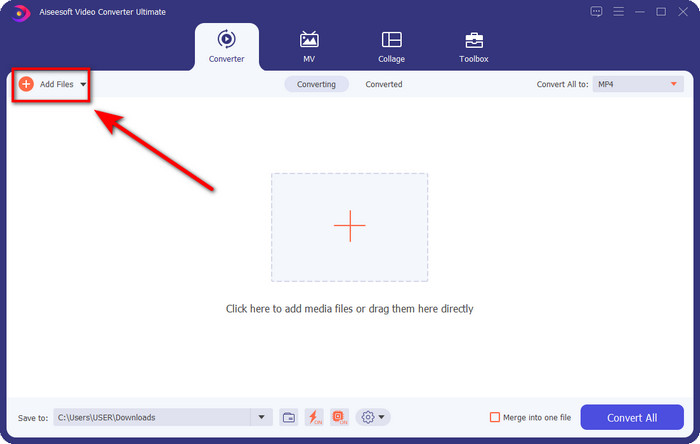
Schritt 2. Ziehen Sie die Audiodatei, die Sie schneiden möchten, in die Benutzeroberfläche, oder klicken Sie auf Dateien hinzufügen und suchen Sie die Audiodatei im angezeigten Ordner auf Ihrem Computer. Klicken Sie auf Öffnen, um mit dem nächsten Schritt fortzufahren.
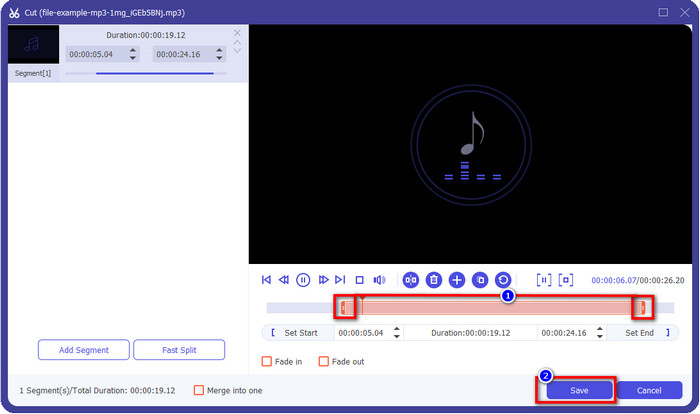
Schritt 3. Nachdem Sie die Audiodatei eingefügt haben, klicken Sie auf die scherenförmige Schaltfläche. Ziehen Sie die Markierungen für Play In und Play Out auf die gewünschte Länge des Audios. Denken Sie daran: Der hervorgehobene Bereich zwischen Play In und Play Out ist der einzige Teil, der erhalten bleibt. Klicken Sie anschließend auf Speichern, um das Audio zu schneiden.
Optional. Müssen Sie Ihr Audio lauter machen? Dann klicken Sie auf die Zauberstab-Schaltfläche, passen Sie den Lautstärkeregler an, indem Sie ihn nach oben ziehen, und klicken Sie auf OK, um zu speichern.
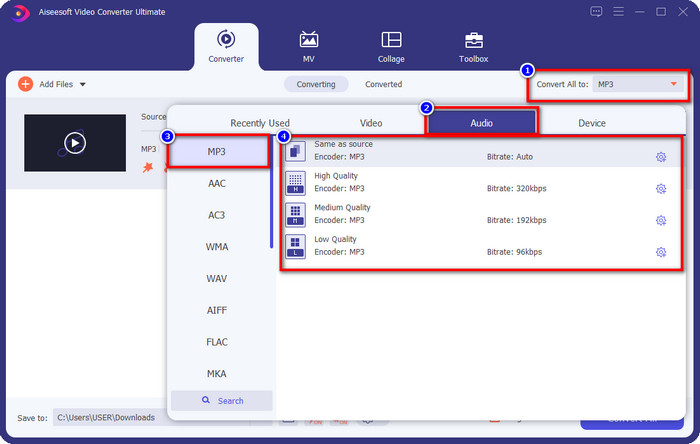
Schritt 4. Gehen Sie zu Alle konvertieren in, Audio und stellen Sie das Format auf MP3. Auch wenn Sie nicht wirklich konvertieren, achten Sie darauf, dass unter „Alle konvertieren in“ MP3 und kein anderes Format steht, um zu vermeiden, dass die Datei in ein anderes Format umgewandelt wird.
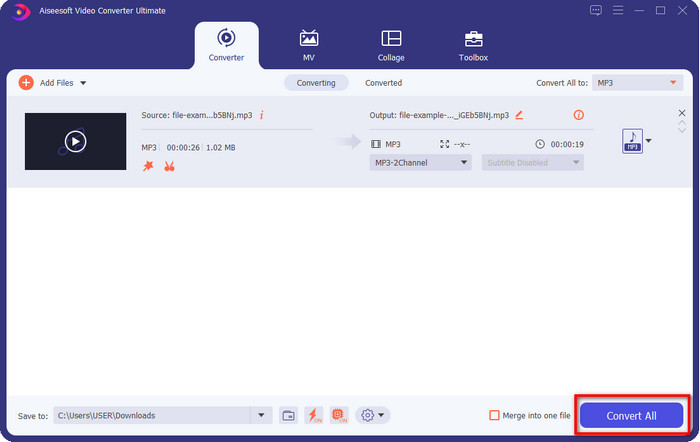
Schritt 5. Durch Klicken auf Alle konvertieren beginnt das Speichern des geschnittenen Audios. Schon haben Sie Ihren Schnitt mit dem besten kostenlosen MP3-Cutter – so einfach ist das.
Vorteile
- Es kann Ihr Audio so schnell wie möglich schneiden und in weniger als einer Sekunde verarbeiten.
- Es stehen erweiterte Funktionen zur Verfügung, um die Lautstärkeleistung zu erhöhen.
- Es unterstützt alle Betriebssysteme wie Windows oder Mac.
- Das Zusammenführen mehrerer Audiodateien ist mit der Audiozusammenführung dieses Tools möglich.
Nachteile
- Der Kauf des Werkzeugs ist erforderlich.
2. Kühnheit
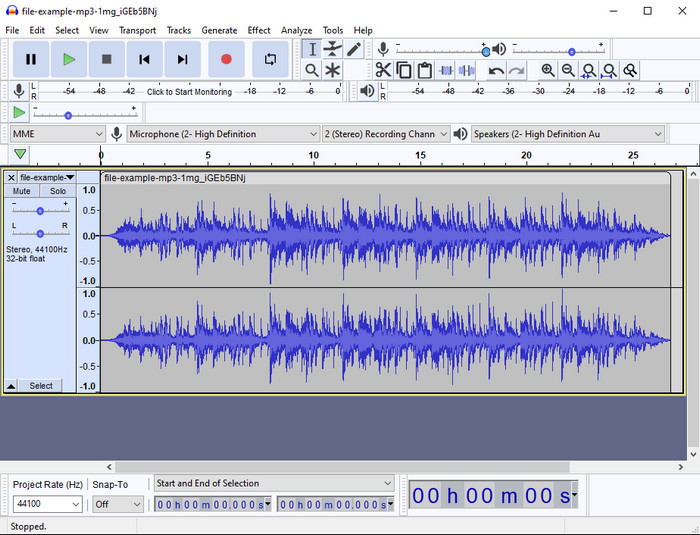
Audacity hat Ihnen über die Jahre professionelle Bearbeitungsfunktionen für Audio geboten. Diese App ist kostenlos herunterzuladen und ermöglicht Mehrspur-Mischungen. Sie ist dafür bekannt, von Podcaster:innen genutzt zu werden, um Podcasts einfach zu bearbeiten und aufzunehmen. Einige Funktionen sind jedoch schwer zu verstehen – vor allem, wenn Sie nicht daran gewöhnt sind, spezialisierte Software wie diese zu verwenden.
Obwohl Sie immer noch lernen können, wie man es benutzt, wird es einige Zeit dauern, bis Sie das volle Potenzial dieses MP3-Audio-Trimmers nutzen, und zum Schneiden von Audio kann man sagen, dass es sofort und mühelos schneidet, wenn Sie es brauchen.
Vorteile
- Kostenloser Download in allen Programmen wie Windows und Mac.
- Fortschrittliche und professionelle Audio-Editoren sind verfügbar, damit Ihr Audio großartig klingt.
- Es eignet sich am besten zum Aufnehmen von Podcasts und mehr.
Nachteile
- Viele Wettbewerber bieten eine benutzerfreundliche Benutzeroberfläche.
- Nicht die beste Wahl für Anfänger für ein sofortiges Ergebnis beim Schneiden und für andere Bearbeitungszwecke.
- Einige Berichte zeigen, dass Ihre Daten gesammelt werden, wenn Sie dieses Tool verwenden, aber es gibt noch keine eindeutigen Beweise.
Teil 2. 3 Zugängliche Online-MP3-Cutter im Web
1. mp3cut.net
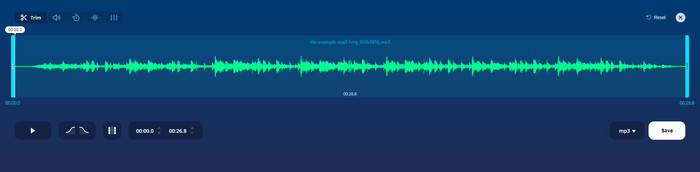
Sie können mp3cut.net verwenden, wenn Sie einen Online-MP3-Cutter für den Job benötigen. Nachdem Sie die Datei in diesen Online-Cutter hochgeladen haben, können Sie nun den Ton entfernen, den Sie auf Ihre Audiodatei zeichnen möchten. Darüber hinaus verfügt das Tool auch über einige kleinere Bearbeitungsfunktionen, um die Geschwindigkeit und Tonhöhe des Audios bei Bedarf zu ändern.
Obwohl es diese Art von Fähigkeit hat, stürzt das Tool die meiste Zeit ab und kann das Audio nicht abspielen, um es anzuhören, wenn Sie es richtig schneiden. Um es erneut zu verwenden, müssen Sie Ihren Browser aktualisieren und die von Ihnen vorgenommene Anpassung noch einmal wiederholen.
Vorteile
- Benutzerfreundlich und über das Internet zugänglich.
- Auf den Punkt gebracht, Funktionen, die Ihnen beim Schneiden von Audio helfen.
- Grundlegende Bearbeitungsfunktionen sind verfügbar.
Nachteile
- Es hat Anzeigen auf der Weboberfläche.
- Manchmal stürzt es ab und muss erneut geladen werden, um es zu verwenden.
2. audiotrimmer.com
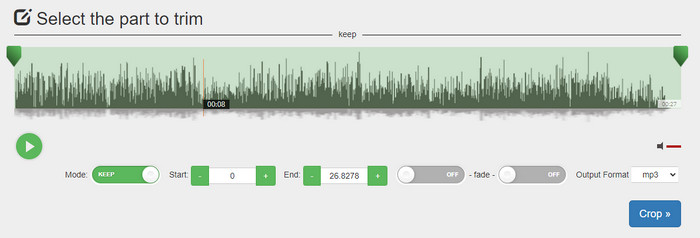
Ein weiteres kostenloses MP3-Schneideprogramm online ist audiotrimmer.com. Dieses Tool bietet leicht verständliche und unkomplizierte Schneidefunktionen, alle Funktionen sind auf den Punkt. Damit können Sie wählen, ob Sie Teile des Audios behalten oder entfernen möchten. Außerdem gibt es – wie bei den anderen hier erwähnten Trimmern – Ein- und Ausblend-Effekte. Als wir jedoch versucht haben, den Ein- und Ausblend-Effekt zu verwenden, hat er nicht funktioniert; unserem Audio wurden keine zusätzlichen Effekte hinzugefügt. Wenn Sie aber nur einen einfachen Schnitt benötigen, ist dies dennoch ein Webtool, das Sie unbedingt ausprobieren sollten.
Vorteile
- Kostenlos und in allen Browsern zugänglich.
- Einfach zu verwenden, um Audio zu trimmen.
- Es hat Ein- und Ausblendeffekte.
Nachteile
- Ein- und Ausblenden funktionieren nicht gut.
- Es gibt viele lästige Anzeigen, wenn Sie darauf zugreifen. Achten Sie also darauf, sie nicht anzuklicken.
3. Clideo

Einer der besten Online-MP3-Cutter und -Joiner, die Sie verwenden können, ist Clideo. Viele Nutzer:innen verwenden dieses Tool gern, weil es gute Bearbeitungsfunktionen bietet. Außerdem können Sie Ihrem Audiotrack bei Bedarf Ein- und Ausblendungen hinzufügen. Doch nachdem wir exportiert und das Ergebnis angehört hatten, waren keine Ein- oder Ausblendungen in unserer Audiodatei vorhanden. Ein weiteres kleines Problem bei diesem Tool ist das Hoch- und Herunterladen von Dateien. Anders als beim zuerst genannten Tool dauert das Hochladen von Audio in den Cutter länger, und teilweise konnten wir die Audiodatei aus unbekannten Gründen gar nicht hochladen.
Obwohl wir auf einige Probleme stoßen, ist es immer noch der beste Cutter online und es ist auch sicher in der Anwendung.
Vorteile
- Bester Online-Cutter online.
- Professionelle Benutzeroberfläche.
- Einfach zu verwenden.
Nachteile
- Der Vorgang des Hoch- und Herunterladens wird zu viel Zeit in Anspruch nehmen.
- Ein- und Ausblenden funktioniert, aber nicht gut.
Teil 3. FAQs zu den MP3-Cuttern
Was ist der beste MP3-Trimmer auf dem Mac?
FVC Video Converter Ultimate ist auch für Mac verfügbar. Wenn Sie also Audio auf dem Mac schneiden müssen, sollten Sie dieses ultimative Tool herunterladen, um Ihre Audiodateien optimal zu bearbeiten. Das Ultimate-Tool ist nicht nur hervorragend zum Schneiden Ihres Audios geeignet, Sie können den Klang auch verbessern, indem Sie ihn verstärken. Außerdem hilft es Ihnen beim Konvertieren, Zusammenführen, Synchronisieren von Audio usw. – das Ultimate-Tool ist zur Stelle. Wenn Sie mehr über dieses Tool erfahren möchten, lesen Sie am besten die oben genannten Details.
Verringert das Zuschneiden des Audios seine Größe?
Die Dateigröße des Audios verringert sich nach dem Trimmen. Als wir die Original-Audiodatei mit der geschnittenen Datei verglichen, sahen wir einige Höhenänderungen. Das heißt, je kürzer die Audiodatei ist, desto kleiner ist ihre Größe, aber wenn Ihre Audiodatei sehr lang ist, dann erwarten Sie, dass die Größe auch signifikant ist.
Kann ich Audacity verwenden, um mehrere Audios zusammenzuführen?
Ja, das können Sie, Audacity unterstützt das Zusammenführen mehrerer Audiotracks zu einer Datei. Allerdings ist das schwierig, besonders wenn Sie kein passendes Tutorial zur Hand haben. Wenn Sie also Audio in Audacity zusammenführen möchten, können Sie auf diesen Link klicken und es dort lernen.
Fazit
Die hier vorgestellten MP3-Cutter haben bereits die von uns festgelegten Standards erfüllt, um Ihnen nur die besten Trimmer anzubieten. Dieser Artikel zeigt, wie wichtig es ist, den richtigen und passenden Cutter entsprechend Ihren Anforderungen zu wählen. Auch wenn alle hier genannten Trimmer dieselbe grundlegende Funktion haben, bietet der FVC Video Converter Ultimate ein deutlich effizienteres Zuschneiden von Audio. Laut unserer Recherche übertrifft dieses Ultimate-Tool alle von uns gesetzten Standards. Wenn Sie also einen erstklassigen Cutter zur Hand haben möchten, ist dies die beste Wahl unter allen auf dem Markt verfügbaren Tools. Zu gut, um wahr zu sein? Dann sollten Sie das Tool herunterladen und es selbst ausprobieren.
-
 Wie man Songs online ausschneidet und zusammenführt – 4 beste Möglichkeiten, die Sie kennen sollten
 Wenn Sie Songs online ausschneiden und zusammenführen möchten, um ein Musikstück zu erstellen, können Sie mehr über die 4 besten Online-Tools erfahren, um die Songs zu schneiden und Dateien aus dem Artikel zu kombinieren.
-
 Entdecken Sie den besten MP4-Trimmer mit Verfahren und Informationen
 Möchten Sie lernen, wie Sie Videos wie die Vlogger schneiden, die Sie sich ansehen? Dann lesen Sie diesen Beitrag weiter, um zu erfahren, welche MP4-Trimmer Sie verwenden können.
-
 MP3-Player-Download – Die 10 besten kostenlosen MP3-Musikplayer des Jahres 2025
 Was ist der beste MP3-Musikplayer? Wie lege ich Musik auf einen MP3-Player? Wie lade ich den MP3-Musik-Player herunter? Dieser Beitrag gibt Ihnen einen detaillierten Überblick über die 10 besten kostenlosen MP3-Player für Windows PC und Mac.
