


 Video Converter Ultimate
 Bildschirm recorder
 Videoreparatur
Umfassende Bewertung für Audioaufzeichnungssoftware zur effektiven Audioaufzeichnung
Ganz gleich, ob Sie Profi oder Einsteiger sind – Sie benötigen eine Audioaufnahmesoftware, um Audiospuren für einen bestimmten Zweck zu bearbeiten und zu verfeinern. Darüber hinaus ist die Wahl eines geeigneten Audio-Recorders auf Ihrem Gerät nicht einfach, da es auf dem Markt viele Optionen gibt. Anstatt mehrere Audiorekorder auszuprobieren, stellen wir Ihnen vier Recorder vor, die wir als passend für Ihre Bedürfnisse ansehen, damit Sie keine bösartige Software herunterladen oder aufrufen müssen. Die folgende Liste von Audiorekordern wurde sorgfältig zusammengestellt, damit Sie nur die besten und nicht leistungsschwache Audiorekorder erhalten.

Teil 1. Die 4 besten Audioaufzeichnungssoftwares für Windows und macOS
1. FVC-Bildschirmrekorder
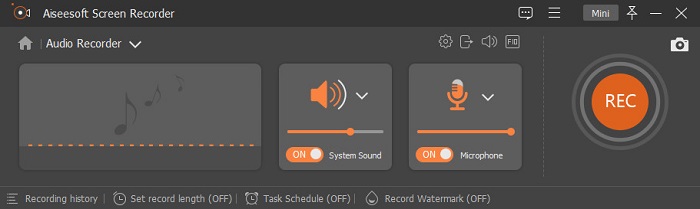
Müssen Sie Audio vom Computer aufnehmen, wissen aber nicht, welches Programm Sie nutzen sollen? In diesem Fall stellen wir Ihnen den besten und bei Weitem am häufigsten gewählten Recorder auf dem Markt vor: den FVC Screen Recorder. Er verfügt über eine hervorragende Benutzeroberfläche, die es Anwendern ermöglicht, mit der Software zu arbeiten, ohne komplizierte Schritte ausführen zu müssen. Zudem haben viele Nutzer Probleme mit Hintergrundgeräuschen – mit der neuen, zusätzlichen Geräuschunterdrückung können Sie aufnehmen, ohne von leisen Hintergrundgeräuschen gestört zu werden. Außerdem bietet das Programm mehrere Funktionen, die Ihnen beim Aufzeichnen effektiv helfen. Möchten Sie wissen, welche das sind? Dann lassen Sie uns die wichtigsten Funktionen des FVC Screen Recorder gemeinsam durchgehen.

Bildschirm recorder
4.988.518+ Downloads- Es nimmt Töne mit ultrahoher Audioqualität auf.
- Nehmen Sie rund um die Uhr Audio auf, solange Sie genügend Speicherplatz auf Ihrem Computerlaufwerk haben.
- Sie können den Systemsound gleichzeitig mit einem Mikrofon aufnehmen.
- Für ein viel besseres Erlebnis beim Aufnehmen Ihrer Stimme steht eine Mikrofonverbesserung zur Verfügung.
- Sie können den Mikrofonton bei Bedarf überprüfen.
Kostenloser DownloadFür Windows 7 oder neuerSicherer Download
Kostenloser DownloadFür MacOS 10.7 oder neuerSicherer Download
Vorteile
- Das Programm lässt die Benutzer ein hochspannendes Erlebnis beim Aufnehmen von Audio auf Mac oder Windows erleben.
- Grundlegende Bearbeitungsfunktionen sind verfügbar, wie das Schneiden oder Trimmen des Audios.
- Es verfügt über einen integrierten Aufnahmeverlauf, um das aufgenommene Audio einfach zu finden.
Nachteile
- Das Hinzufügen von Effekten zu Audio während der Aufnahme wird nicht unterstützt.
- Kaufen Sie vor der Verwendung.
2. Kühnheit
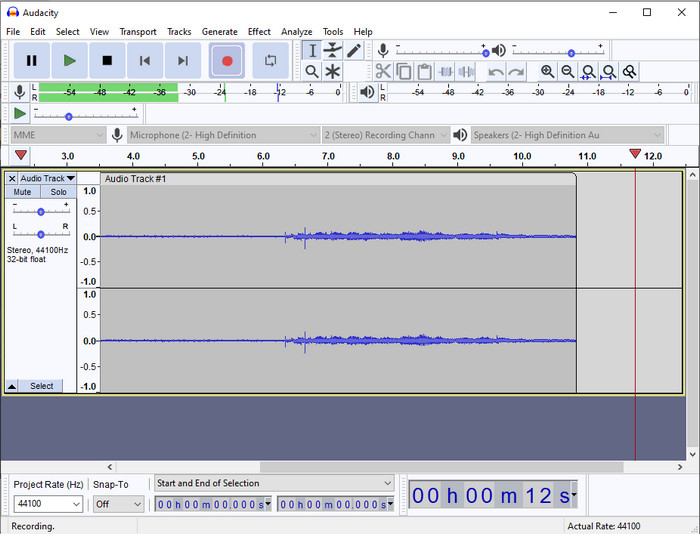
Wenn Sie ein Profi-Tool für Ihre Audioaufnahmen benötigen, ist Audacity eine gute Hilfe. Dieser professionelle Audiorecorder hat bereits Millionen von Podcaster:innen bei ihren Aufnahmen unterstützt. Wenn Sie einen fortschrittlichen Recorder kostenlos benötigen, gehört diese Software zu den Optionen. Obwohl sie einige Profi-Funktionen bietet, ist es aufgrund der schwachen grafischen Benutzeroberfläche dennoch schwierig, sich mit dem Tool vertraut zu machen. Auch wenn es professionelle Aufnahmen ermöglicht, müssen einige Funktionen wie die Geräuschunterdrückung noch verbessert werden. Nichtsdestotrotz nimmt Audacity Computeraudio auf professionelle Weise auf – ein Niveau, das nicht alle Recorder bieten können.
Vorteile
- Kostenloser Download auf allen Desktop-Plattformen.
- Es bietet professionelle Bearbeitungsfunktionen für den Profi.
- Es verfügt über einige erweiterte Funktionen, die Sie zum Erstellen eines Podcasts benötigen.
Nachteile
- GUI der Software ist veraltet.
- Einige seiner Funktionen müssen aktualisiert werden.
- Nicht die beste Wahl für Amateure und diejenigen, die nicht wissen, wie man aufnimmt.
3. QuickTime-Player
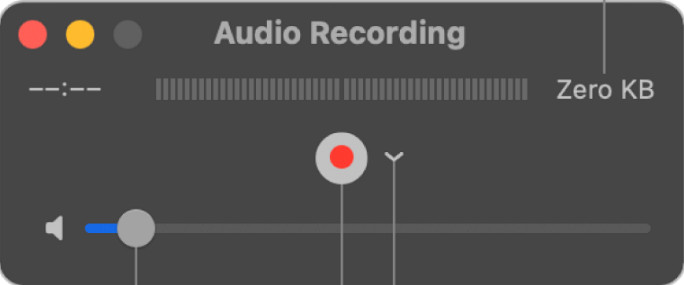
Der QuickTime Player kann auf dem Mac bei Bedarf ebenfalls als Audiorecorder verwendet werden. Auch wenn der Player für Aufnahmen nicht besonders leistungsfähig und effizient ist – Sie werden Verzögerungen und eine geringere Qualität der Audioausgabe bemerken – ist er eine Option für schnelle Audioaufnahmen auf dem Mac, da Sie nichts herunterladen müssen und er zweifellos sicher in der Anwendung ist. Suchen Sie jedoch als Profi nach der besten Audioaufnahmesoftware, ist dies nicht das ideale Werkzeug.
Vorteile
- Es ist bereits auf jedem macOS verfügbar.
- Kostenlos, sicher und einfach zu bedienen.
Nachteile
- Es ist nicht so effektiv wie die anderen Audiorecorder in dieser Liste.
- Die endgültige Ausgabequalität des Audios ist niedrig.
- Nicht die beste Wahl für professionelle Aufnahme und Bearbeitung.
Verwandt:
So nehmen Sie den Bildschirm mit Audio auf dem Mac mit QuickTime auf
So konvertieren Sie QuickTime in MP4
4. Ocenaudio
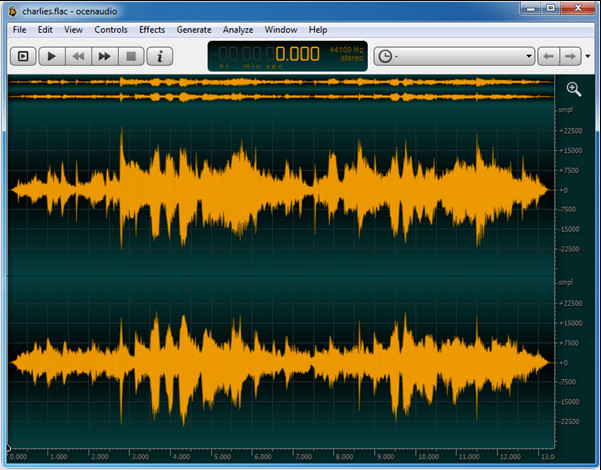
Wenn Sie einen vielseitigen Recorder benötigen, um Audio unter Windows 10 oder höher aufzunehmen, hilft Ihnen Oceanaudio weiter. Dieses Tool hat eine beinahe ähnliche Oberfläche wie Audacity, jedoch ist die GUI hier leichter zu verstehen. Genauer gesagt bietet dieser Recorder eine gewisse Komplexität und Funktionen, die Sie für Audioaufnahmen benötigen. Obwohl die Bedienung etwas anspruchsvoll ist und Sie eventuell ein Tutorial ansehen müssen, lohnt sich der Einsatz am Ende doch. Wenn Sie also einen Editor mit besserer Oberfläche als Audacity suchen, sollte dies Ihre Wahl sein.
Vorteile
- Es verwendet fortschrittliche Technologie für die Aufnahme.
- Es ist eine Expertenwahl für Audioaufnahmen.
- Sie können während der Aufnahme Ihre Stimme hören.
Nachteile
- Es ist nicht benutzerfreundlich.
- Anfänger könnten bei der Verwendung dieses Tools verwirrt werden.
Teil 2. Vergleichstabelle über Audiorecorder-Software
| Merkmale | FVC-Bildschirmrekorder | Kühnheit | QuickTime Player | Ocenaudio |
| Systemton und Mikrofon aufnehmen |  | | | |
| Bearbeiten Sie die Aufnahme | | |  | |
| Hardware-Beschleunigung | | | | |
| Echtzeit-Pre-Listen | | | | |
| Speichern Sie die Originalqualität | | | | |
| Beste Benutzeroberfläche | | | | |
Teil 3. Häufig gestellte Fragen zur Audiorecorder-Software
Ist Cinch Audio Recorder der beste Audiorecorder?
Wir haben kürzlich eine Rezension zum Cinch Audio Recorder veröffentlicht. Wenn Sie also mehr über diesen Audiorecorder erfahren möchten, klicken Sie auf diesen Link und erhalten Sie ausführlichere Informationen über den Recorder.
Was sind die Eigenschaften eines guten Audiorecorders?
Sie müssen grundlegende Standards kennen, bevor Sie sich für einen guten Audiorecorder entscheiden. Erstens sollte es in der Lage sein, den Ton auf Ihrem Mikrofon problemlos aufzunehmen. Zweitens ist es sicher und Malware-frei. Drittens, wenn Sie das Tool kaufen müssen, sollte das Tool selbst den Benutzern hervorragende Leistungen bieten. Viertens bedeutet die Wirksamkeitsrate, dass das Tool bei einer Aufzeichnung sehr effektiv sein muss. Fünftens müssen grundlegende oder erweiterte Funktionen verfügbar sein, um den Benutzern beim Aufzeichnen zu helfen. Bevor Sie sich für einen Audiorecorder entscheiden, der Ihnen hilft, können Sie sich auf diese Standards verlassen.
Wie nimmt man Audio unter Windows 10 auf?
Bevor Sie unter Windows 10 aufnehmen, sollten Sie den besten Recorder wählen, etwa den FVC Video Recorder, indem Sie ihn auf Ihren Desktop herunterladen, das Tool installieren und starten. Wählen Sie anschließend die Option „Audio Recorder“ und klicken Sie darauf. Nun können Sie Systemton oder Mikrofon ganz einfach zu Ihrer Aufnahme hinzufügen, indem Sie sie in der schwebenden Symbolleiste aktivieren. Sobald Sie bereit sind, klicken Sie auf den runden roten Button, um die Aufnahme zu starten. Wenn Sie die Aufnahme beenden möchten, klicken Sie auf die quadratische Schaltfläche zum Stoppen; danach erscheint eine neue Oberfläche, auf der Ihnen die Liste der erstellten Audioaufnahmen angezeigt wird.
Fazit
Jetzt kennen wir die Audioaufnahmesoftware, die auf Ihrem Desktop verfügbar ist. Alle hier vorgestellten Tools unterstützen Sie bei Ihren Aufnahmen. Wenn Sie jedoch nach einem Recorder suchen, der die anderen übertrifft, ist der FVC Screen Recorder die richtige Wahl für Sie. Sind Sie noch unsicher bezüglich dieses Audiorecorders? In diesem Fall ist das Herunterladen die einzige Möglichkeit, ihn zu testen und herauszufinden, ob er so funktioniert, wie wir es in diesem Artikel beschrieben haben.
-
 Top 4 der kostenlosen AIFF-Soundrecorder, die Audio in hoher Qualität produzieren
 In diesem Artikel geht es um AIFF und einige der beliebtesten Tools, mit denen Sie ein hochwertiges AIFF-Format erstellen können.
-
 3 der besten Techniken zum Aufnehmen von Audio auf dem iPhone
 Haben Sie Schwierigkeiten, weil Sie auf dem iPhone keine Audioaufnahmen machen können? Dann lesen Sie diesen Artikel, um zu erfahren, wie Sie Audio auf dem iPhone aufnehmen und welche Tools verfügbar sind.
-
 7 der großartigen Diktiergeräte, die auf allen Plattformen verfügbar sind
 Möchten Sie lernen, wie man Audioaufnahmen macht? Dann gehen Sie zu diesem Artikel, während wir über den besten Audiorecorder sprechen, der Ihren Anforderungen entspricht.
