


 Video Converter Ultimate
 Bildschirm recorder
 Videoreparatur
So konvertieren Sie VOB kostenlos in MKV mit diesen 3 Konvertern [Beste Tools]
VOB oder Video Object ist ein Dateiformat, das üblicherweise auf DVDs verwendet wird. Diese Datei befindet sich in der Regel im Ordner VIDEO_TS, der sich im Stammverzeichnis der DVD befindet. Mittlerweile sind jedoch viele Mediendateien im Internet verfügbar. Die Nutzung von DVDs ist heutzutage nicht mehr weit verbreitet und wird von vielen Geräten nicht mehr unterstützt. Daher benötigen Sie ein Dateiformat, das von zahlreichen Geräten unterstützt wird. MKV ist ein Dateiformat, das auf vielen Geräten problemlos wiedergegeben werden kann. Im Folgenden finden Sie die besten Möglichkeiten, um VOB kostenlos in MKV zu konvertieren.

Teil 1. Konvertieren Sie VOB verlustfrei in MKV
Um Ihre VOB-Dateien in MKV zu konvertieren, benötigen Sie einen Konverter, der sich gut für diese Aufgabe eignet. FVC Video Converter Ultimate ist ein Konverter, der derzeit auf dem Markt sehr beliebt ist. Dieses Programm bietet viele besondere Funktionen, mit denen Sie Ihre VOB-Datei bearbeiten, verbessern, komprimieren und im Stapelverfahren konvertieren können. Außerdem unterstützt dieses Tool eine ultraschnelle Konvertierung, sodass Sie Ihre VOB-Datei sehr schnell und ohne Qualitätsverlust in MKV umwandeln können.

FVC Video Converter Ultimate
Über 5.689.200 Downloads- Es bietet eine Stapelkonvertierung, um mehrere Dateien zu einer zusammenzuführen.
- Es hat eine einfach zu bedienende GUI, die anfängerfreundlich ist.
- Es hat eine Funktion zum Erstellen von GIFs und 3D-Videos.
- Ermöglicht Ihnen eine schnelle Konvertierung aufgrund des integrierten ultraschnellen Konvertierungsprozesses.
- Verfügbar auf verschiedenen Plattformen, einschließlich Windows und Mac.
Gratis DownloadFür Windows 7 oder neuerSicherer Download
Gratis DownloadFür MacOS 10.7 oder neuerSicherer Download
Hier sind die Schritte zum Konvertieren von VOB in MKV mit FVC Video Converter Ultimate:
Schritt 1. Laden Sie dieses Programm herunter, indem Sie unten auf die Schaltfläche Download für Windows oder Mac klicken. Folgen Sie dem Installationsvorgang und fahren Sie dann mit dem nächsten Schritt fort.
Gratis DownloadFür Windows 7 oder neuerSicherer Download
Gratis DownloadFür MacOS 10.7 oder neuerSicherer Download
Schritt 2. Klicken Sie nach dem Herunterladen des Konverters auf die Schaltfläche Dateien hinzufügen oder auf das +-Symbol, um Ihre VOB-Datei zur Warteschlange hinzuzufügen.
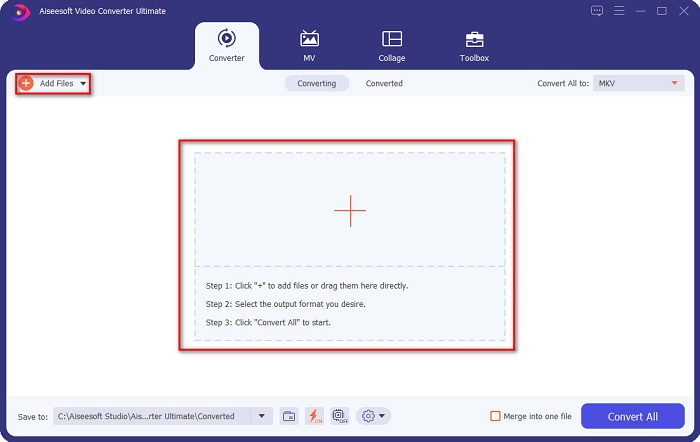
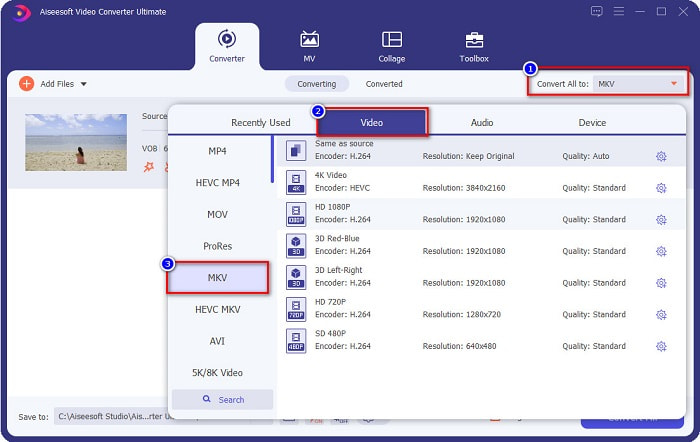
Schritt 3. Klicken Sie anschließend auf die Schaltfläche Alle konvertieren in, die sich in der oberen rechten Ecke der Programmoberfläche befindet. Es erscheint eine Liste der verfügbaren Formate, aus der Sie Ihr gewünschtes Ausgabeformat auswählen.
Schritt 4. Nachdem Sie MKV als Ausgabedatei gewählt haben, klicken Sie auf die Schaltfläche Alle konvertieren, um Ihre VOB-Datei in eine MKV-Datei umzuwandeln. Warten Sie dann ein paar Sekunden, bis die Konvertierung abgeschlossen ist.
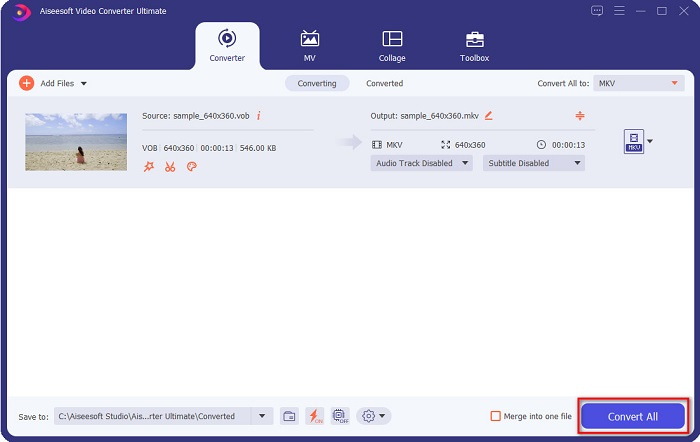
Indem Sie diesen einfachen Schritten folgen, können Sie VOB verlustfrei in MKV konvertieren.
Teil 2. Konvertieren Sie VOB in MKV mit Freeware-Konvertern
Sie können VOB auch mit Freeware in MKV konvertieren. Die Verwendung von Freeware als Konverter kann Ihnen viel Zeit sparen, da Sie keine Internetverbindung benötigen, um sie zu verwenden. Und wenn es darum geht, Freeware-Konverter herunterzuladen, müssen Sie nichts kaufen. Hier sind die besten Freeware-Konverter, die Sie ausprobieren können.
VLC Media Player
Bei der Auswahl des besten Freeware-Konverters lässt sich nicht leugnen, dass VLC Media Player es sein wird. Viele Leute verwenden diesen Freeware-Konverter wegen seiner Benutzerfreundlichkeit. Dieser Mediaplayer ist sehr bekannt für Windows-Benutzer und hat sich als großartige Möglichkeit zum Konvertieren von Dateien erwiesen.
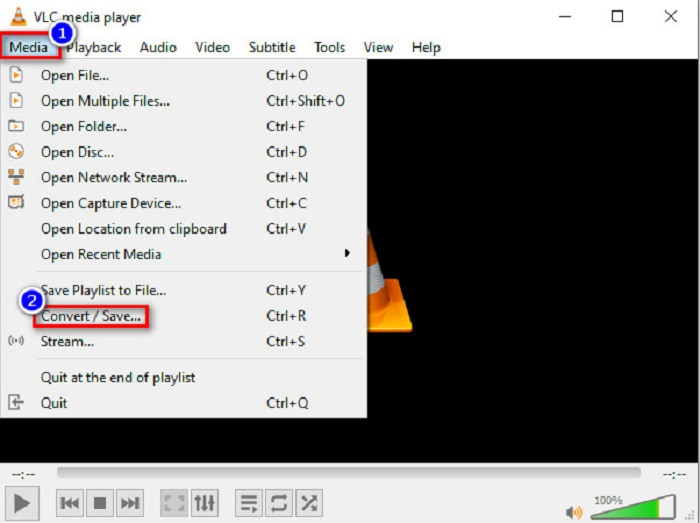
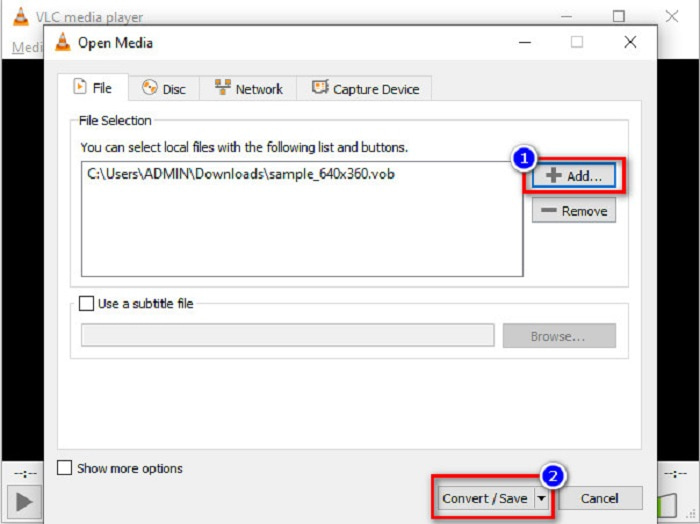
Schritt 1. Wenn Sie den VLC Media Player noch nicht auf Ihrem Gerät installiert haben, laden Sie ihn zunächst herunter, indem Sie in Ihrem Browser danach suchen. Öffnen Sie nach dem Herunterladen das Programm. Klicken Sie nach dem Öffnen auf die Schaltfläche Medien und wählen Sie anschließend Konvertieren/Speichern. Daraufhin werden Sie zu einer anderen Oberfläche weitergeleitet.
Schritt 2. Klicken Sie dann auf die Schaltfläche + Hinzufügen, um Ihre VOB-Datei zu importieren. Klicken Sie anschließend auf die Schaltfläche Konvertieren/Speichern und fahren Sie mit dem nächsten Schritt fort.
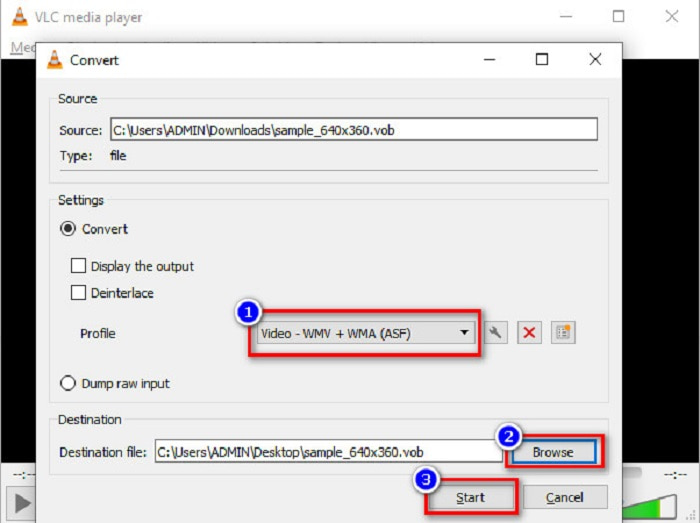
Schritt 3. Wählen Sie abschließend über die Dropdown-Schaltfläche neben Profil MKV als Ausgabeformat aus. Um den Speicherort Ihrer Datei festzulegen, klicken Sie auf die Schaltfläche Durchsuchen. Klicken Sie zum Schluss auf Start, um die Konvertierung zu beginnen.
Handbremse
Ein weiteres kostenloses Programm, mit dem Sie DVD-VOB-Dateien in MKV umwandeln können, ist HandBrake. Dieser Konverter kann kostenlos heruntergeladen werden. Er unterstützt außerdem eine Vielzahl von Formaten, die im Internet verfügbar sind. Allerdings ist die Benutzeroberfläche für Einsteiger etwas kompliziert. Dennoch bietet dieser Konverter Ihnen spezielle Funktionen, die Ihnen helfen, Ihre VOB-Datei in MKV zu konvertieren.
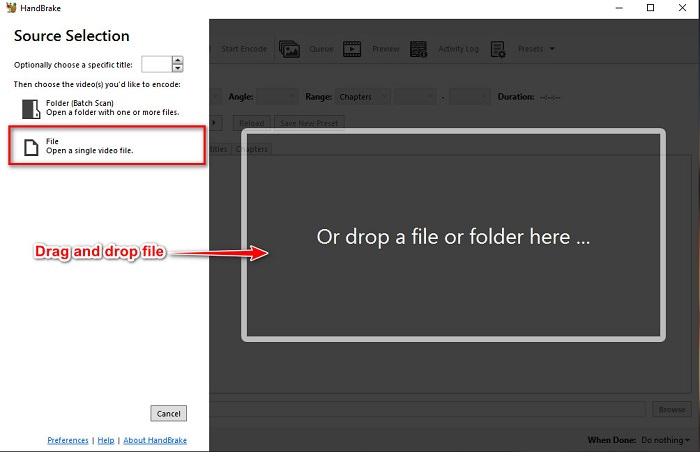
Schritt 1. Laden Sie die App herunter, indem Sie in Ihrem Browser nach HandBrake suchen. Öffnen Sie nach dem Herunterladen das Programm. Klicken Sie dann auf Datei oder ziehen Sie Ihre VOB-Datei in das rechteckige Feld in der Mitte der Programmoberfläche, um sie zu importieren.
Schritt 2. Nachdem Sie Ihre VOB-Datei hochgeladen haben, wählen Sie MKV als Ausgabeformat, indem Sie auf die Dropdown-Schaltfläche neben Format klicken. Um den Speicherort Ihrer Datei auf Ihrem Computer zu ändern, klicken Sie auf die Schaltfläche Durchsuchen.
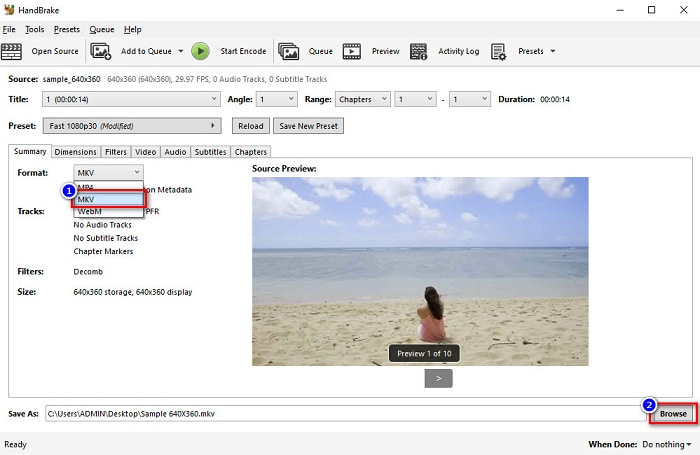
Schritt 3. Klicken Sie im letzten Schritt auf die Schaltfläche Start Encode, um Ihre VOB-Datei mit HandBrake in MKV umzuwandeln.
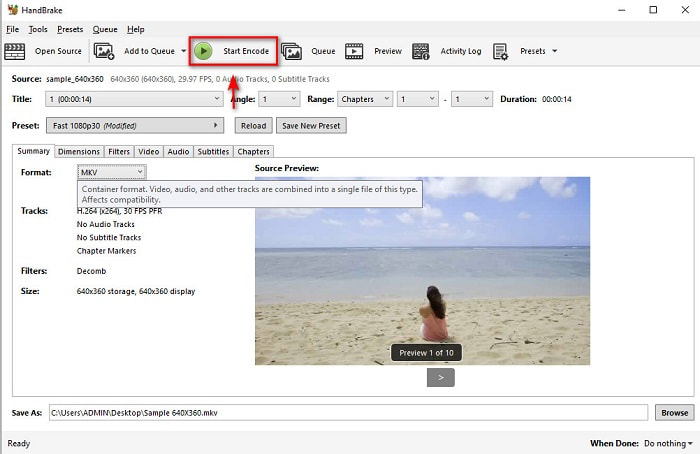
Und so konvertieren Sie VOB mit Freeware in MKV.
Teil 3. Konvertieren Sie eine VOB-Datei in eine MKV-Datei mit einem Online-Tool
Online-Konverter sind bequemer, da Sie nichts herunterladen müssen. Obwohl es viele kostenlose Online-Konverter im Internet gibt, gilt Onlinefreeconvert.com als einer der besten. Dieser Online-Konverter ist leicht zu bedienen und kostenlos. Auch wenn die Konvertierung aufgrund der Webbasis manchmal langsam sein kann, wird er von vielen wegen seiner komfortablen Nutzung geschätzt.
Schritte zum Konvertieren Ihrer VOB-Datei in eine MKV-Datei online:
Schritt 1. Um eine VOB-Datei in das MKV-Dateiformat zu konvertieren, suchen Sie in Ihrem Browser nach Onlinefreeconvert.com; Sie werden dann auf die Website des Konverters weitergeleitet.
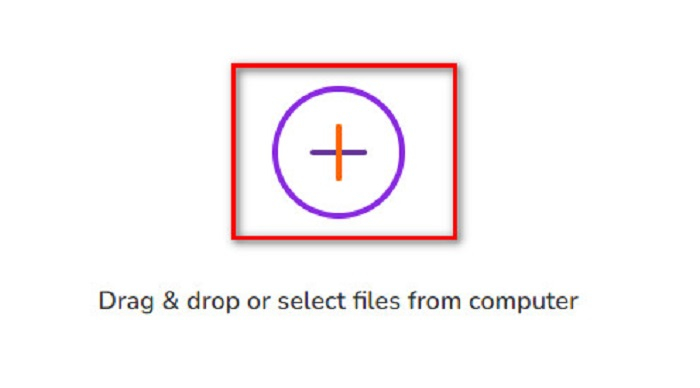
Schritt 2. Ziehen Sie Ihre VOB-Datei per Drag & Drop auf die Seite oder wählen Sie Dateien von Ihrem Computer aus, indem Sie auf die +-Schaltfläche klicken.
Schritt 3. Klicken Sie dann neben Output Format auf die Dropdown-Schaltfläche, um MKV als Ausgabeformat auszuwählen. Klicken Sie abschließend auf die Schaltfläche Start Now, um Ihre VOB-Datei in MKV zu konvertieren.
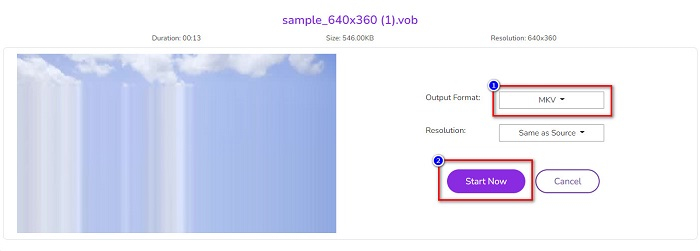
Und so konvertieren Sie VOB online mit einem Online-Konverter in MKV.
Teil 4. Mehr Wissen über VOB und MKV
VOB oder Video Object ist das Dateiformat, das DVD-Videos abspielen. Es enthält Daten, die Audio, Video und Untertitel enthalten. Diese Art von Dateiformat ist urheberrechtlich geschützt, um sie vor direktem Kopieren zu schützen. Im Gegensatz dazu sind MKV-Dateien oder Matroska ein Dateiformat, das häufig zum Speichern kurzer Videoclips und Filme verwendet wird. Es wird auch von zahlreichen Video- und Audio-Codecs unterstützt. Darüber hinaus ist es eine zukunftssichere Datei; Daher ist es so gestaltet, dass es in Zukunft nicht veraltet ist.
Teil 5. Häufig gestellte Fragen zum Konvertieren von VOB in MKV
Was hat eine größere Dateigröße, VOB oder MKV?
MKV-Dateien haben im Vergleich zu VOB größere Dateigrößen. Obwohl es überhaupt keinen großen Unterschied gibt, ist MKV etwas größer.
Können Sie VOB-Videodateien auf dem Mac abspielen?
macOS unterstützt VOB-Dateien nicht; daher können Sie sie auf dem Mac nicht direkt abspielen. Sie können jedoch einen Konverter verwenden, um Ihre VOB-Datei in ein von macOS unterstütztes Format umzuwandeln. Das MOV-Format wird von macOS weitgehend unterstützt. Lesen Sie außerdem diesen Artikel, um mehr über das Konvertieren von VOB in MOV zu erfahren.
Wird die Dateigröße bei der Konvertierung von VOB in MKV beeinflusst?
Nicht unbedingt. Bei der Konvertierung von VOB in MKV wird die Dateigröße nicht beeinflusst, insbesondere wenn Sie FVC Video Converter Ultimate als Tool für die Konvertierung verwenden.
Fazit
Alle oben vorgestellten Online-, Freeware- und Offline-Konverter zeigen eine vielversprechende Leistung. Obwohl sie unterschiedliche Eigenschaften haben, sind sie dennoch ein effektives und effizientes Werkzeug, um VOB in MKV-frei zu konvertieren. Aber wenn Sie einen ultraschnellen Konverter mit vielen herausragenden Funktionen ausprobieren möchten, ist FVC Video Converter Ultimate das beste Tool dafür. Wenn Sie also daran interessiert sind, diesen Konverter auszuprobieren, laden Sie ihn jetzt herunter!
-
 Die besten Möglichkeiten, VOB in FLV umzuwandeln [Kostenlos & Online inklusive]
 Möchten Sie eine VOB-Datei in eine FLV-Datei konvertieren? Sie können die Aufgabe einfach mit Desktop- oder Online-Konvertern erledigen. Lesen Sie diese Anleitung und erfahren Sie, wie Sie VOB einfach und schnell in FLV umwandeln.
-
 Was ist eine VOB-Datei und wie man eine VOB-Datei kostenlos in GIF umwandelt?
 Möchten Sie mehr über VOB-Dateien erfahren und wie Sie sie nach dem Rippen freigeben können? oder Warum müssen Sie VOB in GIF konvertieren? Dann lesen Sie diesen Artikel aufmerksam durch.
-
 3 praktische Konverter zum Umwandeln von VOB-Dateien in das AVI-Format [2021]
 Haben Sie ein Problem, weil die Wiedergabe von VOB-Dateien nicht unterstützt wird? Versuchen wir dann, es mit den 3 unten aufgeführten Methoden mit detaillierten Schritten für jeden Konverter zu konvertieren.
