


 Video Converter Ultimate
 Bildschirm recorder
 Videoreparatur
Zuverlässigster MP4-Metadaten-Editor zum einfachen Hinzufügen, Bearbeiten und Entfernen von MP4-Metadaten
MP4-Tags können Ihnen helfen, Dateien zu organisieren und zu verwalten, indem Sie sie nach den Metadaten sortieren. Aus diesem Grund suchen viele Nutzer nach einem perfekten Metadaten-Editor, um diese Aufgabe mühelos zu erledigen. Zum Glück haben wir heute die besten Tag-Editoren auf dem Markt herausgefiltert, die Sie für Ihre MP4-Dateien verwenden können. Mit Hilfe intensiver Recherche sehen wir uns an, welchen MP4-Metadaten-Editor Sie verwenden sollten, um Ihre Dateien entsprechend anzuordnen.

Teil 1. Die 4 besten kostenlosen MP4-Tag-Editoren, die im Web und offline verfügbar sind
VLC Media Player
Verfügbar für: Windows, Mac und Linux
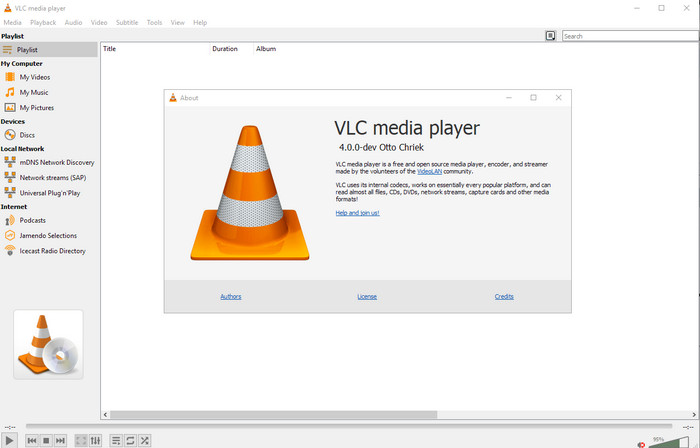
Als Erstes auf unserer Liste steht der beste Videoplayer – wenn Sie jedoch einen kostenlosen MP4-Metadaten-Editor suchen, könnte dieser für Sie interessant sein. VLC Media Player ermöglicht Ihnen kostenloses Bearbeiten oder Entfernen der in Ihre MP4-Dateien eingebetteten Tags. Mit diesem Tool können Sie Metadaten wie Titel, Urheberrecht, Genre, Künstler, Datum, Uhrzeit und mehr ganz einfach bearbeiten. Obwohl viele Nutzer sagen, dass sich Metadaten hier leicht bearbeiten lassen, widersprechen andere dem. Sie finden die Bearbeitung verwirrend und wenig effizient im Vergleich zu anderen Tag-Editoren. Nichtsdestotrotz: Wenn Sie ein sicheres Tool verwenden möchten, das sich bereits bei vielen Anwendern bewährt hat, sollten Sie es ausprobieren.
Amvidia-Tag-Editor
Verfügbar für: Mac
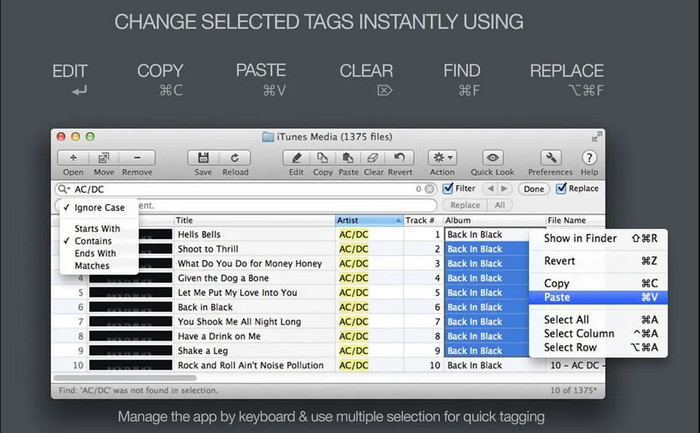
Ein weiterer MP4-Metadaten-Editor für Mac ist der Amvidia Tag Editor. Wenn Sie Metadaten hinzufügen, Coverbilder einfügen, Tags in iTunes bearbeiten oder den Dateinamen ändern müssen, können Sie all dies hier tun; auch für die Stapelverarbeitung von Tags ist dieses Tool hilfreich. Darüber hinaus unterstützt diese kostenlos herunterladbare Software eine große Anzahl an Medienformaten, die Sie in das Tool laden können – Sie müssen es jedoch zunächst installieren. Aufgrund der sehr detaillierten Funktionen kann es für Anfänger etwas dauern, bis sie sich zurechtfinden, da vor dem Hinzufügen von Metadaten viele Schritte nötig sind. Außerdem ist die Benutzeroberfläche veraltet, ähnlich wie bei VLC.
TigoTago
Verfügbar für: Windows
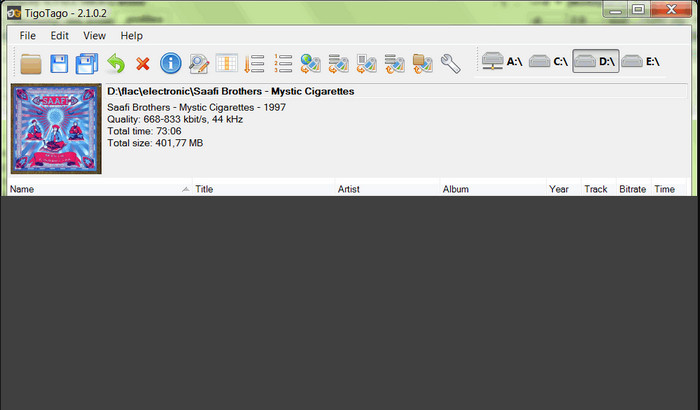
TigoTago ist ein weiterer MP4-Metadaten-Tagger, den Sie unter Windows kostenlos nutzen können. Wenn Sie also bestimmte Daten oder Tags Ihrer MP4-Datei bearbeiten müssen, laden Sie das Tool herunter und ändern Sie die MP4-Tags nacheinander ganz einfach. Mit diesem Tool können Sie grundlegende Tags einer Datei wie Titel, Album, Titelnummern und Künstler ausfüllen, aber auch erweiterte Tags wie Songtexte, Kommentare usw. hinzufügen. Verglichen mit VLC kann man sagen, dass dieses Tool besser ist, da es das Bearbeiten von Tags in den Mittelpunkt stellt. Obwohl es gegenüber dem Media Player Vorteile bietet, besteht weiterhin Verbesserungsbedarf, etwa bei der grafischen Oberfläche und zusätzlichen Funktionen.
InstantD3 - Kostenloser Online-ID3-Tag-Editor
Verfügbar auf: Web
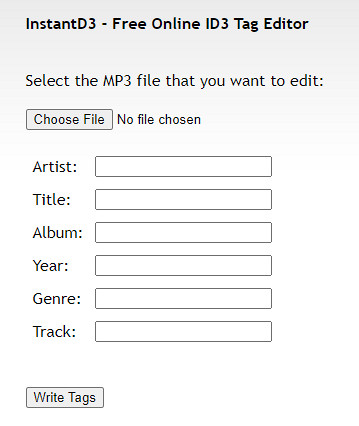
Wenn Sie keine Software herunterladen möchten, können Sie auf diesen Online-MP4-Video-Tag-Editor zugreifen, den InstantD3 - Free Online ID3 Tag Editor. Obwohl das Tool im Internet verfügbar ist, kann es die Metadaten nicht online durchsuchen, um die benötigten Tags automatisch auf Ihrem MP4 anzuwenden. Das Tool bietet eine intuitive Benutzeroberfläche, mit der Benutzer auf einfache Weise Tags zu ihren Audiodateien hinzufügen können. Da das Tool kostenlos ist, sind Anzeigen auf der Website, aber wir müssen Sie warnen, dass die Anzeigen auf der Website für Personen unter 18 Jahren ungeeignet sind. Greifen Sie auch auf Ihr eigenes Risiko auf das Tool zu. Sobald Sie auf die Website des Tools zugegriffen haben, ist Ihre Internetverbindung nicht gesichert.
Teil 2. Best Choice Video Editor zum Hinzufügen, Bearbeiten und Entfernen von Metadaten unter Windows und Mac
Verfügbar für: Windows, Mac & Linux
Die oben erwähnten MP4-Metadaten-Editoren sind gut, aber der FVC Video Converter Ultimate ist der leistungsstarke Metadaten-Editor, den Sie zum Bearbeiten oder Entfernen von Metadaten benötigen. Dieses Tool bietet die besten Bearbeitungsfunktionen, die sich leicht bedienen lassen und dennoch professionelle Ergebnisse liefern. Anders als die zuvor genannten Tools, die nur eine begrenzte Anzahl an Medienformaten unterstützen, können Sie hier MP4, MOV, MKV, FLV, AVI und über 1.000 weitere Formate importieren und deren Metadaten schnell ändern. Erstaunlich, was dieses Tool leisten kann, oder? Wenn Sie sich dieses beeindruckende Programm ansehen, können Sie der Schritt-für-Schritt-Anleitung folgen, die wir bereitstellen, um Tags Ihrer MP4-Dateien zu bearbeiten, hinzuzufügen oder zu entfernen.
Schritt 1. Klicken Sie zunächst auf die Download-Schaltfläche, um den MP4-Tag-Editor für Mac oder Windows herunterzuladen. Folgen Sie dem Installationsvorgang, nachdem Sie die Datei angeklickt haben, und öffnen Sie anschließend das Programm.
Gratis DownloadFür Windows 7 oder neuerSicherer Download
Gratis DownloadFür MacOS 10.7 oder neuerSicherer Download
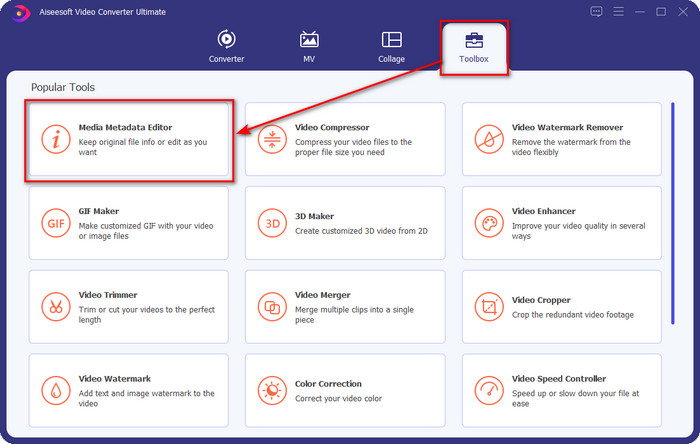
Schritt 2. Nachdem Sie den Editor geöffnet haben, wählen Sie im Bereich mit den drei Sektionen die Toolbox und klicken Sie dort auf Media Metadata Editor.
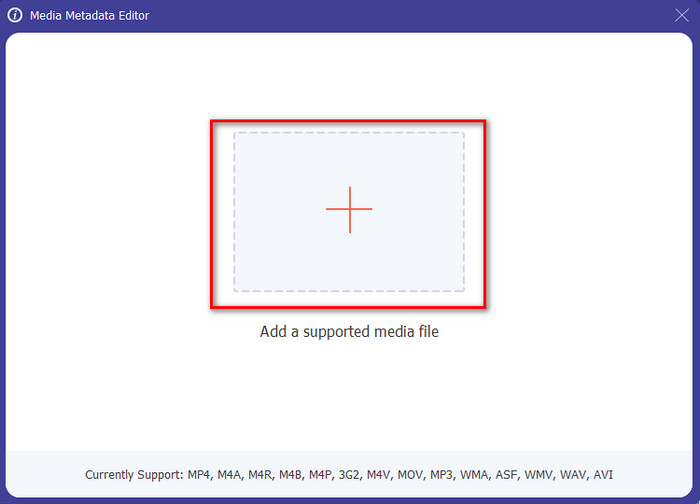
Schritt 3. Um die MP4-Datei hochzuladen, klicken Sie auf die +-Schaltfläche, suchen Sie im sich öffnenden Ordner nach der .mp4-Datei und klicken Sie auf Öffnen, um sie erfolgreich zu importieren.
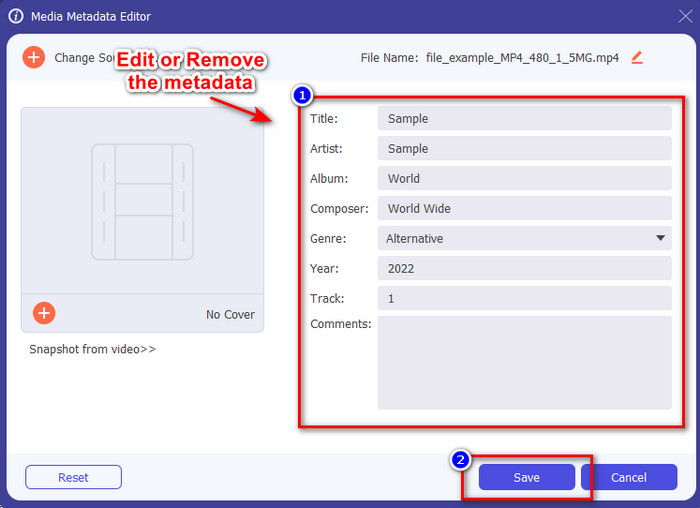
Schritt 4. Fügen Sie Informationen hinzu, entfernen oder bearbeiten Sie sie in dem Textfeld, das auf Ihrem Bildschirm angezeigt wird, und füllen Sie es nach Ihren Wünschen aus. Um die von Ihnen vorgenommenen Änderungen an den MP4-Tags zu speichern, klicken Sie auf die Schaltfläche Speichern. Wenn Sie sich für den Ultimate-Editor entscheiden, werden Sie schnell feststellen, dass die Aufgabe kinderleicht ist.
Verwandt:
Teil 3. Häufig gestellte Fragen zum MP4 Tag Editor
Wie überprüfe ich MP4-Metadaten unter Windows?
Wenn Sie die Metadaten Ihrer MP4-Datei überprüfen möchten, gehen Sie folgendermaßen vor. Suchen Sie zuerst die .mp4-Datei, tippen Sie auf die rechte Maustaste Ihrer Maus, gehen Sie zu Eigenschaften und klicken Sie zuletzt auf Details. Alle Informationen, die Sie zu Ihren Metadaten benötigen, finden Sie in dieser Liste. Wenn Sie sie also nach Ihren Wünschen bearbeiten möchten, wählen Sie oben das Tool aus, das Sie verwenden sollten.
Wo kann ich MP4-Dateien ansehen?
Die meisten Media Player unterstützen MP4-Dateien, da dies das Standardformat für Videodateien ist. Aber die Frage ist: Wo können Sie MP4-Videos in hoher Auflösung ansehen? In diesem Fall sollten Sie auf diesen Link klicken. Alles, was Sie wissen müssen, finden Sie in diesem Artikel.
Wie wählt man den besten MP4-Tag-Editor aus?
Sie müssen sich an einige Dinge erinnern, bevor Sie den MP4-Metadaten-Editor auswählen, den Sie verwenden werden; Wenn Sie diese nicht kennen, können Sie sich auf diese Standards verlassen. Stellen Sie zunächst sicher, dass der Metadaten-Editor das von Ihnen verwendete Format unterstützt. nicht alle Editoren unterstützen einen großen Formatbereich. Die Verwendung eines Metadaten-Editors, der Ihr Format nicht unterstützt, wäre nutzlos. Stellen Sie zweitens sicher, dass das Tool einfach zu bedienen ist; Wenn Sie mit der Bearbeitung von Metadaten noch nicht vertraut sind, stellen Sie sicher, dass das von Ihnen gewählte Tool nicht zu schwer zu erlernen ist. Stellen Sie schließlich sicher, dass es sicher zu verwenden ist; Wenn es herunterladbar oder online ist, müssen Sie wissen, ob es sicher zu verwenden ist. Stellen Sie sicher, dass Sie alle diese einfachen Standards befolgen müssen, bevor Sie den Editor verwenden, um nur das Beste zu erhalten.
Fazit
Die in diesem Artikel vorgestellten MP4-Metadaten-Editoren helfen Ihnen dabei, Metadaten Ihrer MP4-Dateien schnell zu bearbeiten, hinzuzufügen oder zu entfernen. Mit den von uns verfassten, aussagekräftigen Bewertungen können wir die Tools nun vergleichen und herausfinden, welches unsere Anforderungen beim Bearbeiten von MP4-Tags am besten erfüllt. Falls Sie sich noch nicht entscheiden konnten, empfehlen wir Ihnen das beste Tool auf der Liste: den FVC Video Converter Ultimate. Dieses fantastische Programm wird Ihren Bedürfnissen gerecht; Sie müssen es lediglich herunterladen. Klicken Sie also auf die Download-Schaltfläche, folgen Sie den von uns bereitgestellten Schritten und genießen Sie das Bearbeiten der Tags, ohne ins Schwitzen zu geraten.
-
 5 einfachste Möglichkeiten zum Entfernen von Metadaten in beliebigen Mediendateien
 Wie entferne ich Metadaten? Ist es schwer, es zu tun? Muss ich ein kostenloses Tool kaufen oder verwenden, um Tags zu entfernen? Alle diese Fragen haben Antworten in diesem Artikel.
-
 Top 5 Metadatenextraktoren, die online und offline verfügbar sind [2025]
 Sie können mehrere Metadaten-Extraktoren auf dem Markt finden, aber heute wählen wir nur die fünf am häufigsten ausgewählten Tag-Extraktoren nach Zielgruppe aus.
-
 Top 5 Video-Metadaten-Editoren für 2025 [Unvoreingenommene Bewertung]
 Möchten Sie Ihre Video-Metadaten anzeigen? Wenn ja, lesen Sie die folgenden Details, um das Thema vollständig zu verstehen und zu wissen, welches Tool am besten zu Ihnen passt.
