


 Video Converter Ultimate
 Bildschirm recorder
 Videoreparatur
Einfachste Möglichkeiten, MPG in MKV mit den besten Konvertern zu konvertieren [kostenlos]
Sadly, MPG files do not contain subtitle tracks; however, you can convert your file to a file format that stores numerous subtitle tracks in different languages. And if you are looking for a way to convert your MPG file to MKV easily, we provide the simple steps to convert MPG to MKV online and offline; read this article until the end.

Teil 1. Warum MPG in MKV konvertieren
Das MPG-Dateiformat ist eines der am häufigsten verwendeten Dateiformate im Internet. Dieses Dateiformat wurde von MPEG oder Moving Pictures Expert Groups entwickelt. Darüber hinaus kann dieser Dateityp Video-, Audio- und Metadaten speichern. Darüber hinaus unterstützen fast alle Mediaplayer diese Dateitypen weitgehend. Im Gegensatz dazu sind MKV- oder Matroska-Dateien ein Mediendatei-Container, der Video-, Audio- und Untertitelspuren in einer Datei speichert. Dieser Dateityp ist auch bei Filmliebhabern beliebt, da er Audiospuren in verschiedenen Sprachen verarbeiten kann.
Teil 2. Der schnellste Weg, MPG offline in MKV zu konvertieren
There are a lot of converters in the market that can convert MPG to MKV. However, if you want a converter that can do an ultra-fast conversion, FVC Video Converter Ultimate is the best tool. And if you want to remove watermark from your videos, this converter has the feature to do so. Moreover, it can also do a batch conversion to merge multiple file-formats into one. Want to know the advantages of using this MPG to MKV Converter? Then read the details below.

FVC Video Converter Ultimate
Über 5.689.200 Downloads- Bearbeiten und verbessern Sie Ihr Video explizit.
- In diesem Konverter ist ein ultraschneller Konvertierungsprozess verfügbar.
- Es kann MPG-Dateien in MKV, WMV, AVI, MP4 und mehr als 1000 Dateiformate konvertieren.
- Verfügbar auf allen Betriebssystemen wie Windows und macOS.
Gratis DownloadFür Windows 7 oder neuerSicherer Download
Gratis DownloadFür MacOS 10.7 oder neuerSicherer Download
Befolgen Sie die nachstehenden Schritte, um Ihre MPG-Datei in MKV zu konvertieren.
Step 1. Download FVC Converter Ultimate by clicking the Download button below for Windows or macOS. Then follow the installation process, and run the app.
Gratis DownloadFür Windows 7 oder neuerSicherer Download
Gratis DownloadFür MacOS 10.7 oder neuerSicherer Download
Step 2. For the next step, click the Add Files or the + sign button to upload your MPG file on the software's main interface.
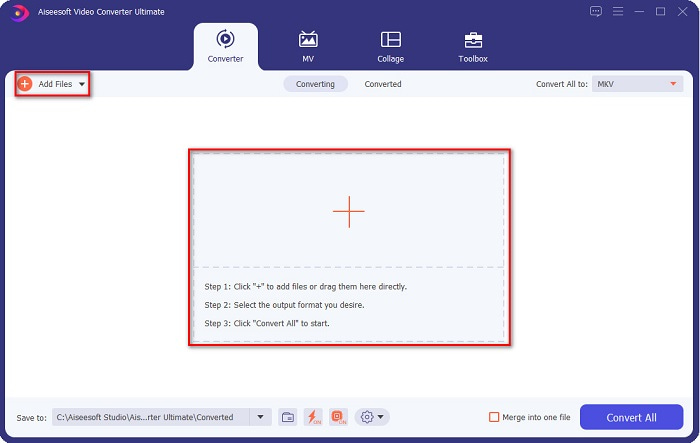
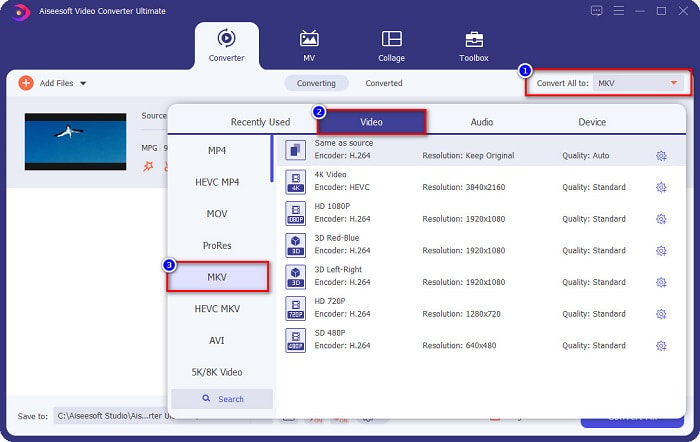
Step 3. After uploading your MPG file, select the output format by clicking the Convert All to button. In your case, choose the MKV file format.
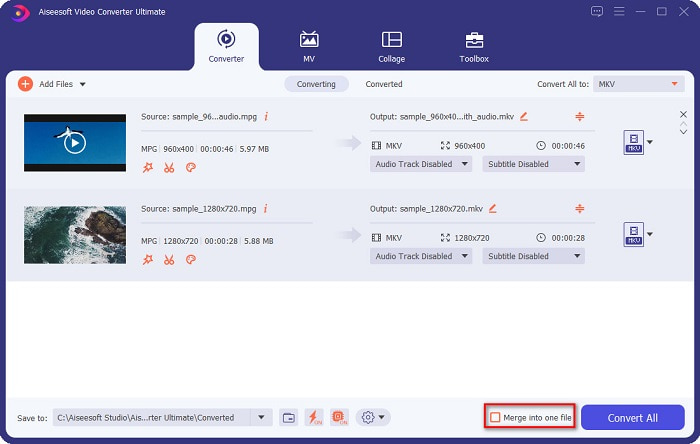
Optional. If you want to convert multiple MPG files into one, tick the Merge into one file box. If not, proceed to the next step.
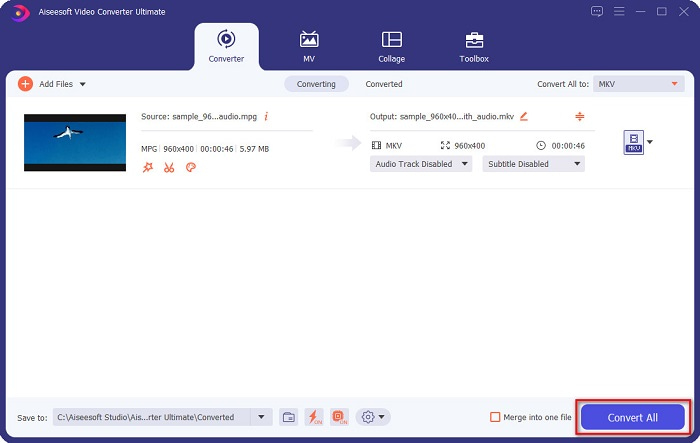
Step 4. To finish, click the Convert All button to convert your MPG file to an MKV file. Wait for a few seconds, and that’s it! As easy as that, you can easily convert MPG to MKV.
Teil 3. Konvertieren Sie MPG in MKV mit einem Freeware-Tool
Ever wonder what the best freeware tool to convert MPG to MKV is? We observed that many users use HandBrake as the first line of choice. This freeware can convert MPG to MKV, WebM, and MP4 files. In addition, it has an easy-to-use interface, which is a good thing if you are a beginner. However, it can only convert limited file formats. Nonetheless, it is still an effective tool for converting MPG to MKV.
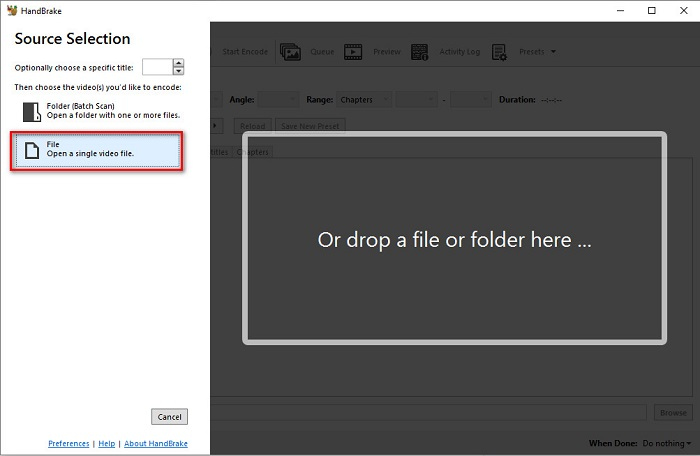
Step 1. Download HandBrake on your device, then run the application. After opening the app, click the File option on the right side of the software’s interface. When your computer files appear, select your MPG file.
Step 2. Then select the output file format that you want on the drop-down button beside Format. And then, by clicking the Browse button, choose where your file destination will be.
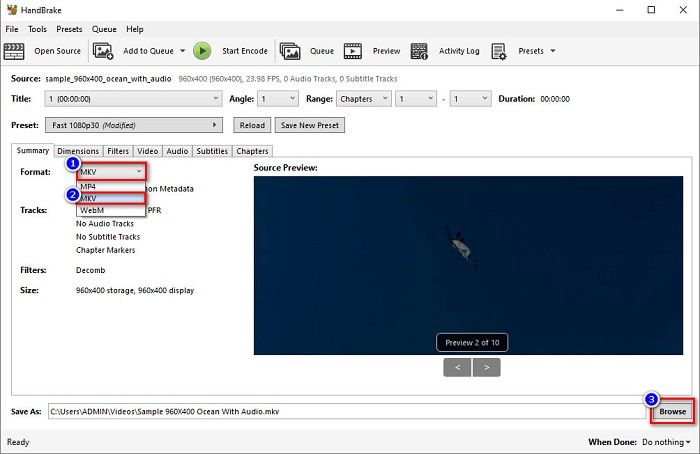
Step 3. Finally, click the Start Encode button to convert your MPG file to MKV file format.
Sie können MPG mit einem Freeware-Konverter in MKV umwandeln, indem Sie die obigen einfachen Schritte befolgen.
Teil 4. 2 Methoden zum Online-Konvertieren von MPG in MKV
Die Konvertierung über Online-Konverter ist möglicherweise die bequemste Option. Darüber hinaus müssen Sie nichts herunterladen, wenn Sie Online-Konverter verwenden. Stattdessen können Sie direkt online konvertieren. Ihre Konvertierungsgeschwindigkeit hängt jedoch davon ab, wie schnell Ihre Internetverbindung ist. Nichtsdestotrotz haben wir unten die zwei besten Methoden aufgelistet, um Ihre MPG-Datei in MKV zu konvertieren.
Methode 1. Verwenden Sie den kostenlosen Online-Videokonverter von FVC
FVC Free Online Video Converter is a free online converter that conveniently converts various file formats. It supports file formats like MPG to MKV, AVI, MP4, MOV, MP3, and more. It also has a beginner-friendly converter because it has an easy-to-use GUI. Moreover, it has a feature that allows you to change your file's video and audio bitrate. So, if you are interested in this MPG to MKV converter online, follow the steps below.
Step 1. In your browser, search FVC Free Online Video Converter, or go directly to the webpage by clicking this link. And then launch the software application.
Step 2. After launching the app, click the Add Files to Convert button. Your computer files will appear, then select your MPG file.
Laden Sie die Desktop‑Version herunter, um Dateien stapelweise zu konvertieren.
Step 3. And then choose MKV as your output format.
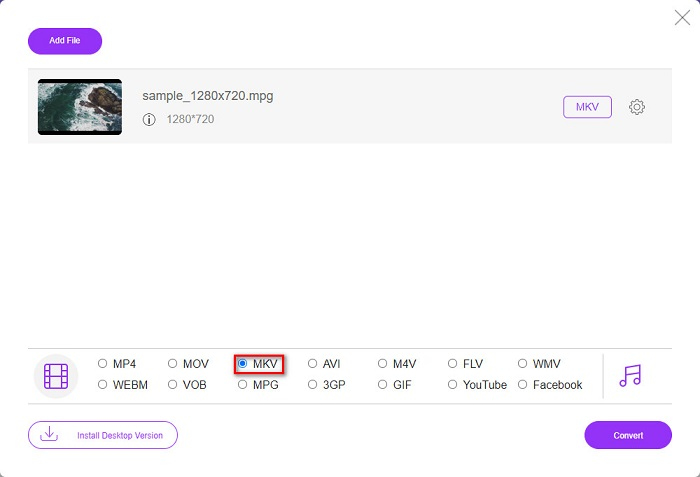
Step 4. For the last step, click the Convert button. Then your MPG to MKV conversion will begin.
Methode 2. Verwenden Sie CloudConvert
Another online converter that you can use is CloudConvert. This converter is very efficient to use because of its simple interface. Moreover, you can also compress your files when using it. However, it only supports limited file formats. Despite that, many still use this converter for convenience purposes.
Step 1. In your browser, search CloudConvert. When you are already on the webpage, click the Select Files button. Then select your MPG file when your computer files appear.
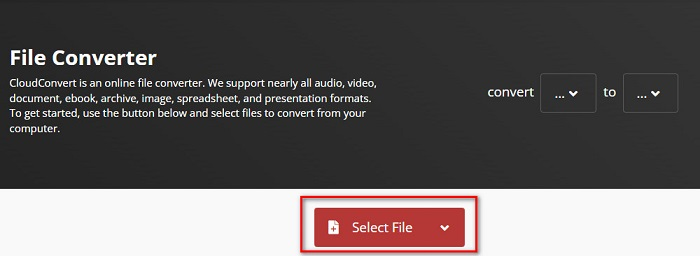
Step 2. Then, choose the MKV file as your output format on the drop-down button.
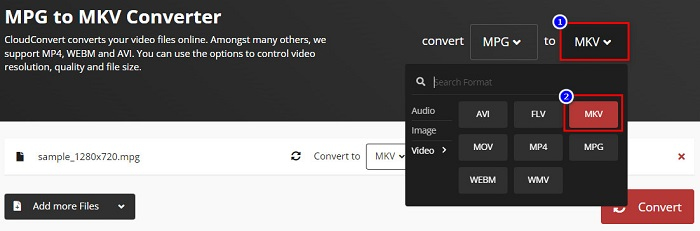
Step 3. Lastly, click the Convert button. Then wait for your file to be converted, and voila! With those three easy steps, you can change MPG to MKV.
MPG vs. MKV
MPG wurde von der Moving Picture Experts Group (MPEG) entwickelt und ist ein gängiges digitales Videoformat zum Speichern von Video-, Audio- und Metadateninformationen. Es ist sehr nützlich, wenn Sie Filme erstellen, die im Internet geteilt werden sollen. Diese Dateien in MPG enthalten normalerweise MPEG-1- oder MPEG-2-Video-/Audiokomprimierung.
Das 2002 veröffentlichte Multimedia-Containerformat Matroska ist ein Open-Source-Format, das eine Reihe von Video-, Audio-, Bild- und Untertitelspuren enthalten kann. So können Sie damit ganz einfach kurze Videoclips, Fernsehsendungen und Filme speichern. Es ist sehr beliebt für Anime-Fans.
Teil 5. Häufig gestellte Fragen zum Konvertieren von MPG in MKV
Beeinflusst die Konvertierung von MPG in MKV die Dateigröße?
Ja, obwohl es keine großen Auswirkungen hat, wenn Sie eine MPG-Datei in eine MKV-Datei konvertieren, nimmt die Dateigröße zu.
Was hat eine größere Dateigröße?
MKV-Dateien haben im Vergleich zu MPG-Dateien eine größere Dateigröße, da MKV-Dateien Video-, Audio- und mehrere Untertitelspuren in einer Datei enthalten.
Können Sie MKV-Dateien komprimieren?
You can compress MKV files by using a file compressing tool. FVC Video Converter Ultimate has a feature that allows you to compress your large video files.
Fazit
Dieser Artikel unterstützt Sie, wenn Sie nach den besten Möglichkeiten zum Konvertieren von MPG- in MKV-Dateien suchen. Alle oben vorgestellten Konverter zeigen eine vielversprechende Leistung beim Konvertieren von Dateien. Aber wenn Sie nach einem Konverter mit vielen herausragenden Funktionen suchen, sollten Sie versuchen, FVC Video Converter Ultimate als erste Wahl zu verwenden. Wenn Sie noch nicht überzeugt sind, laden Sie es herunter, um den besten Konverter auszuprobieren, den Sie verwenden können.
-
 3 einfache Möglichkeiten zum Konvertieren von MPG in MOV auf Ihrem Mac/Windows/Online
 Möchten Sie Ihre MPG-Dateien konvertieren und später auf Ihrem iOS, iPod, iPad oder Mac transportieren? In diesem Artikel erfahren Sie, wie Sie MPG schrittweise in MOV konvertieren.
-
 So konvertieren Sie MPG in FLV ohne Qualitätsverlust [Bewährt]
 Sie müssen Ihren Lieblingsfilm auf diesem Mediaplayer ansehen, aber er unterstützt kein MPG. Versuchen Sie, Ihre MPG-Datei mit diesen in diesem Artikel vorgestellten Konvertern in FLV zu konvertieren.
-
 2 ultimative MPG-Konverter zum kostenlosen Konvertieren von MPG in WMV
 Möchten Sie MPG kostenlos in WMV konvertieren? In diesem Fall haben Sie Glück, denn wir haben herausgefunden, dass es zwei Tools gibt, mit denen Sie Ihre MPG-Dateien konvertieren können.

