


 Video Converter Ultimate
 Bildschirm recorder
 Videoreparatur
 Sicherer Download
So konvertieren Sie MP4 in OGG Free & Online
MP4 ist ein digitaler Multimedia-Container, in dem Video, Audio und Untertitel gespeichert sind. OGG ist ein kostenloses und offenes Containerformat für effizientes Streaming und Dateikomprimierung. Manchmal müssen Sie MP4 in das OGG-Format konvertieren, um auf einigen Audio-Playern spielen zu können. Dieser Beitrag wird 3 kostenlose MP4 zu OGG Konverter teilen, um MP4 zu OGG ohne Probleme zu konvertieren.

Teil 1. Professionelle Möglichkeit, MP4 kostenlos in OGG zu konvertieren
Wenn Sie den besten MP4-zu-OGG-Konverter finden möchten, können Sie FVC Free FLV to MP4 Converter ausprobieren. Es ist eine kostenlose und einfach zu bedienende Videokonvertierungssoftware für Windows und Mac. Sie können verschiedene Videos wie MP4, FLV, MOV, MKV, MTS, M2TS usw. mühelos in OGG umwandeln. Außerdem bietet sie Bearbeitungsfunktionen, um am Anfang/Ende des Videos Themes hinzuzufügen sowie Autor, Zeit und Anbieter anzupassen.

- Konvertieren Sie Videos in MP4, MKV, AVI, MOV, MP3, AAC, AIFF usw. in OGG.
- Exportieren Sie OGG-Videos und verlustfreie Audiodateien aus MP4-Dateien mit einem Klick.
- Ermöglichen Sie Benutzern das Bearbeiten von Anbieter, Titel, Autor, Uhrzeit und Hinzufügen von Themen.
- Batch-Konvertierung von MP4 in OGG für die Wiedergabe auf einigen tragbaren Audioplayern.
Kostenloser DownloadFür Windows 7 oder neuerSicherer Download
Kostenloser DownloadFür macOS 10.7 oder neuerSicherer Download
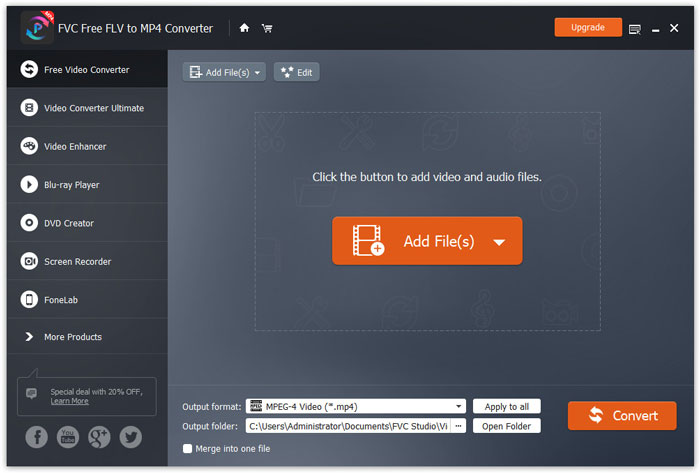
Schritt 1. Installieren und starten Sie nach dem Herunterladen FVC Free FLV to MP4 Converter auf Ihrem Windows- oder Mac-Computer. Klicken Sie auf die Schaltfläche Add Files, um die MP4-Dateien von Ihrem Computer zu laden. Wenn Sie mehrere MP4-Dateien auf einmal konvertieren möchten, laden Sie sie einfach alle hoch.
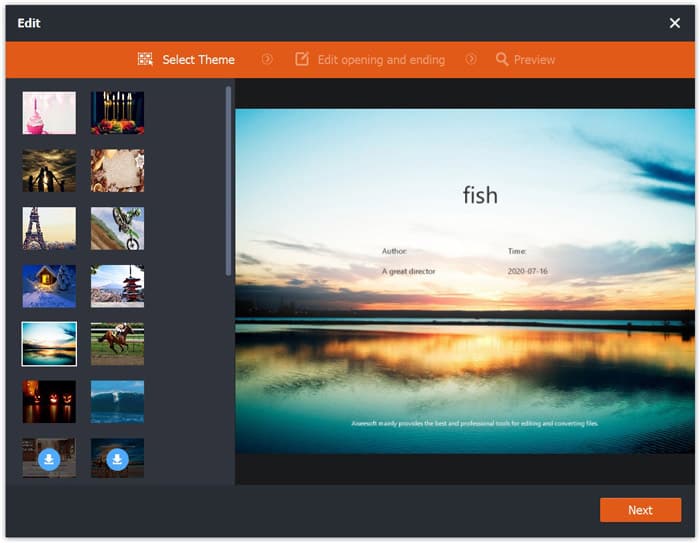
Schritt 2. Klicken Sie auf Ihre MP4-Datei und dann auf die Schaltfläche Bearbeiten. Sie können ein Theme zu Ihrer MP4-Datei hinzufügen sowie den Opening- und Ending-Inhalt bearbeiten. Klicken Sie anschließend auf Weiter, um die Änderungen zu prüfen und zu speichern.
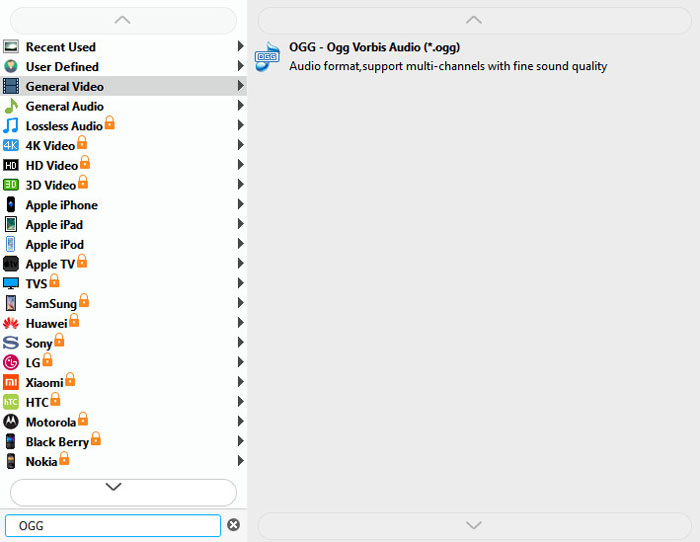
Schritt 3. Klicken Sie unten auf die Dropdown-Schaltfläche Output format und suchen Sie in der Liste nach dem OGG-Format. Sie können OGG - Ogg Vorbis Audio (*.ogg) als Ausgabeformat auswählen.
Schritt 4. Wählen Sie den Ausgabeordner auf Ihrem Computer aus und klicken Sie auf die Schaltfläche Convert, um mit der Umwandlung von MP4 in OGG zu beginnen.
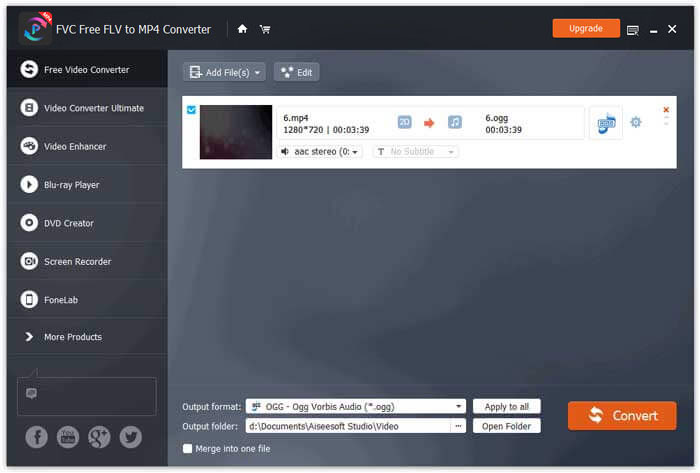
Mit FVC Free FLV to MP4 Converter können Sie auch mehrere MP4-Dateien zu einer zusammenführen.
Teil 2. So ändern Sie MP4 in OGG Online
Im Vergleich zu einem Desktop-Konverter ist die Verwendung eines Online-Konverters eine zeitsparende Methode zum Konvertieren von MP4 in OGG. Es gibt viele Online-MP4-OGG-Konverter, die Sie auswählen können. In diesem Teil werden wir 2 MP4-zu-OGG-Konverter freigeben, um Ihre MP4-Dateien kostenlos online in OGG umzuwandeln.
1. Zamzar
Zamzar ist eine multifunktionale Online-Plattform für Videokonverter, Audiokonverter, Bildkonverter und eBookkonverter. Mit Zamzar können Sie MP4 problemlos in eine Vielzahl anderer Formate wie OGG konvertieren. Hier sind einfache Schritte, um MP4 mit Zamzar online in OGG zu konvertieren.
Schritt 1. Gehen Sie auf www.zamzar.com/convert/mp4-to-ogg/ und klicken Sie auf die Schaltfläche Add Files, um Ihre MP4-Dateien hochzuladen.
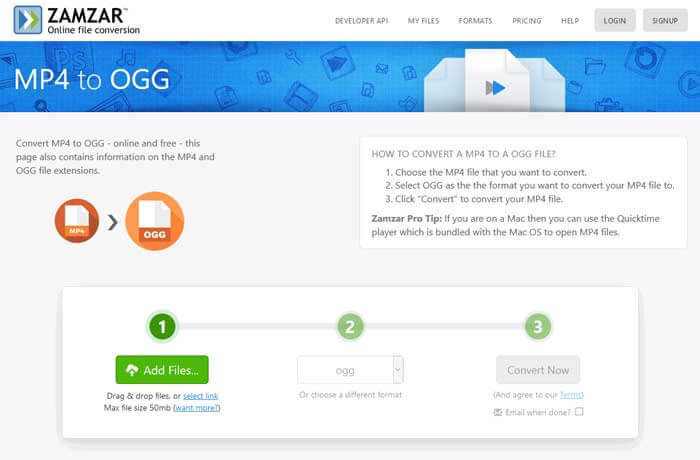
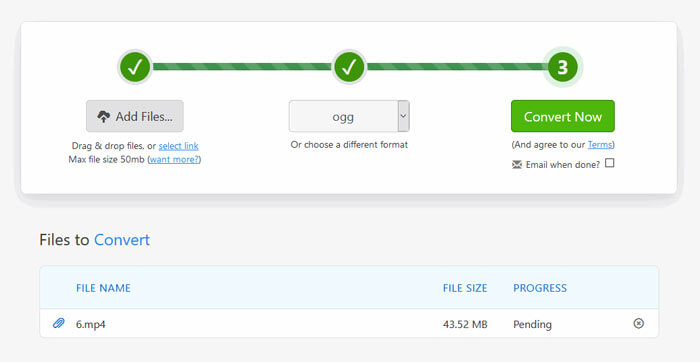
Schritt 2. Das Standardausgabeformat ist bereits auf ogg eingestellt. Klicken Sie auf die Schaltfläche Convert Now, um mit der Konvertierung von MP4 in OGG zu beginnen.
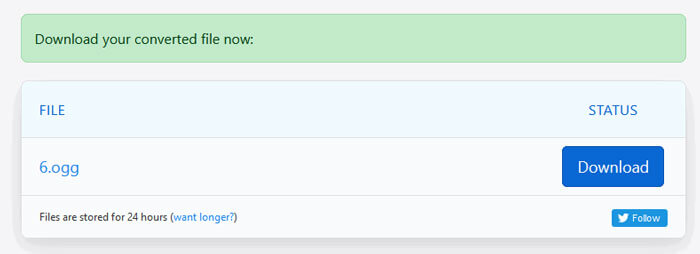
Schritt 3. Anschließend werden Sie auf eine andere Seite weitergeleitet. Dort können Sie auf die Schaltfläche Download klicken, um die konvertierte OGG-Datei auf Ihrem Computer zu speichern.
Wenn Sie eine große MP4-Datei konvertieren, kann die Umwandlung mit Zamzar hängen bleiben. Sie müssen die Seite aktualisieren und erneut konvertieren. Wenn Sie eine reibungslose Konvertierung wünschen, kann Ihnen FVC Free FLV to MP4 Converter sehr helfen. (Weitere MP4-Player finden Sie hier)
2. Convertio
Convertio ist ein einfaches Tool zum Konvertieren von Dokument-, Bild-, Tabellen-, E-Book-, Audio- und Videodateien. Mit Convertio können die MP4-Dateien mit hervorragender Genauigkeit in MP3 konvertiert werden. Führen Sie die folgenden Schritte aus, um OGG mit Convertio aus MP4 zu exportieren.
Schritt 1. Gehen Sie zum Convertio MP4 to OGG Converter (convertio.co/mp4-ogg/). Klicken Sie auf die Schaltfläche Choose Files, um Ihre MP4-Dateien hochzuladen. Sie können auch MP4-Dateien aus Dropbox, Google Drive hinzufügen oder die URL einfügen.
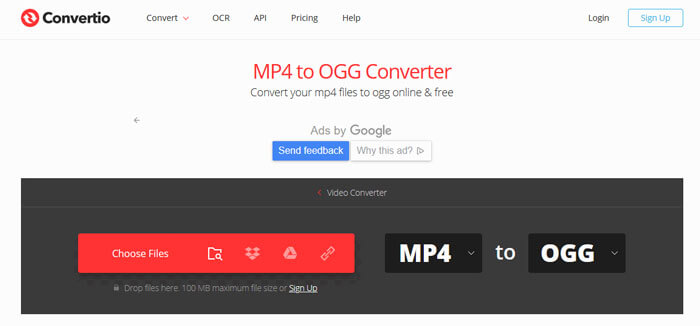
Schritt 2. Wählen Sie OGG über das Dropdown-Symbol und klicken Sie dann auf das Zahnrad-Symbol, um Codec, Qualität, Audiokanäle, Frequenz und Lautstärke festzulegen. Sie können die MP4-Datei auf den gewünschten Teil zuschneiden.
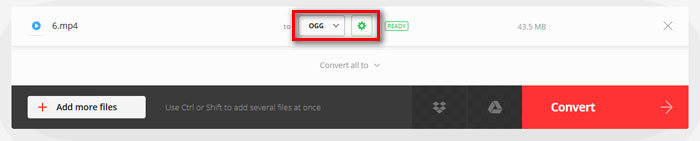
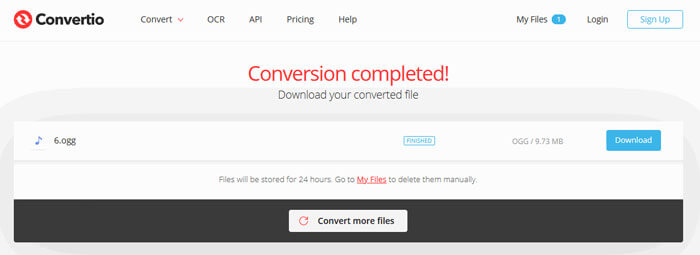
Schritt 3. Nachdem alles eingestellt ist, klicken Sie auf die Schaltfläche Convert, um MP4 in OGG zu konvertieren. Nach der Konvertierung klicken Sie auf die Schaltfläche Download, um die konvertierte OGG-Datei auf Ihrem Computer zu speichern.
Teil 3. FAQs zum Konvertieren von MP4 in OGG
1. Was ist das OGG-Videoformat?
OGG ist ein kostenloses und offenes Containerformat, das Musik, Videos, Text wie Untertitel und Metadaten enthalten kann.
2. Welcher Player kann OGG-Dateien abspielen?
Es gibt viele tragbare Player, die OGG-Dateien wie VLC, Windows Media Player, Adobe Audition, Audials, MPlayer und mehr abspielen können.
3. Wie konvertiere ich MP4 in MP3?
Mit Hilfe von FVC Free Online Video Converter können Sie online ganz einfach MP4 in MP3 umwandeln. Gehen Sie auf diese Online-Seite und klicken Sie auf die Schaltfläche Add Files to Convert, um das Launcher-Programm zu installieren. Wählen Sie dann die MP4-Dateien vom Computer aus und markieren Sie MP3 als Ausgabeformat. Klicken Sie auf die Schaltfläche Convert, um MP4 in MP3 zu konvertieren.
Fazit
Wir haben hauptsächlich 3 MP4 in OGG-Konvertierungen eingeführt, um MP4 in OGG-Dateien online und offline zu konvertieren. Mit dem Desktop-Konverter FVC Free FLV to MP4 können Sie die Open-Source-OGG-Datei problemlos aus MP4 exportieren. Wenn Sie bessere Lösungen haben, zögern Sie bitte nicht, einen Kommentar zu hinterlassen.
-
 WebM zu MP4 | Kostenlos WebM in MP4 konvertieren
 Wie kann ich WebM-Dateien ohne Webbrowser ansehen? Sie müssen WebM in MP4 konvertieren. Hier sind die 10 besten kostenlosen WebM to MP4-Konverter, mit denen Sie WebM online und auf Mac- und Windows-Computern in MP4 ändern können.
-
 MP4 zu FLV | Top 3 Free Converter
 Dieser Beitrag ist die detaillierte Anleitung zur Konvertierung von MP4 in FLV. Mit den drei besten kostenlosen Konvertern können Sie MP4 problemlos online, auf Windows- oder Mac-Computern in FLV ändern.
-
 Top 6 Möglichkeiten zum Kombinieren von MP4-Dateien unter Windows / Mac / Online
 Möchten Sie Ihre MP4-Rohdateien für Ihr Projekt zusammenführen? In diesem Beitrag werden die sechs wichtigsten Möglichkeiten zusammengefasst, mit denen Sie MP4-Videos unter Windows, Mac und online problemlos kombinieren können.
