


 Video Converter Ultimate
 Bildschirm recorder
 Videoreparatur
 Sicherer Download
So entfernen Sie ganz einfach Wasserzeichen von Abschlussbildern
Wasserzeichen sind ein Dorn im Auge, wann immer Sie sie auf einem Foto sehen, und sie ruinieren die Qualität des Fotos. Sie werden Wasserzeichen auf Fotos sehen, wenn der Ersteller nicht möchte, dass seine Arbeit gestohlen wird. Und wenn Sie Student sind, werden Sie wahrscheinlich Wasserzeichen auf Ihrem Abschlussbild sehen, die den Namen des Studios oder des Fotografen angeben, der es aufgenommen hat.
Wenn Sie das Wasserzeichen auf Ihrem Abschlussfoto entfernen möchten, benötigen Sie Tools, die Ihnen dabei helfen, das Wasserzeichen zu entfernen. In diesem Artikel haben wir die drei am häufigsten verwendeten Wasserzeichen-Entferner aufgelistet, und Sie erfahren außerdem die Schritte, um Wasserzeichen aus Abschlussfotos zu entfernen.

Teil 1. So entfernen Sie Wasserzeichen von Abschlussbildern online
Es gibt viele Tools zum Entfernen von Wasserzeichen, die Sie im Internet sehen werden. Allerdings sind nicht alle kostenlos und einfach zu bedienen. Außerdem erfahren Sie in diesem Teil, wie Sie Wasserzeichen bequem und effizient entfernen können.
FVC Free Watermark Remover ist ein Online-Wasserzeichenentferner, mit dem Sie Wasserzeichen auf Ihren Abschlussfotos ganz einfach entfernen können. Dieses Online-Tool ist beliebt, weil Sie nichts herunterladen müssen, bevor Sie es verwenden. Außerdem unterstützt es die gängigsten Bildformate wie PNG, JPG, JPEG, BMP und mehr. Und selbst wenn Sie das Wasserzeichen auf Ihrem Bild entfernen, behält es beim Herunterladen dasselbe Bildformat wie zuvor.
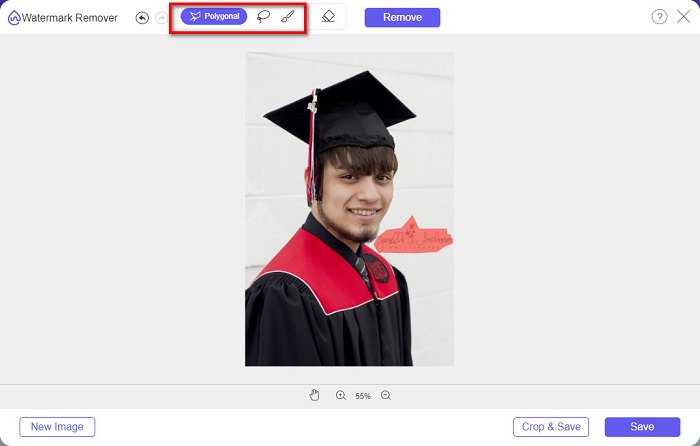
Mit diesem Wasserzeichen-Entferner können Sie bei der Auswahl des Wasserzeichenbereichs aus den Entferner-Voreinstellungen wählen. Sie können zwischen Vieleck, Lasso oder Pinsel wählen. Darüber hinaus können Sie dieses Tool verwenden, um andere unnötige Dinge auf Ihrem Bild zu löschen.
Vorteile
- Es hat eine schnelle Betriebssoftwareschnittstelle.
- Es ist sicher zu verwenden.
- Es ist 100% kostenlos zu verwenden.
- Verfügbar in allen Webbrowsern, einschließlich Google, Firefox und Safari.
Nachteile
- Es ist internetabhängig.
So entfernen Sie Wasserzeichen auf Abschlussbildern mit FVC Free Watermark Remover:
Schritt 1. Suchen Sie in dem von Ihnen verwendeten Browser nach FVC Free Watermark Remover. Sie können auf diesen Link klicken, um direkt auf die Webseite zu gelangen.
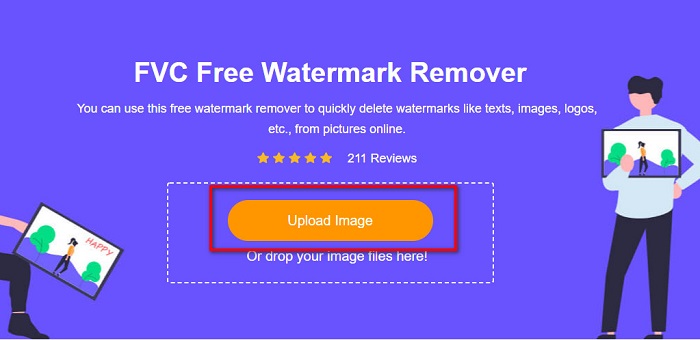
Schritt 2. Klicken Sie in der Hauptoberfläche der Software auf die Schaltfläche Upload Image. Es werden die Ordner Ihres Computers geöffnet, in denen Sie das Abschlussfoto auswählen und hochladen.
Schritt 3. Wählen Sie anschließend das Entfernen-Werkzeug aus, das Sie zum Entfernen des Wasserzeichens verwenden möchten. Wählen Sie zwischen Polygonal, Lasso oder Brush. Markieren Sie dann den Bereich des Wasserzeichens, den Sie entfernen möchten.
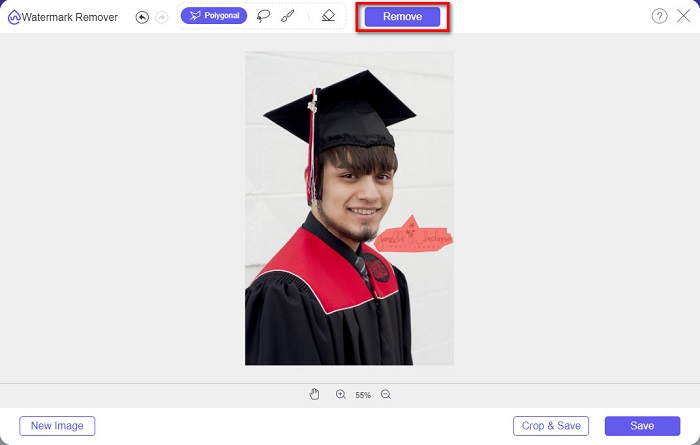
Schritt 4. Klicken Sie nach der Auswahl des Wasserzeichenbereichs auf die Schaltfläche Remove, um das Wasserzeichen zu löschen.
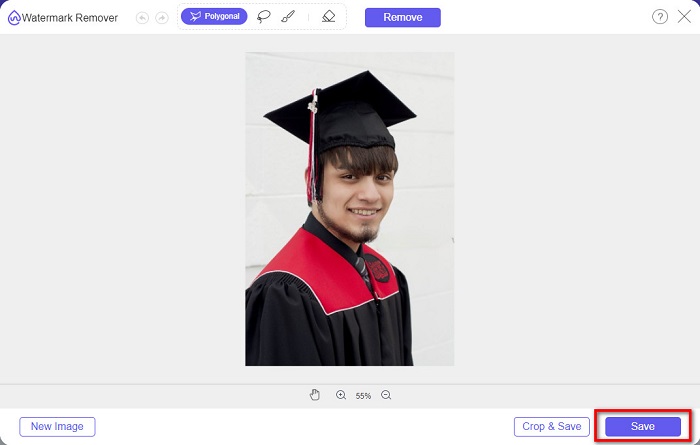
Schritt 5. Sie werden sehen, dass das Wasserzeichen entfernt wurde. Klicken Sie auf die Schaltfläche Save, um das Bild auf Ihr Gerät herunterzuladen. Außerdem ist dieses Online-Tool zur Wasserzeichenentfernung auch ein Photobucket-Wasserzeichenentferner.
Teil 2. So entfernen Sie Wasserzeichen von Abschlussbildern mit Inpaint
Manchmal wird das Wasserzeichen retuschiert, um das Foto wieder in sein ursprüngliches Aussehen zu versetzen. Aber wie tun sie das? Profis verwenden einen Fotoeditor und malen das Etikett Pixel für Pixel, was ein paar Arbeitsstunden bedeutet. Es gibt jedoch ein weiteres Tool, das Ihnen das Leben leichter machen wird. In diesem Teil lernen Sie die Verwendung von Inpaint und seine Vorteile kennen.
Inpaint ist ein Online-Wasserzeichenentferner, der Ihnen ebenfalls hilft, Wasserzeichen auf Ihrem Abschlussfoto zu entfernen. Diese Online-Softwareanwendung hat zudem eine herunterladbare Version für Windows und Mac. Darüber hinaus können Sie damit unerwünschte Elemente auf Ihrem Foto entfernen, wie Logos, Texte, Objekte usw. Überraschend ist außerdem, dass sie eine Funktion hat, mit der Sie alte Fotos reparieren und in ihre ursprüngliche Qualität zurückversetzen können. Sie verfügt ebenfalls über Entfernen-Werkzeuge, mit denen Sie den Wasserzeichenbereich auswählen können, den Sie entfernen möchten.
Vorteile
- Es verfügt über eine einfach zu bedienende Softwareschnittstelle.
- Es ermöglicht Ihnen die digitale Gesichtsretusche.
- Es ermöglicht Ihnen, die schwarzen Bereiche von Panoramen zu füllen.
- Zugänglich in fast allen Webbrowsern wie Google und Firefox.
Nachteile
- Es ist internetabhängig.
So entfernen Sie mit Inpaint Wasserzeichen aus dem Abschlussbild:
Schritt 1. Suchen Sie Inpaint in Ihrem Browser und gehen Sie dann auf die Webseite. Klicken Sie anschließend in der Hauptoberfläche der Software auf die Schaltfläche Upload Image, um Ihr Abschlussfoto hochzuladen.
Schritt 2. Wählen Sie als Nächstes das Entfernen-Werkzeug aus, mit dem Sie den Wasserzeichenbereich markieren möchten. Wählen Sie zwischen Marker Tool, Lasso Tool und Polygonal Lasso Tool.
Schritt 3. Wählen Sie anschließend mit dem gewünschten Werkzeug den Wasserzeichenbereich aus, den Sie entfernen möchten.

Schritt 4. Klicken Sie abschließend auf die Schaltfläche Erase, um das Wasserzeichen auf Ihrem Abschlussfoto zu entfernen. Klicken Sie dann auf die Schaltfläche Download, um das Foto herunterzuladen.
Teil 3. So entfernen Sie Wasserzeichen aus dem Abschlussbild mit Photoshop
Adobe Photoshop ist die bekannteste Bearbeitungssoftware, die viele Profis verwenden. Was viele Benutzer jedoch nicht wissen, ist, dass es sich nicht nur um eine Bearbeitungssoftware handelt. Es kann auch unerwünschte Wasserzeichen auf Ihrem Foto entfernen. Lesen Sie diesen Teil ausführlich, um zu erfahren, wie Sie das Wasserzeichen von Ihrem Foto entfernen.
Adobe Photoshop ist die bekannteste Bildbearbeitungssoftware mit vielen Bearbeitungsfunktionen. Viele Profis verwenden diese Bearbeitungsanwendung, weil Sie Ihr Bild auf vielfältige, professionelle Weise bearbeiten können. Sie enthält Werkzeuge, mit denen Sie Ihr Bild im Detail bearbeiten können. Darüber hinaus erzeugt sie Ausgaben in hoher Qualität, die Sie auf jeder Social-Media-Plattform teilen können.
Vorteile
- Es verfügt über viele erweiterte Bearbeitungsfunktionen.
- Es enthält viele Tools zum Bearbeiten.
- Es erzeugt qualitativ hochwertige Ausgaben.
- Es ermöglicht Ihnen, Bilder sowohl für den Druck als auch für das Internet zu bearbeiten und zu erstellen.
Nachteile
- Es hat eine schwer zu bedienende Softwareschnittstelle.
- Sie müssen die App kaufen, um sie herunterzuladen.
So entfernen Sie Wasserzeichen auf Ihrem Foto mit Adobe Photoshop:
Schritt 1. Laden Sie Adobe Photoshop auf Ihr Gerät herunter und starten Sie dann die App. Öffnen Sie in der Hauptoberfläche das Bild in Photoshop.
Schritt 2. Wählen Sie den Bereich des Wasserzeichens aus. Sie können das Pen Tool, das Quick Selection Tool oder das Magic Wand Tool verwenden.
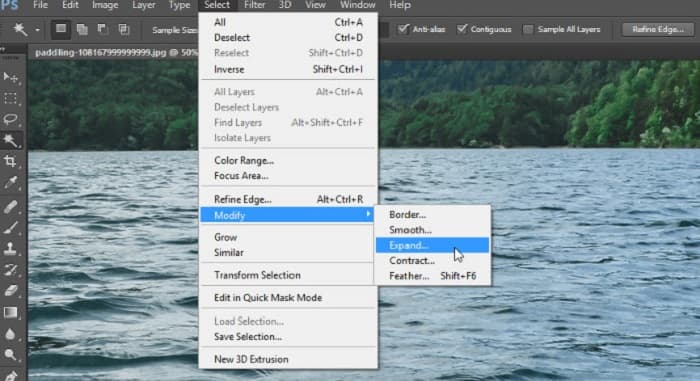
Schritt 3. Gehen Sie zu Select > Modify > Expand, um die Hintergrundpixel mit einzubeziehen.
Schritt 4. Gehen Sie zu Edit > Fill und wählen Sie dann im Bereich „Contents“ die Option Content-Aware aus.
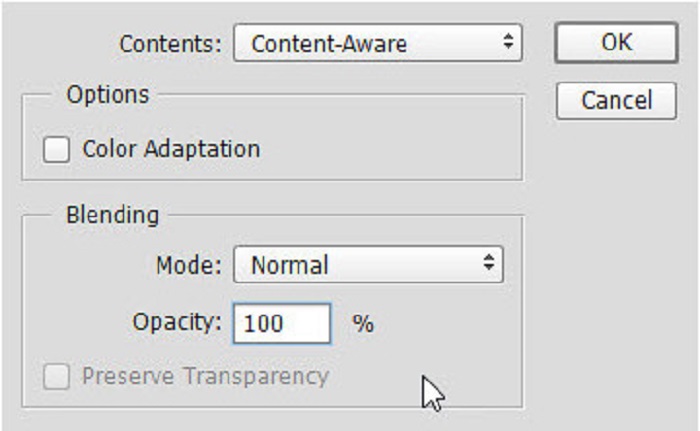
Schritt 5. Drücken Sie anschließend CTRL+D. Sie werden sehen, dass das Wasserzeichen mit dem Hintergrund aufgefüllt wurde. Verwenden Sie dann zum Entfernen der Wasserzeichenumrisse das Clone Stamp Tool.
Schritt 6. Halten Sie die Alt-Taste gedrückt und fahren Sie die Kontur des Wasserzeichens nach. Wenn Sie mit dem Entfernen der Spuren fertig sind, werden Sie feststellen, dass das Wasserzeichen entfernt wurde.
Teil 4. Häufig gestellte Fragen zum Entfernen von Wasserzeichen aus Abschlussbildern
Beeinträchtigt das Entfernen von Wasserzeichen von Abschlussbildern die Qualität?
Das Entfernen des Wasserzeichens von Abschlussbildern beeinträchtigt nicht unbedingt die Qualität. Wenn Sie das Wasserzeichen entfernen, hinterlassen einige Tools jedoch immer noch Spuren.
Können Sie Wasserzeichen auf Canva entfernen?
Ja. Canva hat eine Funktion, mit der Sie Wasserzeichen kostenlos entfernen können. Klicken Sie dazu einfach auf die Schaltfläche Wasserzeichen entfernen.
Können Sie die Wasserzeichen auf PDF entfernen?
Mit den oben gezeigten Tools können Sie beliebige Wasserzeichen aus Ihrer PDF-Datei entfernen.
Fazit
Da Sie nun gelernt haben, wie man Wasserzeichen aus Abschlussfotos entfernt, können Sie es jetzt selbst tun und die oben vorgestellten Tools ausprobieren. Das Entfernen des Wasserzeichens wird mit einem Wasserzeichenentferner ganz einfach. Viele Menschen empfehlen jedoch die Verwendung von FVC Free Watermark Remover, weil es praktisch und leicht zu bedienen ist.
-
 So entfernen Sie das Lumion-Wasserzeichen auf Windows und Mac ganz einfach
 Müssen Sie das Lumion-Wasserzeichen entfernen, um es professionell zu präsentieren? Nun, es gibt Tools, mit denen Sie das Wasserzeichen entfernen können, das es hinterlässt.
-
 So entfernen Sie das Weibo-Wasserzeichen auf Videos und Bildern ganz einfach
 Haben Sie Probleme beim Entfernen des Weibo-Wasserzeichens auf exportierten Videos und Bildern? In diesem Fall müssen Sie einen Wasserzeichenentferner verwenden, den wir unten auflisten, der Ihnen helfen könnte.
-
 Erfahren Sie, wie Sie Movavi Watermark kostenlos entfernen $91;Muss haben!$93;
 Das Exportieren eines Videos oder Bildes auf Movavi hinterlässt ein Wasserzeichen, aber ist es möglich, es zu entfernen? Um zu lernen, wie man das Wasserzeichen kostenlos entfernt, lesen Sie dies.
