


 Video Converter Ultimate
 Bildschirm recorder
 Videoreparatur
 Sicherer Download
MP4-Videos für E-Mails auf 5 Arten einfach komprimieren [2025]
Das Versenden von Videodateien per E-Mail kann aufgrund von Dateigrößenbeschränkungen manchmal sehr aufwändig sein. Normalerweise können E-Mails nur Dateien mit einer Größe von 25 MB pro Anhang verarbeiten. Jeder Anhang, der diese Größe überschreitet, wird in einen Google Drive-Link umgewandelt. Wenn Sie also nach einer Lösung für dieses Problem suchen, sind Sie hier richtig.
In diesem Artikel lernst du fünf einfache Methoden, um Videos für E-Mails zu komprimieren. So musst du beim Versenden von Videodateien per E-Mail keine Unterbrechungen mehr befürchten. Worauf wartest du also noch? Lass uns loslegen!

Teil 1. Komprimieren Sie eine Filmdatei für E-Mails mit einem Videokompressor
Das Komprimieren einer Filmdatei für E-Mails mit einem Videokomprimierer ist mit geeigneten und speziellen Videokomprimierungstools ganz einfach. Es gibt verschiedene Videokomprimierungstools, die jeweils unterschiedliche Komprimierungsstufen, Qualitätserhaltung und Benutzerfreundlichkeit bieten. Einige Tools bieten voreingestellte Profile für eine E-Mail-freundliche Komprimierung, während andere manuelle Anpassungen zum Ausgleich von Größe und Qualität ermöglichen. Im Folgenden finden Sie drei Methoden zum Komprimieren einer Filmdatei für E-Mails:
Beste Möglichkeit zum Komprimieren von Videos für E-Mails
Die beste Methode, ein Video für E-Mails zu komprimieren, ist der von FVC ausgewählte Video Converter Ultimate. Dieses voll ausgestattete Videokonvertierungsprogramm verfügt über eine Toolbox, in der du die Funktion zum Videokomprimierer findest. Wenn du ein Video mit diesem Tool komprimierst, kannst du es mühelos verarbeiten. Das Programm hat eine benutzerfreundliche Oberfläche, mit der Nutzer nur 2–3 Schritte ausführen müssen, um ihre Videos zu komprimieren. Um dieses Tool besser kennenzulernen, sieh dir die folgenden Funktionen an:
Hauptfunktion:
• Komprimieren Sie die Größe von Videodateien für E-Mails und behalten Sie dabei die hohe Qualität bei.
• Stellen Sie durch Konvertieren der Formate die Videokompatibilität mit jeder E-Mail-Plattform sicher.
• Verwenden Sie voreingestellte E-Mail-freundliche Profile oder passen Sie die Komprimierungseinstellungen manuell an.
• Es kann mehrere Videodateien stapelweise komprimieren.
Nachdem Sie nun wissen, was der ausgewählte Video Converter Ultimate von FVC leisten kann, können wir uns nun mit seiner Verwendung befassen.
Schritt 1. Zuerst musst du das Programm auf deinem Computer herunterladen und installieren.
Kostenloser DownloadFür Windows 7 oder höherSicherer Download
Kostenloser DownloadFür macOS 10.7 oder höherSicherer Download
Schritt 2. Öffne das Programm, gehe zur Toolbox und klicke auf Video Compressor. Klicke anschließend auf die rote Plus-Taste, um das Video hinzuzufügen, das du komprimieren möchtest.
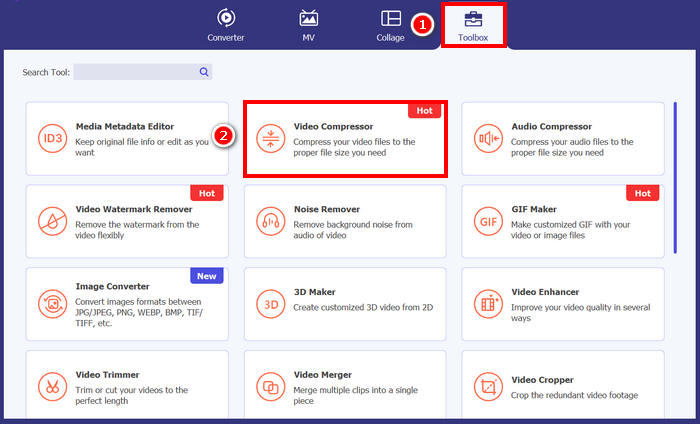
Schritt 3. Um anschließend die Dateigröße des Videos zu reduzieren, kannst du bei der Option Size einfach den Slider verschieben, um die Dateigröße deines Videos anzupassen, oder sie alternativ manuell in das Box-Feld eingeben. Wenn du fertig bist, klicke auf die Schaltfläche „Compress“.
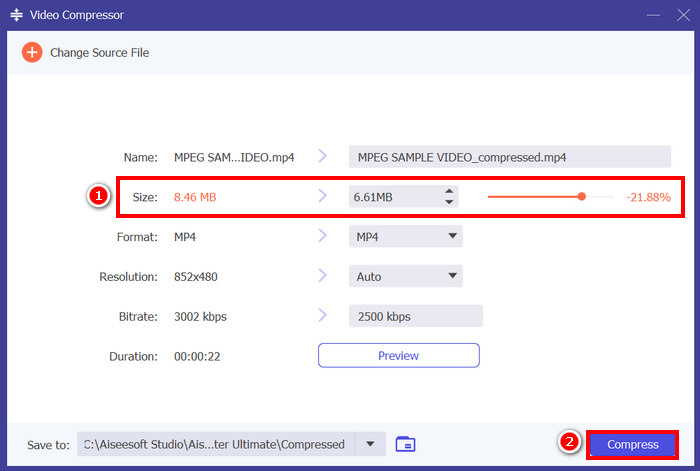
Hinweis: Wenn du dein Video während der Komprimierung zusätzlich verbessern möchtest, kannst du auch Auflösung, Bitrate usw. anpassen.
FVC hat sich für Video Converter Ultimate entschieden, eines der besten Tools zum Komprimieren von Videos für E-Mails. Es ist schnell, einfach zu bedienen und behält die Videoqualität bei. Darüber hinaus bietet es zusätzliche Funktionen wie Stapelkomprimierung und Formatkonvertierung und ist somit eine vielseitige Lösung für die Verarbeitung von Videodateien.
Video für E-Mail komprimieren [Kostenlos]
Wenn Sie nach einer kostenlosen Möglichkeit suchen, Videos für E-Mails zu komprimieren, können Sie den VLC Media Player verwenden. Dieses Tool ist nicht nur ein Media Player, der verschiedene Medien abspielt und streamt. Es kann auch zum Komprimieren von Videos verwendet werden. Führen Sie dazu die folgenden Schritte aus:
Schritt 1. Öffne zunächst den VLC Media Player oder lade ihn herunter und installiere ihn, falls du ihn noch nicht hast.
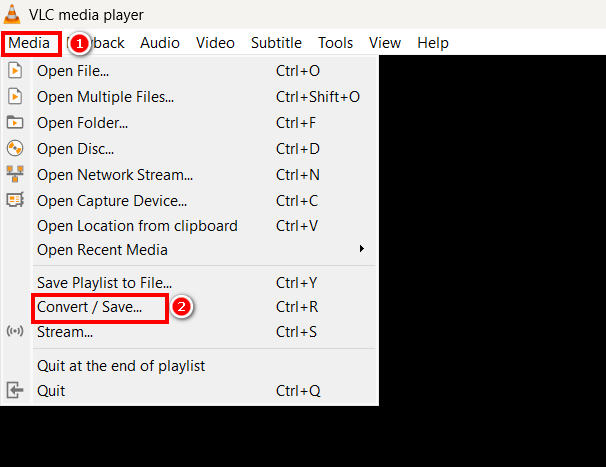
Schritt 2. Gehe danach zum Reiter Media und wähle unten Convert/Save aus.
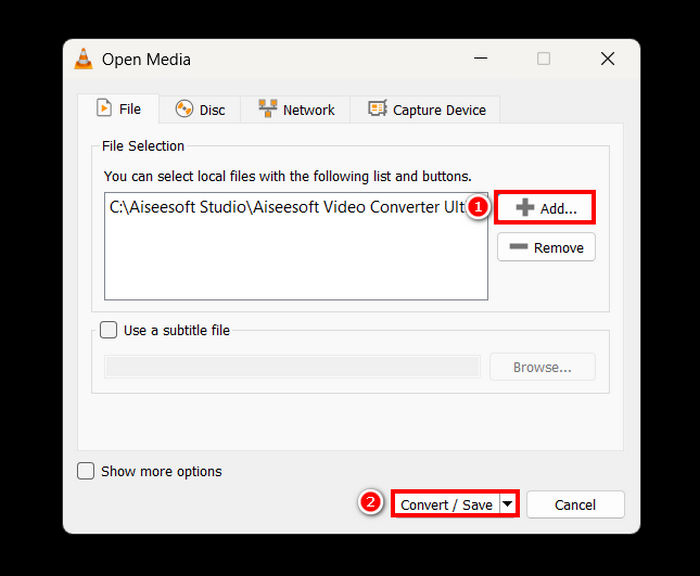
Schritt 3. Klicke nun auf die Schaltfläche Add, um das Video zu importieren, das du für E-Mail komprimieren möchtest, und klicke dann auf die Schaltfläche Convert/Save.
Schritt 4. Wähle im neuen Fenster die Option Edit Selected Profile und gehe dort zum Tab Video Codec, um Auflösung, Bitrate und Bildrate deines Videos zu ändern.
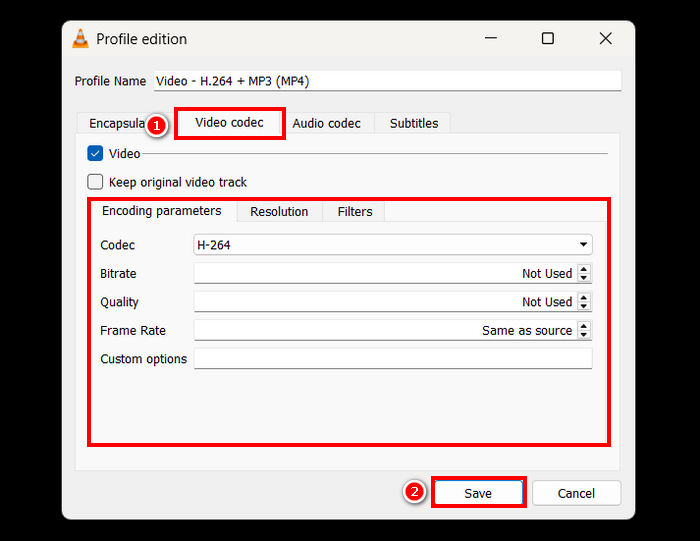
Schritt 5. Wenn alles erledigt ist, speichere die Einstellungen und klicke auf die Start-Schaltfläche, um mit der Komprimierung deines Videos zu beginnen.
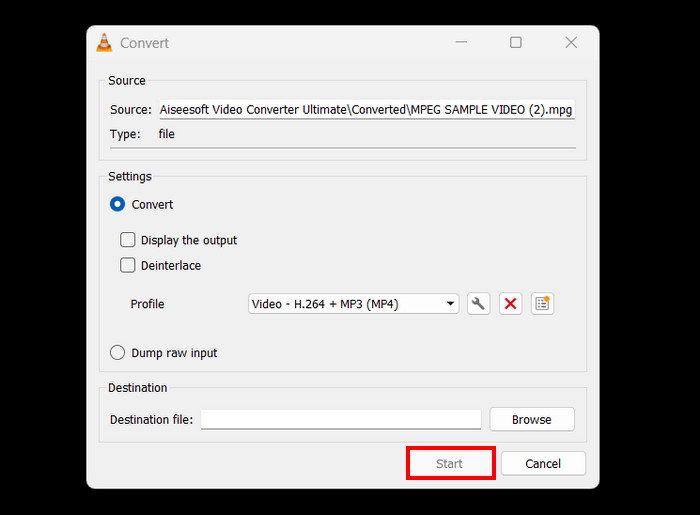
Einschränkung: Im Vergleich zu einem speziellen Videokompressor ist das Komprimieren in VLC nicht so direkt und bietet kein voreingestelltes Profil für E-Mails. Stattdessen ist eine manuelle Anpassung erforderlich, was überfordernd sein kann und sich nicht für Nutzer eignet, die eine schnelle und unkomplizierte Lösung benötigen.
So komprimieren Sie ein Video für E-Mails online
Wenn du eine Online-Methode bevorzugst, kannst du den Video Compressor von FreeConvert verwenden. Dieses webbasierte Videokomprimierungstool ermöglicht es Nutzern, Videos für E-Mails zu komprimieren. Der Unterschied zu einer Software-Anwendung besteht darin, dass keine Installation erforderlich ist, was für einige praktisch sein kann. Allerdings hat dieses Tool hinsichtlich der Videogröße, die du komprimieren kannst, Einschränkungen. Um dieses Tool zu verwenden, folge den nachstehenden Schritten:
Schritt 1. Rufe die offizielle Website von FreeConvert auf. Suche einfach in deinem Internetbrowser nach „FreeConvert Video Compressor“.
Schritt 2. Klicke anschließend auf die Schaltfläche Choose Files, um das Video zu importieren, das du für E-Mail komprimieren möchtest.
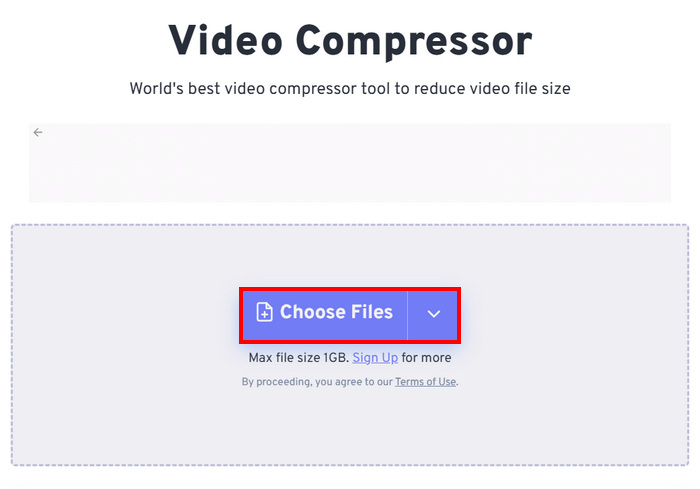
Schritt 3. Gehe nun zu den Advanced Settings, die durch ein Gear-Symbol dargestellt werden, und passe dort die Größe des Videos an. Schiebe den Slider einfach nach links, um die Videogröße zu verringern. Klicke abschließend auf die Schaltfläche Apply Settings, um mit der Komprimierung deines Videos zu beginnen.
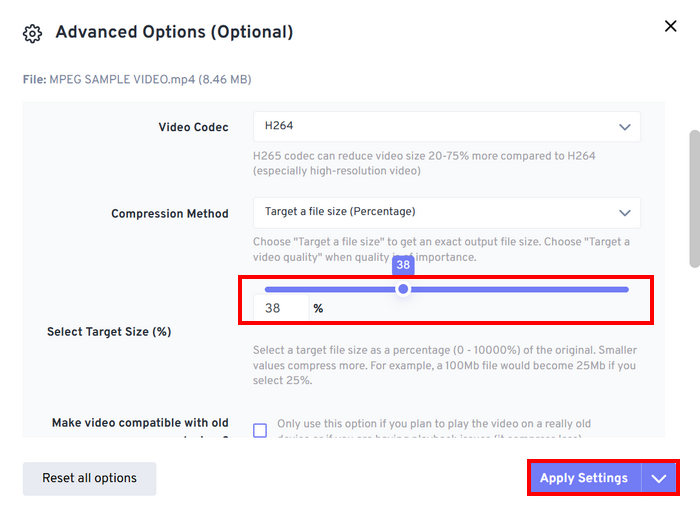
Schritt 4. Klicke zuletzt auf die Schaltfläche Compress Now, um mit der Komprimierung deines Videos für E-Mails zu starten.
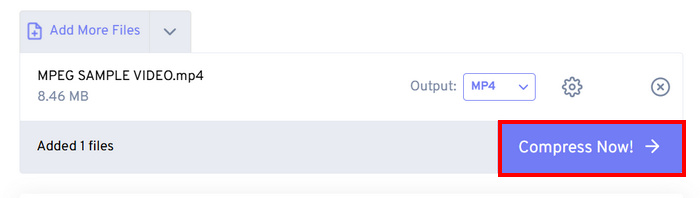
Einschränkung: Nutzer können nur Videos mit einer Größe von bis zu 1 GB komprimieren; alles, was diese Dateigröße überschreitet, erfordert ein Abonnement für einen Premium-Tarif. Außerdem kann sich, da es sich um einen webbasierten Videokompressor handelt, die Geschwindigkeit des Komprimierungsprozesses je nach Internetverbindung des Nutzers unterscheiden.
Teil 2. So verkleinern Sie die Videogröße für E-Mails mit einer ZIP-Videodatei
Eine weitere Möglichkeit, die Videogröße für E-Mails zu reduzieren, besteht darin, eine ZIP-Datei zu erstellen. Diese Methode eignet sich gut, um die Dateigröße leicht zu reduzieren und mehrere Videos in einem Anhang zu gruppieren. Auch diese Methode ist einfach durchzuführen. Im Vergleich zu speziellen Videokomprimierungstools ist sie jedoch nicht so effizient. Führen Sie dazu die folgenden Schritte aus:
Schritt 1. Suche zunächst in deiner Mediathek das Video, das du für E-Mails komprimieren möchtest.
Schritt 2. Klicke anschließend mit der rechten Maustaste darauf und wähle die Option Compress to und dann ZIP File aus.
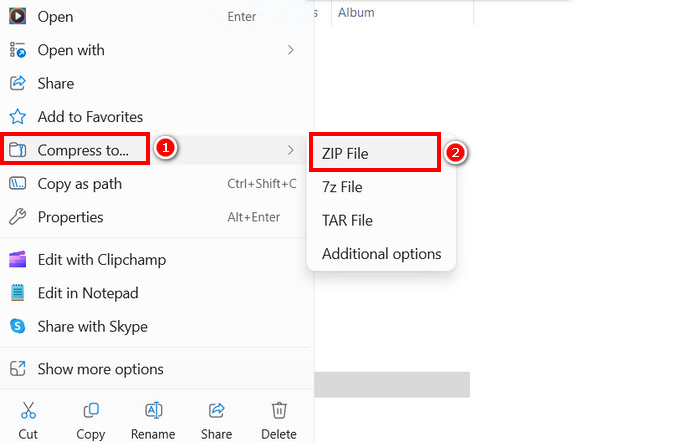
Einschränkung: Das Erstellen einer ZIP-Datei ist zwar eine schnelle Möglichkeit, Videos für E-Mails zu komprimieren, reduziert die Dateigröße jedoch nicht so stark wie Videokomprimierungstools, die Bitrate, Auflösung oder Format anpassen, um bessere Komprimierung zu erreichen. Wenn deine ZIP-Datei zu groß ist, ist ein spezieller Videokompressor die bessere Lösung.
Teil 3. Wie verkleinert man ein Video für E-Mails über Google Drive?
Google Drive kann Videos nicht direkt komprimieren, wie es dedizierte Videokompressoren tun. Beim Herunterladen wird das auf das Laufwerk hochgeladene Video jedoch in einer ZIP-Datei gespeichert. Dadurch wird die Größe des Videos für die Speicherung und Übertragung leicht reduziert.
Hinweis: Mit dieser Methode wird die Größe nur minimal reduziert und sie reicht für große Videodateien möglicherweise nicht aus.
So verkleinerst du ein Video für E-Mails über Google Drive:
Schritt 1. Lade in deinem Google Drive zunächst die Videos hoch, deren Größe du verringern möchtest.
Schritt 2. Klicke anschließend mit der rechten Maustaste auf die Videos, deren Größe du reduzieren möchtest.
Schritt 3. Nach dem Herunterladen werden diese Videodateien in einer ZIP-Datei gespeichert.
Einschränkung: Wie bereits erwähnt, verfügt Google Drive nicht über eine direkte Funktion, um Videos für E-Mails zu komprimieren. Außerdem ist das Herunterladen als ZIP-Datei immer noch keine besonders effiziente Lösung.
Teil 4. Häufig gestellte Fragen zum Komprimieren eines Videos für E-Mail
Wie kann ich ein Video am besten für E-Mails komprimieren?
Die beste Methode, ein Video für E-Mails zu komprimieren, ist die Verwendung eines speziellen Videokompressors wie FVC Video Converter Ultimate. Dieses Videokonvertierungstool wurde für die Komprimierung verschiedenster Videodateien entwickelt und ermöglicht es Nutzern, große Videodateien beim Versand per E-Mail problemlos zu handhaben.
Warum kann ich keine große Videodatei per E-Mail versenden?
Wichtig zu beachten: Die meisten E-Mail-Dienste, einschließlich Gmail, haben eine Dateigrößenbeschränkung von 25 MB pro Anhang. Deshalb komprimieren Absender, die größere Dateien als erforderlich haben, ihre Videos zunächst. Genau aus diesem Grund ist es auch notwendig, Videos für E-Mails zu komprimieren.
Verringert das Komprimieren eines Videos dessen Qualität?
Ja, das Komprimieren eines Videos für E-Mails kann dessen Qualität leicht beeinträchtigen, da Sie im Grunde Auflösung, Bitrate und andere Kodierungsparameter reduzieren, um die Dateigröße zu verringern. Es gibt jedoch fortschrittliche Videokompressoren wie den von FVC ausgewählten Video Converter, mit dem Sie Auflösung, Bitrate und Format steuern können, um Qualitätsverluste zu minimieren.
Kann ich ein Video für E-Mails online komprimieren?
Ja. Sie können Online-Tools wie den Video Compressor von FreeConvert verwenden, um Videos zu komprimieren, ohne Software installieren zu müssen. Bei kostenlosen Versionen kann es jedoch zu Dateigrößenbeschränkungen kommen.
Wie sende ich ein großes Video, wenn die Komprimierung nicht ausreicht?
Wenn die Komprimierung nicht ausreicht, können Sie das Video auf Google Drive, OneDrive oder Dropbox hochladen und den Link per E-Mail weitergeben, anstatt die Datei anzuhängen.
Fazit
Angesichts der Größenbeschränkungen für Videodateien bei allen E-Mail-Diensten ist die Fähigkeit zur Komprimierung unerlässlich. Wenn du also in derselben Situation bist und Schwierigkeiten hast, ein Tool zu finden, das Videos für E-Mails komprimieren kann, probiere einfach alle Methoden in diesem Artikel aus und wähle diejenige, die am besten zu dir passt.
Beginnen Sie noch heute mit der Komprimierung Ihrer Videos und senden Sie sie problemlos!
-
 So komprimieren Sie GoPro-Videos von 4K auf 1080p (kostenlos und online)
 Wenn Sie ein Video mit der GoPro-Kamera aufnehmen, ist die Dateigröße des aufgenommenen Videos normalerweise extrem groß, was nur schwer mit anderen geteilt werden kann. In diesem Beitrag erfahren Sie, wie Sie GoPro-Videos komprimieren.
-
 2 Möglichkeiten zum Komprimieren von Videos für YouTube
 YouTube-Videos sind groß und langsam hochzuladen? Komprimieren Sie die Größe von Videodateien für YouTube auf zwei Arten online und am Computer.
-
 Adobe Premiere Video komprimieren: Dinge, die Sie beachten müssen
 Dieser Artikel enthält die besten und geeignetsten Methoden zum Komprimieren von GIF Premiere. Entdecken Sie die Lösung und verschiedene Alternativen zu Adobe Premiere Compress.
