


 Video Converter Ultimate
 Bildschirm recorder
 Videoreparatur
 Sicherer Download
Einfaches Tutorial zum Entfernen des DeviantArt-Wasserzeichens mit Ultimate Tools
DeviantArt ist als die größte Online-Kunstgalerie und Community bekannt. Es enthält Bilder, auf die Sie online zugreifen können. Sie können über 350 Millionen Kunstwerke und Bilder erkunden, die von Künstlern und Kunstbegeisterten auf der ganzen Welt geschaffen wurden. Darüber hinaus verfügt es über viele Kunstwerke, Fotografien und Videografien. Sein Hauptziel ist es, die Werke der Künstler zu fördern, auszustellen und zu teilen. DeviantArt ist auch ein Medium, um Künstler weltweit zu verbinden, wo sie ihre Interessen teilen, Verbindungen miteinander knüpfen und über ihre Kunst sprechen können.
Wenn du Bilder von DeviantArt herunterlädst und nicht registriert bist, enthalten sie ein Wasserzeichen. Daher ist die beste Methode für dich, das Wasserzeichen mit Drittanbieter-Apps zu entfernen. Zum Glück haben wir Online‑Tools gefunden, mit denen du jedes Wasserzeichen auf deinem DeviantArt‑Foto entfernen kannst. Lies diesen Artikel aufmerksam, um die besten DeviantArt‑Wasserzeichenentferner kennenzulernen. Und erfahre, wie man das DeviantArt‑Wasserzeichen entfernt, und zwar mit den leistungsstärksten Tools.

Teil 1. Warum platziert DeviantArt Wasserzeichen auf Bildern?
Viele verwenden Wasserzeichen, um zu verhindern, dass ihre Arbeit kopiert wird, egal ob es sich um ein Foto oder ein Video handelt. Sobald Sie ein Foto aus sozialen Medien hochladen oder teilen, kann es kopiert werden. Wenn Sie also für Ihre Arbeit anerkannt werden möchten, fügen Sie Ihrem Bild oder Video am besten ein Wasserzeichen hinzu.
DeviantArt macht das auch. Sie betten Wasserzeichen oder Logos in ihre Bilder ein, damit sie nicht kopiert werden, ohne das Bild überhaupt zu kaufen. DeviantArt platziert auch ein Wasserzeichen auf seinen Bildern, damit das Unternehmen für die von ihm produzierten Bildarbeiten bekannt ist. Darüber hinaus stellt das Wasserzeichen von DeviantArt sicher, dass die Bilder nicht ohne Zustimmung des Eigentümers wiederverwendet oder verändert werden.
Wenn Sie also ein DeviantArt-Wasserzeichen auf dem heruntergeladenen Bild haben, entfernen Sie dieses Wasserzeichen am besten. Lesen Sie dazu den nächsten Teil.
Teil 2. So entfernen Sie das DeviantArt-Wasserzeichen online
Wenn Sie das DeviantArt-Wasserzeichenbild entfernen möchten, müssen Sie zuerst einen Wasserzeichenentferner finden. Glücklicherweise helfen Ihnen viele Softwareanwendungen beim Entfernen des DeviantArt-Wasserzeichens. Und wenn Sie das Wasserzeichen bequem entfernen möchten, empfiehlt es sich, ein Online-Tool zu verwenden, da Sie nichts auf Ihr Gerät herunterladen müssen. Lesen Sie daher diesen Teil einschließlich, um das erstaunlichste Tool zu kennen und zu erfahren, wie Sie das DeviantArt-Wasserzeichen auf Ihren Bildern entfernen können.
FVC Free Watermark Remover
FVC Free Watermark Remover ist einer der bekanntesten Online‑Wasserzeichenentferner, auf den du in allen Webbrowsern zugreifen kannst. Außerdem unterstützt er die gängigsten Bildformate wie PNG, JPEG, JPG und BMP. Die Bedienung ist sehr einfach, weshalb viele Einsteiger dieses Tool bevorzugen. Darüber hinaus kannst du mit den Entfernungstools der App (Polygon, Lasso und Pinsel) das DeviantArt‑Wasserzeichen manuell aus deinem Bild entfernen. Zudem ist keine Anmeldung bei einem Konto erforderlich, und die Nutzung ist kostenlos. Und keine Sorge wegen des Ausgabeformats deines Bildes: Es exportiert dein Bild im Originalformat.
So entfernen Sie das DeviantArt-Wasserzeichen auf Ihrem Bild mit FVC Free Watermark Remover:
Schritt 1. Öffne deinen Browser und suche nach FVC Free Watermark Remover. Oder klicke auf den bereitgestellten Link, um direkt auf die Webseite zu gelangen.
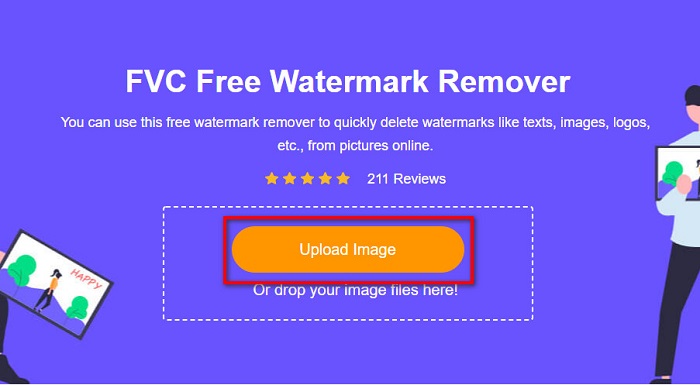
Schritt 2. Klicke anschließend auf die Schaltfläche Upload Image, um dein DeviantArt‑Bild auf der Hauptoberfläche der Software hochzuladen.
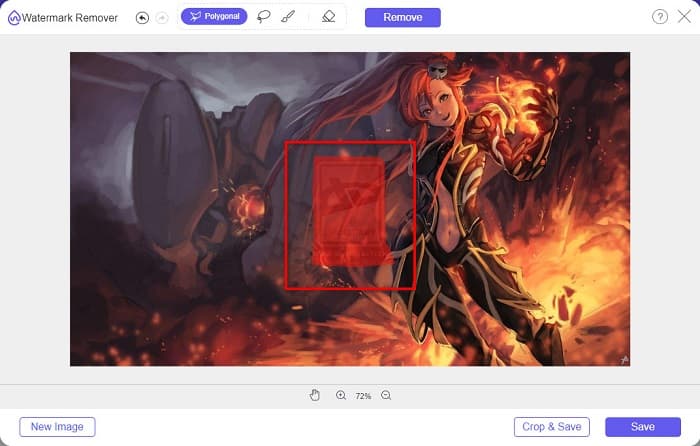
Schritt 3. Wähle dann das Entfernungstool aus, das du bevorzugst. In diesem Beispiel verwenden wir das Polygonal Tool. Markiere anschließend den Wasserzeichenbereich auf deinem Bild.
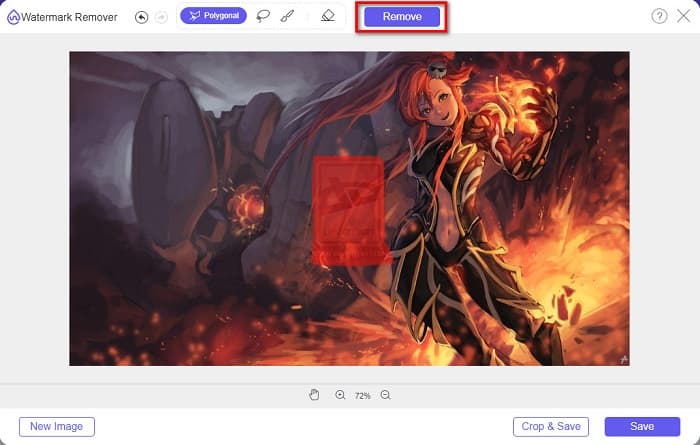
Schritt 4. Klicke auf die Schaltfläche Remove, um das Wasserzeichen auf deinem DeviantArt‑Bild zu entfernen.
Schritt 5. Klicke schließlich auf die Schaltfläche Save, um dein Bild auf deinem Gerät zu speichern. Das war’s! Auf diese Weise kannst du auch das Lumion‑Wasserzeichen entfernen.
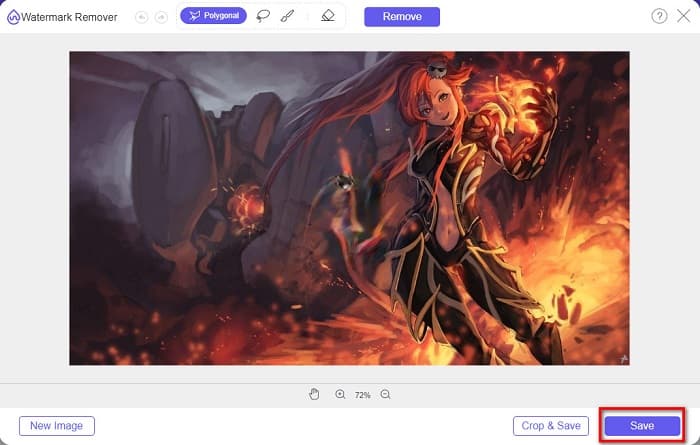
Als völlig kostenloser Deviantart-Wasserzeichenentferner ermöglicht Ihnen FVC Watermark Remover die Auswahl unerwünschter Bereiche mit Polygon-, Lasso- und Pinselwerkzeugen und sorgt so für eine präzise Auswahl. Mit nur einem Klick können Sie das Deviantart-Wasserzeichen online und kostenlos entfernen. Obwohl der Vorgang relativ einfach ist, wird Sie das Ergebnis definitiv überzeugen. Ich bevorzuge dieses Tool am meisten.
Wasserzeichen-Entferner.io
Watermark Remover.io ist ein bekanntes Tool zum Entfernen aller Arten von Wasserzeichen. Es ist benutzerfreundlich, da es über eine leicht verständliche Oberfläche verfügt. Außerdem unterstützt es die gängigsten Bildformate wie PNG, JPEG, JPG, WEBP und andere. Faszinierend ist, dass es einen KI‑gestützten Entfernungsvorgang nutzt: Das Wasserzeichen wird automatisch entfernt, nachdem du dein Bild hochgeladen hast. Darüber hinaus ist es in fast allen Webbrowsern zugänglich, etwa in Google Chrome und Firefox.
Schritte zum Entfernen des DevianArt-Wasserzeichens auf Ihrem Bild:
Schritt 1. Öffne deinen Browser und suche nach Watermark Remover.io. Klicke dann auf die Webseite, die zu dem Tool führt.
Schritt 2. Auf der Hauptoberfläche siehst du die Schaltfläche Upload Image; klicke darauf.
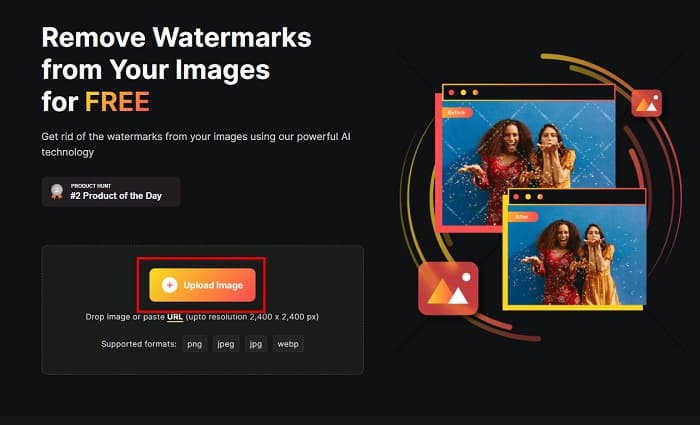
Schritt 3. Nachdem du dein Bild hochgeladen hast, entfernt das Tool das eingebettete Wasserzeichen automatisch. Und das war’s! So einfach kannst du das DeviantArt‑Wasserzeichen von deinem Bild entfernen.
Dieses Tool eignet sich auch für viele unterstützte Bildformate wie PNG, JPEG, WEBP usw. Es ermöglicht Ihnen außerdem, Bild-URLs direkt in die Verarbeitung einzufügen. Im Vergleich zum FVC Free Watermark Remover ist dieses Tool jedoch nicht völlig kostenlos. Sie müssen Credits erwerben, um diesen Deviantart-Wasserzeichenentferner unbegrenzt online nutzen zu können.
FotoLustig
Ein weiteres Online‑Tool zur Wasserzeichenentfernung, das du ausprobieren solltest, ist PhotoFunny. Dieses Online‑Tool ist sehr einsteigerfreundlich, das heißt, es verfügt über eine einfache Benutzeroberfläche. Du kannst damit Logos, Text oder Bild‑Wasserzeichen von deinem Bild entfernen. Allerdings liegt der Schwerpunkt des Tools darauf, die Bildbereiche zu verwischen, sodass sie nicht mehr auffallen. Dennoch ist es ein gutes Werkzeug, um das DeviantArt‑Wasserzeichen auf deinem Bild unauffällig zu machen.
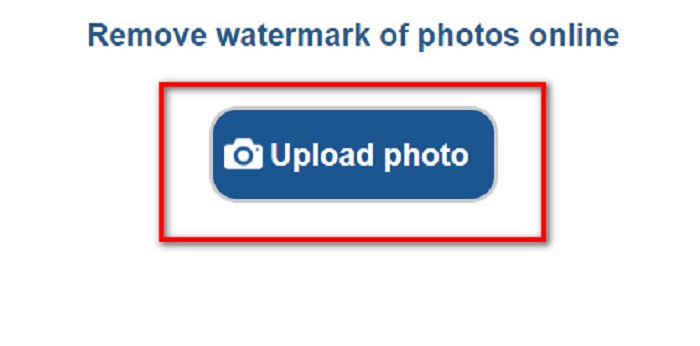
Schritt 1. Suche in deinem Browser nach PhotoFunny. Klicke dann auf die Schaltfläche Upload Photo auf der Hauptoberfläche der Software, um dein DeviantArt‑Bild hochzuladen.
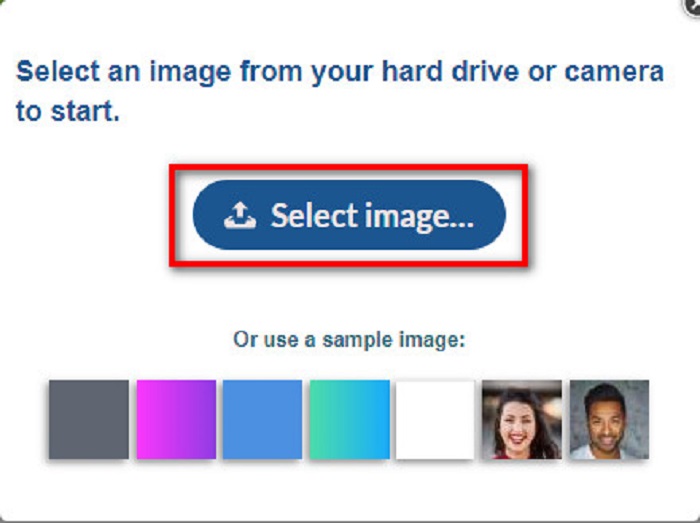
Schritt 2. Anschließend erscheint ein Beschreibungsfenster, in dem du auf die Schaltfläche Select Image klickst, um dein Bild hochzuladen.
Schritt 3. Verschiebe schließlich das Entfernen‑Fenster über den Wasserzeichenbereich, klicke auf die Schaltfläche Remove Watermark, und du wirst sehen, dass das DeviantArt‑Wasserzeichen auf deinem Bild kaum noch zu erkennen ist. Klicke hier, um zu erfahren, wie du Movavi‑Wasserzeichen entfernst.
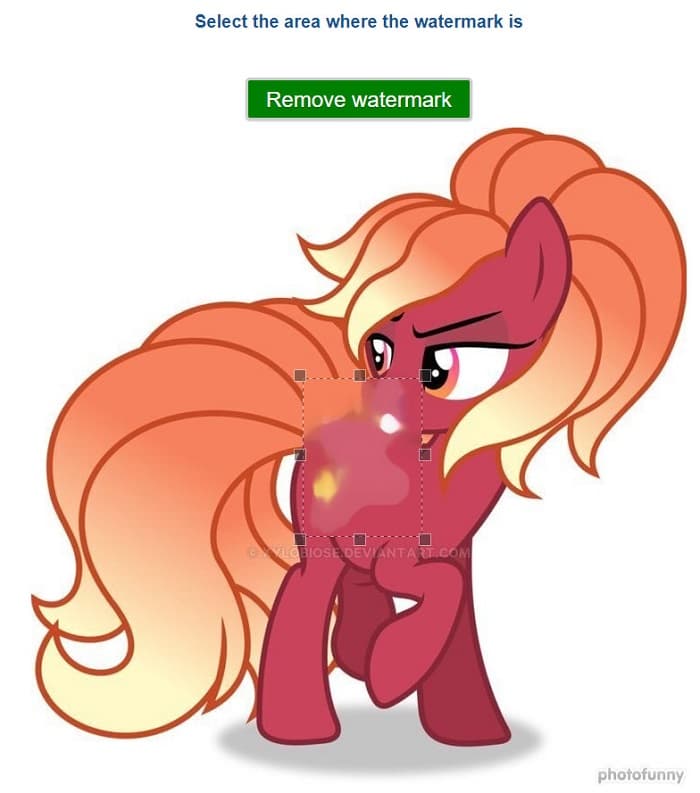
Photofunny entfernt nicht nur das Deviantart-Wasserzeichen, sondern ist auch ein hervorragender Fotoeditor, mit dem Sie Ihren Fotos Rahmen, Effekte, Collagen und mehr hinzufügen können. Die Website bietet zahlreiche Funktionen, die es zu entdecken gilt. Für Benutzer, die nur das Wasserzeichen entfernen möchten, ist die Navigation jedoch unübersichtlich, sodass die Suche und Nutzung dieses Tools möglicherweise etwas aufwendig ist.
Fotor
Um das DeviantArt‑Wasserzeichen zu entfernen, kannst du auch Fotor ausprobieren. Dabei handelt es sich um ein Online‑Tool, mit dem du unerwünschten Text, Logos oder Symbole (sprich Wasserzeichen) aus deinen Fotos löschen kannst. Es ist Teil der Fotor‑Suite für Bildbearbeitungstools und dafür bekannt, besonders einsteigerfreundlich und leicht zugänglich zu sein – du brauchst keine speziellen Bearbeitungskenntnisse.
Schritte zum Entfernen des Deviantart-Wasserzeichens mit Fotor:
Schritt 1. Gehe auf die offizielle Webseite von Fotor und wähle unter dem Reiter AI Tools die Option Remove Watermark from Photo aus.
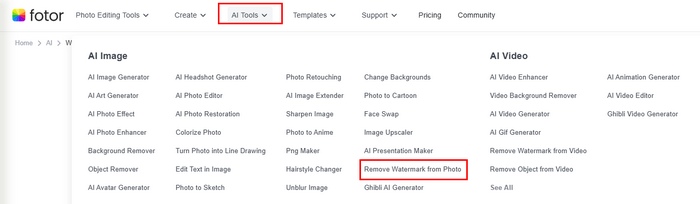
Schritt 2. Klicke auf die Schaltfläche Try AI Watermark Remover, um dein DeviantArt‑Foto hochzuladen.
Schritt 3. Du kannst Auto auswählen und auf Remove klicken, um das Wasserzeichen automatisch zu entfernen. Oder, wenn du das Wasserzeichen manuell entfernen möchtest, kannst du mit dem Brush die unerwünschten Wasserzeichen markieren.
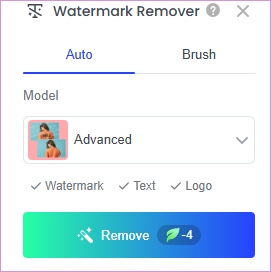
Schritt 4. Klicke zum Schluss auf Download, um das Ergebnis lokal zu speichern.
Dieses Tool bietet ebenfalls eine gute Entfernungswirkung. Allerdings enthält es ein integriertes Wasserzeichen, wenn Sie kein VIP-Mitglied werden. Sie müssen das Upgrade durchführen, bevor Sie das Ergebnis herunterladen können.
Media.io
Media.io Watermark Remover ist eine Online-Plattform, die KI-Technologie nutzt, um unerwünschte Elemente wie Wasserzeichen, Logos, Text oder sogar Personen aus Fotos und Videos zu entfernen. Die Plattform ist benutzerfreundlich und geräteübergreifend nutzbar, sofern Sie über einen Webbrowser verfügen. Windows-Nutzer können die Plattform auch auf ihren Desktop herunterladen.
Schritte zum Entfernen von Deviantart-Wasserzeichen mit Media.io:
Schritt 1. Gehe auf die offizielle Seite von Media.io und wähle unter dem Menü Edit den Punkt Watermark Remover aus.
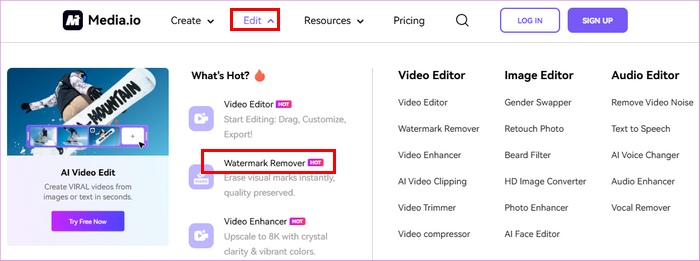
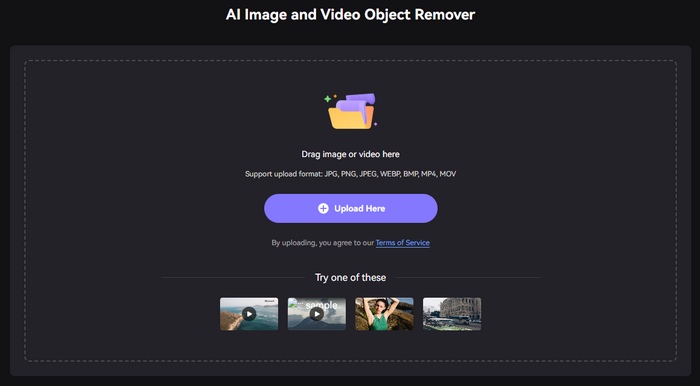
Schritt 2. Klicke auf Upload Here, um dein DeviantArt‑Bild hinzuzufügen.
Schritt 3. Nun kannst du die Pinselgröße anpassen und sie auf den Bereich anwenden, in dem sich das Wasserzeichen befindet. Klicke dann auf Remove objects now.
Dieses Tool verfügt über eine übersichtliche Benutzeroberfläche und zeichnet sich dadurch aus, dass es auch das Entfernen von Video-Wasserzeichen unterstützt. Sie müssen sich jedoch anmelden, bevor Sie den Media.io Deviantart-Wasserzeichenentferner online verwenden können. Dieses Tool ist identisch mit Fotor. Sie müssen die Pro-Version erwerben, um das Ergebnis ohne Wasserzeichen herunterzuladen.
Teil 3. Häufig gestellte Fragen zum Entfernen des DeviantArt-Wasserzeichens
Können Sie das DeviantArt-Wasserzeichen entfernen und im selben Format speichern?
Ja. Es gibt Wasserzeichenentferner, mit denen Sie jedes Wasserzeichen entfernen können, ohne das Dateiformat Ihres Bildes zu ändern.
Können Sie das Wasserzeichen offline entfernen?
Es gibt unzählige Softwareanwendungen, die Sie herunterladen können, um Wasserzeichen zu entfernen. Eine der beliebtesten Apps zum Entfernen von Wasserzeichen ist FVC Video Converter Ultimate.
Zählt ein Wasserzeichen als Urheberrecht?
Wasserzeichen dient als Eigentum an der eigenen Arbeit. Es ist eine Methode, die von Eigentümern verwendet wird, um die Verletzung von Arbeiten zu verhindern.
Wie lade ich Massenbilder von Deviantart herunter?
Deviantart unterstützt den Massendownload von Bildern offiziell nicht, um die Arbeit der Künstler zu schützen. Wenn Sie dies dennoch tun möchten, können Sie andere Online-Bilddownload-Tools von Drittanbietern ausprobieren.
Fazit
Da du jetzt weißt, wie man das DeviantArt‑Wasserzeichen entfernt, liegt es nun bei dir, welches dieser Tools du verwenden möchtest. Wenn du dein Bild dekorieren willst, während du das Wasserzeichen entfernst, kannst du PhotoFunny ausprobieren. Wenn du ein umfassenderes Fotobearbeitungstool möchtest, könnte Fotor genau das Richtige für dich sein. Wenn du eine kostenlose Lösung mit guter Wasserzeichenentfernung suchst, kann FVC Free Free Watermark Remover eine gute Wahl sein. Probiere sie einfach entsprechend deinen Bedürfnissen aus!
-
 Einfaches Entfernen von Wasserzeichen aus PDF mit einfachen Schritten
 Entfernen Sie Wasserzeichen aus PDF, indem Sie diesen einfachen Schritten folgen. Erfahren Sie, wie Sie mit diesen erstaunlichen Tools ganz einfach Wasserzeichen aus Ihrer PDF-Datei entfernen können.
-
 So entfernen Sie das Coub-Wasserzeichen mit einfachen Schritten
 Erfahren Sie, wie Sie mit diesen beliebten Wasserzeichen-Entfernern Coub-Wasserzeichen aus Ihren Videos entfernen. Lesen Sie diesen Artikel, um diese erstaunlichen Tools und ihre Verwendung kennenzulernen.
-
 Einfache Möglichkeiten zum Entfernen von Wasserzeichen von Abschlussbildern
 Möchten Sie wissen, wie Sie Wasserzeichen von Abschlussbildern am besten entfernen können? Wenn Sie diesen Artikel lesen, erfahren Sie, wie Sie Wasserzeichen auf Grad-Bildern einfach entfernen können.
