


 Video Converter Ultimate
 Bildschirm recorder
 Videoreparatur
 Sicherer Download
So entfernen Sie letztendlich das Wasserzeichen aus von Renderforest exportierten Videos
Renderforest ist ein voller Pakt exzellenter animierter Vorlagen für Intros, Outros, Titel, Werbung oder dergleichen. Sie können ganz von vorne beginnen oder die hier verfügbaren Vorlagen verwenden. Auch wenn Sie kein Experte für Videobearbeitung sind, können Sie es dennoch mit dieser Webplattform überwinden. Aufgrund ihrer Nutzung und ihres optimalen Vorteils haben sich viele Benutzer für diese Plattform entschieden, um ein hochwertiges, effizientes, kompatibles und zuverlässiges Design zu erstellen, wenn Sie ein Abonnement in Anspruch nehmen.
So kannst du das hier bearbeitete Video kostenlos herunterladen, wenn du dich anmeldest – allerdings mit einem Wasserzeichen. Das Wasserzeichen ist für viele von uns ein Problem, sowohl für diejenigen, die ihr Video hier bereits exportiert haben, als auch für diejenigen, die sich das Abonnement dieses Tools nicht leisten können. Im Folgenden führen wir Anleitungen zum Entfernen des Wasserzeichens von Renderforest auf, wobei wir die nützlichsten Tools nutzen, die wir während unserer Recherche zusammengetragen haben. Wenn du den nächsten Teil dieses Artikels liest, können wir sie mit dir teilen.

Teil 1. 3 effektive Methoden zum Entfernen von Wasserzeichen aus Renderforest-Videos
FVC Video Converter Ultimate
FVC Video Converter Ultimate ist ein hervorragender Video-Wasserzeichenentferner, der dir Schritt für Schritt zeigen kann, wie man das Renderforest-Wasserzeichen entfernt. Du kannst dich auf dieses Tool verlassen, um das Wasserzeichen in deinem Video mühelos zu entfernen. Wenn wir dieses ultimative Tool mit anderen vergleichen, hat es die Fähigkeit, das Wasserzeichen in deinem Video mit Unterstützung durch KI-Technologie zu beseitigen. Nichtsdestotrotz ist es das beste Tool, um das Wasserzeichen in deinem Video zu entfernen – ganz gleich, in welchem Format du es hochlädst. Was macht dieses Tool so herausragend? Du musst kein Technikprofi sein, um es zu nutzen; mit der einfachen Anleitung und den folgenden Schritten kannst du das Wasserzeichen entfernen, das Renderforest deinem Video hinzufügt.
Schritt 1. Lade die Software auf deinen Desktop herunter, indem du auf die passende Download-Schaltfläche klickst. Klicke auf die heruntergeladene Datei, installiere sie und wähle „Jetzt starten“, um die Software sofort zu öffnen.
Gratis DownloadFür Windows 7 oder neuerSicherer Download
Gratis DownloadFür MacOS 10.7 oder neuerSicherer Download
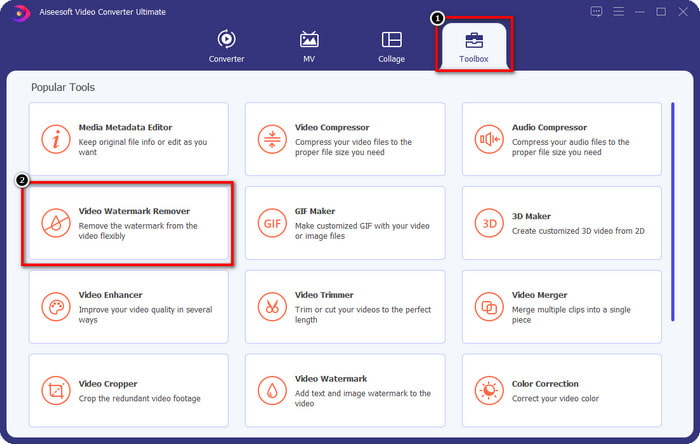
Schritt 2. Öffne nach dem Start der Software die Toolbox und klicke dann darunter auf Video Watermark Remover (Video-Wasserzeichenentferner).
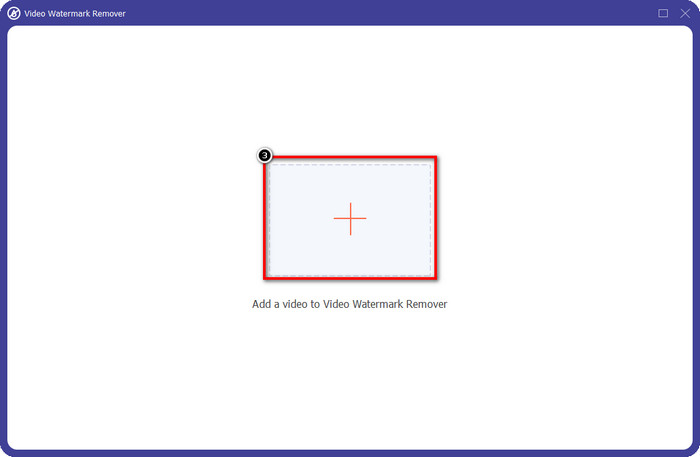
Schritt 3. Klicke auf das +-Symbol auf deinem Bildschirm, um das Renderforest-Video mit Wasserzeichen hochzuladen, das du exportiert hast.
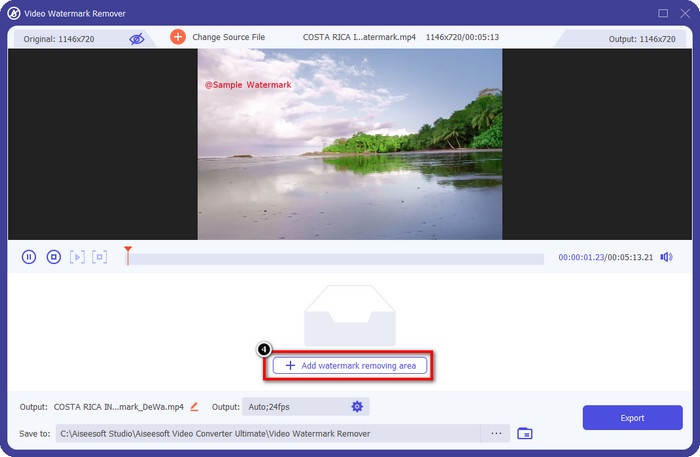
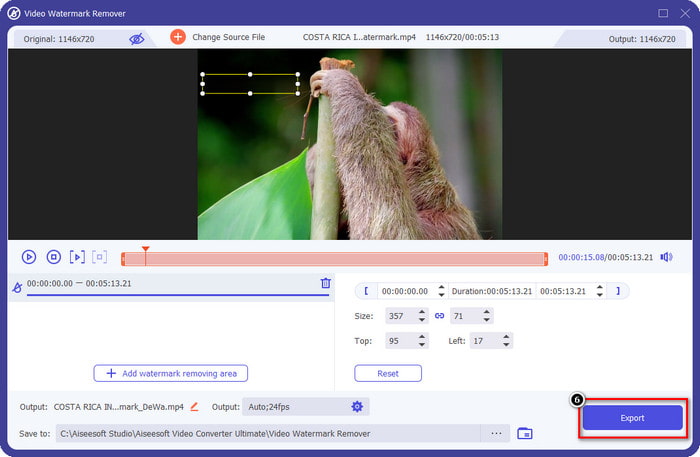
Schritt 4. Drücke auf Add Removing Watermark Area (Bereich zum Entfernen des Wasserzeichens hinzufügen), um mit dem Entfernen des Renderforest-Wasserzeichens zu beginnen.
Schritt 5. Ziehe im neuen Fenster auf deinem Bildschirm das Auswahlfeld, bis es genau auf das Wasserzeichen passt. Du kannst das Auswahlfeld nach Bedarf frei anpassen.
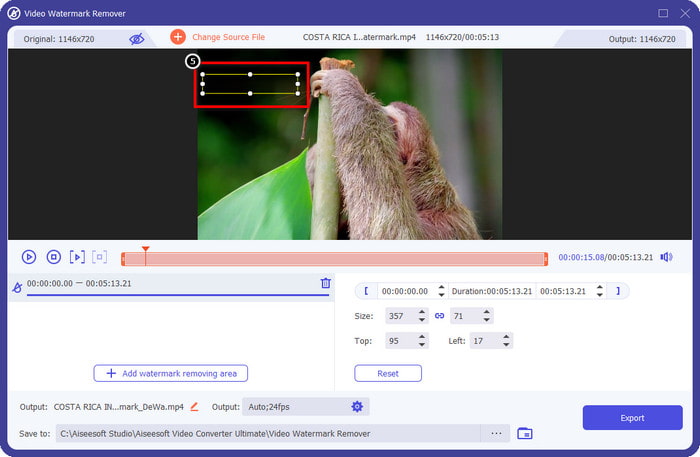
Schritt 6. Sobald das Auswahlfeld das Wasserzeichen in deinem Video erfasst hat, klicke auf Export, um mit dem Entfernen zu beginnen und das Video ohne Wasserzeichen zu speichern. Die Verarbeitung erfolgt sehr schnell, und du kannst das Video anschließend ohne das störende Wasserzeichen verwenden.
Verwandt:
DeviantArt-Wasserzeichen entfernen
Video Helper-Wasserzeichen entfernen
Logo jetzt entfernen
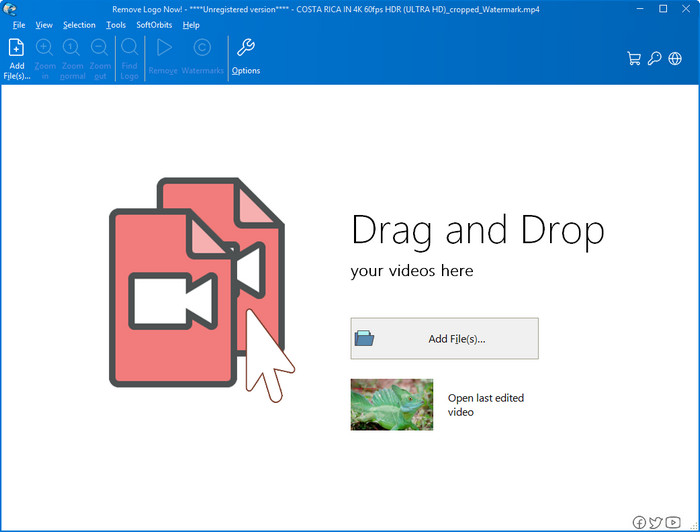
Als Nächstes auf unserer Liste hat sich Remove Logo Now einen ausgezeichneten Ruf beim Entfernen von eingeblendeten Wasserzeichen unter Windows erarbeitet. Mit diesem Tool benötigst du keine besonderen Kenntnisse, um zu wissen, wie man das Renderforest-Wasserzeichen auf einem PC entfernt. Nach dem Entfernen des Wasserzeichens sind bei genauerem Hinsehen noch leichte Spuren an der Stelle zu erkennen, an der das Wasserzeichen war. Wenn du jedoch nicht ganz genau hinschaust, wirst du das Wasserzeichen oder die Rückstände im exportierten Video kaum bemerken. Das folgende Tutorial zeigt dir, wie du das Wasserzeichen in deinem Video auf Windows-Geräten entfernst.
Schritt 1. Lade Remove Logo Now auf deinen Desktop herunter und installiere es, anschließend folge dem Installationsprozess.
Schritt 2. Starte die Software und klicke dann auf Add Files, um das Video hier hochzuladen. Du kannst das Video auch per Drag & Drop hier hineinziehen, um das Hochladen zu beschleunigen.
Schritt 3. Wähle das Werkzeug aus, mit dem du das Wasserzeichen markieren möchtest. Markiere anschließend das Wasserzeichen und klicke auf Remove (Entfernen).
Schritt 4. Klicke auf Start, um den von diesem Tool bereitgestellten Vorgang zum Entfernen des Wasserzeichens zu starten.
Video-Wasserzeichen-Entferner online

Wenn du ungern Software auf deinen Desktop herunterlädst, aber trotzdem wissen möchtest, wie du das Renderforest-Wasserzeichen entfernst, dann probiere den Video Watermark Remover Online aus. Mit diesem vollständig automatisierten Wasserzeichenentferner kannst du das Wasserzeichen in deinem Video kostenlos entfernen, ohne etwas auf deinen Desktop herunterzuladen. Wie bei den hier erwähnten Tools kannst du dieses Tool auch als Anfänger im Videoediting oder beim Entfernen von Wasserzeichen innerhalb weniger Minuten beherrschen. Folge dem Tutorial unten, um zu erfahren, wie du es benutzt.
Schritt 1. Öffne den Online-Wasserzeichenentferner, indem du in deinem bevorzugten Webbrowser danach suchst.
Schritt 2. Klicke auf das Upload-Cloud-Symbol auf der Hauptseite, um das Video einzufügen, das du bei Renderforest exportiert hast.
Schritt 3. Warte den Uploadvorgang ab; das Wasserzeichen in deinem Video wird automatisch entfernt. Klicke anschließend auf Download, um das Video ohne Wasserzeichen zu erhalten.
Teil 2. Häufig gestellte Fragen zum Entfernen des Renderforst-Wasserzeichens
Wie hoch ist die Abonnementgebühr für Renderforest?
Renderforest unterstützt drei verschiedene Preisarten, die Sie nutzen können; $ 14,99 für Lite, $24,99 für Pro und $29,99 für Business jeden Monat. Diese Preise haben einen anderen Zweck als die anderen; Sie können auf die Hauptwebsite gehen, um zu sehen, welche Einträge für das Abonnement verfügbar sind, das Sie in Anspruch nehmen möchten.
Ist es möglich, das Wasserzeichen ohne Tool aus Renderforest Video zu entfernen?
Ja, Sie können das Wasserzeichen in Ihrem Renderforest entfernen, ohne ein Tool zu verwenden, und zwar durch den Kauf einer monatlichen oder jährlichen Gebühr für die Software. Wenn Sie also die Videodatei exportieren, wird ihr kein Wasserzeichen hinzugefügt.
Welches ist der beste Plan für Renderforest? Monatlich oder jährlich?
Das monatliche Abonnement ist eine gute Wahl, wenn Sie das Tool einige Male verwenden möchten, aber wenn Sie sich entscheiden, die Software für längere Zeit zu verwenden, ist es besser, ein Jahresabonnement in Anspruch zu nehmen, da es Sie weniger kostet als die Verlängerung jeden Monat. Aber bevor Sie in Anspruch nehmen, können Sie den Renderforest kostenlos nutzen, indem Sie sich hier in Ihrem Konto anmelden und dann versuchen, die anderen kostenlosen Vorlagen zu verwenden.
Fazit
In der Tat liefert dieser Artikel starke Beweise für das kostenlose Entfernen des Renderforest-Wasserzeichens mit den drei hilfreichsten Wasserzeichen-Entfernern, die Sie verwenden können. Wenn Sie ein Windows-Benutzer sind und das Wasserzeichen auf Ihrem Desktop entfernen möchten, müssen Sie versuchen, Logo jetzt entfernen zu verwenden. Wenn Sie jedoch keine Software herunterladen möchten, müssen Sie es mit dem Video Watermark Remover Online versuchen, da Sie mit diesem Tool Wasserzeichen effektiv entfernen können.
Aber wenn Sie ein Windows- oder Mac-Benutzer sind, der einen effektiven Wasserzeichen-Entferner haben möchte, dann ist der beste Wasserzeichen-Entferner, den Sie verwenden können, ohne Zweifel der FVC Video Converter Ultimate. Es ist der ultimative Wasserzeichenentferner, mit dem Sie das Wasserzeichen, das Ihr Renderforest-Video stört, effizient und professionell entfernen können.
-
 2 Möglichkeiten zum schnellen Entfernen von VSDC-Wasserzeichen unter Windows und Mac
 Suchen Sie nach einer Möglichkeit, das VSDC-Wasserzeichen aus Ihren Videos zu entfernen? Mit diesem Artikel stellen wir Tools zur Verfügung, mit denen Sie das Wasserzeichen entfernen können.
-
 Entfernen Sie das Animoto-Wasserzeichen auf Videos einfach und effektiv
 Wie entferne ich das Animoto-Wasserzeichen auf dem Video? Lesen Sie diesen Artikel weiter, da wir ein vollständiges Tutorial zur Vorgehensweise bereitgestellt haben.
-
 So entfernen Sie Wasserzeichen aus Videos mit Final Cut Pro [Vollständige Anleitung]
 Haben Sie ein Problem mit dem Wasserzeichen in Videos? Mehr haben wir nicht gesagt, denn wir haben ein Tutorial zum Entfernen von Wasserzeichen aus Videos mit Final Cut Pro bereitgestellt.
