


 Video Converter Ultimate
 Bildschirm recorder
 Videoreparatur
 Sicherer Download
Eine exemplarische Übersicht über Inpaint Watermark Remover
Are you willing to learn how to use Inpaint to remove a watermark? Well, we got you! If you are reading this guide, you could be looking for the best method to remove watermarks from your images. Then you are free from having to bother yourself. This post will give you honest reviews of the programs you need to use, such as Inpaint Watermark Remover. You will learn enough about each tool, including its features, pros, cons, and cost. Also, we will offer you the best alternative to Inpaint in removing watermarks from your photo. This way, you will have another option for what watermark remover you might use. Let's read this article to discover additional useful information.

Teil 1: Überblick über Inpaint
The great and reliable software called Inpaint is dedicated to removing undesired elements from images, such as watermarks, logos, texts, stamps, etc. There are numerous sophisticated photo-editing programs available. Inpaint is not included. You'll like Inpaint's simplicity and speed if you're a casual photographer, a beginner, or a busy user who doesn't always have the time to use sophisticated picture editing software like Photoshop. In addition, Windows and Mac users can use Inpaint. You can download the apps, and you can use them directly online. Lastly, the intelligent marker tool from Inpaint makes removing undesirable objects a breeze. Additionally, Inpaint can assist you in perfectly restoring any damaged old photos. However, you must purchase a subscription if you want to save your image with a high resolution. It can only offer low quality when using the free version.
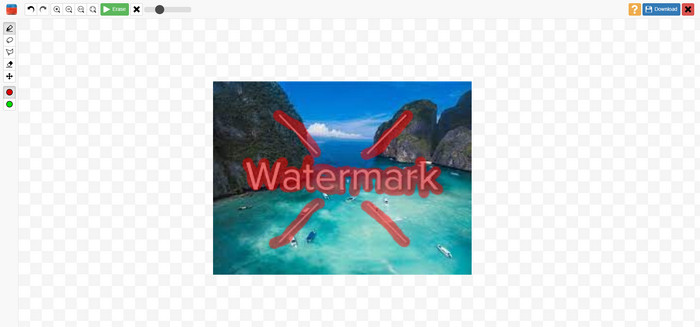
Funktionen, Vor- und Nachteile von Inpaints
Funktionen
◆ Entfernen Sie unerwünschte Elemente aus einem Foto.
◆ Alte Fotos reparieren.
◆ Gesichtsretusche möglich
Vorteile
- Bietet eine intuitive Benutzeroberfläche, die einfach zu bedienen ist.
- Es kann Wasserzeichen sofort entfernen.Es kann Wasserzeichen sofort entfernen.
Nachteile
- Funktioniert nicht gut bei Fotos mit komplizierten Hintergründen.
- Kaufen Sie ein Abonnement, um großartige Funktionen zu erleben.
So verwenden Sie Inpaint zum Entfernen eines Wasserzeichens
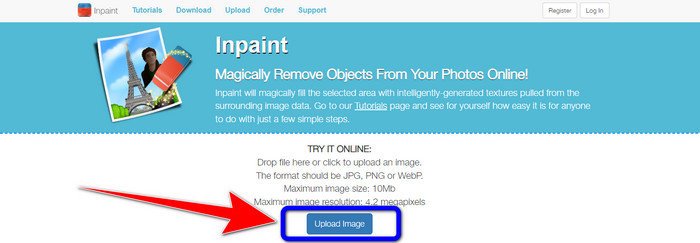
Step 1: Visit the website of Inpaint. Then, click the Upload Image button to add your photo with a watermark you want to remove.
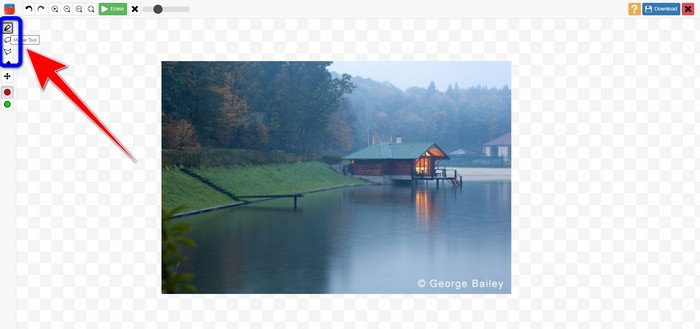
Step 2: After adding your photo, you must highlight the watermarks using the watermark remover tools. These tools are Marker, Polygonal, and Lasso.
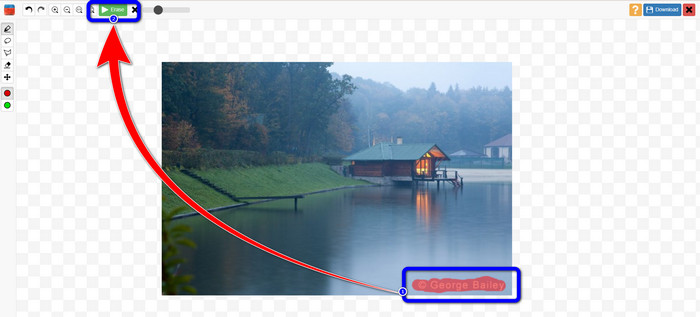
Step 3: When you are done highlighting the watermarks from your photos, click the Erase button on the upper left part of your screen and wait for the removal process.
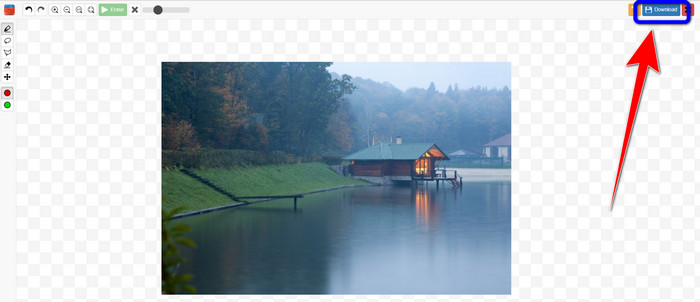
Step 4: When the watermark is gone, click the Download button and save your output on your desktop.
Teil 2: Beste Alternative zu Inpaint zum Entfernen von Wasserzeichen aus Fotos online
Nachdem Sie die effektive Methode zur Verwendung von Inpaint zum Entfernen eines Wasserzeichens kennen, ist hier die beste Alternative, mit der Sie Wasserzeichen von Ihren Fotos entfernen können.
FVC Free Watermark Remover
The best online tool you can use aside from Inpaint is FVC Free Watermark Remover. This online software lets you eliminate all unnecessary elements from your images, such as watermarks, logos, texts, signatures, and more. You can use many remover tools, like Brush, Polygonal, and Lasso. But wait, there’s more. This online software has a Cropping feature, which means you can eliminate any watermarks by cropping your photo. It has a fast removal process, so you don’t need to consume more time. After removing watermarks, you can save your final output in the same format. It also supports various image formats, such as JPG, PNG, BMP, and more. In addition, this watermark remover has an understandable interface with simple steps to follow, which is suitable for non-professional users.
Funktionen
◆ Kann Bilder zuschneiden, um Wasserzeichen zu entfernen.
◆ Bilder in Originalqualität exportieren.
◆ Entfernen Sie störende Elemente aus Fotos mit Lasso-, Pinsel- und Polygon-Werkzeugen.
Vorteile
- Perfekt für nicht-professionelle Benutzer.
- Es hat eine verständliche Benutzeroberfläche.
- Total frei.
- Es hat einen schnellen Entfernungsprozess.
- Garantieren Sie die Privatsphäre jedes Benutzers.
- Die Anwendung muss nicht installiert werden.
Nachteile
- Für den Betrieb der Anwendung ist eine Internetverbindung erforderlich.
Using Watermark Remover Tools
Da sich der Wasserzeichenbereich in der Mitte Ihres Fotos befindet, verwenden wir das Werkzeug zum Entfernen von Wasserzeichen anstelle des Zuschneidewerkzeugs. Befolgen Sie diese einfachen Schritte unten, um Wasserzeichen mit FVC Free Watermark Remover von Ihren Fotos zu entfernen.
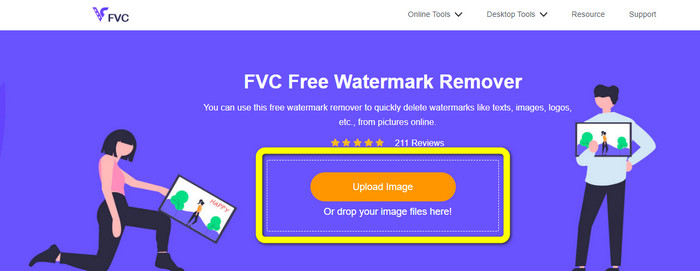
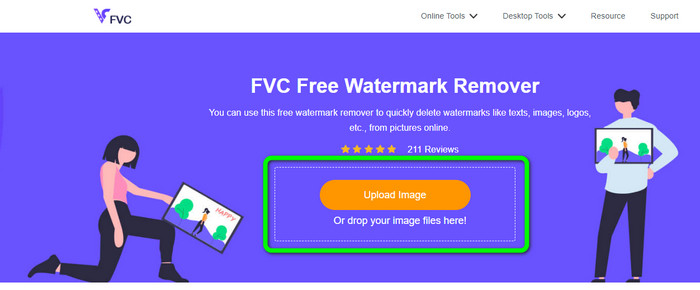
Step 1: Go to the FVC Free Watermark Remover website. Click the Upload Image button to upload your image with a watermark. You can also directly drag your file.
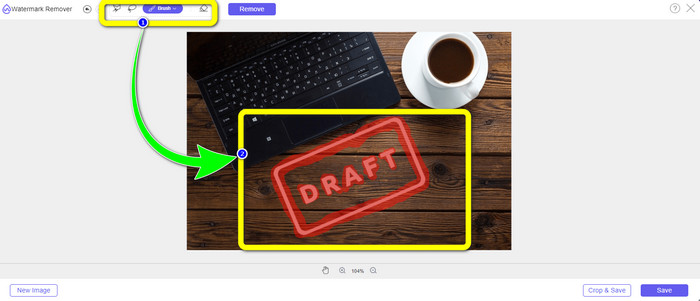
Step 2: Highlight the watermarks using the remover tools you can see at the upper part of the interface.
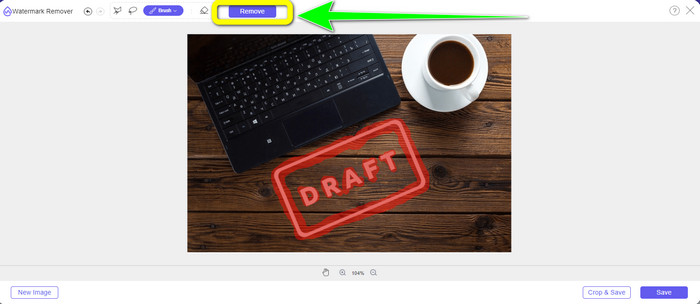
Step 3: When you are done highlighting the watermark from your image, click the Remove button to remove the watermark and wait for the fast removal process.
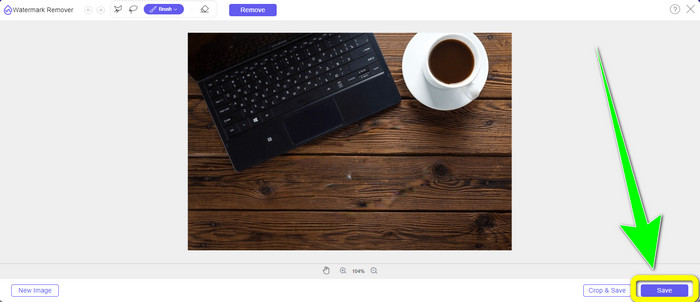
Step 4: After completely removing the watermark from your photo, click the Save button to download the photo without the watermark.
Using Cropping Tool
Bei dieser Methode müssen Sie den Bereich des Wasserzeichens Ihres Fotos berücksichtigen. Wenn sich das Wasserzeichen in der Ecke oder am Rand Ihres Bildes befindet, können Sie das Zuschneidewerkzeug verwenden. Befolgen Sie die nachstehenden einfachen Schritte, um zu erfahren, wie Sie ein Foto zuschneiden, um ein Wasserzeichen zu entfernen.
Step 1: Click the Upload Image button to insert your photo with a watermark.
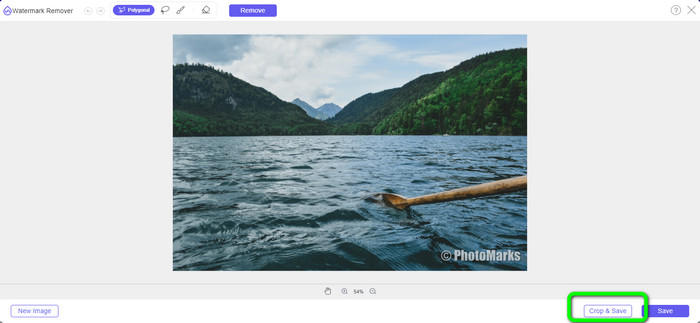
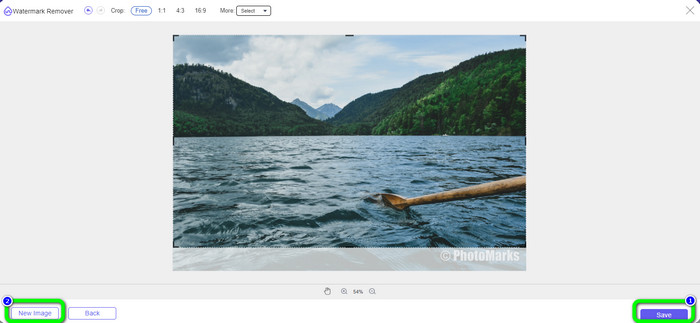
Step 2: After inserting the photo, click the Crop & Save button on the lower right part of the interface.
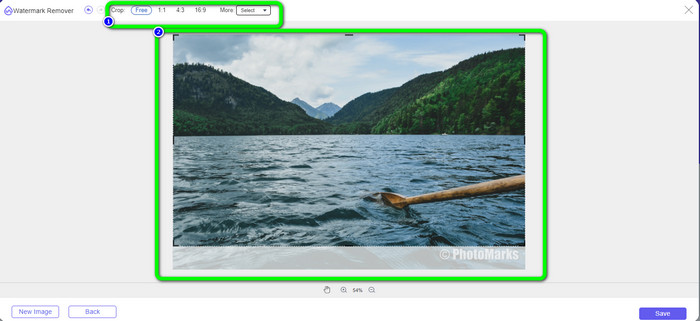
Step 3: On the upper part of the interface, there are cropping options you can choose. These options will help you to crop your photo. But if you want to crop the photo manually, click the Free option.
Step 4: After removing the watermark by cropping the photo, hit the Save button on the lower right part of the interface to download your photo without a watermark. Then, if you still want to crop another photo, you click the New Image button on the lower left part of the interface.
Verwandte Themen:
Ways on How to Easily Remove Reddit Watermarks from Images
How to Remove Watermark in Lightroom Mobile [Solved]
Teil 3: FAQs zu Inpaint Watermark Remover
Wann sollte ich Inpaint verwenden?
Sie können Inpaint verwenden, um unerwünschte Elemente aus Ihren Fotos zu entfernen, wie z. B. Personen, Wasserzeichen, Logos, Aufkleber und mehr. Mit diesem Tool können Sie Ihr Foto fantastischer und angenehmer für das Auge Ihrer Betrachter machen.
Kann ich Inpaint auf meinem Computer verwenden?
Ja, du kannst! Sie können Inpaint herunterladen, da es eine Desktop-Version anbietet. Diese herunterladbare Anwendung hat mehr großartige Funktionen als die Online-Version. Sie können Bilder ohne Einschränkungen anhängen und es bietet eine höhere Wiederherstellungsqualität mit einem besseren Inpainting-Algorithmus.
Ist Inpaint ein besserer Wasserzeichenentferner?
Inpaint is reliable in removing watermarks from a photo. However, there are limitations. It has a file size and resolution limit, which is not good for users. You can use the FVC Free Watermark Remover if you want a better watermark remover. It has no limitations, and you can remove watermarks from a photo for free.
Fazit
As you can see, this post provided you with an honest review about Inpaint Watermark Remover. Moreover, it offers the best alternatives you can use to remove watermarks from your photos. If you want a 100% free watermark remover, you can use FVC Free Watermark Remover.
-
 So entfernen Sie einfach Wasserzeichen aus Videos in After Effects
 Dieser Artikel hilft beim Entfernen von Wasserzeichen aus dem Video mit After Effects. Außerdem bietet es die besten Alternativen, um störende Objekte zu beseitigen.
-
 Schritt-für-Schritt-Anleitungen zum Entfernen von Emojis aus Videos
 Ärgern Sie sich über Emojis in Ihren Videos? Dieser Beitrag zeigt Ihnen die besten Verfahren zum sofortigen Entfernen von Emojis aus Ihren Videos mit großartigen Tools.
-
 Hervorragende Möglichkeiten zum Entfernen von Aufklebern von Fotos und Videos
 Möchten Sie Sticker mühelos von Videos und Fotos entfernen? Hier sind die effektivsten Methoden, einschließlich der zuverlässigsten und einfachsten Methoden, die Sie ausprobieren können.
