


 Video Converter Ultimate
 Bildschirm recorder
 Videoreparatur
 Sicherer Download
Schnellste Methode zum Konvertieren von MXF in M4V auf dem Desktop und online
Die MXF-Datei ist ein branchenüblicher Standard für Audio und Video. Allerdings wird dieses Dateiformat von Apple QuickTime Player nicht unterstützt, sodass es unmöglich ist, Ihre MXF-Datei mit diesem Programm abzuspielen. Wenn Sie Ihre MXF-Datei nicht mit Apple QuickTime Player wiedergeben können, müssen Sie sie in ein anderes Format wie M4V konvertieren. Sie haben Glück, denn wir haben die beste Lösung für Sie. In diesem Artikel erhalten Sie die effektivsten und nützlichsten Methoden, um MXF in M4V mit zuverlässigen Offline- und Online-Konvertern umzuwandeln. Außerdem zeigen wir Ihnen, wie Sie Ihre Videos attraktiver machen können, indem Sie sie einfach bearbeiten. Lesen Sie diesen Artikel jetzt und holen Sie sich alle Informationen, die Sie benötigen.

Teil 1: Großartige Methode, um MXF online in M4V zu konvertieren
Einer der besten Online-Konverter, die Sie nutzen können, um MXF in M4V zu konvertieren, ist der FVC Free Video Converter Online. Diese Online-Software ist in der Lage, verschiedene Videoformate wie MOV, MKV, AVI, FLV, MP4, WEBM, VOB und mehr zu konvertieren. Außerdem können Sie viele Dateien in einem einzigen Vorgang umwandeln, da dieser Konverter Stapelkonvertierung unterstützt. Zusätzlich können Sie vor der Konvertierung Ihrer Videos deren Auflösung, Bitrate und Bildrate nach Ihren Vorlieben anpassen. Er verfügt zudem über eine benutzerfreundliche Oberfläche und eine einfache Vorgehensweise beim Konvertieren von Dateien. So kann jeder diesen Online-Konverter bedienen, sowohl fortgeschrittene als auch unerfahrene Nutzer. Darüber hinaus ist dieser Online-Konverter in allen gängigen Browsern wie Google Chrome, Mozilla Firefox, Microsoft Edge und weiteren verfügbar, was ihn für die Nutzer sehr zugänglich macht.
Darüber hinaus können Sie neben der Videokonvertierung auch zahlreiche Audioformate konvertieren, darunter AAC, MP3, M4A, M4B, FLAC und mehr. Es hat auch eine Audioeinstellung, mit der Sie die Abtast- und Bitraten anpassen können. Anhand dieser Funktionen können Sie feststellen, dass FVC Free Video Converter Online zuverlässig ist.
Funktionen
◆ Konvertieren Sie verschiedene Videoformate wie MP4, AVI, M4V, MXF, MOV, WMV, MKV, FLV und mehr.
◆ Kann die Auflösung, Bitrate und Bildrate von Videos bearbeiten.
◆ Bietet Batch-Konvertierungsprozess.
◆ Konvertieren Sie Audiodateien wie MP3, AAC, AC3, M4B, FLAC und mehr.
◆ Kann die Abtastrate und Bitrate des Audios bearbeiten.
Sehen Sie sich die folgenden Schritte an, um zu erfahren, wie Sie die MXF-Datei mit FVC Free Video Converter Ultimate in das M4V-Format konvertieren.
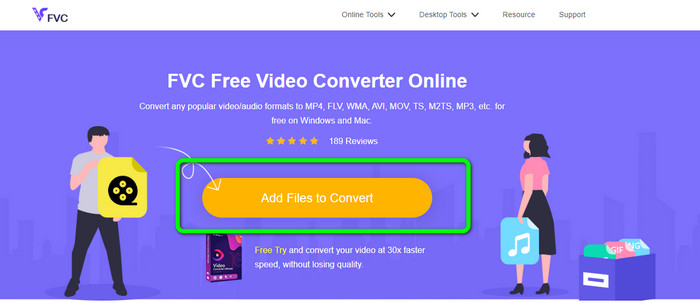
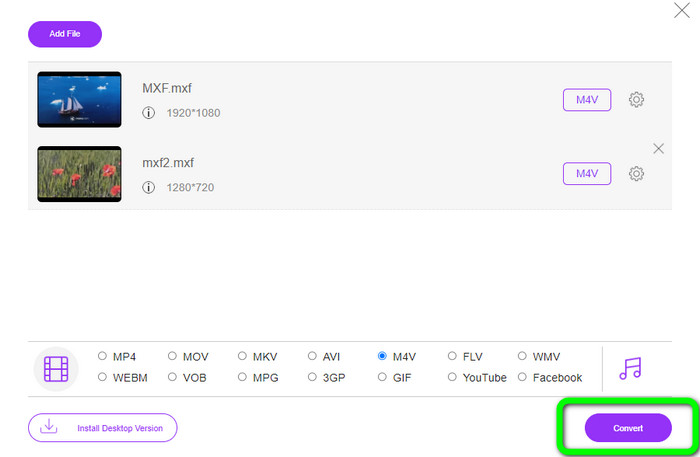
Schritt 1: Öffnen Sie Ihren Browser und rufen Sie die Website des FVC Free Video Converter Online auf. Sobald Sie sich auf der Startseite befinden, klicken Sie auf Dateien zum Konvertieren hinzufügen, um die MXF-Videodatei hochzuladen, die Sie konvertieren möchten.
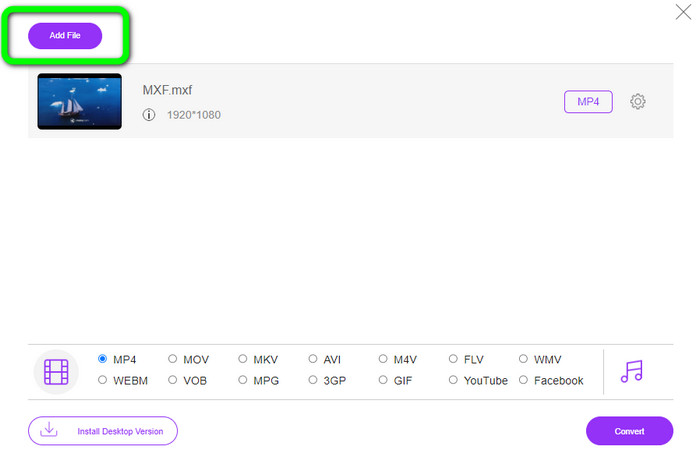
Schritt 2: Dieser Konverter unterstützt eine Stapelkonvertierung. Wenn Sie also weitere MXF-Dateien hochladen möchten, klicken Sie auf die Schaltfläche Datei hinzufügen.
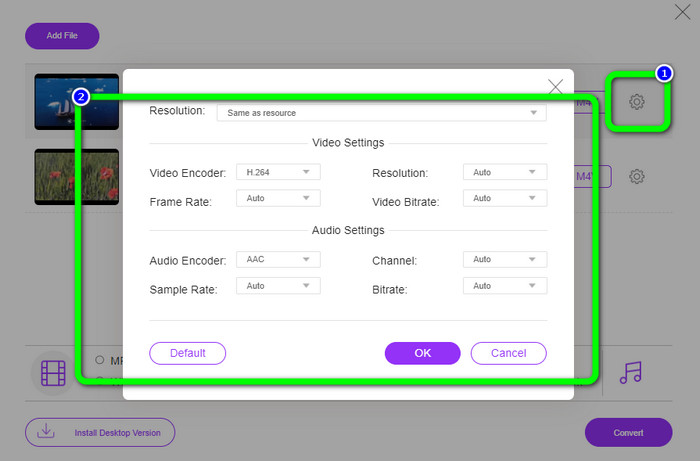
Schritt 3: In diesem Abschnitt können Sie Ihr Video bearbeiten, indem Sie auf das Einstellungs-Symbol klicken. Nachdem Sie auf dieses Symbol geklickt haben, können Sie die Bildrate, Auflösung und Bitrate des Videos anpassen. Außerdem können Sie die Abtastrate und Bitrate der Audiospur ändern. Klicken Sie anschließend auf die Schaltfläche OK.
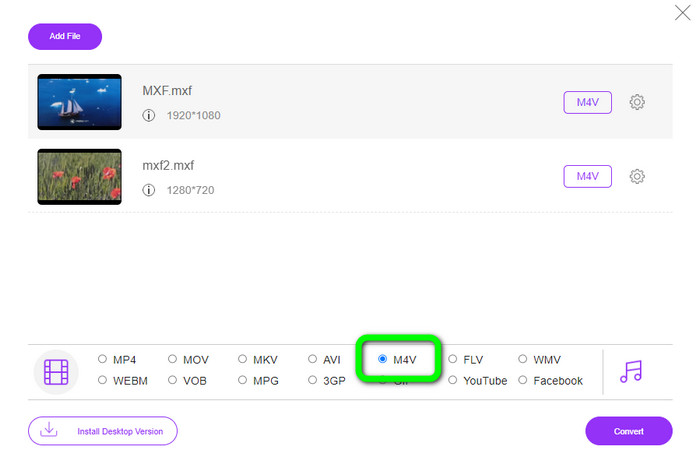
Schritt 4: Nachdem Sie Ihre Videos bearbeitet haben, können Sie das Ausgabeformat ändern, indem Sie im unteren Bereich der Oberfläche aus den Formatoptionen das Format M4V auswählen.
Schritt 4: Für den letzten Schritt drücken Sie die Schaltfläche Konvertieren. Warten Sie den Konvertierungsvorgang ab und speichern Sie Ihr Video am gewünschten Speicherort.
Teil 2: Der schnellste Weg, MXF verlustfrei in M4V zu konvertieren
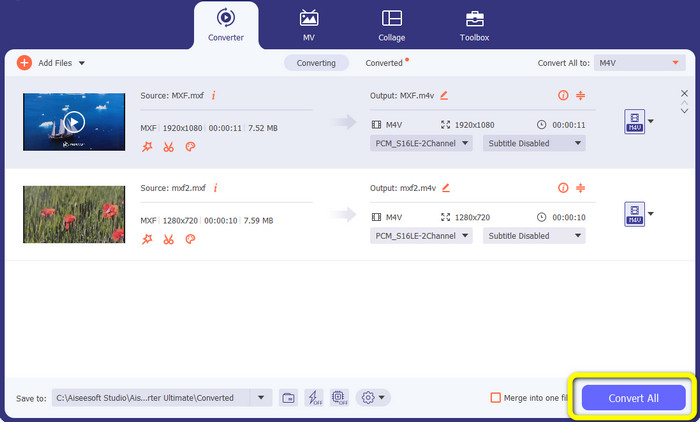
Wenn Sie ein herunterladbares Tool benötigen, um MXF verlustfrei in M4V zu konvertieren, ist Video Converter Ultimate die beste Wahl. Dieser leistungsstarke Konverter kann verschiedene Dateien sehr schnell umwandeln, denn er bietet eine schnelle Konvertierung – nicht 10‑mal, nicht 20‑mal, sondern 30‑mal schneller als die durchschnittliche Konvertierungsgeschwindigkeit. Außerdem hat er eine weitere großartige Funktion, die Sie nutzen können: Sie können mehrere Dateien gleichzeitig konvertieren, da dieser Konverter eine Stapelkonvertierung unterstützt. Und neben MXF und M4V unterstützt dieses Tool zahlreiche weitere Videoformate, darunter MP4, FLV, AVI, MKV, MOV, WMV, VOB und mehr. Zudem ist Video Converter Ultimate sowohl unter Windows als auch unter Mac verfügbar, was ihn ideal für Nutzer beider Systeme macht.
Darüber hinaus bietet diese herunterladbare Anwendung neben der Konvertierung von Videos weitere großartige Funktionen. Wenn Sie ein Musikvideo für Ihren Partner, Ihre Familie, Freunde usw. erstellen möchten, können Sie dieses Tool verwenden. Video Converter Ultimate bietet einen Musikvideo-Ersteller, mit dem Sie wunderbare Filme mit Musik erstellen können. Es bietet auch kostenlose Themen wie fröhlich, schick, einfach, verschneite Nächte, romantisch und mehr. Wenn Sie ein Video mit einer großen Dateigröße haben, können Sie es auch mit dem Video Compressor komprimieren. Mit Hilfe dieses Tools können Sie die Größe Ihres Videos ganz einfach ändern.
Funktionen
◆ Konvertieren Sie mehr als 100 Videodateiformate, darunter M4V, MXF, FLV, AVI, MP4, XVID, VOB, MOV, SWF, MKV und mehr.
◆ Mehrere Dateien gleichzeitig konvertieren.
◆ Bietet Musikvideomacher.
◆ Erstellen Sie eine fantastische Collage.
◆ Bieten Sie Videobearbeitungstools wie Video-Trimmer, Kompressor, Enhancer, Farbkorrektur usw. an.
◆ Konvertieren Sie Bilddateiformate wie BMP, PNG, JPG und mehr.
Befolgen Sie die detaillierten Schritte unten, um MXF mit dem FVC Video Converter Ultimate verlustfrei in M4V zu konvertieren.
Schritt 1: Laden Sie Video Converter Ultimate auf Ihr Gerät herunter, indem Sie auf die Schaltfläche Download klicken. Unten stehen zwei Download-Schaltflächen zur Verfügung. Wenn Sie Windows nutzen, klicken Sie auf die Windows-Version. Verwenden Sie einen Mac, klicken Sie auf die Mac-Version. Starten Sie anschließend das Programm.
Gratis DownloadFür Windows 7 oder neuerSicherer Download
Gratis DownloadFür MacOS 10.7 oder neuerSicherer Download
Schritt 2: Wählen Sie danach den Bereich Konverter. Klicken Sie auf das +-Symbol oder auf die Schaltfläche Datei hinzufügen, um die MXF-Videodatei zu importieren.
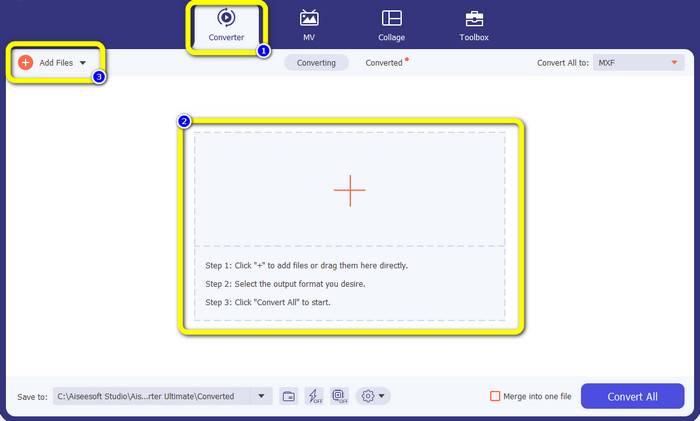
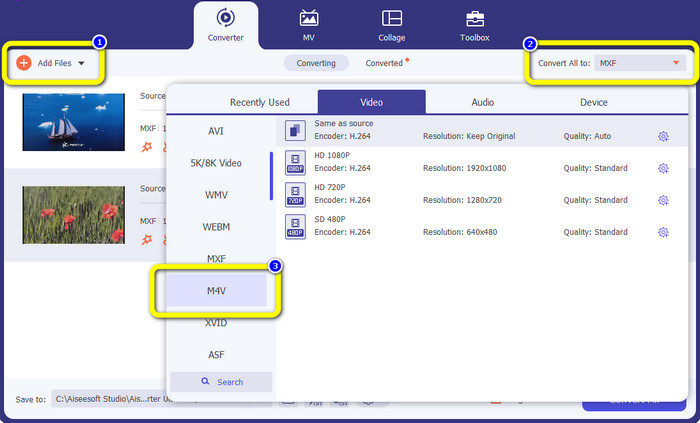
Schritt 3: Wenn Sie mehrere Dateien gleichzeitig konvertieren möchten, klicken Sie auf die Schaltfläche Datei hinzufügen. Klicken Sie dann auf die Schaltfläche Alle konvertieren in und wählen Sie das Dateiformat M4V aus. Sie können außerdem die gewünschte Auflösung für Ihr Video auswählen.
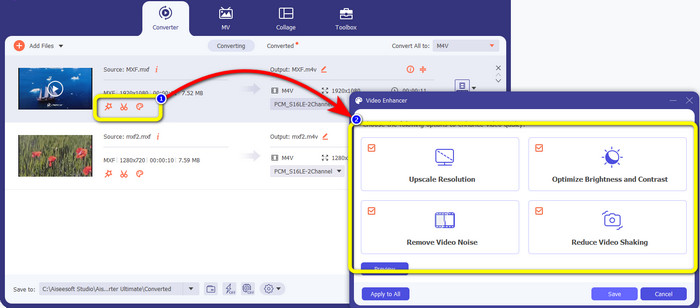
Schritt 4: Wenn Sie Ihre Videos vor der Konvertierung bearbeiten möchten, können Sie dies tun. Klicken Sie auf die Bearbeitungstools im ersten Feld. Wählen Sie dann das Symbol Video verbessern. Markieren Sie anschließend alle Kästchen, um die Auflösung zu erhöhen, Helligkeit und Kontrast zu optimieren sowie Bildrauschen und Verwacklungen zu reduzieren.
Schritt 5: Wenn Sie mit der Bearbeitung und der Wahl des Ausgabeformats fertig sind, klicken Sie auf die Schaltfläche Alle konvertieren und speichern Sie Ihr Video auf Ihrem Gerät.
Teil 3: Was ist MXF?
Die SMPTE-Vereinigung hat den MXF-Mediencontainer für die geschäftliche Nutzung erstellt. MXF implementiert einen Teil des Datenschemas des Advanced Authoring Format (AAF) und hat sich kürzlich zum Industriestandard für die nichtlineare professionelle Videobearbeitung entwickelt. MXF-Dateien können problemlos in jedes gängige Videoformat konvertiert und mit nahezu jedem Codec komprimiert werden. Es ist wichtig zu beachten, dass die Implementierung dieses Formats durch Sony, Panasonic und Canon zahlreiche Inkompatibilitäten aufwies, eine große Schwäche dieses Containers. Die Überarbeitung des Standards von 2009 befasst sich mit diesen Problemen.
Teil 4: Was ist M4V?
M4V ist eine Art Videocontainer, der von iTunes-Dateien zum Speichern von Audio- und Videodaten verwendet wird. Es ist am besten, Audio- oder Videodateien im iTunes Store zu kaufen, wenn sie mit Apple FairPlay DRM gegen unbefugtes Anzeigen und Kopieren geschützt sind. Da das Format auf der MPEG-4-Struktur basiert, kann praktisch jeder moderne Player ungeschützte Dateien anzeigen.
Weiterführende Lektüre:
Beste MXF-zu-WMV-Konverter, um MXF kostenlos in WMV umzuwandeln
Top 4 der besten Lösungen zum Konvertieren von MXF in MKV [Gelöst]
Teil 5: Häufig gestellte Fragen zum Konvertieren von MXF in M4V
Wie groß ist eine MXF-Datei?
MXF unterstützt Dateigrößen bis zu 2 Gigabyte. Darüber hinaus unterstützt MXF längere Dateien. Die maximale Aufnahmezeit für Mediendateien im OMF-Format beträgt drei Stunden. MXF kann 12 Stunden Audio auf zwei Kanälen bei 48 kHz verarbeiten.
Wer verwendet MXF-Dateien?
Mehrere Produktionswerbespots, darunter die SONY MSW 2000-Serie von IMX-Videorecordern, verwendeten es. Außerdem unterstützen Avid-Bearbeitungsgeräte eine bestimmte Variante von MXF.
Wie konvertiere ich MXF in MOV?
Sie können den FVC Free Video Converter Online verwenden. Laden Sie Ihre MXF-Datei hoch, wählen Sie das MOV-Format aus den Formatoptionen und klicken Sie auf die Schaltfläche „Konvertieren“. Auf diese Weise können Sie MXF sofort in MOV umwandeln.
Fazit
Es gibt viele Möglichkeiten, MXF in M4V zu konvertieren. Wenn Sie jedoch die besten und lohnendsten Konverter verwenden möchten, können Sie auf die oben genannten Anwendungen zurückgreifen: Video Converter Ultimate und FVC Free Video Converter Online. Diese beiden Konverter arbeiten schneller als viele andere Programme, und Sie können sie kostenlos nutzen.
-
 Verschiedene Methoden zum Ändern des MOV- in das M4V-Dateiformat
 Suchen Sie nach einer effektiven Methode, um die MOV-Datei in das M4V-Format zu konvertieren? Dann erfüllt dieser Artikel Ihren Wunsch. Hier sind die besten Konverter, die Sie verwenden können.
-
 Hervorragende Techniken zum sofortigen Konvertieren von GIF in M4V
 Dieser Leitfaden bietet Ihnen die effektivsten Strategien zum Konvertieren von GIF in M4V. Außerdem stellen wir Ihnen die besten zwei Konverter vor, die Sie ausprobieren können.
-
 Top 2 außergewöhnliche Möglichkeiten zum Konvertieren von M2TS in M4V
 Denken Sie, dass es möglich ist, die M2TS-Datei in ein anderes Format zu konvertieren? Wir zeigen Ihnen, wie Sie M2TS in das M4V-Dateiformat konvertieren, wenn Sie die beste Lösung wünschen.
