


 Video Converter Ultimate
 Bildschirm recorder
 Videoreparatur
 Sicherer Download
Top MP3-zu-M4A-Konverter: Schnelle und einfache Audiokonvertierung
Sind Sie unzufrieden, wenn Sie niedrigqualitative Audios anhören, die Ihren Lieblingssongs nicht gerecht werden? Dann ist es Zeit, Ihr Klangerlebnis mit der Power der MP3-zu-M4A-Konvertierung aufzurüsten! Indem Sie Ihre Audiodateien in M4A umwandeln, können Sie das wahre Potenzial Ihrer Musiksammlung freisetzen und den Unterschied selbst hören. In diesem Leitfaden zeigen wir Ihnen die Vorteile der MP3-zu-M4A-Konvertierung und stellen Ihnen die besten Software-Konverter vor, um einen reibungslosen Konvertierungsprozess zu gewährleisten. Machen Sie sich bereit, Ihr Audioerlebnis zu transformieren und Ihre Musik wie nie zuvor zu genießen.

Teil 1. Die besten Möglichkeiten zum Konvertieren von MP3 in M4A
Hier sind einige der besten Audiokonverter von MP3 zu M4a. Es gibt eine Offline-Methode, bei der es sich um eine Desktop-App handelt, und ein weiteres Online-Tool, bei dem es sich um ein webbasiertes Programm handelt. Sehen Sie sich diese an, um mehr zu erfahren.
1. Videokonverter Ultimate
Video Converter Ultimate ist eine flexible Software, die eine Vielzahl von Funktionen für die Audio- und Videokonvertierung bietet. Wenn es um das Konvertieren von MP3 in M4A geht, ist Video Converter Ultimate eine ausgezeichnete Wahl und stellt Nutzern einen einfachen und unkomplizierten Prozess zur Verfügung, um ihre Audiodateien zu konvertieren. Das Tool unterstützt eine breite Palette von Audioformaten, und seine fortschrittliche Audiocodec-Technologie gewährleistet eine Ausgabe in hoher Qualität. Ob Sie Audiodateien für private oder berufliche Zwecke umwandeln müssen – Video Converter Ultimate macht den Vorgang schnell, sodass Sie sich auf das Wesentliche konzentrieren können: das Genießen Ihrer hochwertigen Audiodateien.
Schritt 1. Programm herunterladen und installieren
Wählen Sie zunächst eine der Schaltflächen Kostenloser Download und folgen Sie dann den Anweisungen auf dem Bildschirm, um die Datei auf Ihrem Computer zu speichern. Starten Sie anschließend die App und machen Sie sich mit den intuitiven Bedienelementen vertraut.
Kostenloser DownloadFür Windows 7 oder höherSicherer Download
Kostenloser DownloadFür macOS 10.7 oder höherSicherer Download
Schritt 2. Audiodateien hinzufügen
Wählen Sie anschließend das Plus-Symbol in der Hauptoberfläche und navigieren Sie zum Speicherort der Audiodatei, die Sie konvertieren möchten. Nachdem eine Datei hochgeladen wurde, erscheint eine Vorschau in der Benutzeroberfläche. Wenn Sie MP3 in M4A im Batch-Modus konvertieren möchten, können Sie auch einen gesamten Ordner mit Dateien hochladen.
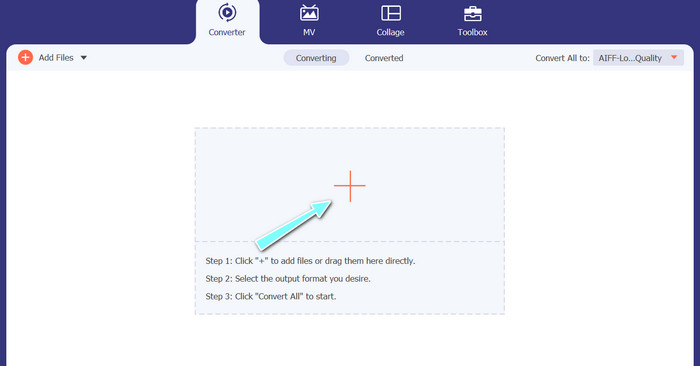
Schritt 3. Ausgabeformat wählen
Wählen Sie als Nächstes das Ausgabeformat, indem Sie im Menü Profil (oben rechts im Tool) auf die Registerkarte Audio klicken. Sie können mithilfe der Formate MP3 oder M4A nach oder von MP3 konvertieren.
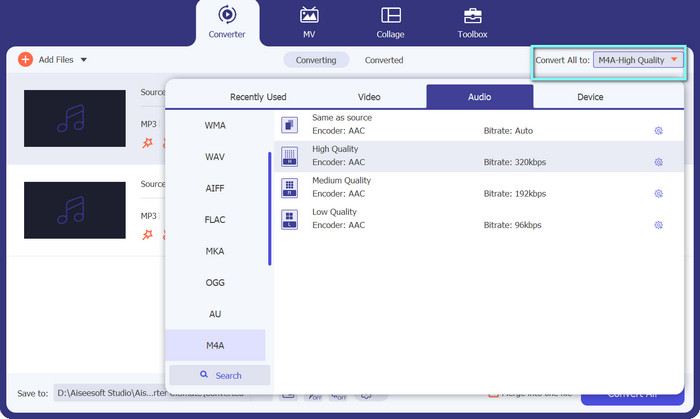
Schritt 4. Ausgabe speichern
Wählen Sie unten auf dem Bildschirm den Zielordner aus. Wenn Sie bereit sind, die Konvertierung zu starten, klicken Sie auf die Schaltfläche Alles konvertieren.
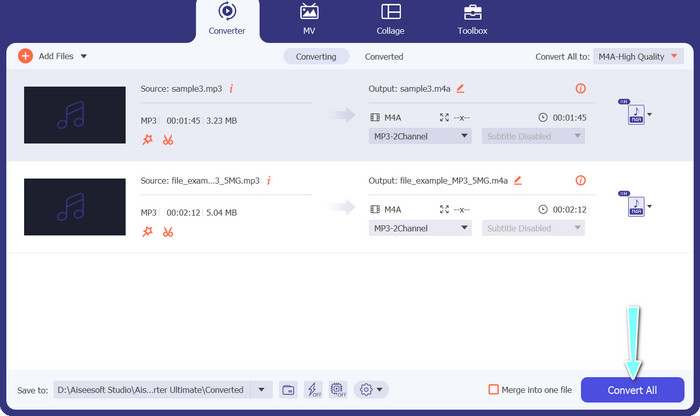
2. Kostenloser Online-Videokonverter
Kein Speicherplatz für ein weiteres Programm? Kein Problem – Sie können auch ein Online-Tool nutzen, um Dateien ohne Programminstallation zu konvertieren. Die webbasierte App Free Video Converter Online ermöglicht Ihnen die Konvertierung direkt im Browser. Außerdem unterstützt sie viele Formate, sowohl für Video- als auch für Audiodateien. Nicht zu vergessen: Mit diesem Online-Tool können Sie auch eine Stapelkonvertierung durchführen. Darüber hinaus ist die Anpassung der Ausgabequalität der Audiodatei eine weitere großartige Funktion des Tools. Sehen Sie sich an, wie dieser MP3-zu-M4A-Online-Konverter funktioniert.
Schritt 1. Um Free Video Converter Online zu verwenden, öffnen Sie zunächst Ihren bevorzugten Webbrowser und rufen Sie die Website direkt auf.
Schritt 2. Wählen Sie dann die MP3-Datei aus, die Sie in M4A umwandeln möchten, indem Sie auf die Schaltfläche Dateien zum Konvertieren hinzufügen klicken.
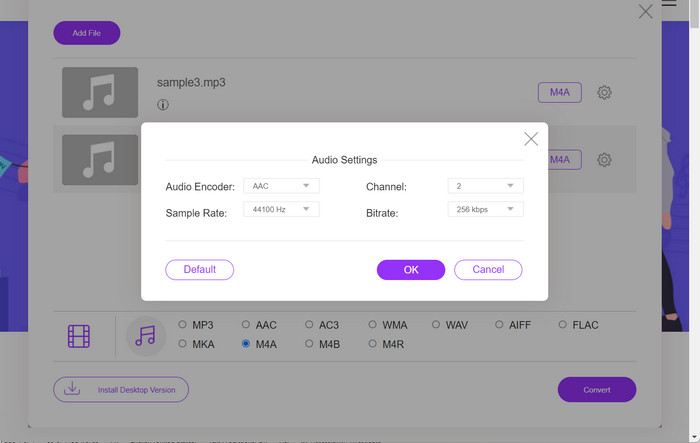
Schritt 3. Wählen Sie im Optionenbereich für das Audio-Format M4A als gewünschtes Ausgabeformat. Auch die Ausgabequalität bzw. Bitrate der M4A-Datei kann angepasst werden.
Schritt 4. Klicken Sie auf die Schaltfläche Konvertieren, um den Konvertierungsprozess zu starten. So konvertieren Sie MP3 online in M4A.
Teil 2. Konvertieren Sie MP3 in M4A unter Windows
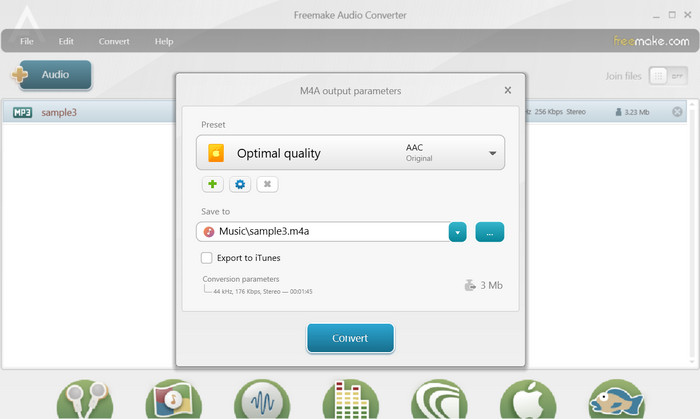
Freemake Audio Converter ist ein kostenloses und benutzerfreundliches Programm, mit dem Benutzer Audiodateien in verschiedene Formate konvertieren können, darunter M4A, MP3, WAV und mehr. Mit seiner einfachen Drag-and-Drop-Oberfläche können Benutzer ihre MP3-Dateien einfach hinzufügen und sie ohne komplizierte Einstellungen oder Konfigurationen in M4A konvertieren. Das Tool verfügt außerdem über eine Reihe von Anpassungsoptionen, mit denen Benutzer Parameter wie Bitrate und Abtastrate anpassen können, um die gewünschte Ausgabequalität zu erhalten. Alles in allem ist es einer der besten MP3-zu-M4A-Konverter, die Sie verwenden können.
Schritt 1. Laden Sie Freemake Audio Converter auf Ihren Windows-Computer herunter und installieren Sie das Programm.
Schritt 2. Starten Sie das Programm und klicken Sie auf die Schaltfläche +Audio, um Ihre MP3-Datei(en) in das Programm zu laden.
Schritt 3. Wählen Sie am unteren Rand des Programmfensters aus der Liste der verfügbaren Formate zu M4A. Verwenden Sie das Dropdown-Menü, um die gewünschten Qualitätseinstellungen für Ihre Ausgabedatei auszuwählen.
Schritt 4. Wählen Sie den Ausgabeordner, in dem Ihre konvertierte Datei gespeichert werden soll. Klicken Sie abschließend auf die Schaltfläche Konvertieren, um den Konvertierungsvorgang zu starten.
Teil 3. Konvertieren Sie MP3 in M4A auf dem Mac
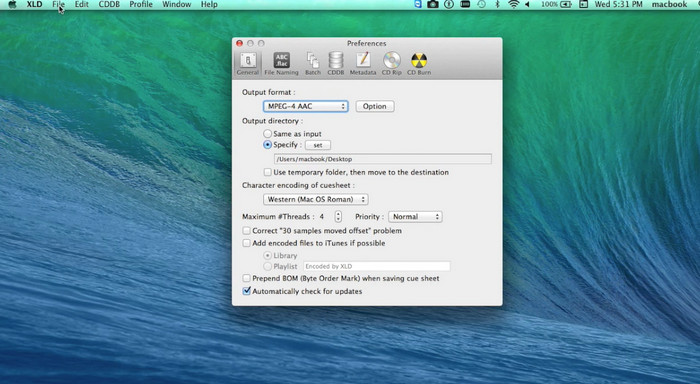
XLD ist ein kostenloses und benutzerfreundliches Programm, mit dem Mac-Benutzer Audiodateien in verschiedene Formate konvertieren können, darunter M4A, MP3, FLAC und mehr. Mit seiner einfachen Drag-and-Drop-Oberfläche können Benutzer ihre MP3-Dateien einfach hinzufügen und sie ohne komplizierte Einstellungen oder Konfigurationen in M4A konvertieren. XLD bietet auch eine Reihe von Anpassungsoptionen, mit denen Benutzer Parameter wie Bitrate und Abtastrate anpassen können, um die gewünschte Ausgabequalität zu erreichen.
Schritt 1. Laden Sie XLD auf Ihren Mac herunter und installieren Sie das Programm.
Schritt 2. Starten Sie das Programm und klicken Sie auf die Schaltfläche Öffnen, um Ihre MP3-Datei(en) in das Programm zu laden.
Schritt 3. Wählen Sie in den Programmeinstellungen M4A aus der Liste der verfügbaren Formate. Über das Dropdown-Menü können Sie die gewünschten Qualitätseinstellungen für Ihre Ausgabedatei festlegen.
Schritt 4. Wählen Sie anschließend den Ausgabeordner, in dem Ihre konvertierte Datei gespeichert werden soll. Klicken Sie zuletzt auf die Schaltfläche Konvertieren, um den Konvertierungsvorgang zu starten. So konvertieren Sie MP3 auf dem Mac kostenlos in M4A.
Teil 4. Konvertieren Sie MP3 in M4A auf Android
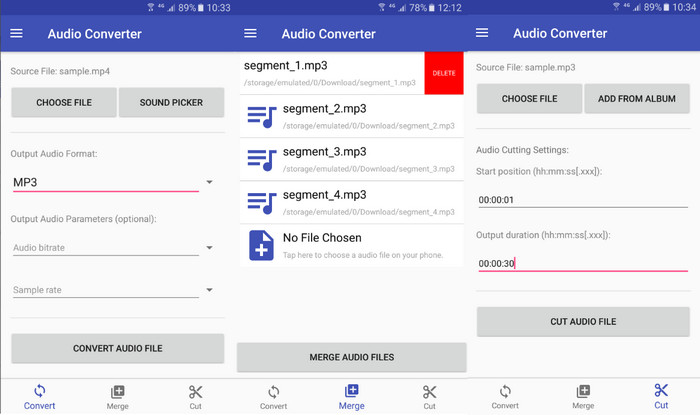
Wenn es um die Konvertierung von Audiodateien geht, ist die kostenlose und unkomplizierte Android-Software Audio Converter von Online-Convert.com kaum zu übertreffen. Benutzer können ihre MP3-Dateien einfach per Drag-and-Drop in die Programmoberfläche ziehen, um den Konvertierungsprozess in M4A zu starten. Die Ausgabequalität einer Audiodatei kann durch Ändern von Einstellungen wie Bitrate und Abtastrate in Audio Converter angepasst werden. Hier sind die Schritte zum Ändern von MP3 in M4A auf Android:
Schritt 1. Laden Sie Audio Converter von Online-Convert.com aus dem Google Play Store auf Ihr Android-Gerät herunter und installieren Sie die App. Starten Sie die App und tippen Sie auf die Schaltfläche Audio konvertieren.
Schritt 2. Wählen Sie dann MP3 als Eingabeformat und M4A als Ausgabeformat.
Schritt 3. Tippen Sie nun auf die Schaltfläche Dateien auswählen, um Ihre MP3-Datei(en) zur App hinzuzufügen. Tippen Sie anschließend auf die Schaltfläche Konvertierung starten, um den Umwandlungsprozess zu beginnen. So einfach ist das! Jetzt wissen Sie, wie Sie MP3 auf Android in M4A konvertieren.
Teil 5. Konvertieren Sie MP3 in M4A unter iOS
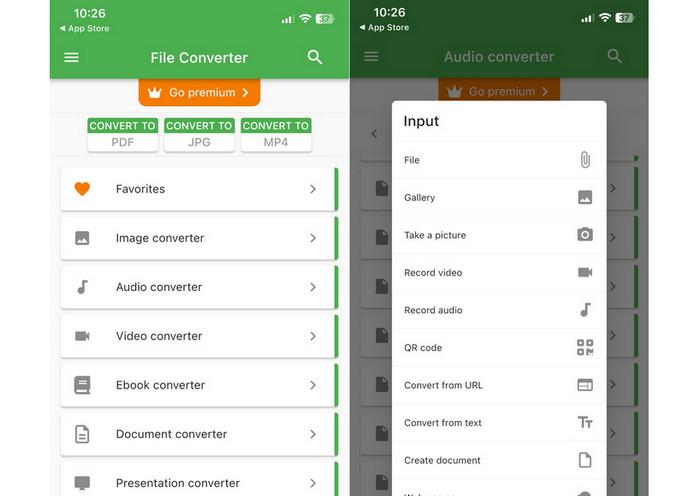
Audiodateien wie MP3 können mit Hilfe von File Converter Free, einer kostenlosen und unkomplizierten iOS-Software, in das tragbarere und verlustfreiere M4A-Format konvertiert werden. Sein unkompliziertes Design macht es jedem leicht, MP3-Dateien zu laden und sie in M4A zu konvertieren, ohne sich mit irgendwelchen Einstellungen oder Setups herumschlagen zu müssen.
Schritt 1. File Converter Free ist im App Store verfügbar und kann kostenlos heruntergeladen und verwendet werden. Starten Sie das Programm und tippen Sie auf die Registerkarte Audio.
Schritt 2. Wählen Sie MP3 als Eingabeformat und M4A für Apples AAC-Format als Ausgabeformat. Wählen Sie die gewünschte Ausgabequalität über das Dropdown-Menü. Um eine MP3-Datei in das Programm zu importieren, klicken Sie auf die Schaltfläche Datei hinzufügen.
Schritt 3. Klicken Sie auf die Schaltfläche Konvertieren, um den Konvertierungsvorgang zu starten.
Teil 6. Häufig gestellte Fragen zum Konvertieren von MP3 in M4A
Kann ich mit Windows Media Player MP3 in M4A konvertieren?
Ja, Sie können MP3-Dateien mit Windows Media Player in M4A konvertieren, allerdings sind dafür einige zusätzliche Schritte nötig, da M4A im Windows Media Player nicht nativ unterstützt wird. Alternativ können Sie einfach eine Alternative zum Windows Media Player verwenden.
Wird die Konvertierung von MP3 in M4A zu einem Verlust der Audioqualität führen?
Das Konvertieren von MP3 in M4A kann aufgrund der Unterschiede in den Komprimierungsalgorithmen, die von den beiden Formaten verwendet werden, zu einem leichten Verlust der Audioqualität führen.
Kann ich M4A zurück in MP3 konvertieren?
Ja, viele Audiokonverter-Programme und -Tools ermöglichen es Ihnen, bei Bedarf M4A in MP3 zu konvertieren. Beachten Sie jedoch, dass wiederholtes Konvertieren zwischen Formaten zu Qualitätsverlust führen kann.
Fazit
Die MP3-zu-M4A-Konvertierung ist ein wertvoller Prozess für alle, die die Qualität und Kompatibilität ihrer Audiodateien verbessern möchten. Wenn Sie die in dieser Anleitung beschriebenen Schritte und Tipps befolgen, können Sie Ihre MP3-Dateien mühelos in M4A umwandeln und hochwertige Audioqualität auf jedem Gerät genießen.
-
 Kostenlos & Online | So konvertieren Sie MP4 in M4A unter Windows / Mac
 Wie konvertiere ich MP4 zu M4A online? Kann ich das Audio aus MP4-Dateien extrahieren? Wenn Sie diesen Beitrag lesen, erhalten Sie alle Antworten zur Konvertierung von MP4 zu M4A.
-
 Die besten Tools, die Sie zum Stapelkonvertieren von MP3- in M4R-Dateien verwenden können
 Suchen Sie nach einem Konverter, der Ihre MP3-Datei stapelweise in einen M4R-Klingelton für Ihr iPhone oder iPad umwandeln kann? Lesen Sie den Artikel durch, um einige der besten zu entdecken, die es gibt.
-
 5 MP3-Cutter zum einfachen Schneiden von Audio [2023 aktualisiert]
 Benötigen Sie einen MP3-Cutter, um das Audio zu schneiden? Lesen Sie in diesem Fall diesen Artikel, da wir Ihnen die Tools zur Verfügung stellen, auf die Sie sich verlassen können, um das Audio einfach zu schneiden.
