


 Video Converter Ultimate
 Bildschirm recorder
 Videoreparatur
 Sicherer Download
2 schnelle Möglichkeiten zum Verkleinern großer OGV-Dateien [Kostenlos & Online]
OGV-Dateien werden häufig verwendet, um Videoinhalte auf Webseiten über das HTML5-Tag

Teil 1. Online-Methode zum Komprimieren von OGV-Dateien mit einem OGV-Kompressor
Free Video Compressor ist ein beliebtes und nützliches kostenloses Online-Tool zum Komprimieren von OGV-Dateien. Anders als viele andere gängige kostenlose Online-Tools hat Free Video Compressor keine Beschränkungen hinsichtlich der Anzahl oder Größe der hochgeladenen Dateien. Noch wichtiger ist, dass auf deinen exportierten Videodateien kein Wasserzeichen erscheint. Außerdem kannst du damit MP4, AVI, WMV, MOV und viele andere gängige Videoformate komprimieren, ohne die Qualität zu zerstören.
So komprimieren Sie OGV-Dateien mit Free Video Compressor
Schritt 1. Rufe die Webseite des Online-OGV-Videokompressors auf, indem du https://www.free-videoconverter.net/free-video-compressor/ in die Adresszeile eingibst.
Schritt 2. Suche den Button Add Files to Compress und klicke darauf, lade anschließend das Startprogramm herunter, um den Dienst zu aktivieren. Gehe im sich öffnenden Fenster zu deinen OGV-Dateien und klicke auf Open, um zu bestätigen.

Schritt 3. Lege anschließend die Komprimierungseinstellungen fest, um die Datei zu verkleinern. Du kannst die Größe deines Videos festlegen, die Auflösung ändern, die Bitrate auswählen und mehr.

Schritt 4. Klicke auf die Schaltfläche Compress, um den Vorgang zu starten. Nach Abschluss wird die Datei automatisch auf deinen Computer heruntergeladen.

Außerdem kann dieser kostenlose Videokompressor Ihnen bei der Lösung anderer Probleme bei der Videokomprimierung helfen. Überprüfen Sie einfach die folgenden Artikel:
Wie man ein Video für E-Mails komprimiert
Wie man AVCHD-Videodateien kostenlos unter Windows und Mac komprimiert
Teil 2. Komprimieren und Optimieren einer OGV-Datei mit Clideo
Clideo ist ein kostenloses All-in-One-Video-Toolkit. Es funktioniert mit allen gängigen Formaten und komprimiert schnell und erfordert kein Herunterladen. Sie können eine OGV-Datei kostenlos auf bis zu 500 MB komprimieren, es gibt jedoch keine Mengenbeschränkung. Jetzt können Sie die folgenden Schritte ausführen, um die Größe Ihrer OGV-Datei zu verringern.
Schritt 1. Besuche https://clideo.com/compress-video und klicke anschließend auf die Schaltfläche Choose file.
Schritt 2. Lade eine OGV-Datei hoch, die du komprimieren möchtest, von deinem Computer. Du kannst die Datei auch aus Dropbox oder Google Drive auswählen, indem du auf den blauen Abwärtspfeil klickst.
Schritt 3. Sobald die Datei hochgeladen ist, beginnt das Tool mit der Verarbeitung des Videos. Die Verarbeitungszeit hängt von der Größe des Videos ab.
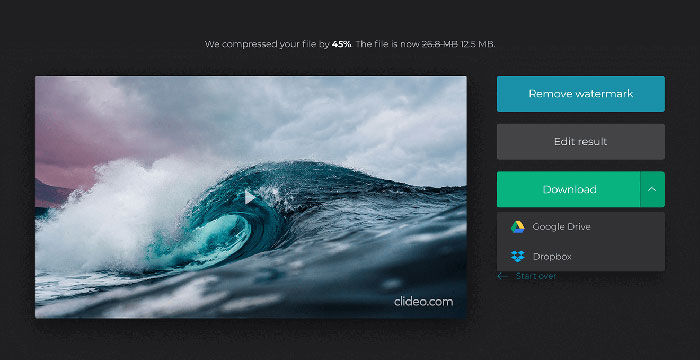
Schritt 4. Wenn die Komprimierung abgeschlossen ist, kannst du die ursprüngliche Dateigröße und die komprimierte Größe sehen. Nun kannst du das Ergebnis in der Vorschau ansehen, um sicherzugehen, dass es gut aussieht. Wenn du zufrieden bist, klicke auf die Schaltfläche Download, um es auf deinem Gerät oder in deinem Cloud-Speicher zu sichern.
Teil 3. FAQs zum Komprimieren von OGV-Dateien
Was ist eine OGV-Datei?
Eine OGV-Datei ist eine Videodatei, die im Open-Source-Ogg-Containerformat Xiph.Org gespeichert ist. Es enthält Videostreams, die einen oder mehrere verschiedene Codecs verwenden können, z. B. Theora, Dirac oder Daala. OGV-Dateien können mit verschiedenen Mediaplayern abgespielt werden.
Wie funktioniert die OGV-Komprimierung?
Bei der OGV-Dateikomprimierung führt die Interframe-Komprimierung zu einer Reduzierung der Dateigröße, indem die Ähnlichkeiten zwischen den Videobildern entfernt werden.
Wie komprimiere ich das MP4-Format in das OGV-Format?
Sie können das oben genannte Tool - Free Video Compressor - verwenden, um Ihre MP4-Dateien auf OGV zu komprimieren. Oder Sie können eine Videokonverteranwendung auswählen, um sie zu erstellen.
Fazit
Mit den oben genannten Online-Methoden können Sie ein OGV-Video effizient komprimieren. Welches haben Sie bevorzugt verwendet? Sie können Ihre Empfehlungen in den Kommentaren unten teilen!
-
 Von 50 MB bis 5 MB - So komprimieren Sie MP4-Dateien in Sekunden
 MP4-Video ist zu groß zum Hochladen? Möchten Sie die Videogröße reduzieren? Hier sind 3 effiziente Möglichkeiten, eine MP4-Datei ohne Einschränkung auf eine kleinere Größe zu komprimieren.
-
 Tutorial - 7 Möglichkeiten, Videos kostenlos zu komprimieren, ohne an Qualität zu verlieren
 Lesen und erhalten Sie 7 Möglichkeiten, um Videos kostenlos auf Ihrem Computer oder Telefon zu komprimieren. Sie können große Videos für E-Mails, Twitter, Instagram, YouTube, WhatsApp und mehr mühelos auf kleine Dateien reduzieren.
-
 So komprimieren Sie MOV-Dateien unter Windows, Mac, iPhone und Android
 Dieser Artikel zeigt ausführlich, wie Sie QuickTime MOV-Videos auf Ihrem Telefon oder Computer komprimieren. Wenn Ihr MOV-Video zu groß ist, um es zu senden, zu teilen oder zu speichern, können Sie hier 4 praktikable Lösungen erhalten.
