


 Video Converter Ultimate
 Bildschirm recorder
 Videoreparatur
 Sicherer Download
So legen Sie einen Spotify-Song als Klingelton fest – Eine Schritt-für-Schritt-Anleitung
Spotify bietet Nutzerinnen und Nutzern auf der ganzen Welt eine umfangreiche Bibliothek mit Musik, Podcasts und anderen Audioinhalten. Millionen von Songs stehen zum Abruf bereit. Wenn Sie die schöne Musik, die dort verfügbar ist, auch als Klingelton auf Ihrem Smartphone verwenden möchten, müssen Sie die ausgewählte Audiodatei zunächst auf Ihr Gerät herunterladen. Zum Glück ist dieser Vorgang nicht kompliziert. In diesem Artikel unterteilen wir den gesamten Vorgang von wie man einen Spotify-Song als Klingelton festlegt in drei Teile und analysieren jeden Teil ausführlich für Sie. Beim Vorbereiten Ihrer Klingeltöne müssen Sie möglicherweise einen Teil der Audiodatei herausschneiden. Vor diesem Hintergrund empfehlen wir Ihnen außerdem eines der professionellsten Audio- und Video-Bearbeitungstools. Einige häufig gestellte Fragen zum Einrichten von Klingeltönen werden ebenfalls beantwortet.

Teil 1. Spotify-Song als Klingelton herunterladen
Kann man Spotify für Klingeltöne verwenden? Die Antwort ist natürlich ja. Was Sie wissen müssen, bevor Sie offiziell fortfahren, ist, dass Sie derzeit keine Musik direkt über Spotify auf Ihr Gerät herunterladen und als Klingeltöne festlegen können. Daher benötigen wir die Hilfe einiger Tools. Laut unserer Umfrage ist Spotify Downloader eine ziemlich gute Wahl. Sie müssen lediglich die offizielle Website in Ihrem Browser öffnen, den Link zu Ihrer Lieblingsmusik kopieren und in den entsprechenden Abschnitt einfügen. So können Sie die Datei direkt auf Ihren Computer herunterladen. Wenn Sie damit Probleme haben, erklären wir Ihnen die Schritte im folgenden Abschnitt.
Folgendes müssen Sie tun, um Spotify-Songs als Klingeltöne mit Spotify Downloader herunterzuladen.
Schritt 1. Rufen Sie mit Ihrem Browser die offizielle Website von Spotify Downloader auf.
Schritt 2. Öffnen Sie die Spotify-App auf Ihrem Smartphone. Suchen Sie dann den Titel, den Sie herunterladen möchten.
Schritt 3. Tippen Sie auf das Dreipunkt-Symbol und wählen Sie Teilen > Link kopieren.
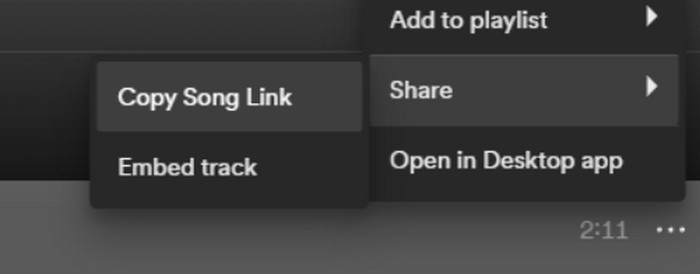
Schritt 4. Nun können Sie zur Spotify-Downloader-Seite wechseln. Fügen Sie den kopierten Link ein und klicken Sie auf Senden.
Schritt 5. Wenn der Vorgang abgeschlossen ist, klicken Sie auf Download.

Teil 2. Machen Sie einen Spotify-Song zu Ihrem Klingelton
Nachdem Sie Ihre Lieblingsmusik auf Ihr Gerät heruntergeladen haben, können Sie mit der Bearbeitung beginnen. Wir können den Höhepunkt des Lieds oder Ihren Lieblingsteil des Lieds bearbeiten und ein Spotify-Lied zu Ihrem Klingelton machen. Es ist zu beachten, dass iPhone und Android-Telefone unterschiedliche Klingelton-Audioformate unterstützen. Derzeit unterstützt das iPhone nur Klingeltöne im M4R-Format, während Android-Telefone derzeit MP3, M4A, WAV und OGG unterstützen. Wenn Sie feststellen, dass Ihr Audiodateiformat die oben genannten Anforderungen nicht erfüllt, können Sie einen professionellen Formatkonverter verwenden, um Ihnen zu helfen.
In diesem Fall empfehlen wir Ihnen, ein All-in-One-Audiobearbeitungstool auszuprobieren: das von FVC ausgewählte Video Converter Ultimate, um die Songbearbeitung aus einer Hand zu realisieren. Neben der zentralen Formatkonvertierung unterstützt es auch das Bearbeiten der Audiolänge, das Anpassen der Lautstärke und der Audiospur sowie das Hinzufügen von Ein- und Ausblendeffekten zu Ihren Klingeltönen. Bei der Verarbeitung Ihrer Dateien entstehen für Sie kaum oder gar keine zusätzlichen Wartezeiten. Es hilft Ihnen, die Parameter Ihrer Audiodateien besonders effizient zu ändern.
Gratis DownloadFür Windows 7 oder neuerSicherer Download
Gratis DownloadFür MacOS 10.7 oder neuerSicherer Download
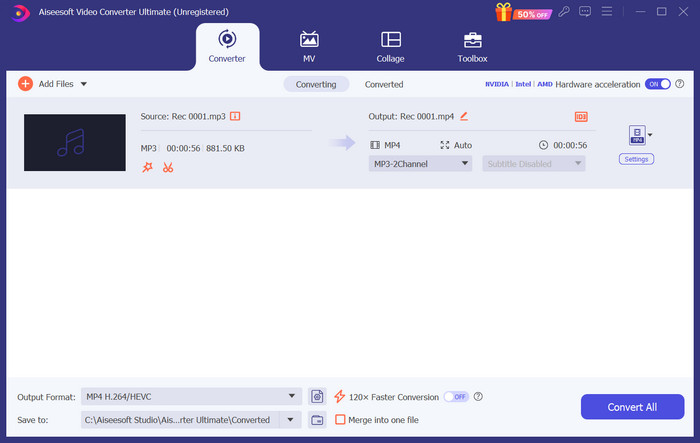
Hier zeigen wir Ihnen, wie Sie mit FVC Video Converter Ultimate einen Klingelton aus Spotify erstellen.
Schritt 1. Laden Sie FVC Video Converter Ultimate auf Ihren Computer herunter und installieren Sie es. Stellen Sie sicher, dass Sie Ihren Lieblingssong auf Ihrem Gerät gespeichert haben.
Schritt 2. Öffnen Sie die Software auf Ihrem Desktop und klicken Sie auf Dateien hinzufügen, um den Spotify-Song auf diese Plattform hochzuladen.
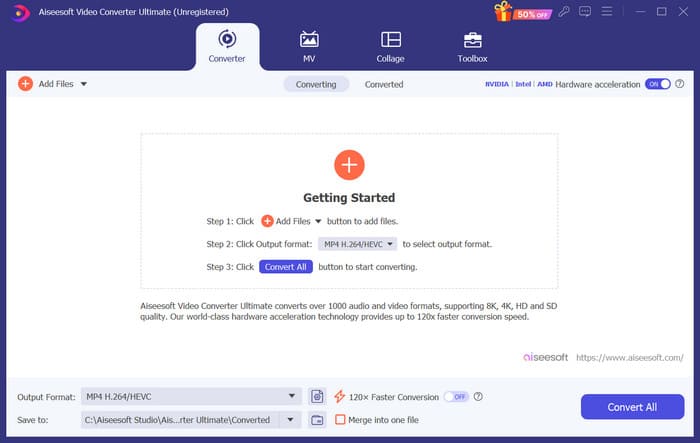
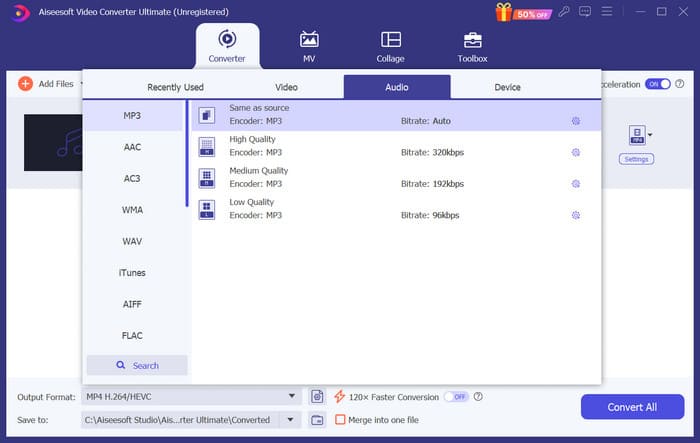
Schritt 3. Um das Format Ihres Klingeltons zu konvertieren, öffnen Sie das Dropdown-Menü neben Ausgabeformat. Anschließend können Sie Ihr Zielformat aus allen Optionen unter Audio auswählen.
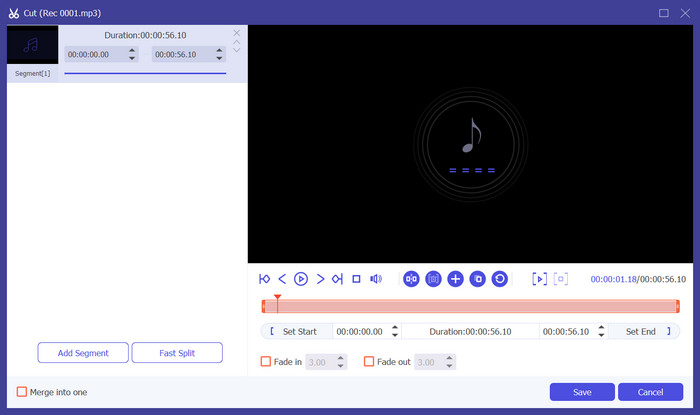
Schritt 4. Um einen Teil des Songs als Klingelton für Ihr Telefon auszuwählen, klicken Sie auf Schneiden. Sie gelangen dann auf die Zuschneide-Seite. Ziehen Sie den Schieberegler, um den Teil auszuwählen, den Sie behalten möchten. In diesem Fenster können Sie Ihrem Klingelton auch Ein- und Ausblendeffekte hinzufügen.
Schritt 5. Um die Lautstärke oder die Audiospur Ihrer Datei zu ändern, klicken Sie auf Bearbeiten. Auf der neuen Seite können Sie das Bearbeitungsergebnis sogar direkt in der Vorschau ansehen. Um die Änderung zu übernehmen, klicken Sie auf OK.
Schritt 6. Wenn Sie die Einstellungen für Ihren Klingelton abgeschlossen haben, klicken Sie auf Alle konvertieren, um die Datei zu exportieren.
Teil 3. Spotify-Song als Klingelton festlegen
Nachdem wir nun unseren neuen Klingelton fertig haben und ihn auf die richtige Länge bearbeitet haben, müssen wir den letzten Schritt machen: den Spotify-Song als Klingelton für eingehende Anrufe auf Ihrem Telefon einstellen. Da verschiedene Geräte unterschiedlich funktionieren, führen wir Sie durch die Einrichtung auf Ihrem Gerät, sowohl auf dem iPhone als auch auf Android-Telefonen.
Android
In diesem Abschnitt führen wir Sie durch die Einstellung von Spotify-Songs als Klingeltöne auf Ihrem Android-Telefon. Wir verwenden als Beispiel ein Samsung-Telefon. Bevor wir beginnen, sollten Sie Ihren Spotify-Song auf Ihr Telefon übertragen. Die Umwandlung über ein USB-Kabel oder Bluetooth sind beides Möglichkeiten, die als Referenz dienen können.
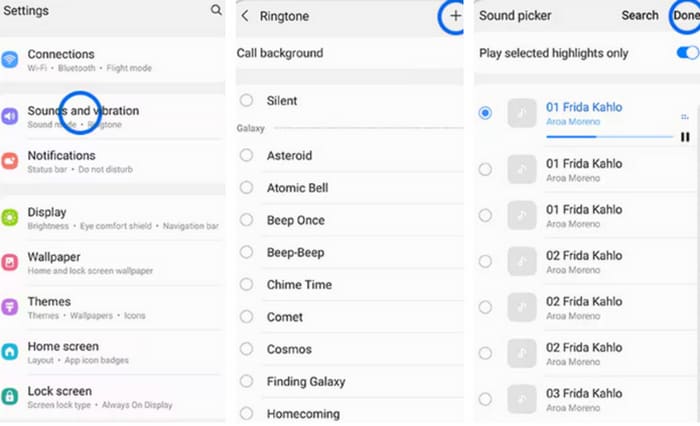
Schritt 1. Öffnen Sie auf Ihrem Smartphone die Einstellungen und tippen Sie auf Töne & Vibration > Telefonklingelton > Meine Töne.
Schritt 2. Tippen Sie auf Hinzufügen und wählen Sie den bearbeiteten Spotify-Song aus allen Dateien auf Ihrem Mobiltelefon aus.
Schritt 3. Um die Änderung zu speichern, tippen Sie auf Fertig. Nun haben Sie erfolgreich einen Spotify-Song als Samsung-Klingelton hinzugefügt.
iPhone
Wenn Sie einen Klingelton für Ihr iPhone erstellen möchten, müssen Sie möglicherweise Tools von Drittanbietern verwenden. Das beliebteste Tool ist GarageBand, und wir erklären Ihnen, wie Sie Spotify-Songs als iPhone-Klingeltöne einrichten.
Schritt 1. Laden Sie GarageBand auf Ihr iPhone herunter und starten Sie es. Wählen Sie Projekt.
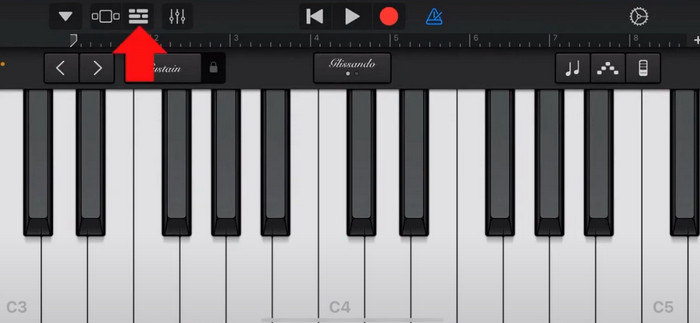
Schritt 2. Wählen Sie danach Loop > Dateien. Um Ihren Spotify-Song auszuwählen, tippen Sie auf „Objekte aus Dateien-App auswählen“.
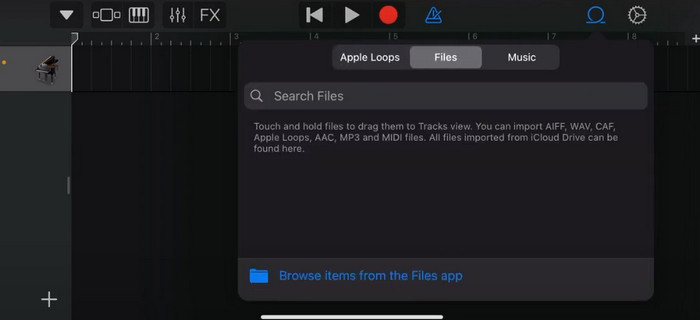
Schritt 3. Ziehen Sie die zugeschnittene Spotify-Datei in die Timeline.
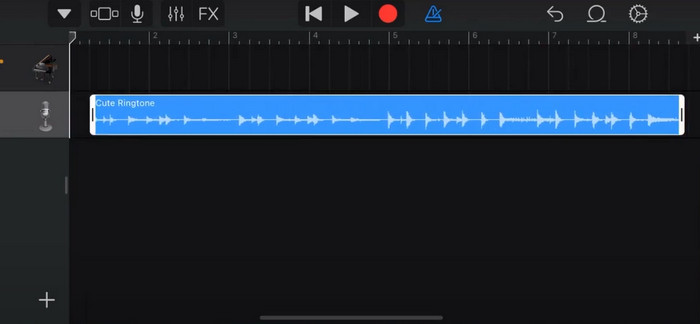
Schritt 4. Deaktivieren Sie das Metronom. Tippen Sie dann auf das Pfeil-nach-unten-Symbol und wählen Sie „Meine Songs“.
Schritt 5. Halten Sie den Songclip gedrückt und tippen Sie auf Teilen.
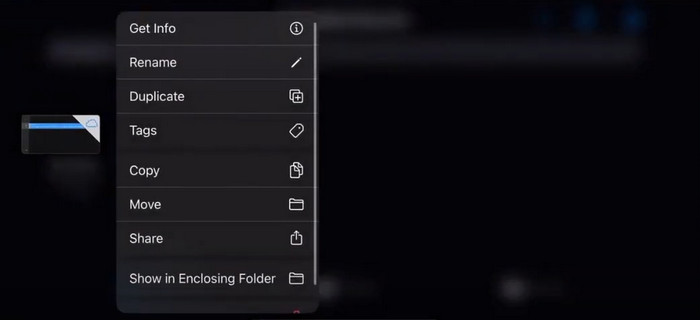
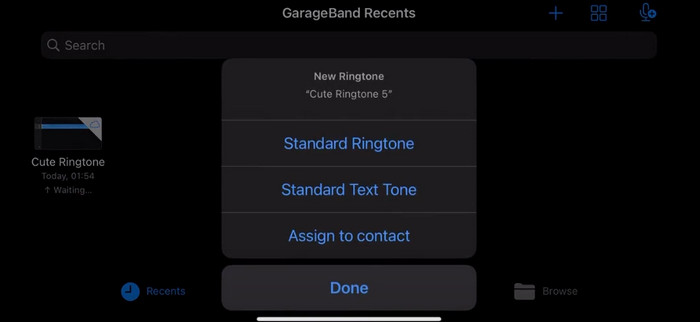
Schritt 6. Wählen Sie Klingelton > Exportieren. Tippen Sie auf „Ton verwenden als“ > Standardklingelton.
Teil 4. Häufig gestellte Fragen zum Einrichten eines Spotify-Songs als Klingelton
Kann ich einen Spotify-Song direkt als Klingelton verwenden?
Spotify erlaubt es Benutzern nicht, einen Song direkt aus der App als Klingelton auf einem Mobilgerät zu verwenden. Es gibt jedoch alternative Methoden, mit denen Sie einen Spotify-Song als Klingelton festlegen können. Sie können den gewünschten Song in einem digitalen Musikgeschäft wie iTunes oder Google Play Music kaufen. Es stehen Tools von Drittanbietern zur Verfügung, mit denen Sie Spotify-Songs in MP3-Dateien konvertieren können.
Wie erstelle ich ohne iTunes einen benutzerdefinierten Klingelton für mein iPhone?
Wenn Sie einen benutzerdefinierten Klingelton für Ihr iPhone erstellen möchten, ohne iTunes zu verwenden, können Sie GarageBand verwenden, eine Musik-App, die auf iOS-Geräten verfügbar ist. Mit dieser Methode können Sie Ihren Klingelton mit Ihren Lieblings-Audioclips auf Ihrem Gerät personalisieren.
Wie konvertiere ich Spotify ohne Computer in einen iPhone-Klingelton?
Einen Spotify-Song direkt in einen iPhone-Klingelton umzuwandeln, ohne einen Computer zu verwenden, ist schwierig. Es gibt jedoch einige alternative Methoden, um ein ähnliches Ergebnis zu erzielen. Sie können beispielsweise eine Klingelton-Maker-App verwenden oder GarageBand wählen.
Fazit
Oben haben wir Ihnen einen vollständigen Überblick darüber gegeben, wie Sie einen Spotify-Song als Klingelton für eingehende Anrufe festlegen. Wir haben alle Schritte abgedeckt und Ihnen ein hochmodernes Audiobearbeitungstool, den von FVC empfohlenen Video Converter Ultimate, zur Verfügung gestellt, mit dem Sie Ihren Song personalisieren können. Wenn Sie möchten, hilft Ihnen dieses Tool auch dabei, ganz einfach ein Video als Ihren Klingelton zu verwenden. Wir sind überzeugt, dass Sie damit alle benötigten Anleitungen erhalten.
-
 Beste Anleitung zum Konvertieren von WAV in einen Klingelton im Handumdrehen
 Möchten Sie WAV mühelos in einen Klingelton konvertieren? Unsere benutzerfreundlichen Tools erledigen die Arbeit! Genießen Sie im Handumdrehen eine hochwertige Audiokonvertierung – ohne technische Probleme. Probieren Sie sie noch heute aus!
-
 So machen Sie aus einer Sprachnotiz einen Klingelton auf iPhone und Android
 Wenn Sie aus einer Sprachnotiz einen Klingelton machen möchten, lesen Sie diesen Artikel. Egal, ob Sie iPhone- oder Android-Benutzer sind, in unseren Inhalten finden Sie Lösungen.
-
 5 MP3-Cutter zum einfachen Schneiden von Audiodateien [2024 aktualisiert]
 Benötigen Sie einen MP3-Cutter, um den Ton zuzuschneiden? In diesem Fall lesen Sie diesen Artikel, denn wir stellen die Tools bereit, auf die Sie sich beim einfachen Audio-Schneiden verlassen können.
