


 Video Converter Ultimate
 Bildschirm recorder
 Videoreparatur
 Sicherer Download
Liste der verfügbaren Tools und Plattformen im Web für 3GP Voice/Video Recorder
Ein ISO-Standard-Format-Container, der für seine geringe Größe bekannt ist und sich daher sehr gut für die Übertragung von Daten über 3G‑Netze und ähnliche Verbindungen eignet. Einige der fortschrittlichen 3GP‑Anrufrekorder verwenden dies als ihr standardbasiertes Format. Mit der Einführung des 3GP‑Formats konnten wir große Dateien auf unseren Smartphones ansehen, selbst bei langsamer Internetverbindung. Die meisten Nutzer verwenden diese Datei, da sie Video‑, Audio‑ und Textformate unterstützt. Daher möchten Anwender weiterhin 3GP‑Videos aufzeichnen oder eine 3GP‑Audiodatei in ein neues Format wie MP3 speichern. In diesem Fall wird ein 3GP‑Video‑Recorder oder 3GP‑Sprach‑Recorder zu einem unverzichtbaren Werkzeug. Also machen Sie weiter und lesen Sie die folgenden Details.

Teil 1. Bester Online-3GP-Recorder zum kostenlosen Aufnehmen von 3GP-Videos
FVC Free Screen Recorder
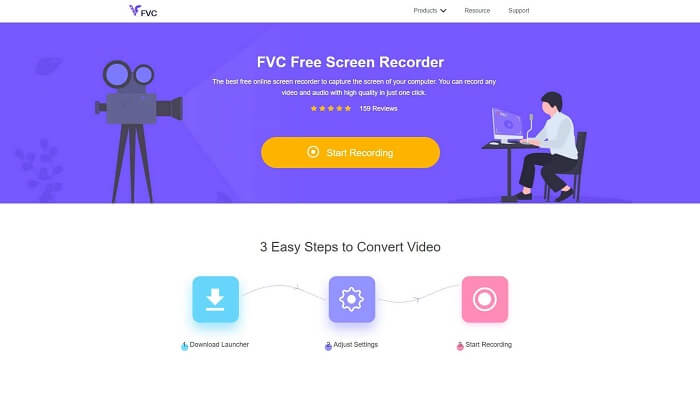
Ein Tool, das sich am besten für Nutzer eignet, die keine Dateien herunterladen möchten und eine stabile Verbindung zum Aufzeichnen haben. Wenn Sie zu diesen Nutzern gehören, ist dies der beste kostenlose Online‑Bildschirmrekorder, entwickelt von FVC: der FVC Free Screen Recorder. Ein Tool, mit dem Nutzer sämtliche Aktionen auf dem Bildschirm Ihres Computers aufnehmen können. Wenn Sie Gameplay, Geschäftsbesprechungen, Diskussionen und dergleichen aufzeichnen möchten, ist dies die beste Wahl. Für detailliertere Informationen und Schritte lesen Sie bitte alles aufmerksam durch und befolgen Sie die aufgeführten Anweisungen.
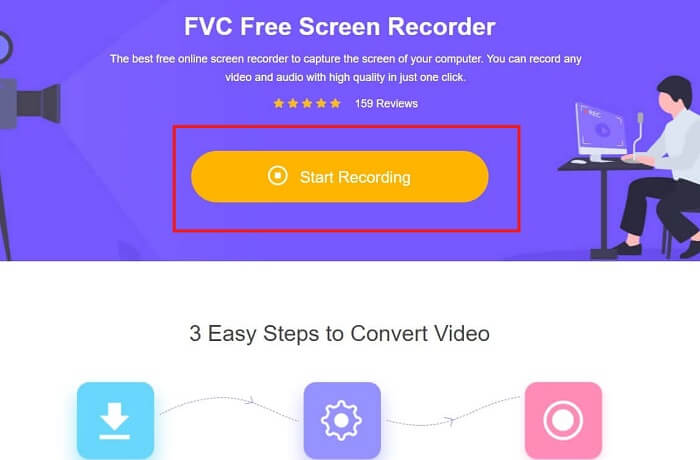
Schritt 1. Klicken Sie auf diesen Link, um zur Hauptoberfläche der Website zu gelangen. Klicken Sie auf „Start Recording“ und starten Sie das Tool.
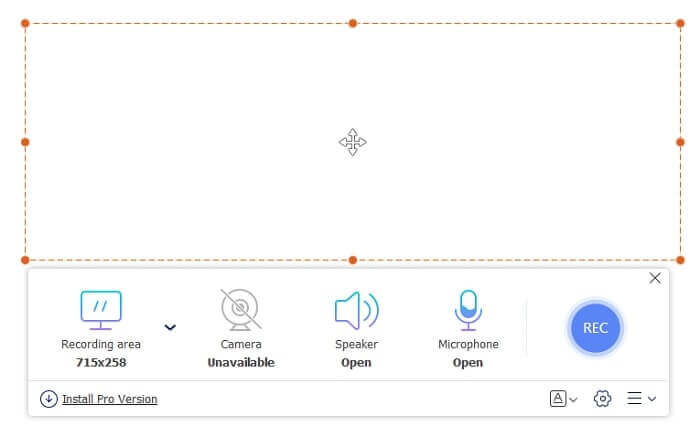
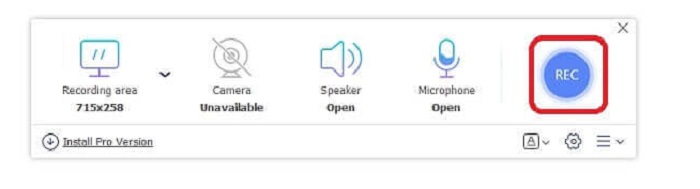
Schritt 2. Wenn das Tool bereits geöffnet ist, sehen Sie einen schwebenden Bildschirm wie diesen.
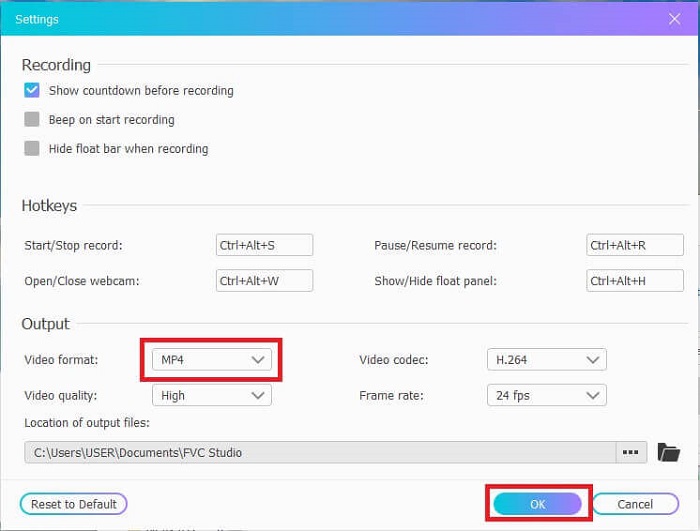
Schritt 3. Drücken Sie auf Settings, um das Format und andere gewünschte Einstellungen anzupassen, und klicken Sie dann auf OK, um zu speichern.
Schritt 4. In der schwebenden Symbolleiste können Sie die Größe des Frame anpassen oder auf Full Screen klicken, um den gesamten Bildschirm aufzunehmen. Neben der Frame‑Größe befindet sich die Webcam, um Ihr Gesicht während der Aufnahme hinzuzufügen, Speaker für den Systemton und schließlich das Mic, um Ihre Stimme hinzuzufügen. Wenn Sie bereit sind, klicken Sie auf die scheibenförmige Schaltfläche, um mit der Aufnahme zu beginnen.
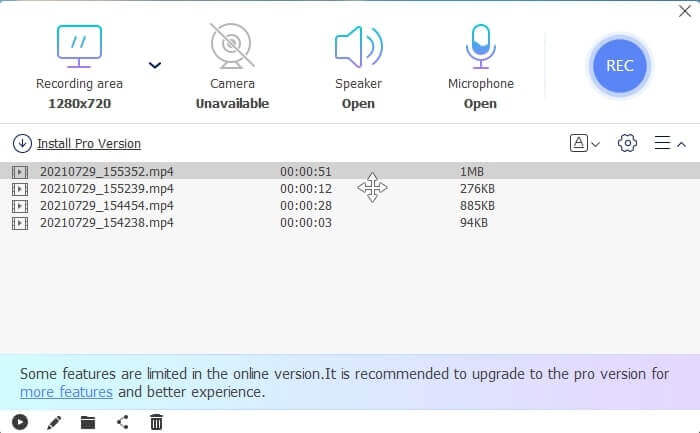
Schritt 5. Wenn die Aufnahme beendet ist, klicken Sie auf die quadratische Schaltfläche. Eine History-Liste wird unterhalb der schwebenden Symbolleiste angezeigt, sortiert von neu nach alt.
Vorteile
- Bestes kostenloses Online-Tool, das für alle Plattformen verfügbar ist.
- Im Gegensatz zu jedem anderen Online-Tool ist es einfach zu bedienen und während der Aufnahme werden plötzlich keine Anzeigen eingeblendet.
- Um sich anzumelden, mussten Sie das Tool verwenden.
Nachteile
- Internetabhängig, es funktioniert nicht ohne Internetverbindung oder Daten.
- Es hat keine Funktion zum Sperren des Bildschirms. Es ist nur in der Premium-Version des Tools verfügbar.
Teil 2. Andere beliebte 3GP-Video- und Sprachrekorder für Windows und Mac
1. FVC-Bildschirmrekorder
Haben Sie schon einmal von einem der besten Bildschirmrekorder gehört, die vom Benutzer weltweit ausgewählt wurden? Dann ist dies für Sie, wenn dies nicht der Fall ist. FVC Screen Recorder Dieser Screen Recorder ist auf allen bekannten Plattformen verfügbar. Die häufigsten Probleme, die mit dem anderen Bildschirmrekorder auftreten können, einige Android-Sprachrekorder 3gp keine Tonausgabe. Während Sie das Tool verwenden, werden Sie niemals auf diese Art von Problem stoßen, solange Sie den Lautsprecher für den Systemton und das Mikrofon nicht ausschalten, um Ihre Stimme hinzuzufügen. Wenn Sie wissen möchten, wie Sie dieses Mehrzweckwerkzeug verwenden, lesen Sie die folgenden Anweisungen gründlich durch und befolgen Sie sie.
Schritt 1. Laden Sie das Tool herunter. Wählen Sie eines der beiden Betriebssysteme, die Sie derzeit verwenden. Installieren Sie das Tool und passen Sie die Preferences nach Ihren Wünschen an, klicken Sie dann auf Finish, um fortzufahren.
Kostenloser DownloadFür Windows 7 oder höherSicherer Download
Kostenloser DownloadFür macOS 10.7 oder höherSicherer Download
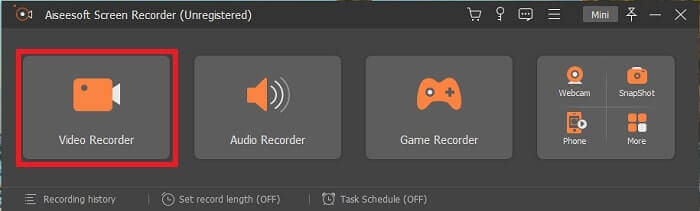
Schritt 2. Nach der Installation erscheint eine schwebende Symbolleiste wie diese auf Ihrem Bildschirm. Dies zeigt an, dass die von Ihnen verwendete App bereits über das Programm ausgeführt wird. Klicken Sie auf Video Recorder.
Schritt 3. Nachdem Sie darauf geklickt haben, passen Sie die Anzeige auf Vollbild an oder wählen Sie einen Bereich aus. Drücken Sie auf System Sound, um den Ton Ihres Computers hinzuzufügen. Diese weiteren Optionen hängen nur davon ab, ob Sie sie verwenden möchten. Sie können außerdem Ihr Gesicht und Ihre Stimme hinzufügen, indem Sie Webcam und Microphone einschalten.
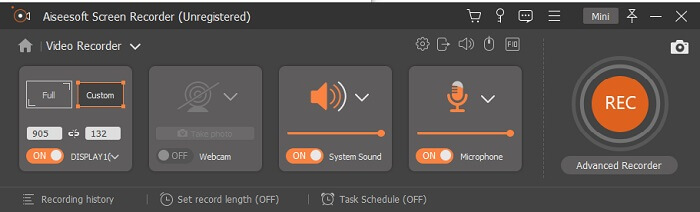
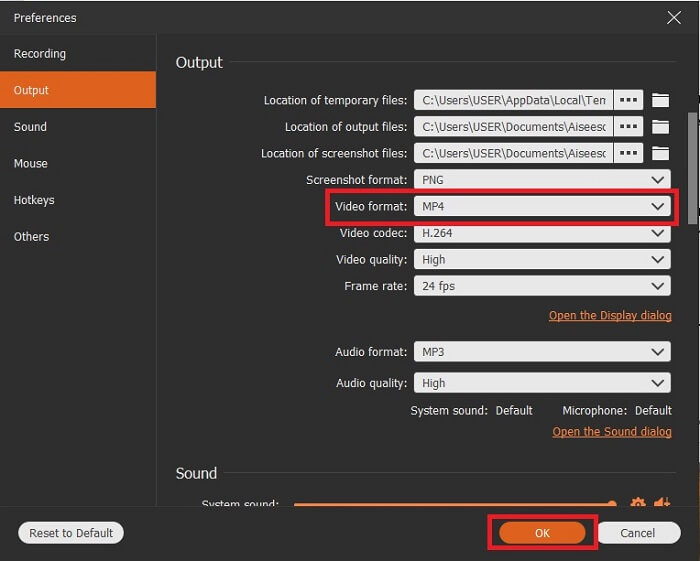
Schritt 4. Bevor Sie starten, klicken Sie auf die Zahnrad‑Schaltfläche und passen Sie die Einstellungen bei Bedarf an, dann klicken Sie auf OK, um die Einstellungen zu speichern. Nach allen Vorbereitungen klicken Sie auf die rundförmige Schaltfläche, um mit der Aufnahme zu beginnen.
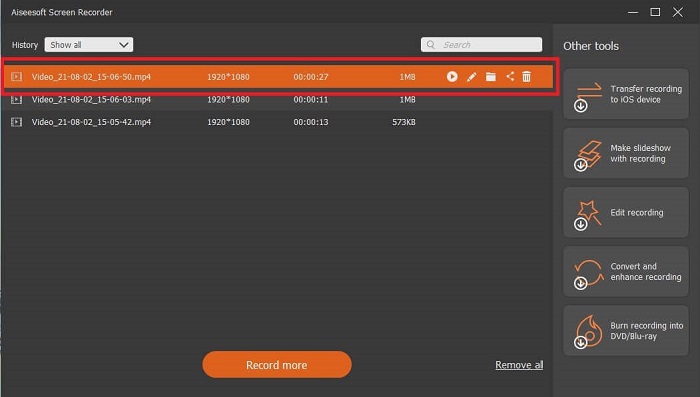
Schritt 5. Wenn Sie die Aufnahme beenden möchten, klicken Sie auf die kleine quadratische Schaltfläche in der Symbolleiste, um sie zu Stoppen. Klicken Sie auf „Save“ und wählen Sie den Speicherort. Anschließend wird eine Liste auf Ihrem Bildschirm angezeigt, die von neu nach alt sortiert ist. Klicken Sie auf das erste Video oben, um die Aufnahme erneut anzusehen.
Vorteile
- Es ist nicht internetabhängig. Nehmen Sie so viel auf, wie Sie möchten, jederzeit und überall.
- Es ist benutzerfreundlich und die beste Wahl für Anfänger, die eine professionelle Ausgabe wünschen, oder für Profis, die einen einfach zu bedienenden Bildschirmrekorder suchen.
- Es hat diese einzigartige Funktion, den Lock-in-Bildschirm.
Nachteile
- Pay-to-Use-Tool und dennoch verwenden die Benutzer es immer noch.
- Es erfordert 2,4 MB Ihres Speichers, um heruntergeladen zu werden.
2. ScreenFlow
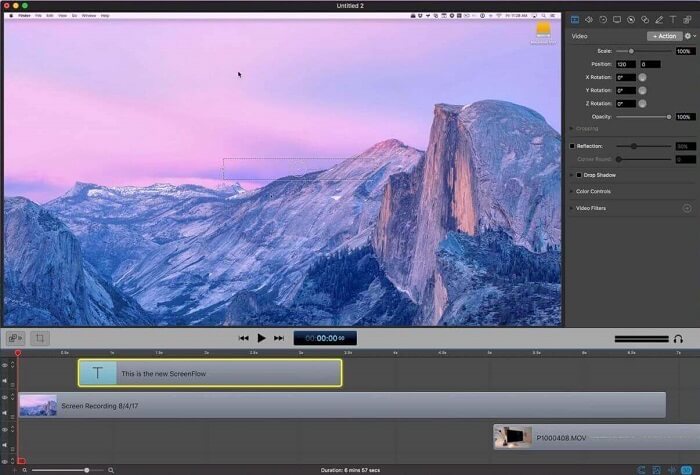
Ein weiteres bestes Tool für Mac-Benutzer. Screenflow ist ein Tool, das als das beste Bildschirmaufzeichnungstool im Mac-Betriebssystem gilt. Es ist ein Pay-to-Use-Tool. Wenn Sie also der Meinung sind, dass dieses Tool billig ist, lautet die Antwort nicht. Dieses Tool kostet fast das Limit, das ein Bildschirmschreiber bieten kann. Es kann das bieten, was andere kostenpflichtige Bildschirmschreiber bieten können. Und aus irgendeinem Grund bevorzugen Mac-Benutzer dies als Bildschirmrekorder ihrer persönlichen Wahl.
Vorteile
- Einfach zu bedienendes Tool, das für Mac verfügbar ist.
- Aktuelles Werkzeug.
- Keine Malware-Probleme.
Nachteile
- Nur auf Mac verfügbar.
- Es kann so teuer sein wie Ihre Wahl.
3. Fraps
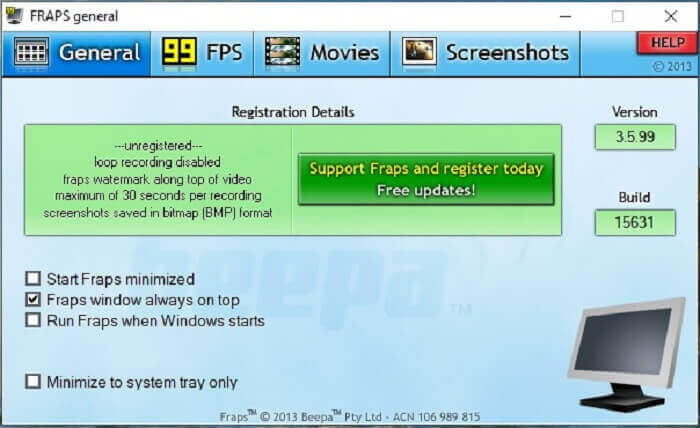
Wie das andere Tool kann Fraps problemlos in die Top 10 der besten Bildschirmrekorder aufgenommen werden. Dieses Tool macht Ihre Bildschirmaufnahme so einfach wie möglich. Wegen seiner punktgenauen Anleitung des Werkzeugs. Aber dieses Tool ist nicht im Update enthalten. Aufgrund der weniger Updates für das Tool wurde seine Popularität immer geringer, aber dennoch bevorzugen einige Benutzer es so, wie es ist.
Vorteile
- Ein einzigartiges Tool, das das AVI-Dateiformat unterstützt.
- Benutzerfreundliche Schnittstelle mit ausführlicher Anleitung.
- Unterstützt Auflösungen bis zu 7680 x 4800.
Nachteile
- Die Oberfläche ist langweilig anzusehen.
- Wegen des AVI-Dateiformats. Wenn Sie 20 Minuten Video aufnehmen, würde dies bis zu fast 4 GB Speicherplatz beanspruchen. Nicht die beste Wahl für lange Aufnahmen.
Teil 3. Vergleichstabelle
| FEigenschaften | FVC Free Screen Recorder | FVC-Bildschirmrekorder | Screenflow | Fraps |
| Video-/Audio-Bildschirmaufnahme |  | | | |
| Kommentieren | | | | |
| Malware-sicher | | | | |
| Hardware-Beschleunigung |  | | | |
| Sperrbildschirm | | | | |
| Dateigröße | Wenig kbps für den Launcher | 2.1mb | 85,3 MB | 2,4 MB |
| Verfügbares Betriebssystem | Auf allen Plattformen | Auf allen Plattformen | Mac OS | Windows XP, 2003, Vista und Windows 7 |
| Preisklasse | Ein kostenloser Open-Source-Online-Recorder | Für 1 Monat: $25.00 Für ein Jahr: $31.20 Für lebenslange Lizenz: $55.20 | SCREENFLOW (Mengenrabattpreise): $149 SCREENFLOWSuper Pak: $209 SCREENFLOWSuper Pak + Premium-Support: $239 | Es ist kostenlos, aber Sie können sich auch für $37 registrieren |
Teil 4. Häufig gestellte Fragen zum 3GP-Rekorder
Warum kann ich mein 3GP-Mediendateiformat nicht auf meinem Mediaplayer abspielen?
Vielleicht liegt es daran, dass Ihr Mediaplayer diesen Codec-Typ nicht unterstützt. Wenn Sie Ihr 3GP‑Dateiformat ansehen möchten, können Sie den FVC Free Video Player verwenden. Dieser Mediaplayer ist kostenlos und unterstützt verschiedene Video‑/Audio‑Formate. Solange Sie Internetzugang haben, können Sie auch die Premium‑Version mit mehr Optionen und Funktionen als die kostenlose Version nutzen. Oder Sie lesen Best 3GP Players, um den gewünschten Player zu finden.
Wie speichere ich eine .3gp-Audiodatei von einem Android-Diktiergerät als MP3-Datei?
Verwenden Sie einen Konverter, der 3GP in MP3 umwandeln kann. Ein sehr gutes Beispiel ist der FVC Free Online Video Converter. Er kann über 200 Medienformate konvertieren, die auf allen Plattformen verfügbar sind.
Ist es möglich, verschiedene 3GP-Dateien in einer Medienausgabe zusammenzuführen?
Ja, das ist mit Hilfe des FVC Free Online Merger möglich. Dieses Online‑Tool macht es möglich, 2 oder mehr 3GP‑Dateien zu einer zusammenzuführen. Es ist ein weiteres hervorragendes Tool, das von FVC entwickelt wurde. Klicken Sie auf den Merger, um fortzufahren.
Fazit
Wir kommen zu dem Schluss, dass die meisten Benutzer die Aufnahme immer noch für verschiedene Zwecke durchführen. Ob als Aufnahmegerät für Montagen, Geschäftstreffen, Lehrergespräche und vieles mehr. Aber egal, aus welchem Grund Sie aufnehmen oder welches Format Sie als Ausgabe des Endprodukts haben möchten. Alle Rekorder können die Arbeit erledigen, wie Sie es wünschen.
Aber trotz all der verschiedenen Rekorder im Internet und in dieser Liste fragen Sie sich vielleicht immer noch, welches Tool am besten zu Ihnen passt. Bevor Sie eine Entscheidung treffen, sollten Sie gründlich darüber nachdenken, ob Ihr Bildschirmrekorder die Anforderungen erfüllt, die Sie heute und vielleicht in Zukunft haben. FVC Screen Recorder ist das beste Tool für Sie. Anders als jedes andere hier aufgeführte Tool ist dieses Programm so einzigartig, dass es sich von allen Bildschirmrecordern im Internet abhebt. Und dennoch ist es immer einfach zu bedienen und liefert die beste Leistung, die sich Einsteiger wie Profis wünschen können. Worauf warten Sie also noch? Geben Sie sich nicht mit einem kostenlosen oder einem teuren Tool zufrieden, wenn Sie eine günstige Version kaufen können, die mehr leisten kann als diese Tools.
-
 4 besten kostenlosen Web-Launch-Recorder zum Aufnehmen von Bildschirmvideos
 Suchen Sie nach der besten Möglichkeit, Aktivitäten auf dem Bildschirm auf Ihrem Desktop aufzuzeichnen, ohne einen Cent zu zahlen? Hier sind die 4 am häufigsten verwendeten kostenlosen Web-Launch-Rekorder.
-
 Der unvoreingenommene Cinch Review Audio Recorder und die beste Alternative
 Cinch Audio Recorder ist der beste Weg, um Musik von Streaming-Sites herunterzuladen. Erfahren Sie einfach mehr über die unvoreingenommene Bewertung und die beste Alternative aus dem Artikel.
-
 Top 5 der besten Maus- und Tastaturrekorder für Windows und Mac
 Hier sind die fünf besten Maus- und Tastaturrekorderprogramme, mit denen Sie Ihre Mausbewegungen und Tastaturklicks speichern und die Ereignisse wiederholen können.
