


 Video Converter Ultimate
 Bildschirm recorder
 Videoreparatur
Wählen Sie den besten GIF-zu-AVI-Konverter, der auf PC und Mac verfügbar ist
Die Konvertierung Ihres GIF- in das AVI-Dateiformat wurde mit Hilfe dieser unglaublichen Tools möglich. Ohne Qualitätsverlust und irgendwie, um es besser zu machen. Einige der Konverter, die Sie möglicherweise verwenden, können Ihnen jedoch nicht die beste Qualität liefern, die Sie verwenden möchten. Sie müssen sich also keine Sorgen machen, wenn Sie Ihr GIF durch ein AVI-Format ersetzen möchten. Konvertieren Sie Ihr Video ohne Qualitätsverlust in ein AVI-Format, indem Sie den unten angegebenen Schritt befolgen und den besten Konverter auswählen, den Sie verwenden sollten.

Teil 1. Das kostenlose und professionelle Konvertieren von GIF in AVI mit detaillierten Schritten
1. Freier Weg - FVC Free Video to GIF Maker
FVC Free Video to GIF Maker ist der beste kostenlose GIF-zu-AVI-Konverter, der dir von FVC zur Verfügung gestellt wird. Außerdem kannst du mit Hilfe dieses Tools beliebige Video- oder Audiodateien kostenlos in ein neues Format umwandeln. Dieses Tool bietet speziell einen der besten Konverter – und das kostenlos. Zwar sind die meisten der wichtigen Funktionen der Premium-Version nicht gratis enthalten, dennoch ist das Tool beim Konvertieren immer noch sehr leistungsfähig. Um zu erfahren, wie du dieses kostenlose Tool verwendest, folge den unten angegebenen Schritten, um dein GIF zu konvertieren.
Schritt 1. Installiere das Tool auf deinem Desktop.
Kostenloser DownloadFür Windows 7 oder höherSicherer Download
Kostenloser DownloadFür MacOS 10.7 oder höherSicherer Download
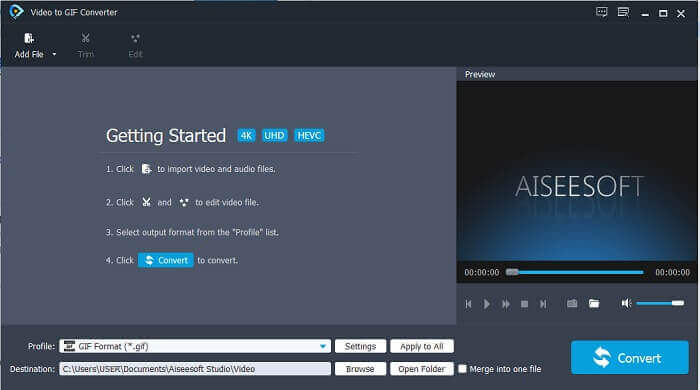
Schritt 2. Dies ist eine Beispieloberfläche, die du siehst, wenn du das Tool bereits heruntergeladen hast.
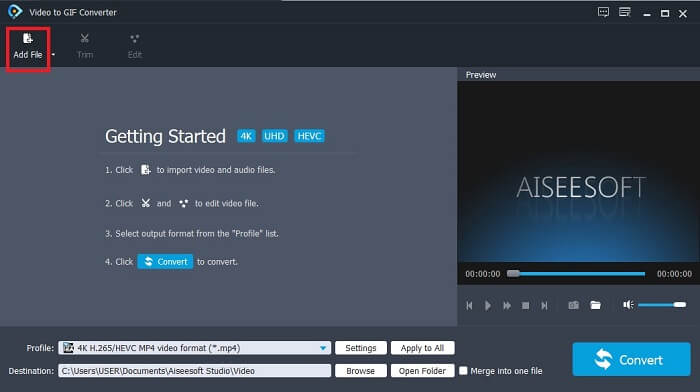
Schritt 3. Klicke auf Datei hinzufügen und wähle die GIF-Datei, die du konvertieren möchtest. Wenn die Datei bereits ausgewählt ist, klicke auf Öffnen, um sie in die Oberfläche einzufügen.
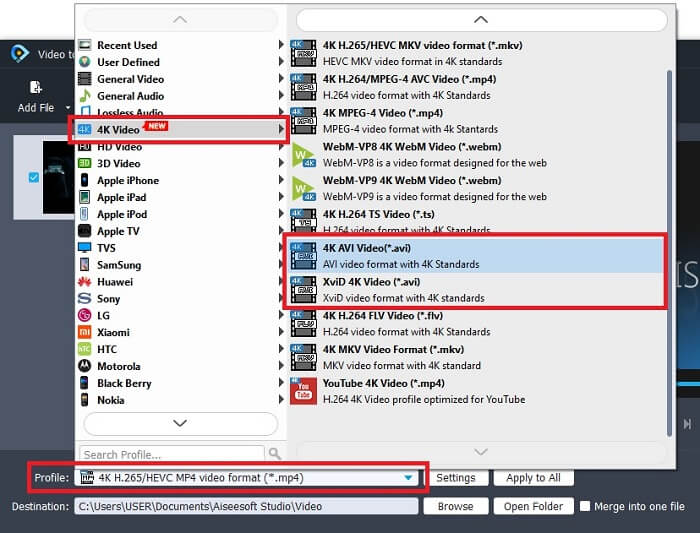
Schritt 4. Ändere unter Profil das Format in AVI. Klicke im Bereich 4K Video auf das Format AVI. Wenn alles bereit ist, klicke auf Konvertieren, um die Umwandlung zu starten.
Schritt 5. Die Konvertierung des GIF dauert nicht lange. Anschließend kannst du dein fertiges Ergebnis genießen.
2. Professioneller Weg - Video Converter Ultimate
Vielleicht fragst du dich, wie man ein GIF in AVI umwandelt oder umgekehrt. Und ob es ein spezielles Tool gibt, das deine Konvertierung besonders hochwertig macht. Dieses Tool ist Video Converter Ultimate, denn es unterstützt mehr Formate als das kostenlose Tool und andere kostenpflichtige Konverter. Außerdem bietet es mehr Funktionen, mit denen du dein Video oder Audio weiter verbessern kannst. Mit diesem ultimativen Konverter kannst du dein GIF zum Leben erwecken. Lerne, wie du dein GIF-Format in ein AVI-Format konvertierst, ohne Qualitätsverlust und mit zusätzlicher Verbesserung des Videos, falls es etwas unscharf geworden ist. Folge dem nachstehenden Schritt, um zu erfahren, wie du deine Lieblings-GIF-Datei richtig umwandelst.
Schritt 1. Klicke auf die Download-Schaltfläche entsprechend deinem Betriebssystem. Installiere das Programm auf deinem Desktop-Laufwerk und passe die Voreinstellungen an, bevor du das Tool startest.
Gratis DownloadFür Windows 7 oder neuerSicherer Download
Gratis DownloadFür MacOS 10.7 oder neuerSicherer Download
Schritt 2. Wenn das Tool bereits in deinem System ausgeführt wird, erscheint dieses kleine Ultimate-Fenster auf deinem Bildschirm, was bedeutet, dass es gestartet ist.
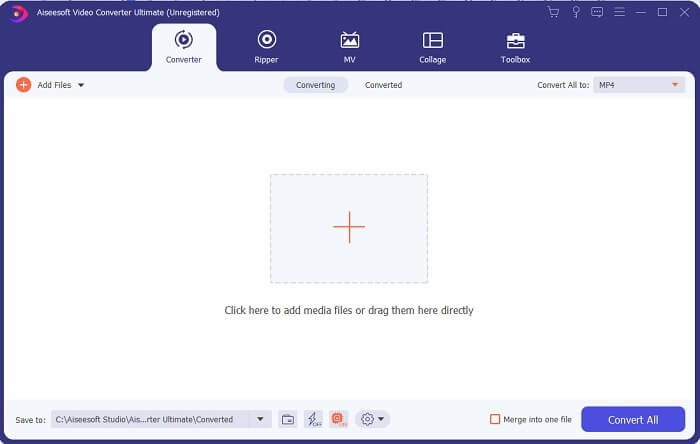
Schritt 3. Klicke auf die Schaltfläche mit dem Plus-Symbol, um die Datei hinzuzufügen, oder ziehe die Datei alternativ per Drag & Drop hinein.
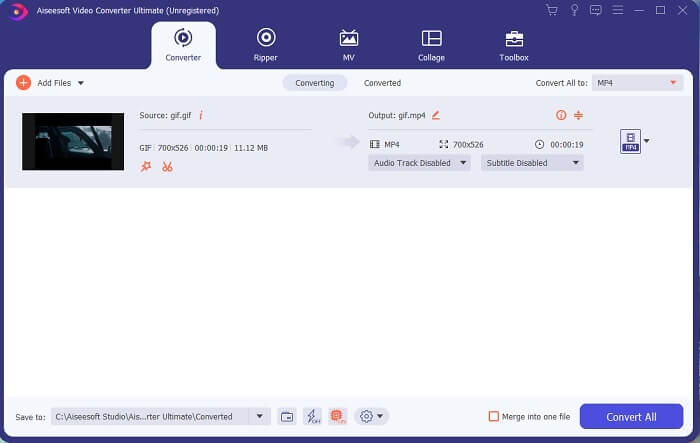
Schritt 4. Klicke auf die Dropdown-Schaltfläche, um das Format zu ändern und AVI auszuwählen. Du kannst auch Encoder, Auflösung und Qualität der Ausgabe festlegen. Wenn alles eingestellt ist, klicke auf Alle konvertieren, um den Konvertierungsvorgang zu starten.
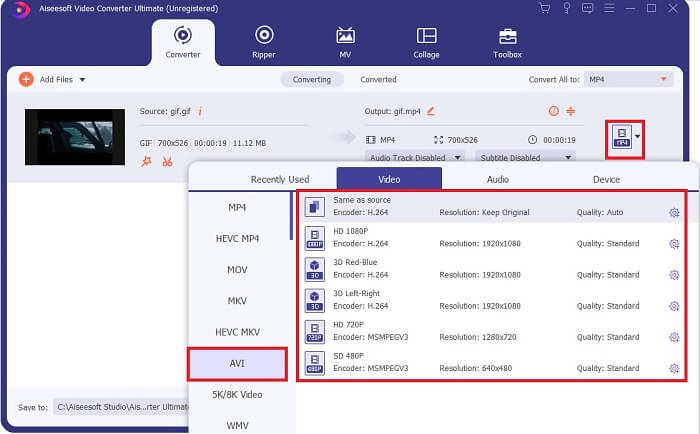
Schritt 5. Dieses Tool bietet eine bis zu 30‑mal schnellere Konvertierung als das kostenlose Tool und ist 100‑mal besser als das andere Tool – du musst also nicht lange warten. Nach Abschluss der Konvertierung öffnet sich automatisch ein Dateimanagerfenster auf deiner Oberfläche.
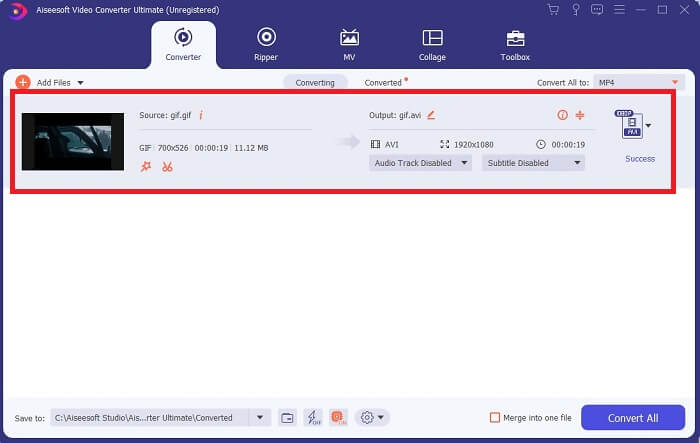
Bonus-Tool und Schritte zum Verbessern des Videos
Nicht alle Premium-Konverter bieten eine solche Funktion. In manchen Fällen werden Videos etwas unscharf, wenn du GIF in AVI konvertierst, weil die Bildrate (fps) des GIF niedriger ist als die von AVI. Es gibt jedoch eine Möglichkeit, dein Video für eine bessere Ausgabe zu optimieren. Folge diesen Schritten, um das bereits konvertierte Video zu verbessern.
Schritt 1. Klicke im Toolbox-Bereich der Software auf Video Enhancer.
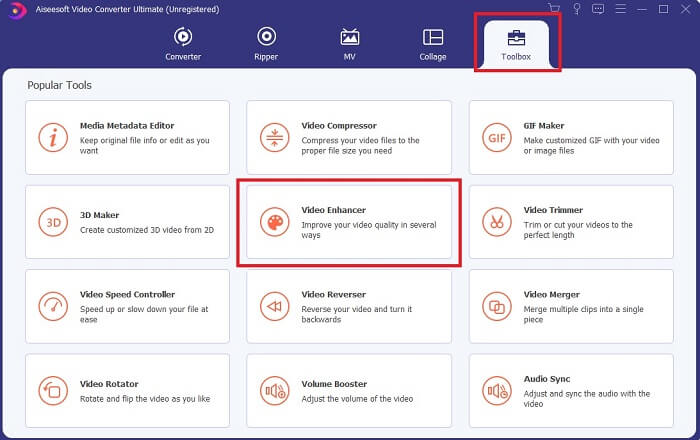
Schritt 2. Klicke auf die Plus-Schaltfläche und wähle das Video aus, das du verbessern möchtest. Klicke auf Auflösung hochskalieren, um die Qualität des Videos zu erhöhen; du kannst auch andere Optionen aktivieren, um die Videoqualität weiter zu verbessern. Klicke dann auf Verbessern, um den Vorgang zu starten.
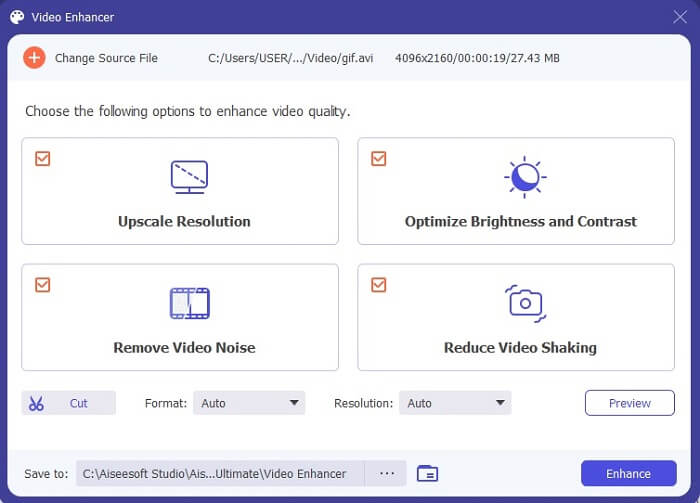
Schritt 3. Die Verbesserung des Videos steht sofort zur Verfügung. Nach dem Optimieren öffnet der Dateimanager automatisch das Video, damit du die deutlich bessere Version ansehen kannst.
Teil 2. Top 3: Die besten im Web verfügbaren Online-Konverter.
1. CloudConvert
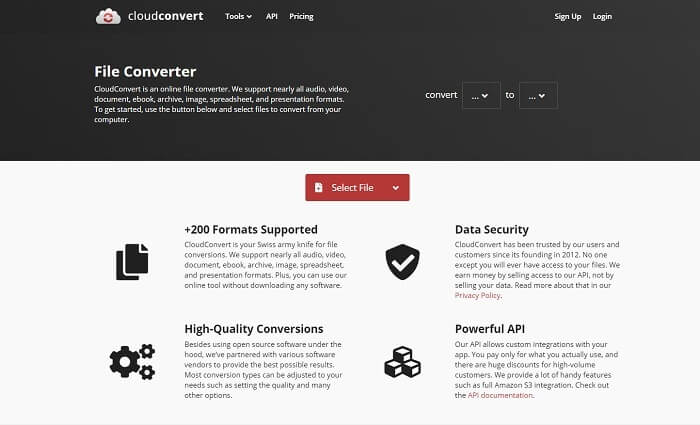
Der beste GIF-zu-AVI-Online-Konverter ist Cloud Convert. Dieses Tool unterstützt nahezu alle Formate für Video, Audio, Dokumente, eBooks, Tabellenkalkulationen, Präsentationsformate sowie Bilder. Du kannst dieses Tool nutzen, ohne es zu installieren, denn es ist ein Online-Dienst – das bedeutet jedoch auch, dass du ohne Internetverbindung, anders als bei den beiden anderen Tools weiter unten, nicht darauf zugreifen kannst. Die Weboberfläche ist deutlich informativer als bei AnyConv. Außerdem ist sie wesentlich ansprechender gestaltet und sehr benutzerfreundlich.
2. AnyConv
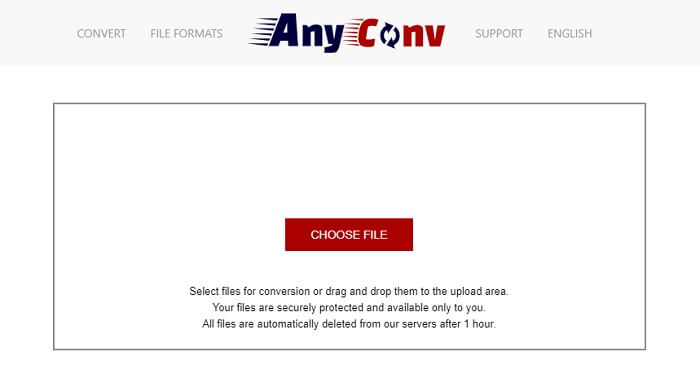
Die sicherste Methode, dein Video zu konvertieren, ist die Nutzung von AnyConv. Du kannst damit ganz einfach dein Format animiertes GIF zu AVI erstellen. Es gilt als der sicherste Konverter, da nur du Zugriff auf deine konvertierten Dateien hast. Alle Dateien, die über dieses Online-Tool umgewandelt werden, werden nach der Konvertierung automatisch gelöscht. Die Website des Tools ist allerdings etwas wenig informativ, sodass die Benutzung aufgrund der fehlenden Informationen verwirrend sein kann.
3. online-convert.com
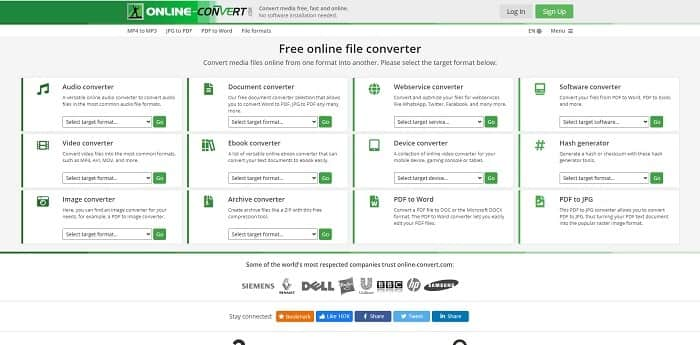
Ein weiteres Tool, das du als Konverter verwenden kannst, ist online-convert.com. Mit diesem Tool können Nutzer bzw. Kunden wie du beliebige Videos, Audios, Bilder und mehr konvertieren. Es ist außerdem möglich, Webdienste, Geräte und Software mit diesem Tool umzuwandeln. Du kannst es auch verwenden, um AVI in ein animiertes GIF oder umgekehrt zu konvertieren. Die Webseite des Tools ist informativ und bietet zu jedem Werkzeug eine kurze Beschreibung, wie man es richtig verwendet. Die Oberfläche selbst wirkt jedoch eher wenig ansprechend, vor allem wegen der dominierenden grünen Farbgebung, die bei manchen Nutzern nicht gut ankommt.
Teil 3. Häufig gestellte Fragen zu GIF zu AVI
Was ist der beste GIF-Cropper, der in allen Softwares verfügbar ist? und wie geht das?
Mit dem GIF-Cropper kannst du dein GIF auf einen ganz bestimmten Bildausschnitt zuschneiden. Klicke auf diesen Link, um mehr Details zu erfahren.
Ist das AVI-Format komprimiert oder unkomprimiert?
Es ist allgemein bekannt, dass AVI ein qualitativ hochwertigeres Videoformat liefert als MPEGs oder MOV. Dieses Format ist jedoch unkomprimiert, daher ist das Volumen einer einzelnen Datei entsprechend groß. Selbst ein nur eine Minute langes Video kann mehr als 1,5 GB oder noch mehr Speicherplatz belegen. Möchtest du deine großen AVI-Dateien komprimieren, klicke hier, um mehr zu erfahren.
Wer hat AVI entwickelt?
Der Entwickler des AVI-Formats ist Microsoft; seine erste Veröffentlichung war November 1992.
Fazit
Um die Details abzuschließen, ist bekannt, dass die Wahl des richtigen Werkzeugs für den richtigen Job gerade beim Converting ein Muss ist. Da das Konvertieren einer Datei in ein neues Format etwas sensibel ist, bedeutet dies, dass bei Verwendung des falschen Konverters einige Daten verloren gehen. Aber wenn Sie den Ultimate Converter verwenden, können Sie auch ohne Internetverbindung und Datenverlust beliebige Dateien konvertieren. Dieses Tool ist die richtige Wahl für Sie, da es nicht nur eine Aufgabe hervorragend erledigt, sondern auch das Beste unter den anderen ist.
-
 5 beste Optionen zum Aufzeichnen des GIF-Formats mit GIF-Rekordern für PC und Mac
 Was ist der beste GIF-Recorder, den Sie zum Aufzeichnen von GIFs verwenden sollten? Die folgende Liste liefert Beweise dafür, welcher der beste Bildschirmschreiber ist.
-
 So konvertieren Sie MPG in das GIF-Format [Online & Offline]
 Möchten Sie eine viel bessere Emotion ausdrücken? Dann müssen Sie stattdessen GIF verwenden. In diesem Artikel erfahren Sie, wie Sie eine MPG-Datei in GIF konvertieren, um Ihr Gefühl viel besser auszudrücken.
-
 [Aktualisiert 2021] Die 9 besten GIF-Editoren für PC, Mac, iOS und Android
 Müssen Sie Ihrem GIF eine persönliche Note verleihen, damit es ausdrucksvoller wird? Lesen Sie diesen Artikel weiter, um zu erfahren, wie Sie bearbeiten und welches Werkzeug für den Job am besten geeignet ist.
